
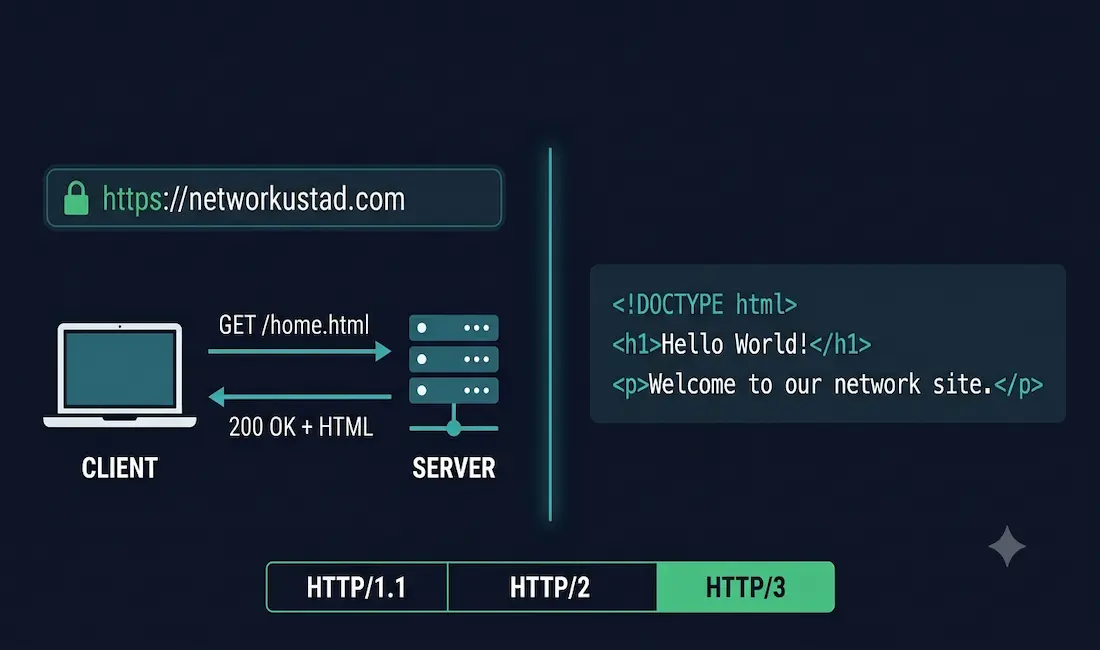
HTTP and HTML are the two foundational technologies behind every web page you visit. They work together but do completely different jobs. HTTP (HyperText Transfer Protocol) is the application-layer protocol that governs how data is requested and delivered between a web server and a client. HTML (HyperText Markup Language) is the markup language that structures and displays the content once it arrives. HTTP handles the transmission; HTML defines what gets transmitted and how it looks.
This guide covers how both work, how a browser goes from a URL to a rendered page, the HTTP request methods, the evolution from HTTP/1.1 through HTTP/2 to HTTP/3, and why HTTPS with TLS is now the baseline standard for all web communication.
What Is HTTP?
HTTP is the protocol that defines how messages are formatted, sent, and processed between a client (typically a web browser) and a web server. It is a stateless, request-response protocol — meaning each request is independent, and the server holds no memory of previous requests unless additional mechanisms like cookies or sessions are used.
HTTP operates at the Application layer of both the TCP/IP and OSI models. Every time you click a link, load a page, or submit a form, HTTP is the protocol moving that request and response across the network.
What Is HTML?
HTML is the markup language used to structure content on web pages. It uses tags — paired instructions like <h1> and </h1>, or <p> and </p> — to tell the browser how to display headings, paragraphs, images, links, tables, and other elements.
HTML defines the content and its structure. CSS controls its appearance, and JavaScript controls its behavior. Together they form the front-end of every web page, but HTML is the foundation — without it, the browser has no structure to render.
The current standard is HTML5, which added native support for video and audio, semantic elements (<article>, <nav>, <section>), improved form controls, and canvas-based graphics, all without requiring third-party plugins.
What Is a URL and How Does It Relate to a URI?
A URI (Uniform Resource Identifier) identifies a resource. A URL (Uniform Resource Locator) is a specific type of URI that both identifies a resource and specifies where to find it and how to access method it. Every URL is a URI, but not every URI is a URL.
Breaking down a typical URL — https://networkustad.com/home:
- Protocol: HTTPS (the secured version of HTTP)
- Server name / domain: networkustad.com
- Path / requested filename: /home
How a Browser Loads a Web Page
When you type a URL into a browser, a specific sequence runs:
- The browser parses the URL and extracts the domain name.
- It queries a DNS server to resolve the domain (e.g.,
networkustad.com) to a numeric IP address. - The browser opens a TCP connection (or a QUIC connection for HTTP/3) to the server on port 80 (HTTP) or port 443 (HTTPS).
- For HTTPS, a TLS handshake takes place — the server presents its certificate, and both sides negotiate an encryption cipher.
- The browser sends an HTTP GET request for the target resource (e.g.,
/home.html). - The server processes the request, retrieves the HTML file from storage, and sends it back in an HTTP response.
- The browser reads the HTML, requests any linked resources (CSS, JavaScript, images), and renders the final page.
This entire process — DNS resolution, connection, TLS handshake, request, response, render — typically completes in under a second on a modern connection.
HTTP Request Methods
HTTP is a request/response protocol. The client sends a request specifying a method that tells the server what action to take. The four most common methods are:
- GET — retrieves a resource, such as a web page or image. GET requests carry no body and should have no side effects on the server.
- POST — Submits data, such as form input or a file upload. POST requests carry a body containing the data.
- PUT — replaces or updates an existing resource at a specified URL.
- DELETE — removes a resource from the server.
Additional methods used in modern APIs include PATCH (partial update), HEAD (retrieves only headers, not the body), and OPTIONS (describes the communication options available for a resource).
HTTP Status Codes
Every HTTP response carries a three-digit status code that tells the client what happened to its request. The codes are grouped by their first digit:
| Range | Category | Common Examples |
|---|---|---|
| 1xx | Informational | 100 Continue |
| 2xx | Success | 200 OK, 201 Created |
| 3xx | Redirection | 301 Moved Permanently, 302 Found |
| 4xx | Client error | 400 Bad Request, 401 Unauthorized, 403 Forbidden, 404 Not Found |
| 5xx | Server error | 500 Internal Server Error, 503 Service Unavailable |
Status codes are essential for troubleshooting. A 404 means the resource doesn’t exist at that URL. A 503 means the server is temporarily unable to handle the request. A 301 tells the browser and search engines that a resource has permanently moved.
HTTP vs HTTPS: What Changes with Encryption
Plain HTTP transmits all data in clear text — headers, request bodies, and responses are all readable by anyone who can intercept the traffic on the network path between client and server. This makes it unsuitable for anything involving credentials, payment data, or personal information.
HTTPS is HTTP with a TLS (Transport Layer Security) layer underneath. TLS provides three things:
- Encryption — data is encrypted in transit so it cannot be read by a third party.
- Authentication — the server’s TLS certificate proves to the browser that it is communicating with the intended server, not an impostor.
- Integrity — a message authentication code (MAC) ensures the data has not been tampered with in transit.
TLS 1.3, finalized in RFC 8446, is the current standard. It requires only one round trip for the handshake (compared to two for TLS 1.2) and removes support for older, weaker cipher suites. SSL — the predecessor to TLS — is fully deprecated and should not appear in any modern system.
As of 2026, approximately 94% of all global web requests are encrypted over HTTPS. Unencrypted HTTP is effectively dead for public internet traffic. Every major browser marks HTTP sites as “Not Secure” and most search engines use HTTPS as a ranking signal.
| Feature | HTTP | HTTPS |
|---|---|---|
| Port | 80 | 443 |
| Encryption | None | TLS 1.3 |
| Data in transit | Plain text | Encrypted |
| Server authentication | No | Yes (TLS certificate) |
| Integrity protection | No | Yes (MAC) |
| Browser indicator | “Not Secure” | Padlock icon |
| SEO impact | Negative signal | Positive signal |
HTTP Protocol Versions: HTTP/1.1, HTTP/2, and HTTP/3
HTTP has gone through several major versions, each designed to address performance limitations in the previous one.
HTTP/1.1
HTTP/1.1 (RFC 2616, published 1997) introduced persistent connections — the same TCP connection can be reused for multiple requests — and chunked transfer encoding. Despite its age, it still accounts for around 28% of global web traffic. Its key limitation is head-of-line blocking: requests are processed in order on each connection, so a slow response holds up everything behind it.
HTTP/2
HTTP/2 (RFC 7540, published 2015) addressed HTTP/1.1’s performance limits with three main improvements: multiplexing (multiple requests and responses in parallel over a single connection), header compression (using HPACK to reduce repetitive header data), and server push (the server can proactively send resources the browser hasn’t yet requested). HTTP/2 dominates at approximately 51% of global web traffic and remains the standard for most web servers and CDNs.
HTTP/3 and QUIC
HTTP/3 (RFC 9114) makes a more fundamental change: it replaces the TCP transport layer with QUIC (RFC 9000), a protocol that runs over UDP. QUIC integrates TLS 1.3 directly into its connection layer rather than layering it on top, which delivers:
- 0–1 RTT connection setup — on return visits, HTTP/3 can send the first data packet with zero round trips before receiving a server response, compared to 2–3 RTTs for TCP + TLS.
- True stream independence — unlike HTTP/2 over TCP, where a single lost packet stalls all streams (TCP head-of-line blocking), QUIC handles each stream independently. A lost packet only delays the stream it belongs to.
- Connection migration — QUIC identifies connections by a connection ID rather than a four-tuple of IP addresses and ports. This means a user switching from Wi-Fi to mobile data maintains their connection without re-handshaking.
HTTP/3 is now an IETF standard, supported by all major browsers and CDNs. As of 2026, it accounts for approximately 21–35% of global web traffic depending on measurement methodology, with the highest adoption in mobile-first markets. This is no longer a future technology — it is the current direction of the web.
| Feature | HTTP/1.1 | HTTP/2 | HTTP/3 |
|---|---|---|---|
| Transport | TCP | TCP | QUIC (UDP) |
| Multiplexing | No | Yes | Yes |
| Header compression | No | HPACK | QPACK |
| TLS integration | Separate | Separate | Built into QUIC |
| Connection setup | 2–3 RTT | 2–3 RTT | 0–1 RTT |
| Global traffic share (2026) | ~28% | ~51% | ~21–35% |
HTTP and HTML Working Together
HTTP and HTML are complementary, not competing. HTTP is the delivery mechanism; HTML is the payload. When the browser sends a GET request over HTTP and the server responds, the response body is almost always an HTML document. The browser then parses that HTML, discovers links to CSS stylesheets, JavaScript files, and images, and fires additional HTTP requests for each one.
Understanding both is fundamental to grasping how the modern World Wide Web operates. HTTP gets the resource to the browser; HTML tells the browser what to do with it.
HTTP and the CCNA
For CCNA candidates, HTTP sits at the Application layer of the TCP/IP model (combining OSI layers 5–7). Key exam points include:
- HTTP uses TCP port 80; HTTPS uses TCP port 443
- HTTP is stateless — each request is independent
- HTTPS encrypts the payload using TLS; the HTTP request structure itself remains the same
- HTTP request methods (GET, POST, PUT, DELETE) are Application layer functions
- DNS resolution precedes every HTTP connection when a domain name is used
For secure communications in modern networks, HTTPS with TLS 1.3 is the expected standard. Understanding how it layers over HTTP is directly testable in CCNA and is foundational for network troubleshooting, traffic analysis, and firewall rule design.
Conclusion
HTTP is the protocol that moves data between clients and servers; HTML is the language that structures what gets moved. Together they form the operational core of the web. HTTPS with TLS 1.3 has made encrypted transport the standard — with 94% of global web traffic now running over HTTPS — and HTTP/3 over QUIC is redefining how fast and resilient that transport can be.
For anyone building, securing, or troubleshooting network applications, understanding where HTTP fits in the stack, how each version behaves, and what HTTPS actually provides at the protocol level is foundational knowledge that surfaces in everything from efficient data management to security architecture.
Frequently Asked Questions
What is the difference between HTTP and HTML?
HTTP (HyperText Transfer Protocol) is the protocol that enables data exchange between web servers and clients. HTML (HyperText Markup Language) is the markup language that structures and displays web content. HTTP handles the transmission; HTML defines the format of the pages the browser renders.
How does a browser resolve a URL to connect to a web server?
The browser queries a DNS server to convert the domain name into a numeric IP address. It then opens a connection to the server on port 80 (HTTP) or port 443 (HTTPS), completes a TLS handshake if using HTTPS, and sends an HTTP request for the target resource.
What is the difference between HTTP/2 and HTTP/3?
HTTP/2 runs over TCP and introduced multiplexing and header compression. HTTP/3 replaces TCP with QUIC, a UDP-based transport that integrates TLS 1.3 directly, eliminates TCP head-of-line blocking, and enables faster connection setup (0–1 RTT) and seamless connection migration across network changes.
Why has HTTPS replaced HTTP as the standard for the web?
HTTPS uses TLS to encrypt data in transit, authenticate the server, and ensure data integrity. Plain HTTP transmits everything as clear text, making it trivially interceptable. As of 2026, around 94% of all global web requests use HTTPS, and major browsers mark HTTP sites as “Not Secure.”
What are the common HTTP request methods and their purposes?
GET retrieves a resource, POST submits data (such as form input), PUT updates or replaces a resource, and DELETE removes a resource. Additional methods include PATCH for partial updates, HEAD for retrieving only headers, and OPTIONS for describing available communication options.
What is TLS and how does it relate to HTTPS?
TLS (Transport Layer Security) is the cryptographic protocol that HTTPS layers on top of HTTP. It provides encryption, server authentication via certificates, and message integrity. TLS 1.3 is the current standard, requiring only one round trip for the handshake and removing support for older weak ciphers. SSL, TLS’s predecessor, is fully deprecated.



