
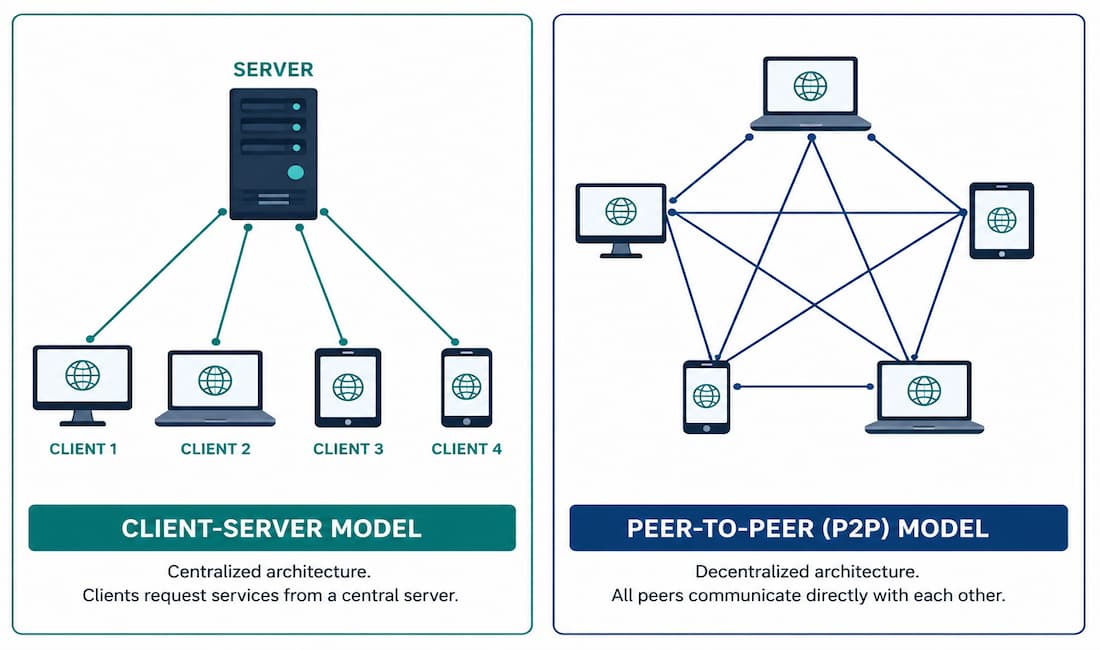
Almost every network interaction you have falls into one of two models: client-server, where a dedicated device provides a service to others, or peer-to-peer, where devices share resources directly with each other, no dedicated server required. Understanding both — and knowing which one a given application actually uses — matters for everything from troubleshooting to security planning.
This guide covers how each model works, real-world examples of both, the P2P applications you’re most likely to encounter, and the security considerations that come with each.
The Client-Server Network Model
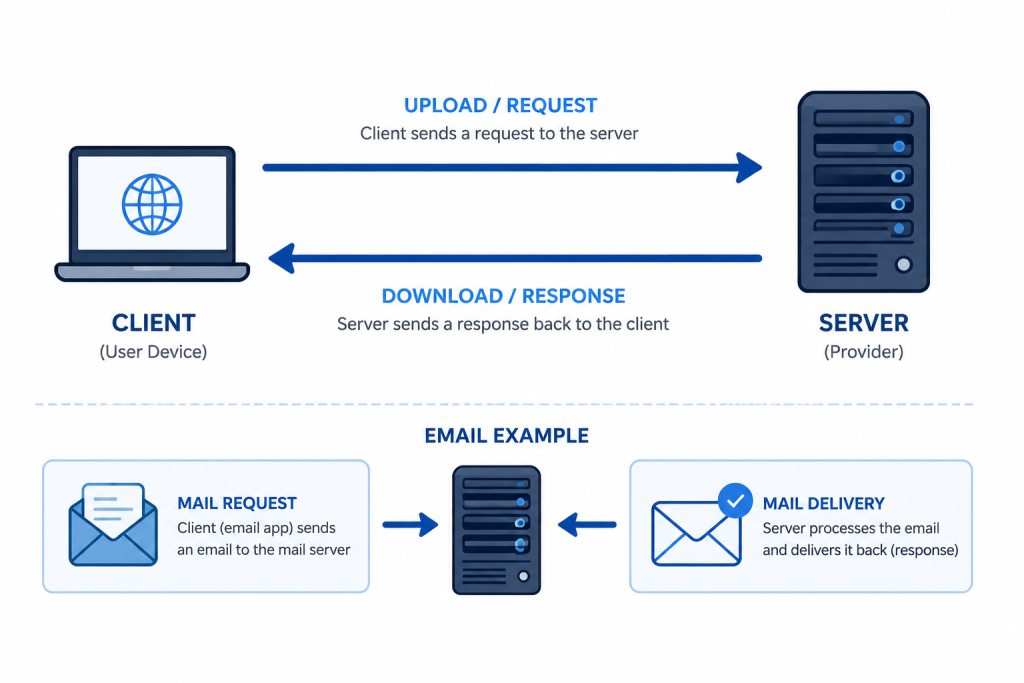
In the client-server model, one device — the client — requests something, and another device — the server — responds. This exchange happens at the application layer, using a specific protocol both sides understand. The client initiates a connection, and the server either accepts or rejects it based on that protocol’s rules.
The application layer protocol in use defines the data exchange format between client and server. Depending on the service, this exchange may also require user authentication and identification of the specific resource or file being requested.
Email is one of the clearest examples of this model. A mail server sends, receives, and stores messages. A client at a remote location — your laptop, your phone — requests that the server deliver any new mail. The server responds by sending the requested messages to the client. Data flowing from client to server is called an upload; data flowing from server to client is called a download.
Other common examples of the client-server model include:
- Web servers — responding to browser requests with HTML, images, and other page content
- FTP and TFTP servers — handling file uploads and downloads
- Online multiplayer gaming servers — coordinating game state across multiple connected players
- DNS servers — resolving domain names on request
Most servers maintain a one-to-many relationship with clients: a single server can serve requests from many clients simultaneously, which is exactly what makes the model scale well for widely-used services.
Testing a Client-Server Connection
You can test connectivity to an email server directly using telnet or nc (netcat) to open a raw connection on the SMTP port:
Windows:
telnet smtp.example.com 25Linux/macOS:
nc smtp.example.com 25A successful connection returns a greeting banner from the mail server (typically starting with 220), confirming the service is reachable and listening. Verify what’s actively connected or listening on your own machine with:
netstat -aThe Peer-to-Peer (P2P) Network Model
Peer-to-peer networking removes the dedicated server from the equation entirely. Two or more hosts connect directly and share resources — files, printers, processing power — without any single device acting exclusively as the provider.
Every connected device in this model is called a peer, and each peer can act as both client and server, sometimes within the same session. A host might serve a file to one peer while simultaneously requesting a different file from another — the client and server roles are assigned dynamically, per transaction, rather than fixed to a specific device.
This is the fundamental structural difference from client-server: there’s no single point that, if it goes offline, takes the whole service down with it. A P2P network’s overall capacity also tends to grow as more peers join, since each new peer adds both demand and supply to the network.
Pure P2P vs. Hybrid P2P
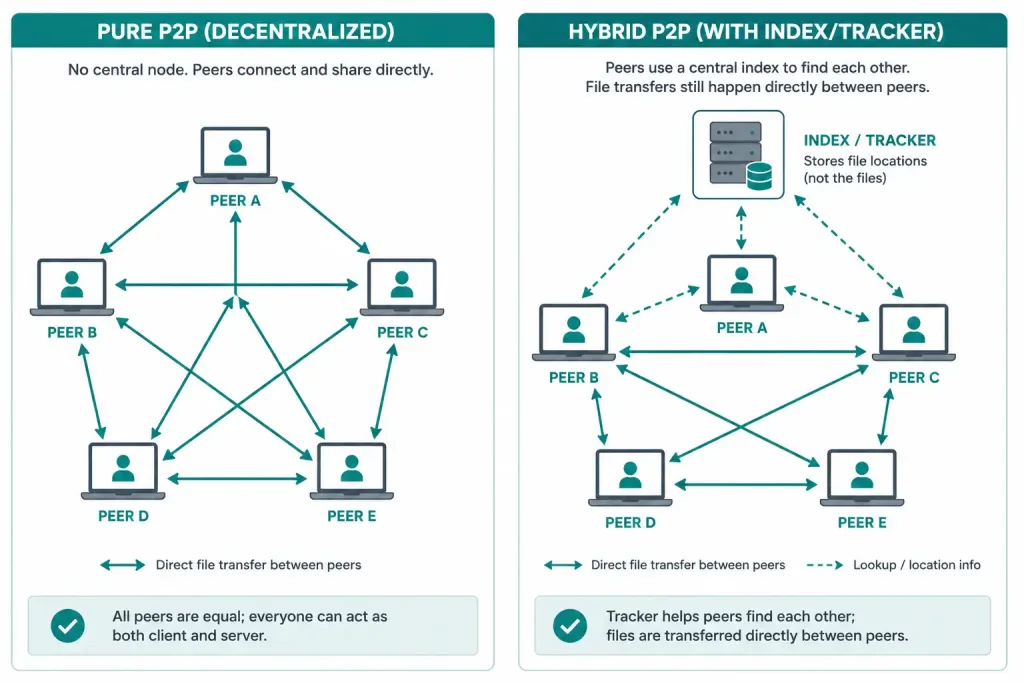
Not all P2P systems are structured identically. In a pure P2P network, peers discover and connect to each other with no centralized coordination at all. In a hybrid model — which most modern P2P applications actually use — a centralized index or tracker server stores the location of resources without hosting the resources themselves. Peers query this index to find out which other peers have the file or resource they need, then connect to those peers directly to transfer the actual data. This hybrid approach keeps the benefits of distributed transfer while solving the practical problem of how peers find each other in the first place.
Common Peer-to-Peer Applications and Protocols
Every device running a P2P application can act as both client and server for every other device running that same application. Some of the more widely known P2P networks and applications, past and present, include:
- BitTorrent
- uTorrent
- eDonkey
- Gnutella2 (G2)
- Bitcoin
- Soulseek
- eMule
- KCeasy
- Ares Galaxy
- Gnutella
Gnutella is one of the older P2P protocols, where each user shares entire files directly with other users on the network. Well-known Gnutella client applications have included gtk-Gnutella, LimeWire, Shareaza, and BearShare — though several of these have since been discontinued or superseded.
BitTorrent takes a different approach: rather than downloading a whole file from one source, clients download small pieces of a file simultaneously from many different peers who already have those pieces — a group of peers sharing the same file is called a swarm. A small .torrent file (or a magnet link, in more modern implementations) tells the client where to find a tracker, which in turn tracks which peers currently have which pieces available. Popular BitTorrent clients have included the original BitTorrent client, uTorrent, and FrostWire.
Bitcoin is worth calling out separately from the file-sharing applications above. Its underlying network is genuinely peer-to-peer — nodes relay transactions and blocks directly to each other with no central server — but its purpose is maintaining a distributed cryptocurrency ledger, not sharing files. It’s a P2P protocol in the structural sense, just applied to a completely different problem.
Copyright Considerations
A large share of file sharing on P2P networks historically involved copyrighted material. Distributing copyrighted files without permission from the rights holder is illegal in most jurisdictions and can carry both criminal and civil consequences. This is worth understanding as a real legal risk, separate from the P2P technology itself — the technology is neutral; how it’s used determines whether it’s legal.
Security Considerations for P2P Networks
P2P networks carry real security trade-offs that client-server networks generally don’t. Because peers connect directly to each other, a compromised or malicious peer has a more direct path to other participants than it would in a centralized model. P2P traffic can also expose your IP address directly to every peer you exchange data with, and certain P2P protocols are commonly abused to spread malware disguised as popular files.
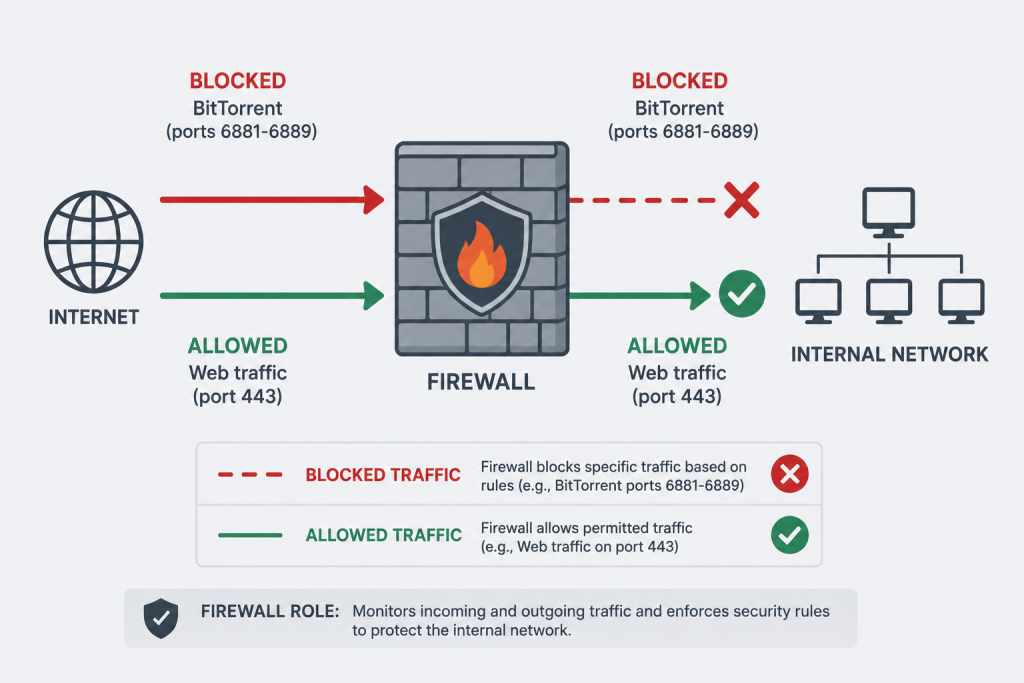
Common P2P applications, including BitTorrent clients, typically use a specific range of ports (commonly 6881–6889 for BitTorrent). If your organization needs to restrict this traffic, you can block that range at the firewall.
Windows:
netsh advfirewall firewall add rule name="Block P2P" dir=in action=block protocol=TCP localport=6881-6889Linux:
sudo ufw deny 6881:6889/tcpKeep in mind that many modern P2P applications can dynamically negotiate different ports specifically to work around firewall restrictions like this one, so port-blocking alone isn’t a complete solution — application-aware filtering or a dedicated policy may be needed in environments where P2P traffic is a genuine concern.
When Real Systems Blend Both Models
Very few large-scale systems are purely one model or the other in practice. It’s worth recognizing a few common blended patterns, since they show up constantly in real infrastructure:
Content Delivery Networks (CDNs) are technically client-server — you’re still requesting content from a server — but they distribute that server role across many geographically dispersed nodes, so your request gets served by whichever node is closest to you. This gives some of P2P’s resilience and load-distribution benefits while keeping the simpler client-server security and management model.
Modern VoIP and video conferencing often start a call using a central signaling server (client-server, to coordinate who’s calling whom) and then, once the call is set up, switch the actual audio/video stream to a direct peer-to-peer connection between the participants when network conditions allow. This reduces server bandwidth costs and can lower latency, falling back to routing through a server only when a direct P2P connection isn’t possible due to firewall or NAT restrictions.
Blockchain networks, Bitcoin included, use a P2P model for the core network but often rely on client-server patterns at the edges — most users don’t run a full peer node themselves, but instead use a client-server “light wallet” that talks to someone else’s full node on their behalf.
Recognizing which parts of a given system are client-server and which are P2P is often the key to understanding where its actual bottlenecks, failure points, and security exposure live — a hybrid system inherits some trade-offs from each model, not just the benefits of both.
Client-Server vs. P2P: A Direct Comparison
| Factor | Client-Server | Peer-to-Peer |
|---|---|---|
| Dedicated server required | Yes | No |
| Single point of failure | Yes — server outage affects all clients | No single point, though individual peers can be unreliable |
| Scalability | Limited by server capacity | Grows as more peers join |
| Typical management overhead | Centralized, easier to secure and monitor | Distributed, harder to monitor centrally |
| Common examples | Email, web browsing, DNS | BitTorrent, Bitcoin, some VoIP systems |
Troubleshooting Tips
If a client-server connection fails, start with basic reachability:
ping server_ipIf ping succeeds but the specific service still fails, trace the path to rule out routing issues:
tracert server_ipOn Linux, use traceroute server_ip instead. If the destination is reachable but the specific service still won’t respond, confirm the service is actually listening on the expected port using netstat -a (Windows) or ss -l (Linux) on the server itself.
If P2P connectivity seems broken, check whether the required ports are actually open and not being blocked by a local or upstream firewall:
netstat -aOn Linux:
ss -lIf the application connects to some peers but not others, the issue is often NAT or firewall configuration on one specific end of the connection rather than the P2P application itself — this is a common enough issue that many P2P clients include a built-in connectivity or “open port” test to help isolate it.
FAQs
What is the client-server model?
The client-server model is a network architecture where a dedicated server provides resources or services, and clients request and receive them. Nearly all traditional internet services — web browsing, email, DNS — rely on this model, with the server handling requests from potentially many clients at once.
How does P2P differ from client-server?
In P2P, there’s no dedicated server — every connected device, or peer, can act as both a client and a server depending on the transaction. This removes the single point of failure that client-server networks have, and lets network capacity grow naturally as more peers join, though it also makes central management and security monitoring harder.
What are examples of client-server applications?
Common examples include email delivered over SMTP, web pages served over HTTP or HTTPS, and file transfers handled by FTP servers. In each case, a specific server application listens for requests, and clients connect to it whenever they need that particular service.
How do P2P applications actually work?
Most modern P2P applications use a hybrid model: a central index or tracker server helps peers find each other, but the actual file or data transfer happens directly between peers. BitTorrent is the clearest example — a tracker coordinates which peers have which pieces of a file, and the pieces themselves move directly between peers, not through the tracker.
How can I secure a P2P network or restrict P2P traffic?
Blocking known P2P port ranges at the firewall (for example, ports 6881–6889 for BitTorrent) is a reasonable first step, using tools like Windows Firewall rules or Linux’s ufw. Keep in mind this isn’t a complete solution on its own, since many P2P applications can dynamically switch ports to work around basic blocking — more thorough control usually requires application-aware firewall rules.
Is Bitcoin actually peer-to-peer?
Yes — Bitcoin’s network relies on nodes relaying transactions and blocks directly to each other rather than through any central server, which is a genuinely P2P architecture. It’s structurally similar to file-sharing P2P networks in that sense, even though its purpose (maintaining a distributed financial ledger) is completely different from sharing files.



