
VRRP (Virtual Router Redundancy Protocol) does the same job as HSRP — multiple routers sharing a virtual IP address so hosts never need to know which physical device is actually forwarding their traffic — but it’s an open IETF standard (RFC 3768) rather than a Cisco-proprietary protocol. If a network mixes equipment from different vendors, VRRP is usable across all of them; HSRP is not.
If HSRP already makes sense, VRRP will feel immediately familiar — the concepts map almost one to one, just with different terminology and slightly different defaults. Getting a few small syntax and range details exactly right, though, is where most real-world VRRP misconfigurations actually happen.
Master and Backup, Not Active and Standby
VRRP uses different role names than HSRP for the same underlying concept:
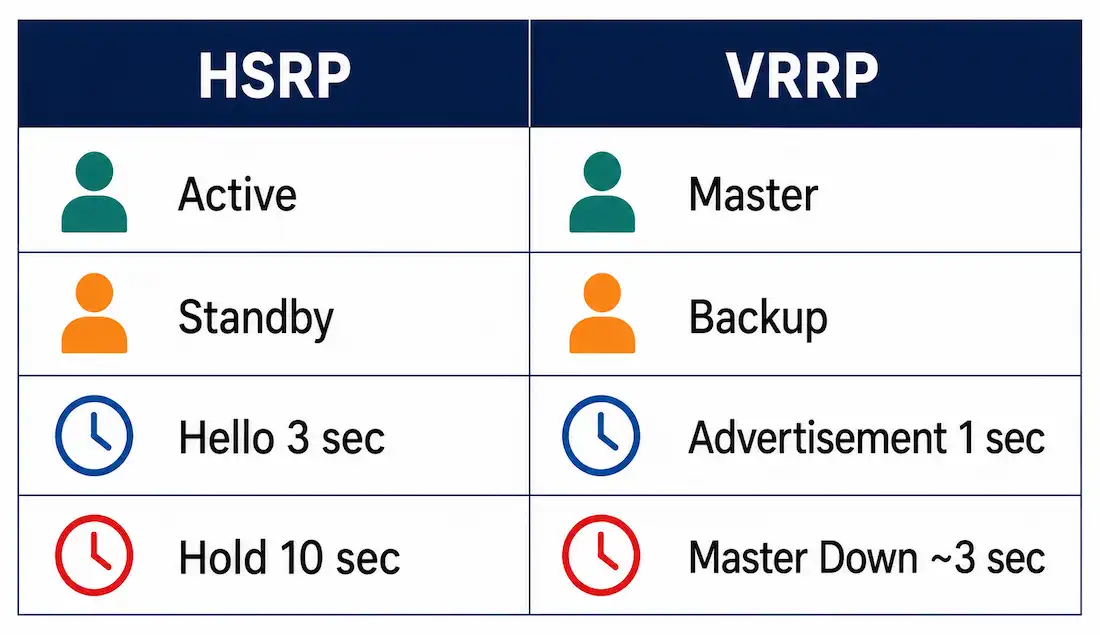
| HSRP Term | VRRP Term | Meaning |
|---|---|---|
| Active | Master | The router currently forwarding traffic for the virtual IP |
| Standby | Backup | A router ready to take over if the Master fails |
| Hello timer (3 sec default) | Advertisement timer (1 sec default) | How often the forwarding router announces itself |
| Hold timer (10 sec default) | Master Down Interval (~3 sec default) | How long before a Backup assumes the Master has failed |
VRRP’s faster default timers mean quicker out-of-the-box failure detection than HSRP’s defaults — covered in more depth in the router redundancy article, which compares both protocols’ timer behavior directly.
Basic VRRP Configuration
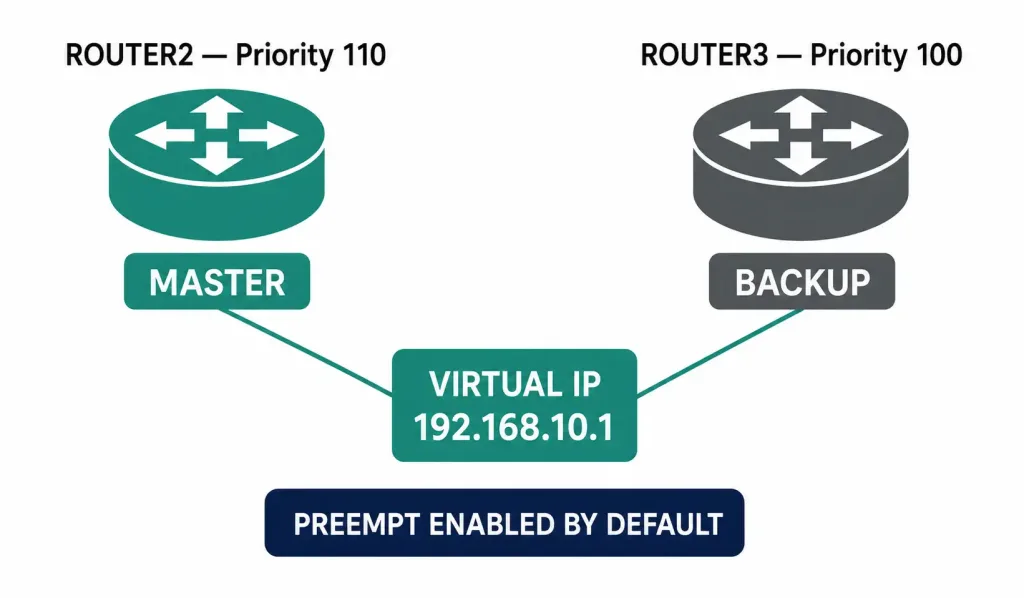
Using the same Router2/Router3 topology from the HSRP and GLBP guides: Router2 will be Master, Router3 will be Backup.
Router2:
Router2> enable
Router2# configure terminal
Router2(config)# interface gigabitEthernet 0/1
Router2(config-if)# no shutdown
Router2(config-if)# ip address 192.168.10.2 255.255.255.0
Router2(config-if)# vrrp 1 ip 192.168.10.1
Router2(config-if)# vrrp 1 priority 110
Router2(config-if)# vrrp 1 preempt
Router2(config-if)# exit
Router2(config)# do wr
Router3:
Router3> enable
Router3# configure terminal
Router3(config)# interface gigabitEthernet 0/1
Router3(config-if)# no shutdown
Router3(config-if)# ip address 192.168.10.3 255.255.255.0
Router3(config-if)# vrrp 1 ip 192.168.10.1
Router3(config-if)# vrrp 1 priority 100
Router3(config-if)# vrrp 1 preempt
Router3(config-if)# exit
Router3(config)# do wr
A note on exact syntax: vrrp 1 preempt needs a space between vrrp and the group number — vrrp1 preempt without the space is invalid and won’t configure anything, since the router won’t recognize it as a valid command.
The 1 is the VRRP group number, formally called the Virtual Router ID (VRID). Per RFC 3768, this can be any value from 1 to 255, and every router participating in the same virtual router must use the same VRID — this is distinct from the priority range, which is capped at 254 for routers backing up the virtual router (255 is reserved specifically for the router that owns the actual IP address being virtualized, a special case covered below).
Priority and the IP Address Owner Case
Priority determines which router becomes Master: highest wins, default is 100. Router2’s priority of 110 beats Router3’s default of 100, so Router2 becomes Master.
RFC 3768 defines one special case worth knowing: if a router’s own physical interface IP address is identical to the virtual IP address being configured — meaning that router is the actual “owner” of that address, not just borrowing it — that router’s priority is fixed at 255 and it will always be Master whenever it’s available, regardless of any priority configured on other group members. This scenario is less common in typical Cisco deployments, where the virtual IP is usually distinct from every router’s own physical interface address (as in the example above), but it’s part of the standard and worth recognizing if you encounter it.
There’s also a reserved value at the other end of the range: priority 0 is used specifically by the current Master to signal that it’s deliberately releasing responsibility for the virtual router — for example, during a graceful shutdown or planned maintenance — which triggers an immediate Backup takeover rather than waiting out the full Master Down Interval. This is a cleaner, faster handoff than simply having the Master go silent and letting the Backup time out waiting for advertisements that will never arrive.
Preemption
With vrrp 1 preempt configured, a router that recovers from a failure and has the highest priority in the group will reclaim the Master role automatically — unlike HSRP, where preemption is disabled by default, VRRP enables preemption by default per the RFC, though it’s shown explicitly configured above for clarity.
If Router2 fails, Router3 detects the missing advertisements and becomes Master. When Router2 recovers, since preemption is active and Router2’s priority (110) is still higher than Router3’s (100), Router2 reclaims the Master role automatically.
Verifying the Configuration
Router2# show vrrp briefShows every VRRP group on the router, its current state (Master or Backup), the group’s virtual IP, and priority — the fastest way to confirm the election happened as expected.
Router2# show vrrpGives fuller per-group detail, including the configured and current priority, advertisement timer, and preemption status. Running this on both routers after any configuration change is worth doing before assuming the election outcome matches what you intended, rather than inferring it purely from the configuration file.
Worked Example: VRRP Failover
With the configuration above, PC0 and every other host on 192.168.10.0/24 point to 192.168.10.1 as their default gateway — exactly as they would under HSRP, as covered in the router redundancy article’s ARP mechanics. Under normal conditions, Router2 (Master) forwards all their traffic.
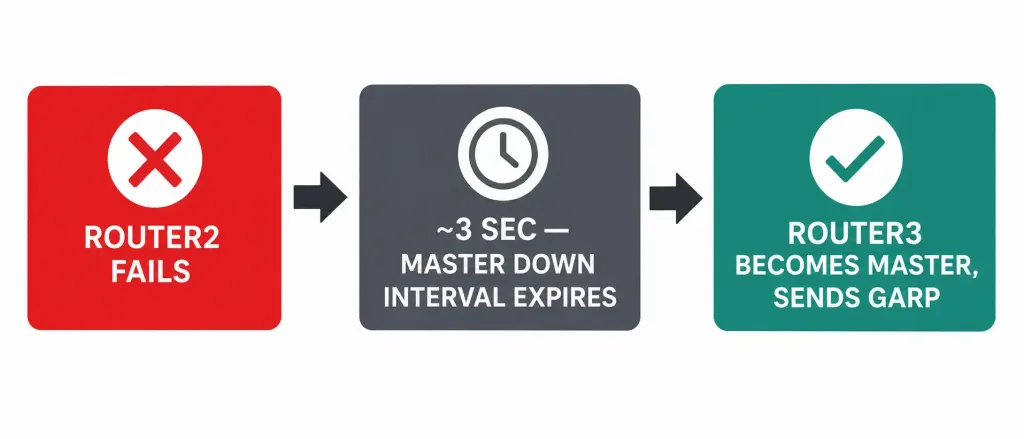
Router2 fails. Router3, in Backup state, has been listening for VRRP advertisements every second (the default advertisement interval) from Router2. Once roughly three advertisement intervals pass with nothing heard — the Master Down Interval, around 3 seconds by default — Router3 transitions to Master and sends a Gratuitous ARP claiming the virtual MAC address, exactly the same mechanism HSRP uses on failover. Switches update their MAC tables, and PC0’s traffic starts arriving at Router3’s physical port instead — all without PC0’s configuration ever changing.
When Router2 recovers, because preemption is active by default and its priority (110) still beats Router3’s (100), Router2 immediately reclaims Master. Router3 drops back to Backup.
Common VRRP Configuration Mistakes
- Missing the space in the command.
vrrp1 preemptand similar concatenated commands are invalid syntax — alwaysvrrp [group] [keyword], with spaces between each part. - Confusing VRID range with priority range. The VRID (group number) can be 1-255. Priority for a non-owner router can be 1-254, with 255 reserved for the special IP-address-owner case and 0 reserved to signal a Master releasing responsibility.
- Mismatched VRIDs across routers. Every router intended to participate in the same virtual router must use the identical VRID — a typo here means the routers simply won’t recognize each other as part of the same group.
- Assuming VRRP and HSRP can interoperate directly. They’re separate protocols with different packet formats and multicast addresses (VRRP uses 224.0.0.18; HSRP uses 224.0.0.2 or 224.0.0.102 depending on version). A router running VRRP and a router running HSRP on the same segment will not participate in the same redundancy group with each other, even if configured with matching-looking priorities.
- Forgetting that VRRP’s faster default timers mean more frequent advertisement traffic. This is rarely a real problem on modern hardware, but it’s a genuine trade-off against HSRP’s slower, less chatty defaults if advertisement volume is ever a concern on very constrained links, such as a low-bandwidth WAN segment carrying the VRRP-enabled interface alongside production traffic.
VRRPv2 vs. VRRPv3
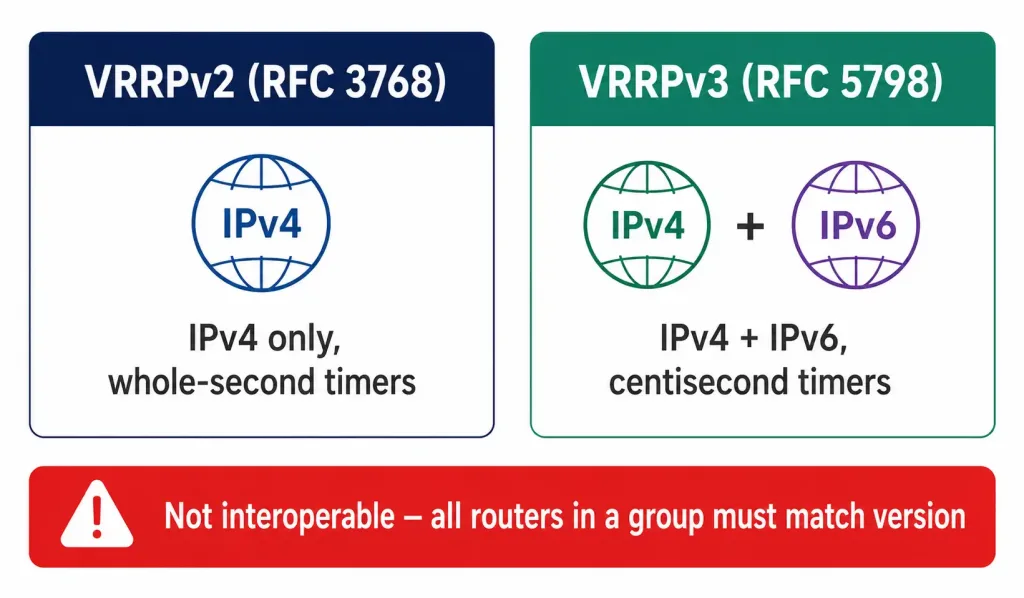
RFC 3768 later defined VRRPv2, IPv4-only, which is what the configuration above uses. RFC 5798 subsequently defined VRRPv3, adding IPv6 support and reducing the advertisement timer’s granularity to centiseconds for faster possible convergence than v2’s whole-second timers allow. The two versions aren’t directly interoperable within the same group — a router running v2 and a router running v3 won’t recognize each other as part of the same virtual router, so mixed-version deployments need to standardize on one version across every participating device, the same requirement HSRP has between its v1 and v2.
Frequently Asked Questions
What’s the main difference between VRRP and HSRP?
VRRP is an open IETF standard (RFC 3768), usable across equipment from any vendor. HSRP is Cisco-proprietary and only works between Cisco devices. Functionally they solve the same problem the same way — a shared virtual IP with automatic failover — just with different terminology (Master/Backup vs. Active/Standby) and different default timers.
Why doesn’t the command vrrp1 preempt work?
It’s missing a required space. The correct syntax is vrrp [group] preempt, for example vrrp 1 preempt. Without the space, the router doesn’t parse it as a valid VRRP command at all.
What’s the actual valid range for a VRRP group number?
1 to 255, per RFC 3768. This is the Virtual Router ID (VRID), and every router in the same virtual router group must use the identical value. This is a different range than VRRP priority, which tops out at 254 for ordinary backup routers.
Is preemption enabled by default in VRRP?
Yes — this is one of the real differences from HSRP, which disables preemption by default. VRRP enables it by default per the RFC, meaning a recovered higher-priority router will typically reclaim the Master role automatically without any extra configuration needed.
What happens if a router’s physical IP address matches the virtual IP exactly?
That router is considered the IP address “owner” under RFC 3768, and its priority is automatically fixed at 255 — the maximum possible value, guaranteeing it will always become Master whenever it’s available, regardless of what priority is configured on other group members.
Can a Cisco router running HSRP and a router running VRRP share the same redundancy group?
No. They’re different protocols with different packet formats and different multicast destination addresses, so they can’t participate in the same group together. A mixed-vendor environment needing shared redundancy has to standardize on VRRP specifically, since HSRP won’t run on non-Cisco equipment at all.
Conclusion
VRRP gives you essentially everything HSRP does — a shared virtual gateway, automatic failover, deliberate priority-based control over which router leads — as an open standard usable across any vendor’s equipment, not just Cisco’s. The concepts transfer directly from HSRP: Master instead of Active, Backup instead of Standby, faster default timers, and preemption enabled out of the box rather than requiring an extra command. The syntax details that actually break configurations in practice are small but exact — a missing space in vrrp 1 preempt, the VRID range topping out at 255 rather than 254, and version compatibility between VRRPv2 and v3 — all worth getting right the first time rather than debugging after the fact.



