
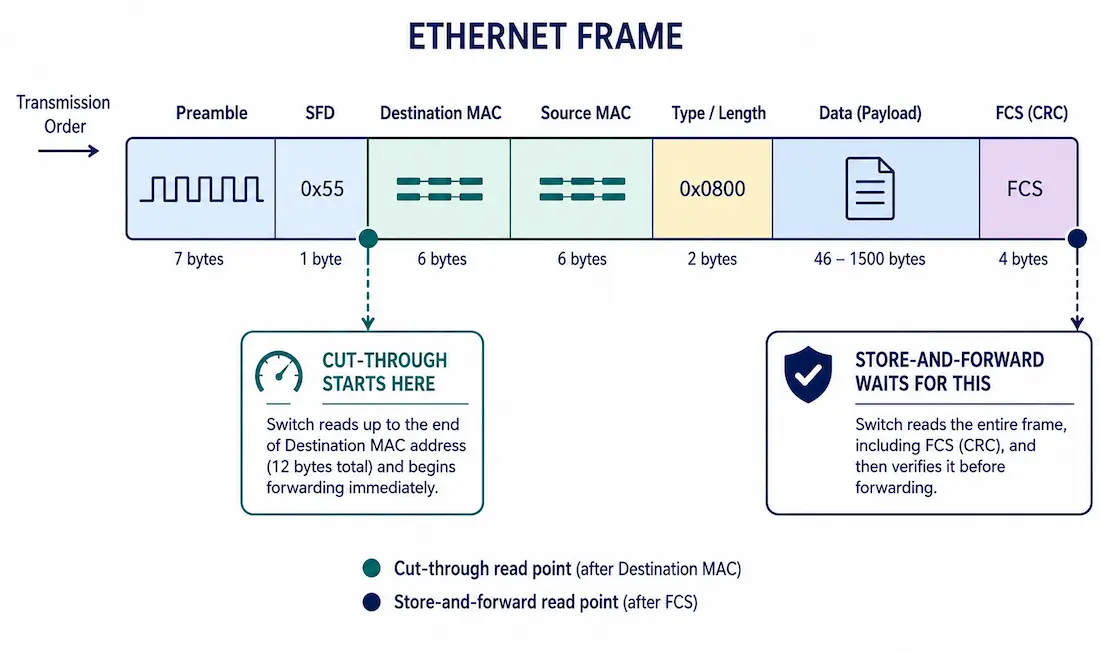
Every switch has to decide exactly when to start forwarding a frame — wait for the whole thing, or start moving it the instant enough information is available. That decision defines the three switching methods every CCNA and CCNP candidate needs to know: store-and-forward, cut-through, and fragment-free. Each represents a different trade-off between reliability and latency.
This guide covers how each method actually works at the frame level, which one your equipment is actually running (a question with a more nuanced answer than most guides give), and how to verify and troubleshoot switching behavior on real Cisco hardware.
From Ethernet Bridges to LAN Switches
Early Ethernet bridges segmented collision domains using software-based frame forwarding, which limited both speed and port scalability — every forwarding decision went through general-purpose software logic rather than dedicated hardware. The introduction of application-specific integrated circuits (ASICs) is what made modern Ethernet switching possible: forwarding decisions moved into dedicated hardware, letting switches handle thousands of frames per second per port without the performance penalty software-based bridging carried.
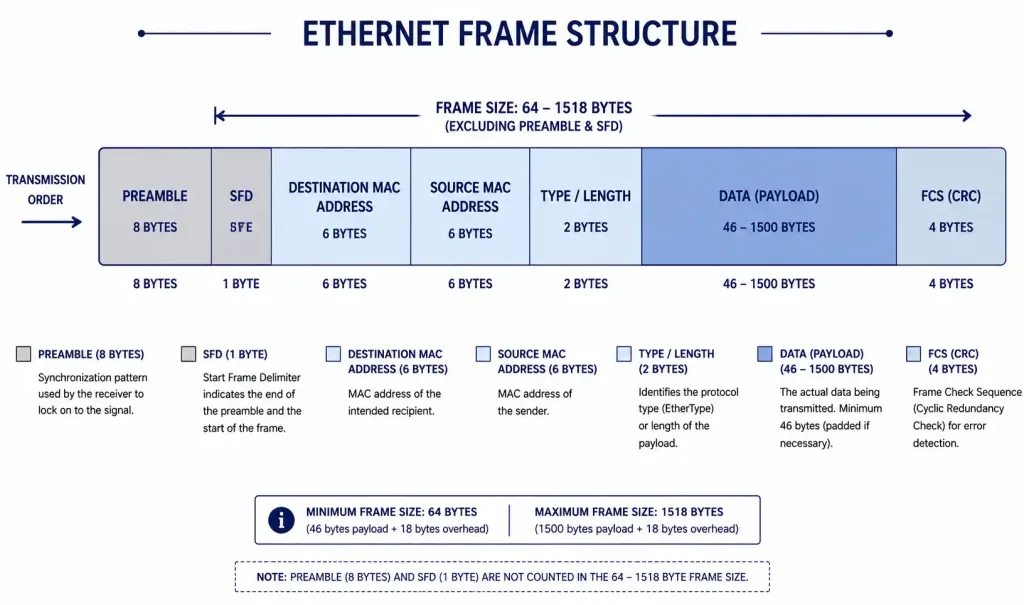
Ethernet Frame Structure
Understanding switching methods requires understanding which parts of a frame each method actually reads before making a decision:
| Field | Size | Purpose |
|---|---|---|
| Preamble | 8 bytes | Synchronization, not inspected for forwarding decisions |
| Destination MAC | 6 bytes | Used by every switching method to determine the egress port |
| Source MAC | 6 bytes | Used for MAC address table learning |
| Type/Length | 2 bytes | Identifies the payload protocol (EtherType) |
| Data/Payload | 46-1500 bytes | The actual frame contents |
| FCS (Frame Check Sequence) | 4 bytes | A CRC checksum, verified only by methods that check for errors |
The destination MAC address becomes available after just 14 bytes (preamble aside) — 6 bytes of destination MAC, plus a bit more framing overhead — which is exactly why cut-through switching can start forwarding so early. The FCS, by contrast, sits at the very end of the frame, meaning any method that verifies it has to wait for the entire frame to arrive first.
Store-and-Forward Switching
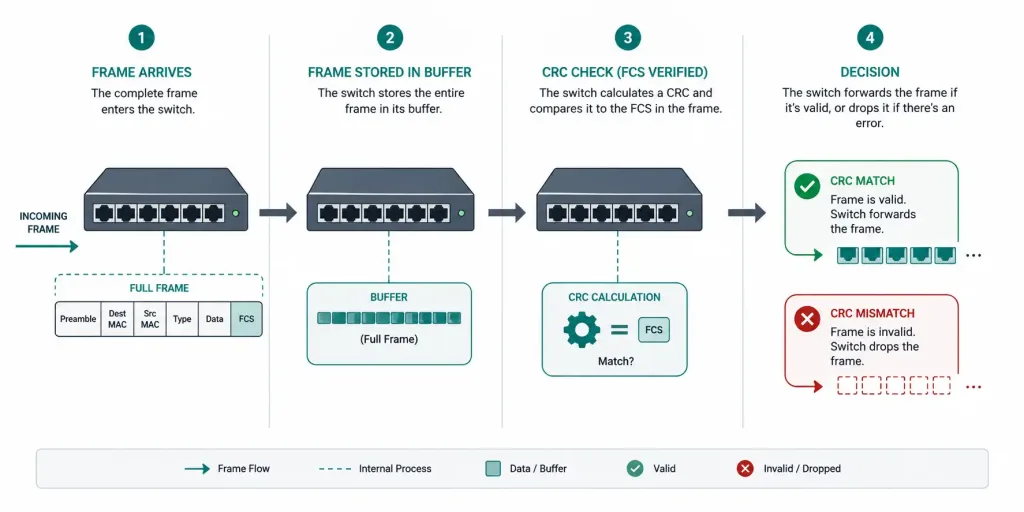
Store-and-forward reads the complete frame into buffer memory before making any forwarding decision at all.
How it works:
- The switch receives the entire frame on the ingress port.
- It calculates a CRC over the frame and compares it against the FCS field to check for transmission errors.
- If the CRC checks out, the switch looks up the destination MAC address in its MAC address table to determine the egress port.
- The frame is forwarded; if the CRC check fails, the frame is dropped instead, preventing a corrupted frame from propagating further into the network.
Because it waits for the complete frame regardless of ingress and egress port speeds, store-and-forward also handles speed mismatches naturally — if a frame arrives on a 100 Mbps port and needs to exit a 1 Gbps port, the switch simply buffers it during the CRC check and forwards it at the egress port’s speed once ready.
Cut-Through Switching
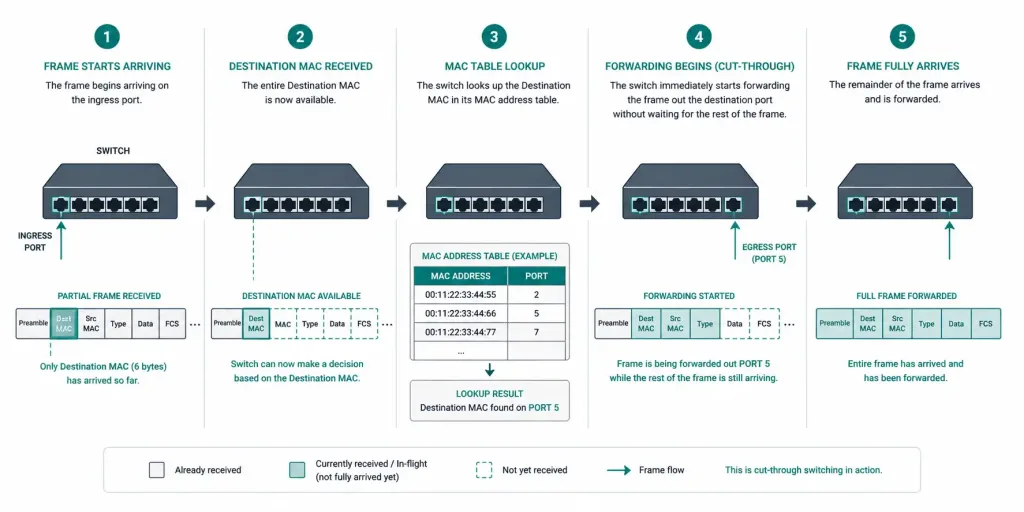
Cut-through switching prioritizes latency over error checking, forwarding a frame as soon as the destination MAC address has been read — typically just 6 bytes into the frame, plus preamble overhead.
How it works:
- The switch reads the destination MAC address as it arrives.
- It looks up that address in the MAC table to determine the egress port.
- Forwarding begins immediately, without waiting for the rest of the frame — including the FCS, which means no error checking happens at all.
Some cut-through implementations read further than the bare minimum — inspecting the destination MAC, source MAC, and EtherType (14 bytes total), plus up to another 40 bytes covering typical IPv4 and TCP header sizes — to support additional Layer 3/4 filtering decisions without fully abandoning the speed advantage cut-through provides.
This makes cut-through attractive for genuinely latency-sensitive environments — high-performance computing clusters and financial trading systems, where every microsecond of added latency has a real, measurable cost. The trade-off is real too: a corrupted frame gets forwarded just as readily as a clean one, since there’s no verification step at all.
Fragment-Free Switching
Fragment-free switching is a middle ground: it waits for the first 64 bytes of the frame — the standard Ethernet collision window — before forwarding, which is enough to catch most collision-related fragments (undersized, corrupted “runt” frames caused by collisions on shared media) without waiting for the entire frame the way store-and-forward does. This is sometimes called “modified cut-through,” and was the default mode on some older Catalyst platforms, like the Catalyst 1900 series.
Which Method Is Actually the Default? It Depends on the Platform
This is worth being precise about, since it’s a point where a lot of study material oversimplifies. There isn’t one universal “Cisco default” — it genuinely depends on the platform generation:
- Older Catalyst switches (2950/2960-era and similar) relied on store-and-forward as their standard, dependable method, prioritizing reliability given the hardware capabilities of the time.
- Modern Nexus data center switches (3000/9000 series) actually default to cut-through switching for lower latency, verified directly against Cisco’s own NX-OS configuration guides. Store-and-forward mode activates automatically only under specific conditions — most notably when a port is oversubscribed and its ingress rate exceeds the egress port’s switching capacity, at which point the hardware needs to buffer regardless.
- Catalyst 9000-series switches also generally operate in cut-through mode by default, and — per Cisco’s own engineering guidance — the switching mode itself typically isn’t something you configure directly through the CLI on this platform. What you can configure are CEF (Cisco Express Forwarding) behaviors and QoS policies that affect how traffic is processed, which is a related but distinct topic from the raw hardware switching mode.
Configuring switching mode where it actually is configurable — on supported Nexus platforms:
switch(config)# no switching-mode store-forwardThis re-enables cut-through switching (the Nexus default) after it’s been explicitly disabled. There is no equivalent switchport mode cut-through command on Catalyst switches — if you’ve seen that syntax elsewhere, it isn’t valid IOS/IOS-XE configuration.
Verify actual switching behavior and error statistics, which works consistently across Cisco platforms:
show interfaces <interface> | include CRC
show interfaces <interface> counters errors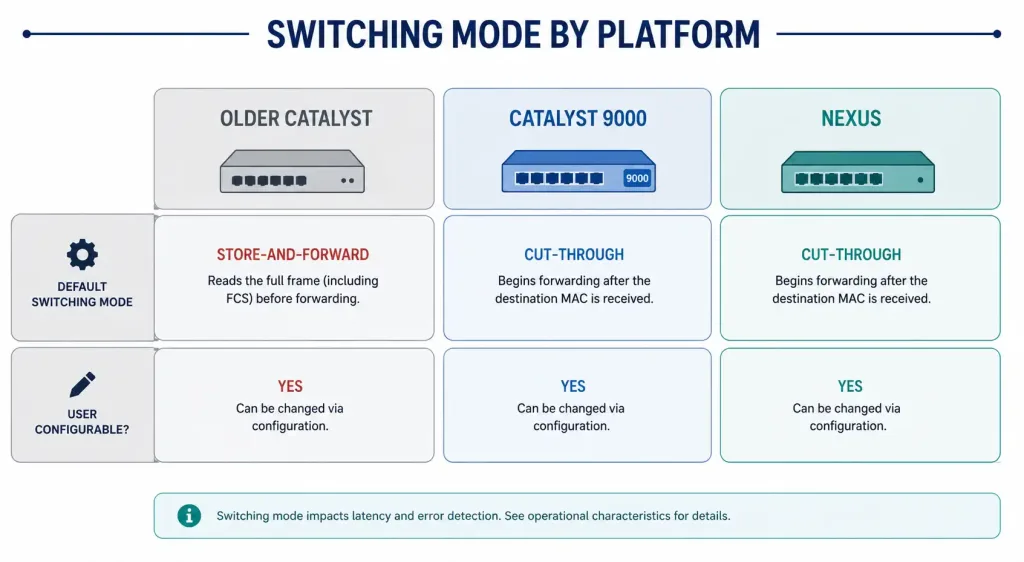
How Switching Method Interacts with QoS
It’s worth understanding that switching method and QoS solve different problems, even though they’re often discussed together. Switching method determines when a switch starts forwarding an individual frame. QoS determines which frames get forwarded first when multiple frames are competing for the same egress port. A switch running cut-through still benefits from QoS classification and queuing — the two mechanisms operate at different points in the forwarding pipeline, and neither substitutes for the other.
In practice, this means a low-latency application benefiting from cut-through switching often also needs QoS configured correctly to get the full latency benefit — cut-through reduces the switch’s own processing delay, but a frame still sitting in a congested output queue behind lower-priority traffic experiences queuing delay that cut-through does nothing to address. The two need to work together: cut-through minimizes per-hop processing time, while QoS minimizes queuing time for the traffic that actually needs priority.
This is also why claims that a specific switching method alone “solves” latency for voice or video traffic should be treated with some skepticism — real-world latency-sensitive deployments almost always combine a fast switching method with proper QoS marking and queuing, rather than relying on switching method changes in isolation.
Comparing the Three Methods
| Feature | Store-and-Forward | Cut-Through | Fragment-Free |
|---|---|---|---|
| Error checking | Full CRC/FCS verification | None | Partial (64-byte collision window only) |
| Typical latency | Higher (tens of microseconds, frame-size dependent) | Lowest (single-digit microseconds) | Moderate |
| Handles speed mismatches | Yes, naturally via buffering | No, not without additional buffering | Limited |
| Common on | Older Catalyst switches, most general enterprise deployments | Nexus data center switches, HPC, low-latency trading environments (default) | Some legacy Catalyst platforms |
Practical Applications
Store-and-forward remains the right choice anywhere reliability matters more than shaving off microseconds — general enterprise LANs, environments with mixed-speed interfaces, and anywhere a corrupted frame reaching its destination would cause real problems downstream.
Cut-through earns its place specifically where latency has a measurable cost — HPC clusters, financial trading floors, and other environments where the error-checking trade-off is deliberate and well understood, not accidental.
Fragment-free sees far less use today than in the shared-Ethernet, collision-prone era it was designed for; on modern full-duplex switched networks, the collisions it was built to catch simply don’t occur in the first place.
Troubleshooting Frame Forwarding Issues
Seeing CRC errors on an interface: this points to a physical-layer problem — a damaged cable, a failing transceiver, or electrical interference — rather than anything related to which switching method is in use. Check error counters directly:
show interfaces <interface> counters errorsSuspecting cut-through is forwarding corrupted frames downstream: since cut-through skips FCS verification entirely, errors that would be caught by store-and-forward can propagate further into the network before something downstream finally detects them. If this is a genuine concern for a specific link, moving that link to store-and-forward (where the platform supports the distinction) trades some latency for the safety net.
A speed-mismatched link seems slower than expected: this is often store-and-forward buffering doing exactly what it’s supposed to do — a 100 Mbps-to-1 Gbps mismatch requires buffering regardless of the platform’s general default, since a frame can’t be forwarded at a rate it never arrived at. This isn’t a misconfiguration; it’s the automatic fallback behavior working as intended.
FAQs
What is the main difference between store-and-forward and cut-through switching?
Store-and-forward reads the entire frame and verifies its CRC/FCS before forwarding, catching corrupted frames at the cost of added latency. Cut-through forwards as soon as the destination MAC address is read, minimizing latency but forwarding corrupted frames just as readily as valid ones, since it never checks the FCS at all.
Is store-and-forward actually the default on Cisco switches?
It depends on the platform — older Catalyst switches have generally defaulted to store-and-forward, but modern Nexus data center switches and Catalyst 9000-series switches actually default to cut-through for lower latency, falling back to store-and-forward automatically only under specific conditions like a port speed mismatch. There’s no single universal answer that applies across Cisco’s entire current and legacy product line.
When should I use cut-through switching?
Cut-through makes sense specifically in latency-sensitive environments where the error-checking trade-off is a deliberate choice — high-performance computing clusters and financial trading systems are the classic examples. Outside of those specific use cases, the latency savings rarely outweigh the loss of error detection for most enterprise networks.
What is fragment-free switching?
Fragment-free is a middle-ground method that waits for the first 64 bytes of a frame — the standard Ethernet collision window — before forwarding, catching most collision-related fragment errors without the full latency cost of store-and-forward. It saw more use in the shared-Ethernet era than it does on modern full-duplex switched networks, where the specific error type it was designed to catch is far less common.
Can I configure switching mode on a Catalyst switch the way I can on Nexus?
Generally, no — on Catalyst 9000-series switches specifically, the underlying hardware switching mode typically isn’t user-configurable through the CLI, unlike Nexus platforms, which support explicit switching-mode store-forward configuration. If you’ve encountered instructions describing a switchport mode cut-through command, that syntax doesn’t exist in real Cisco IOS/IOS-XE configuration.
Does cut-through switching support VLAN-tagged frames?
Yes — cut-through switching can process VLAN-tagged frames normally, since the VLAN tag sits early enough in the frame to be read alongside the destination MAC address. It still doesn’t perform any error checking regardless of whether VLAN tagging is in use, so the same reliability trade-off applies either way.



