An accurate, practical guide to VLAN ID ranges for anyone studying CCNA or managing a Cisco network. Technical details here follow the IEEE 802.1Q standard and Cisco’s official documentation.
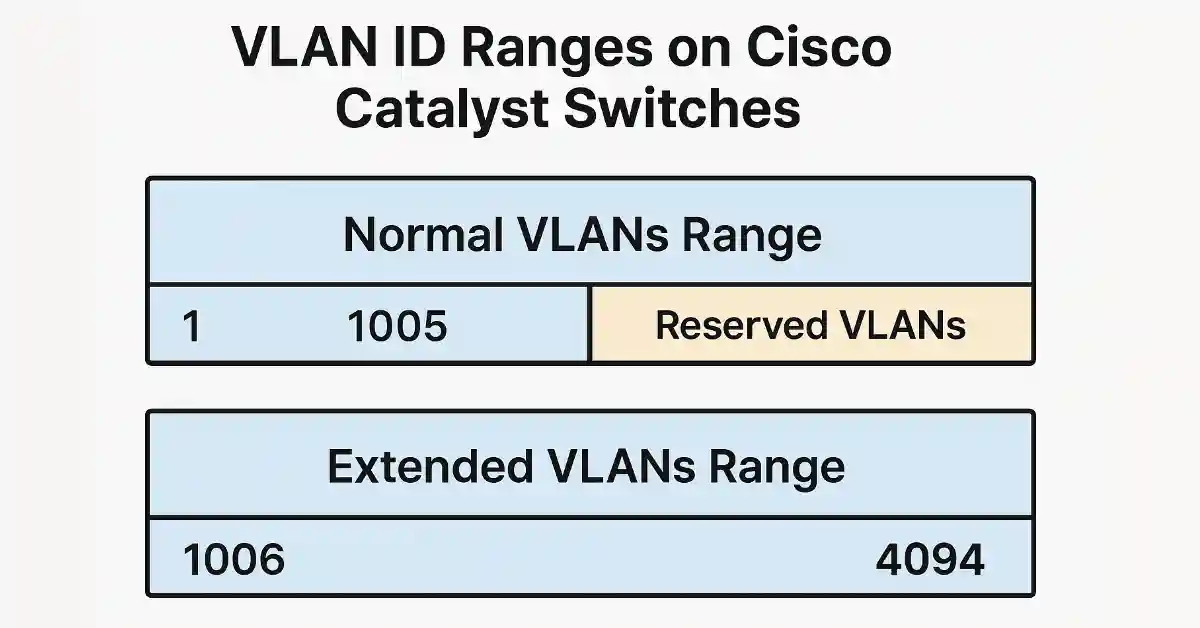
Cisco Catalyst switches support a VLAN ID range from 1 to 4094, divided into a normal range (1–1005) and an extended range (1006–4094). The normal range covers the needs of most small-to-enterprise networks, with VLANs 1002–1005 reserved for legacy Token Ring and FDDI and unable to be removed. Extended-range VLANs are stored in the running configuration, are aimed largely at service providers, and come with some feature limitations, including no VTP support. This guide explains each range, how to configure them, and how to fix the problems you’ll most commonly run into.
First, the standard vs. the Cisco split
It’s worth being precise about where these numbers come from, because it’s a common point of confusion. The IEEE 802.1Q standard — the industry standard for VLAN tagging — defines the usable VLAN ID range as 1 to 4094. The values 0 and 4095 are reserved by the standard for internal protocol use and cannot be assigned to a VLAN or a port.
The further division of that range into “normal” (1–1005) and “extended” (1006–4094) is a Cisco-specific distinction, tied to how Cisco switches store and manage VLANs, not part of the 802.1Q standard itself. So when you see “the VLAN range is 1–1005,” that’s really describing Cisco’s normal range, not the universal limit. Keeping that distinction clear helps a lot when you move between vendors or read different documentation. The rest of this article focuses on Cisco Catalyst behaviour, which is what most CCNA study and enterprise deployment concerns.
Normal-range VLANs (1–1005)
The normal range runs from 1 to 1005 and is what you’ll use for the overwhelming majority of real-world VLANs. A few key characteristics:
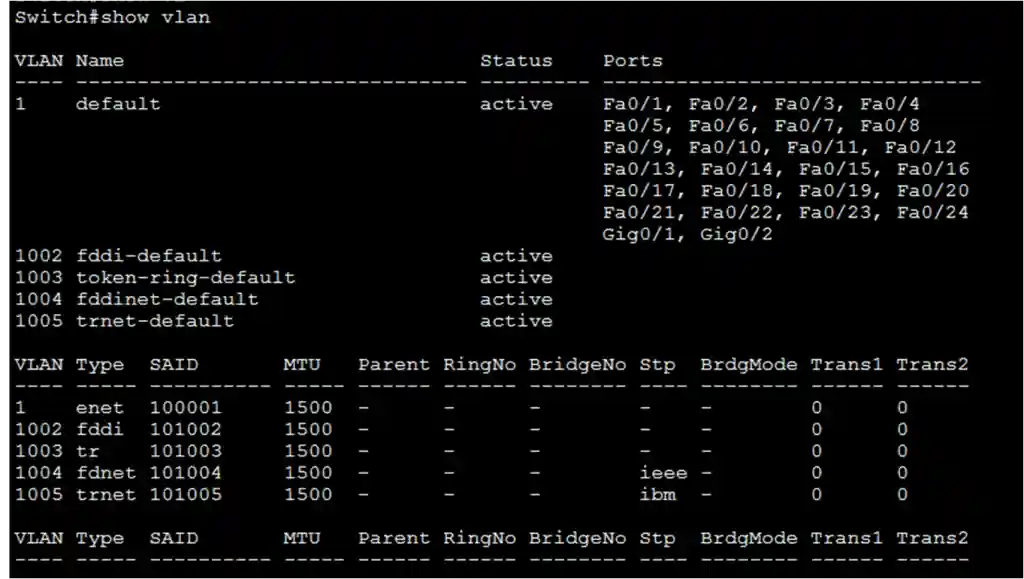
VLANs 1002 through 1005 are reserved for legacy Token Ring and FDDI technologies. Along with the default VLAN 1, these automatically created VLANs (1, 1002, 1003, 1004, and 1005) cannot be deleted or renamed, even though the technologies they were built for are effectively obsolete today.
Normal-range VLAN configurations are stored in a dedicated database file, vlan.dat, which lives in the switch’s flash memory rather than in the running configuration. This is an important practical detail: because these VLANs aren’t in the running-config, you won’t see them there, and returning a switch to a truly clean state requires deleting both the startup configuration and the vlan.dat file before reloading.
The VTP (VLAN Trunking Protocol) helps propagate and synchronise VLAN configurations across multiple switches in a domain — but VTP can only learn and store normal-range VLANs. That limitation is central to understanding why the extended range behaves differently.
A security note worth building into your habits: although VLAN 1 is the default and every port belongs to it out of the box, it’s widely recommended not to use VLAN 1 for user traffic or management. Moving unused ports out of VLAN 1 and using a different, purpose-built VLAN is a standard hardening practice, since relying on default settings is a common source of avoidable risk.
Extended-range VLANs (1006–4094)
The extended range (1006–4094) exists mainly to serve environments that need far more VLANs than the normal range provides — most notably service providers supporting large numbers of customers, and some very large enterprises. In typical organisations you may never need to venture into it.
Extended-range VLANs differ from normal-range ones in a few consequential ways. Their configurations are stored in the running configuration, not in vlan.dat — which means that, as with any running-config change, they must be saved to the startup configuration to survive a reboot. Because VTP historically could not learn extended-range VLANs, using them generally requires the switch to be in VTP transparent mode. And they support basic VLAN functionality but exclude some advanced VTP-dependent features such as VTP pruning.
Configuring VLAN ID ranges on Cisco switches
The following Cisco IOS commands show how to create normal- and extended-range VLANs on a Catalyst switch.
1. Configuring a normal-range VLAN
Switch> enable
Switch# configure terminal
Switch(config)# vlan 100
Switch(config-vlan)# name SALES
Switch(config-vlan)# exit
2. Configuring an extended-range VLAN
Before configuring extended-range VLANs, make sure the switch is in VTP transparent mode:
Switch(config)# vtp mode transparent
Switch(config)# vlan 2000
Switch(config-vlan)# name GUEST
Switch(config-vlan)# exit
3. Saving and verifying the configuration
Switch# show vlan brief
Switch# show running-config | include vlan
Switch# copy running-config startup-config
Note: Extended-range VLANs live in the running configuration, so the final copy running-config startup-config step is what ensures they persist after a reload. Normal-range VLANs are saved to vlan.dat automatically when created, but saving the running-config is still good practice.
Troubleshooting VLAN ID range issues
Below are the most common VLAN-range problems, their symptoms, and how to resolve them.
1. A normal-range VLAN is missing or inactive
Symptoms: A VLAN you created doesn’t appear in show vlan brief, or a port assigned to it isn’t passing traffic.
What to check: Confirm the VLAN actually exists and is active, and that it’s stored in vlan.dat. If it’s missing, recreate it and confirm:
Switch(config)# vlan 100
Switch(config-vlan)# exit
Switch# show vlan brief
Also verify the ports are assigned to the correct VLAN with show vlan brief, since a VLAN can exist while its intended ports still sit in VLAN 1.
2. An extended-range VLAN disappears after a reboot
Symptoms: An extended-range VLAN (1006–4094) works until the switch is reloaded, then vanishes.
Why it happens: Extended-range VLANs are stored in the running configuration, not vlan.dat, so they’re lost on reload unless saved.
Solution: Confirm it’s present in the running-config, then save:
Switch# show running-config | include vlan
Switch# copy running-config startup-config
If the VLAN won’t configure at all, confirm the switch is in VTP transparent mode with show vtp status.
3. VLANs aren’t propagating between switches
Symptoms: VLANs created on one switch don’t appear on others in the domain.
What to check: Verify VTP configuration, since VTP is what synchronises normal-range VLANs across switches:
Switch# show vtp statusConfirm the VTP domain name matches on all switches, that VTP mode is appropriate (a client won’t originate VLANs; a transparent-mode switch won’t propagate them via VTP), and that the trunk links between switches are up and carrying the VLANs. Remember that extended-range VLANs won’t propagate via VTP at all — they must be configured manually on each switch.
Conclusion
Understanding VLAN ID ranges is fundamental to managing and optimising a Cisco network. The key takeaways: the 802.1Q standard defines VLAN IDs 1–4094 (with 0 and 4095 reserved); Cisco divides that into a normal range (1–1005, stored in vlan.dat, VTP-aware, with 1 and 1002–1005 reserved and undeletable) and an extended range (1006–4094, stored in the running-config, requiring VTP transparent mode and lacking some VTP features). Choosing the right range, saving your configuration correctly, and following basic hygiene like avoiding VLAN 1 for user traffic all contribute to a network that’s more performant, more secure, and easier to manage. For a natural next step, VLAN segmentation pairs directly with inter-VLAN routing, and both are core skills for CCNA-level networking.
Technical details in this guide follow the IEEE 802.1Q standard and Cisco Catalyst switch behaviour. Specific commands and supported ranges can vary by switch model and IOS version — consult your device’s documentation for exact syntax.