
Static routes are the simplest routing tool a network administrator has: manually tell the router exactly how to reach a specific network, with no protocol overhead and no automatic recalculation if something changes. That simplicity is both the appeal and the limitation, and knowing exactly when a static route is the right choice — versus when it becomes a maintenance liability — is core CCNA material.
This guide covers configuring standard static routes and default routes for both IPv4 and IPv6, verification, troubleshooting, and a clear picture of when static routing actually makes sense.
Why Use Static Routing?
Static routes are manually configured and provide a clear, predictable path between two networking devices — but they have to be manually reconfigured if the network topology changes, which is their central trade-off against dynamic routing protocols.
In exchange, static routing is more secure and efficient in specific ways: it uses less bandwidth than dynamic routing protocols, since no CPU cycles are spent calculating and communicating routes, and it eliminates an entire class of routing protocol vulnerabilities simply by not running one. It provides genuinely easy maintenance in smaller networks that aren’t expected to grow significantly, and it also removes any ambiguity about the exact path traffic will take — a property some environments value for its predictability alone, independent of the security or bandwidth arguments.
Common use cases:
- Stub networks, where a single route reaches the entire network and the router has only one neighbor — dynamic routing adds complexity with no real benefit here.
- Default routes, for traffic destined anywhere the routing table has no more specific match — sent to any destination further than the next upstream router.
- Route summarization, using a single static route to represent several nearby networks, reducing the number of routes advertised elsewhere.
- Backup routes, providing a fallback path if a primary dynamic route or link goes down.
Static routes fall into two main categories: a route between two specific networks, and the static default route (also called the Route of Last Resort). Two more specialized variants — summary static routes and floating static routes — build on these same fundamentals for more specific scenarios, covered in their own dedicated guides.
A Consistent Worked Example
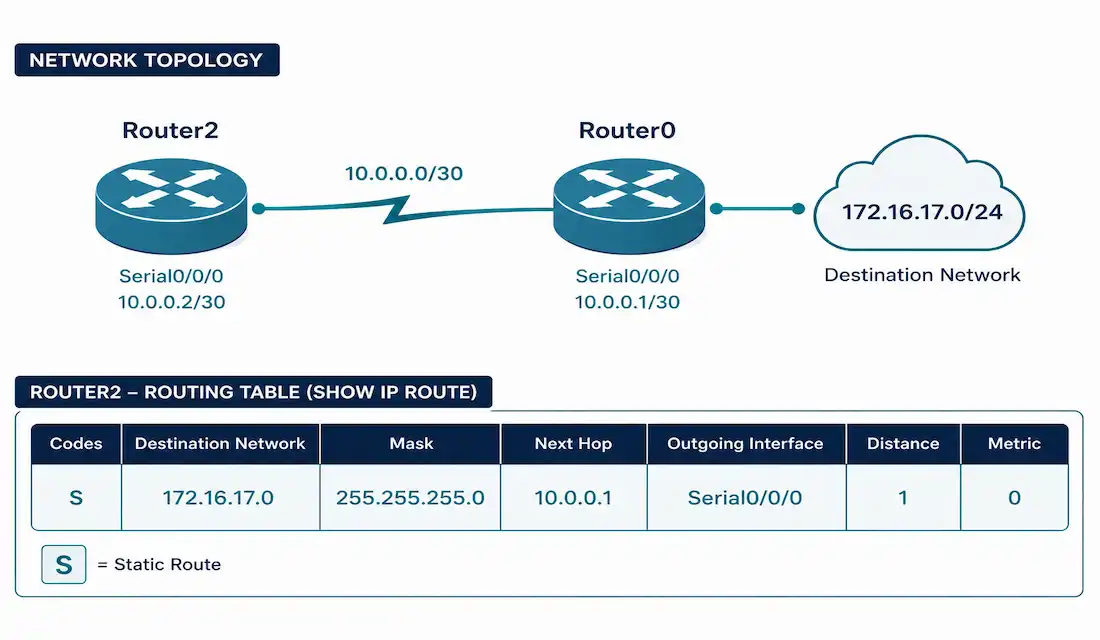
Consider a topology where Router2 needs a static route to reach the 172.16.17.0/24 network, which sits on the far side of Router0, connected via Router2’s Serial0/3/0 interface.
Command syntax:
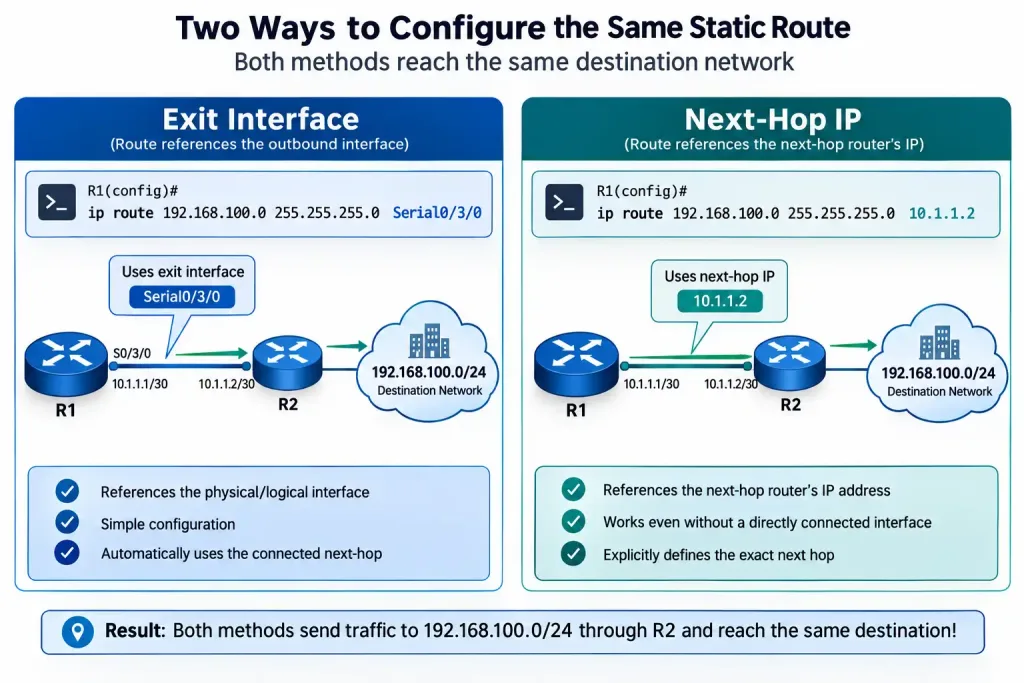
Router(config)# ip route <network-address> <network-mask> {next-hop-ip | exit-interface} [administrative-distance]Using the exit interface:
Router2(config)# ip route 172.16.17.0 255.255.255.0 Serial0/3/0Using the next-hop IP address instead — functionally equivalent, differing only in how the route appears in the routing table:
Router2(config)# ip route 172.16.17.0 255.255.255.0 10.1.1.2Both approaches reach the same destination. The choice mainly comes down to readability and how you prefer the routing table to display the route — using the exit interface shows the physical path directly, while using the next-hop IP is often clearer on multi-access segments where the exit interface alone wouldn’t fully specify the path.
The optional administrative distance parameter, appended as a trailing number:
Router2(config)# ip route 172.16.17.0 255.255.255.0 Serial0/3/0 10The 10 here overrides the static route’s default administrative distance of 1, making the route less preferred than default (though still more preferred than most dynamic routing protocols, since EIGRP internal starts at 90). This is genuinely useful for a specific purpose: configuring a static route as a backup that only gets used if a preferred dynamic route becomes unavailable — a technique covered in more depth in the floating static route guide linked above. Without a clear reason to change it, leave this parameter unset and let the route use its default AD of 1.
Verify the route was installed:
Router2# show ip routeStatic routes appear in the routing table with the code S.
Configuring IPv6 Static Routes
The concept is identical; the syntax differs slightly to match IPv6 addressing:
Router(config)# ipv6 route <ipv6-prefix>/<prefix-length> {ipv6-address | interface-type interface-number}Example, reaching a specific IPv6 network:
Router2(config)# ipv6 route 2001:db8:17::/64 Serial0/3/0Verify:
Router2# show ipv6 routeStatic Default Routes (Gateway of Last Resort)
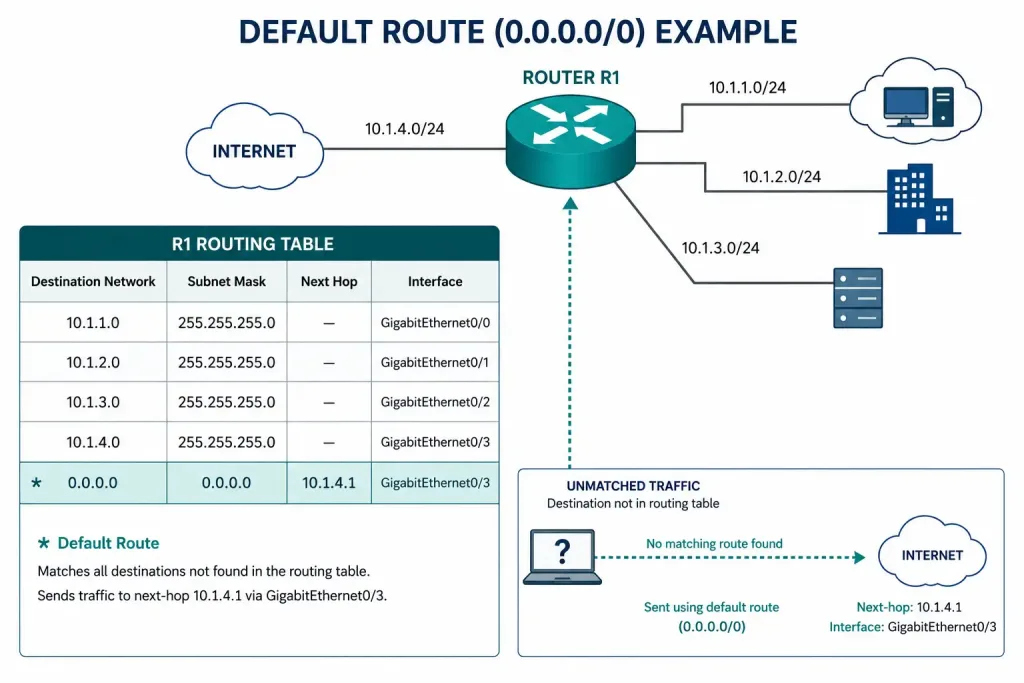
A default route handles traffic destined for anywhere the routing table has no specific match — it’s identified in the routing table with an S*, the asterisk specifically marking it as the default route, also called the Gateway of Last Resort.
IPv4 default route:
Router2(config)# ip route 0.0.0.0 0.0.0.0 Serial0/3/0IPv6 default route:
Router2(config)# ipv6 route ::/0 Serial0/3/0In both cases, the next hop points toward Router0 — the same upstream device this guide’s worked example has used consistently throughout, whether reaching a specific remote network or acting as the catch-all default.
Verify the default route specifically:
Router2# show ip route | include GatewayDefault static routes support load balancing across multiple next hops too — configuring more than one default route with different next-hop addresses lets the router distribute traffic across both, similar to equal-cost load balancing with dynamic protocols.
Summary and Floating Static Routes: A Brief Overview
Two more specialized static route patterns build directly on the fundamentals covered above, each solving a specific problem worth knowing about even if you’re using the dedicated guides linked earlier for full configuration detail.
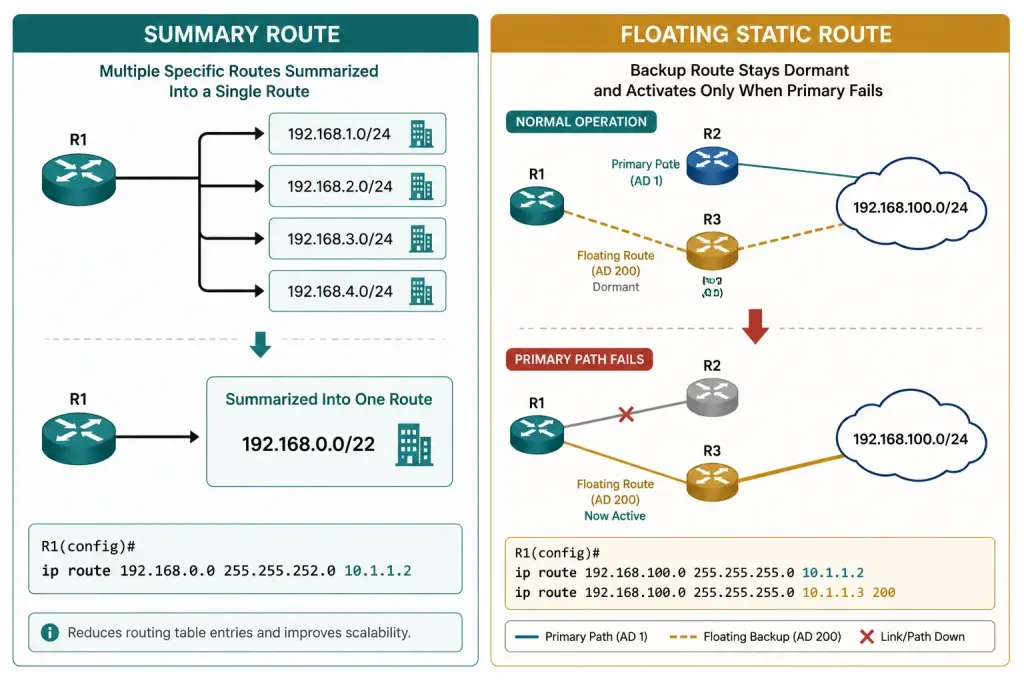
Summary static routes consolidate several individual static routes into one, when the destination networks share a common, summarizable boundary. Instead of configuring separate routes for 172.16.16.0/24, 172.16.17.0/24, 172.16.18.0/24, and 172.16.19.0/24 individually, a single summary route to 172.16.16.0/22 covers all four, provided the actual physical topology genuinely supports reaching all of them through the same next hop. This reduces routing table size and configuration overhead, at the cost of losing per-network granularity — if one of those four networks is actually reachable through a different path, summarization would incorrectly route its traffic the same way as the other three.
Floating static routes use the administrative distance override covered above specifically to create an automatic backup path. Configure a floating static route with an AD higher than your primary route’s source (higher than a dynamic protocol’s AD, for instance), and it stays completely unused — sitting dormant in the configuration — right up until the primary route disappears from the table, at which point it becomes active automatically with no manual intervention required. This is one of the more elegant patterns in basic routing: a backup that requires zero ongoing maintenance to keep ready, since it simply won’t be preferred until it’s actually needed.
Verifying Static Route Configuration
Confirm a specific route is installed correctly:
Router2# show ip route staticCheck the full running configuration for all static routes:
Router2# show running-config | include ip routeTest actual reachability, not just the routing table entry:
Router2# ping 172.16.17.1
Router2# traceroute 172.16.17.1
A route appearing correctly in the routing table doesn’t guarantee the destination is actually reachable — an intermediate hop failure, a firewall rule, or a misconfigured device on the far end can all still block traffic even with a perfectly correct static route.
Troubleshooting Static Routes
The route doesn’t appear in the routing table at all: confirm the command was entered correctly and in global configuration mode, and check for a typo in the network address or mask — a static route with an incorrect mask silently creates a route to the wrong set of addresses rather than producing an obvious error.
Router2# show running-config | include ip routeThe route appears, but traffic still isn’t reaching the destination: verify the next-hop address or exit interface is actually correct and currently up.
Router2# show ip interface briefAn exit interface that’s administratively down or a next-hop address that’s no longer valid produces a route that looks correct in configuration but doesn’t actually forward traffic.
Two routes to the same destination, but the wrong one is being used: check administrative distance — a static route (AD 1 by default) will always be preferred over a dynamically learned route to the same destination, even if the dynamic route would otherwise be a better path. If you specifically want the dynamic route preferred except as a backup, that’s exactly the floating static route pattern, using a manually raised AD as covered above.
Router2# show ip route 172.16.17.0A previously working static route stopped working after a topology change: this is the fundamental trade-off of static routing — unlike a dynamic routing protocol, a static route doesn’t automatically detect and route around a failed path. If the configured next-hop or exit interface is no longer valid, the route needs to be manually updated, which is precisely the maintenance burden that makes static routing a better fit for small, stable networks than large or frequently-changing ones.
Static vs. Dynamic Routing: Quick Comparison
| Feature | Static Routing | Dynamic Routing |
|---|---|---|
| Configuration | Manual | Automatic |
| Bandwidth usage | Low | Higher (routing protocol overhead) |
| Security | High (no protocol to exploit) | Medium (protocol-specific vulnerabilities possible) |
| Scalability | Low | High |
| Reacts to topology changes | No — requires manual update | Yes — automatic reconvergence |
FAQs
What is a static route in Cisco networking?
A static route is a manually configured path to a specific network, defined using the ip route (IPv4) or ipv6 route (IPv6) command with a next-hop address or exit interface. Unlike dynamic routing, it requires no routing protocol overhead but also doesn’t automatically adjust if the network topology changes.
What’s the difference between using a next-hop IP address and an exit interface?
Both achieve the same routing outcome and are functionally equivalent for point-to-point links — the main difference is how the route displays in the routing table and, on multi-access segments specifically, that a next-hop IP address more precisely identifies the actual path than an exit interface alone would. For most point-to-point serial or WAN links, either approach works equally well.
What is a default static route, and when should I use one?
A default static route (0.0.0.0 0.0.0.0 for IPv4, ::/0 for IPv6) handles traffic for any destination not matching a more specific route in the table — commonly used at the edge of a network where a single upstream path handles everything not otherwise known locally. It’s also called the Gateway of Last Resort and appears in the routing table marked with an asterisk.
How does administrative distance affect static routes?
Static routes default to an administrative distance of 1, making them preferred over nearly every dynamically learned route to the same destination. This can be intentionally overridden with a trailing number in the ip route command — raising the AD above a dynamic protocol’s own AD creates a floating static route, used specifically as an automatic backup that only activates if the preferred dynamic route becomes unavailable.
Why would a correctly configured static route stop working?
Static routes don’t automatically detect or route around topology changes the way dynamic routing protocols do — if the configured next-hop becomes unreachable or the exit interface goes down, the route needs to be manually corrected. This is the central trade-off of static routing: no protocol overhead in exchange for no automatic failover, which is exactly why static routing suits small, stable networks better than larger or frequently changing ones.
Can static and dynamic routing be used together on the same router?
Yes — this is extremely common in practice. A router might use a dynamic protocol like OSPF or EIGRP for its core internal routing while relying on a static default route to reach the internet, or use floating static routes specifically as backups for dynamically-learned paths. Administrative distance is what governs which route wins when both a static and dynamic route exist for the same destination.



