
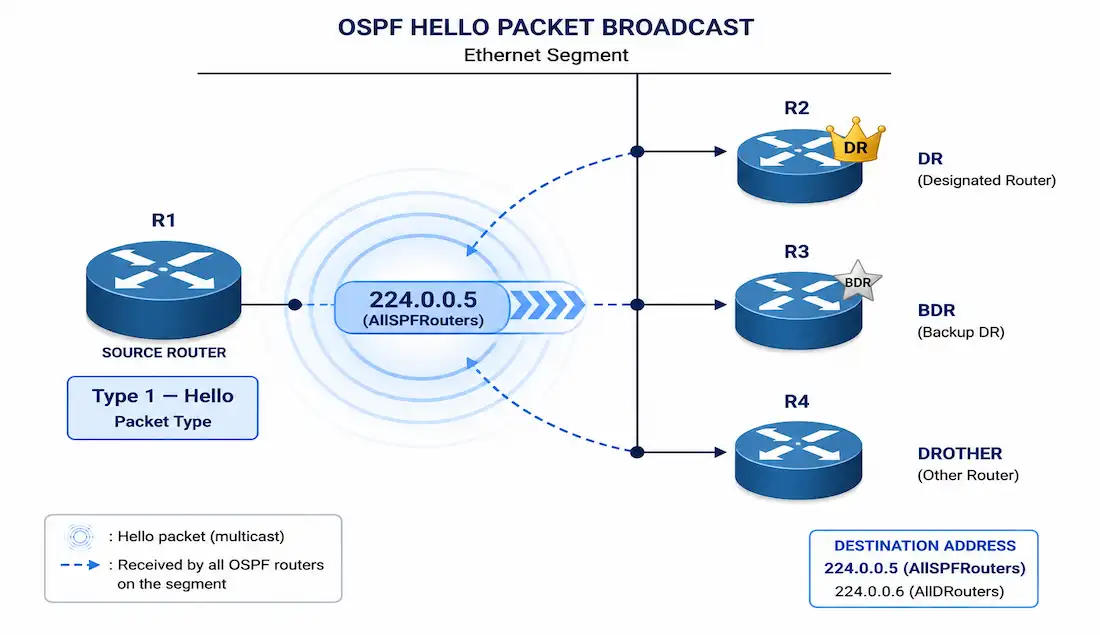
OSPF Hello packets are Type 1 packets. Routers send them out every OSPF-enabled interface, including virtual links. Their job is simple: find neighbors, and keep those neighbor relationships alive. It’s a small packet with a big job. Nearly every OSPF problem you’ll ever troubleshoot starts here.
Routers send Hello packets as multicast, to 224.0.0.5 (AllSPFRouters). This lets routers discover neighbors dynamically, with no manual neighbor configuration needed in most cases. On multi-access networks, DROTHERs also send their link-state updates to a second address, 224.0.0.6 (AllDRouters), which only the DR and BDR listen to. Hello packets themselves still go to 224.0.0.5; 224.0.0.6 matters once adjacencies are up and routers start exchanging LSAs. Hello packets also advertise the parameters routers use to elect a Designated Router (DR) and Backup Designated Router (BDR) on multi-access networks. Point-to-point links skip that election step entirely. There’s only one possible neighbor on a point-to-point link, so DR/BDR has nothing to do there.
Hello packets are the foundation everything else in OSPF builds on. Without a working Hello exchange, routers never form adjacencies. Without adjacencies, they never synchronize their Link-State Databases (LSDBs). No LSDB synchronization means no working OSPF routing at all, and no reliable network design to build on top of.
How OSPF Reaches Convergence
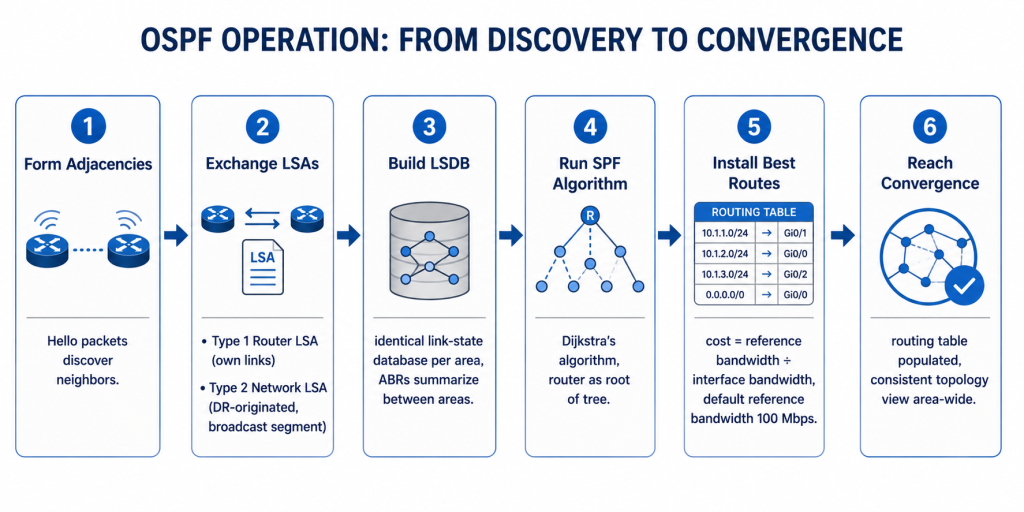
Hello packets are step one of a six-step process. Understanding the full sequence puts Hello’s role in context.
1. Form adjacencies. Routers send Hello packets to discover neighbors and negotiate the parameters covered above.
2. Exchange LSAs. Once adjacent, routers flood Link-State Advertisements describing their directly connected links. Type 1 (Router LSA) describes a router’s own links. Type 2 (Network LSA) is originated by the DR on broadcast networks, describing the segment itself. Flooding continues, neighbor to neighbor, until every router in the area holds an identical set.
3. Build the LSDB. Each router assembles the flooded LSAs into a Link-State Database — its picture of the area’s topology. Every router in an area must end up with an identical LSDB before convergence can complete. In multi-area OSPF, Area Border Routers summarize LSAs between areas, keeping the LSDB smaller for areas that don’t need full detail from their neighbors.
4. Run the SPF algorithm. Each router runs Dijkstra’s Shortest Path First algorithm against its own LSDB, building a tree with itself as the root and calculating the shortest path to every other router and network.
5. Install best routes. From the SPF tree, the router installs the lowest-cost path to each destination into the routing table. OSPF’s default cost formula is reference bandwidth ÷ interface bandwidth, with reference bandwidth defaulting to 100 Mbps. Faster interfaces get a lower, more preferred cost.
6. Reach convergence. Convergence happens once the routing table holds the best available paths and every router in the area shares a consistent topology view. OSPF reaches this by walking each neighbor relationship through the eight states below.
Hello Packet Structure
Every Hello packet has two parts. First, a standard OSPF header, shared across all five OSPF packet types. Second, a set of fields specific to Hello packets.
OSPF Header Fields
Type. An 8-bit field. It identifies which of the five OSPF packet types this is:
- Type 1: Hello, for neighbor discovery.
- Type 2: Database Description (DBD), for LSDB synchronization.
- Type 3: Link-State Request (LSR), asking for specific LSAs.
- Type 4: Link-State Update (LSU), delivering those LSAs.
- Type 5: Link-State Acknowledgment (LSAck), confirming an LSU arrived.
Router ID. A 32-bit field, written in dotted decimal notation. It uniquely identifies the sending router. By default, OSPF picks the highest IP address on a loopback interface, or the highest IP address on any active interface if no loopback exists. You can also set it manually with the router-id command.
Area ID. A 32-bit field. It identifies which OSPF area the packet belongs to. Routers only form adjacencies with neighbors in the same area, on a given interface. Get this wrong, and the two routers never even try to become neighbors.
Network Mask. The subnet mask of the sending interface. Both neighbors need to agree on this mask. If the masks don’t match, adjacency won’t form. This trips people up more often than you’d expect.
Hello-Specific Fields
Hello Interval. How often, in seconds, the router sends Hello packets. Neighbors must match on this value, or adjacency fails outright. Configure it with ip ospf hello-interval <seconds> under the interface.
Router Priority. A value from 0 to 255. Default is 1. This decides who wins DR and BDR election. Higher wins. A priority of 0 removes a router from the election entirely. Configure it with ip ospf priority <value>.
Dead Interval. How long a router waits without hearing a Hello before it declares a neighbor dead. This must also match between neighbors.
Designated Router (DR). The Router ID of the elected DR on that segment.
Backup Designated Router (BDR). The Router ID of the elected BDR, standing by to take over if the DR fails. (This link points to a community forum thread rather than an authoritative source. Retained per site link policy, flagged for citation quality.)
List of Neighbors. The Router IDs of every neighbor this router has already heard from. This list confirms bidirectional communication, moving a relationship into 2-Way state.
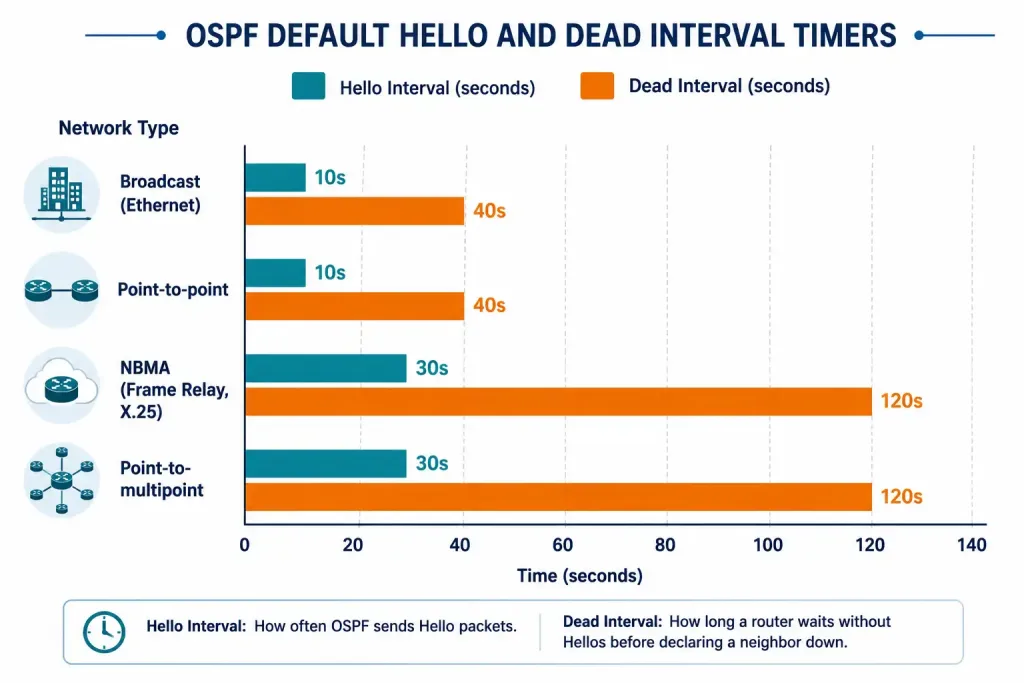
Hello and Dead Timers by Network Type
Timer defaults change depending on the network type.
| Network Type | Default Hello Interval | Default Dead Interval |
|---|---|---|
| Broadcast (Ethernet) | 10 seconds | 40 seconds |
| Point-to-point | 10 seconds | 40 seconds |
| NBMA (Frame Relay, X.25) | 30 seconds | 120 seconds |
| Point-to-multipoint | 30 seconds | 120 seconds |
The Dead Interval is always four times the Hello Interval by default, no matter the network type. If you change one manually, the other doesn’t update automatically. You have to set both yourself. This trips up a lot of people during real troubleshooting. Someone tweaks the Hello Interval to speed up convergence, forgets the Dead Interval, and ends up with a mismatch nobody expected.
Adjacency States
OSPF neighbors move through a defined sequence of states as they form an adjacency. The full state machine has eight states, not four. Most beginner material stops at 2-Way and jumps straight to Full, which skips the part of the process that actually shows up in troubleshooting output.
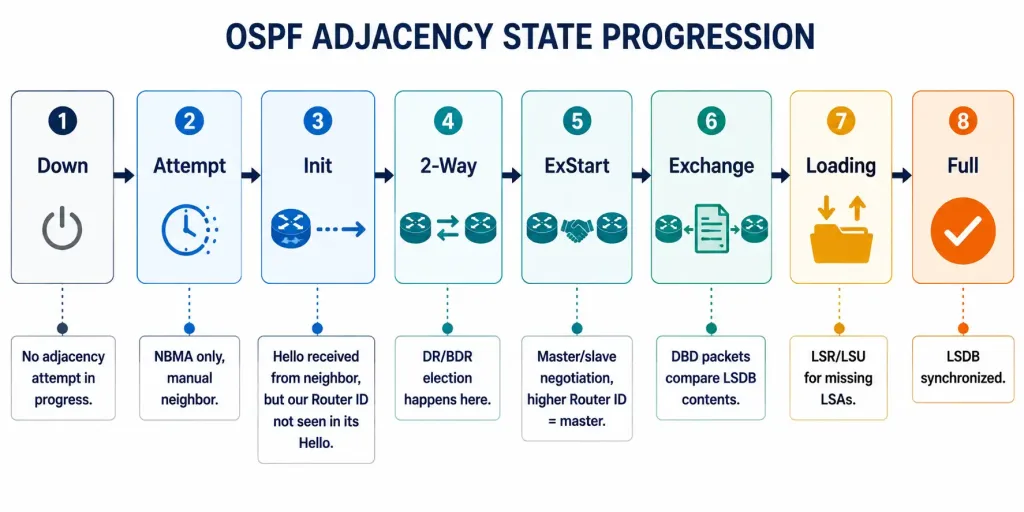
- Down. No Hello received yet.
- Attempt. Valid only on NBMA networks with manually configured neighbors. The router has sent a Hello but hasn’t confirmed it was received.
- Init. A Hello arrived, but it’s one-directional. The neighbor hasn’t confirmed it sees this router yet.
- 2-Way. Both routers see each other in their Hello packets’ neighbor list. Communication is confirmed bidirectional. DR and BDR get elected here, on multi-access segments. Routers that won’t become DR or BDR with each other stop here, by design.
- ExStart. The two routers negotiate master/slave roles and an initial DBD sequence number, ahead of actual database exchange. The router with the higher Router ID becomes master.
- Exchange. Routers send DBD packets describing their LSDB contents. Each side compares what it already knows against what the neighbor is describing.
- Loading. Routers send Link-State Request packets for any LSAs they’re missing, and receive Link-State Updates in response.
- Full. LSDBs are fully synchronized. The adjacency is complete.
On a broadcast segment, a router that doesn’t become DR or BDR still forms Full adjacencies with the DR and BDR, but stays in 2-Way with every other DROTHER. That’s expected behavior, not a stuck adjacency.
A Note on OSPFv3 (IPv6)
Everything above describes OSPFv2, used for IPv4. OSPFv3, used for IPv6, follows the same eight states and the same DR/BDR election logic described here. A few structural differences matter: LSAs carry IPv6 prefix information instead of IPv4, the Router ID stays a 32-bit value even though it no longer needs to resemble an IPv4 address, and adjacencies form per-link rather than per-subnet, since a single IPv6 interface commonly carries multiple prefixes.
Worked Example: DR/BDR Election
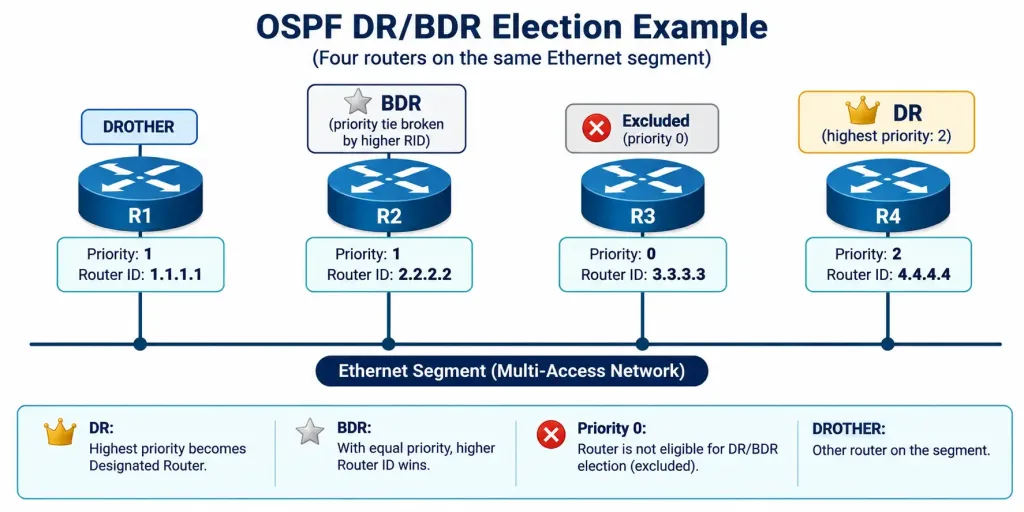
Election logic is easier to internalize with real numbers than with a rule stated in the abstract. Four routers sit on the same Ethernet segment:
| Router | Priority | Router ID |
|---|---|---|
| R1 | 1 | 1.1.1.1 |
| R2 | 1 | 2.2.2.2 |
| R3 | 0 | 3.3.3.3 |
| R4 | 2 | 4.4.4.4 |
Highest priority wins first. R4 has priority 2, higher than everyone else, so R4 becomes DR.
R3 has priority 0, which removes it from the election completely. It can never become DR or BDR on this segment, regardless of its Router ID.
That leaves R1 and R2 as BDR candidates, both at priority 1. Priority ties break on Router ID, highest wins. R2’s Router ID (2.2.2.2) beats R1’s (1.1.1.1), so R2 becomes BDR.
R1 ends up DROTHER: not DR, not BDR, forming Full adjacency with both R4 and R2, and staying in 2-Way with R3.
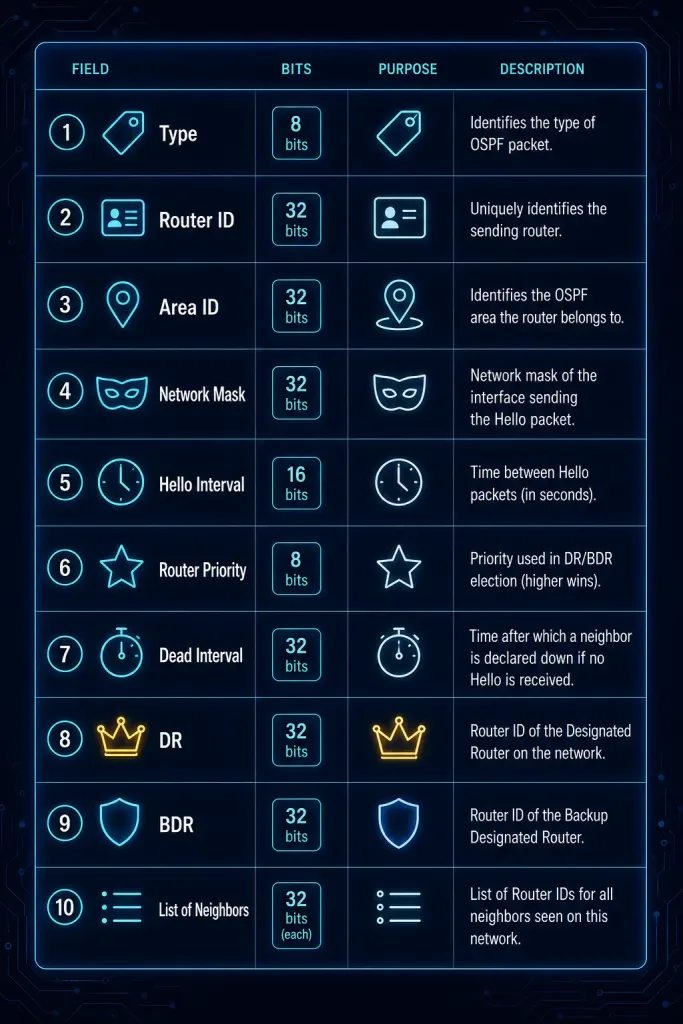
Hello Packet Fields at a Glance
| Field | Size | Purpose |
|---|---|---|
| Type | 8 bits | Identifies this as a Hello packet (Type 1) |
| Router ID | 32 bits | Uniquely identifies the sending router |
| Area ID | 32 bits | Identifies the OSPF area |
| Network Mask | 32 bits | Confirms both neighbors share the same subnet |
| Hello Interval | 16 bits | How often Hellos are sent |
| Options | 8 bits | Advertises optional capabilities the router supports |
| Router Priority | 8 bits | Decides DR/BDR election |
| Dead Interval | 32 bits | How long to wait before declaring a neighbor dead |
| Designated Router | 32 bits | Router ID of the elected DR |
| Backup Designated Router | 32 bits | Router ID of the elected BDR |
| List of Neighbors | Variable | Router IDs of all neighbors already heard from |
This table is worth memorizing loosely, not word for word. What matters more is understanding why each field exists. Every field here either helps two routers agree they’re compatible neighbors, or helps decide roles once they are.
Verifying Neighbor States
show ip ospf neighbor is the fastest way to check where every neighbor relationship currently stands:
Router# show ip ospf neighbor

Neighbor ID     Pri   State           Dead Time   Address         Interface
10.1.1.2        1     FULL/DR         00:00:38    10.1.1.2        GigabitEthernet0/0
10.1.1.3        1     2WAY/DROTHER    00:00:35    10.1.1.3        GigabitEthernet0/0
In this example, the router has reached Full adjacency with the DR (10.1.1.2). Its relationship with a non-DR/BDR neighbor (10.1.1.3, shown as DROTHER) has intentionally stopped at 2-Way — the expected behavior described above, not a problem.
Packet Capture Analysis
Wireshark is the easiest way to actually see a Hello packet in the wild. Use the filter ospf, or ip.proto == 89 if you want to catch OSPF traffic more broadly. Once you’ve got a capture, check the Hello Interval, Dead Interval, and Neighbor List fields directly.
Seeing the real bytes on the wire makes the whole process click in a way reading about it never quite does. Try capturing on two routers at once, right as they form an adjacency. Watch the neighbor list field grow as each side learns about the other. It makes the 2-Way transition feel concrete instead of abstract.
You can also use this capture technique to confirm timer values without logging into every router by hand. If you’re auditing a network someone else built, a quick capture tells you the actual configured Hello and Dead intervals faster than digging through running-config on a dozen devices.
Troubleshooting Hello Packet Issues
Common problems with adjacency formation tend to fall into a few buckets. (This link points to a VLAN trunk troubleshooting article rather than OSPF-specific content. Retained per site link policy, flagged for topic mismatch.)
Adjacency won’t form at all. Usually a mismatched Hello or Dead interval, or a mismatched Area ID or network mask. Check both sides with show ip ospf interface.
Stuck in 2-Way when it should reach Full. On a broadcast network, this can be completely normal for non-DR/BDR routers. If it’s not expected, check for an MTU mismatch instead — a common cause of adjacencies that stall in Exchange rather than 2-Way.
No Designated Router gets elected, or the wrong router wins. Check Router Priority on each candidate with show ip ospf interface. A priority of 0 removes a router from the race entirely.
Multicast Hellos aren’t reaching a neighbor. Confirm basic reachability to 224.0.0.5 isn’t blocked by an access list or firewall rule somewhere in the path.
Stuck in ExStart or Exchange. This almost always points to an MTU mismatch between the two interfaces, not a timer or priority problem. Verify with show interfaces on both sides and compare the MTU values directly.
Adjacency forms but expected routes don’t appear. Check show ip ospf database to confirm the LSDB actually contains the LSAs you expect, before assuming the SPF calculation itself is wrong. Authentication mismatches can sometimes let Hello packets through while blocking later LSA exchange, depending on configuration.
Illustrative Scenario: Hello Interval Mismatch
Here’s a common scenario, meant to show the troubleshooting logic in action rather than describe a specific real event.
A network has several branch routers running OSPF. Someone configures a new router with a Hello Interval of 30 seconds, while every existing router on that segment uses the default 10 seconds. The new router’s adjacency never progresses past Init state, no matter how long you wait.
Running show ip ospf neighbor on the existing routers shows the new router stuck, never reaching Full. Checking show ip ospf interface on the new router reveals the mismatched 30-second Hello Interval immediately. Fixing it with ip ospf hello-interval 10 on the new router’s interface resolves the adjacency within seconds of the next Hello exchange.
This kind of mismatch is one of the more common real-world causes of OSPF adjacency problems, precisely because the symptom (stuck in Init, or never appearing at all) looks the same as several other unrelated issues. Checking the Hello and Dead intervals first, before digging into anything more exotic, saves a lot of troubleshooting time.
Conclusion
Hello packets look simple on the surface. Just a periodic multicast, right? But nearly every field in them does real work. Timers that must match exactly. Priorities that decide elections. A neighbor list that confirms two-way communication before anything else can happen. Get comfortable with this packet, and OSPF troubleshooting stops feeling mysterious. Most adjacency problems trace back to something in this one packet type. Learn it well now, and every other OSPF topic gets easier from here.
FAQs
What is the role of OSPF Hello packets in networking?
Hello packets discover neighbor adjacencies and keep them alive. (This link points to an EIGRP-specific article rather than OSPF content. Retained per site link policy, flagged for topic mismatch.) They’re multicast to 224.0.0.5. They carry the parameters routers need to agree on before forming an adjacency. On multi-access networks, they also carry out DR and BDR election. Without Hello packets, OSPF routers would have no way to find each other automatically.
How does the Hello Interval impact OSPF operations?
The Hello Interval sets how often a router sends Hello packets. It defaults to 10 seconds on broadcast and point-to-point links, and 30 seconds on NBMA links. Neighbors must match this value exactly. A mismatch prevents the adjacency from forming at all, even if every other setting is correct.
What determines the Designated Router in OSPF?
Router Priority decides it first. Higher priority wins, and the default is 1 for every router. If priorities tie, the higher Router ID wins instead. A priority of 0 takes a router out of the running completely, useful when you want a specific router to never become DR.
Why might OSPF adjacency fail during Hello exchange?
The most common causes are mismatched Hello or Dead intervals, mismatched Area IDs, or mismatched subnet masks between the two interfaces. Multicast reachability problems can also block Hello packets from arriving at all. Start troubleshooting with show ip ospf interface on both sides, and compare the values directly.
Do Hello packet timers ever change automatically based on network type?
No, but the defaults differ by network type, which trips people up. Broadcast and point-to-point interfaces default to a 10-second Hello and 40-second Dead interval. NBMA and point-to-multipoint interfaces default to 30 seconds and 120 seconds instead. If you manually change one timer, the other doesn’t adjust on its own. You need to set both explicitly if you want them to stay in the expected 4-to-1 ratio. Mismatched timers are one of the single most common causes of an OSPF adjacency that just won’t come up, so check them first before assuming something more complicated is wrong.
Why does a router stay stuck in ExStart or Exchange instead of reaching Full?
This is almost always an MTU mismatch, not a Hello-related problem. If one interface has a smaller MTU than its neighbor, DBD packets get dropped once they exceed the smaller value. show interfaces on both routers, compared side by side, usually finds it in seconds.



