
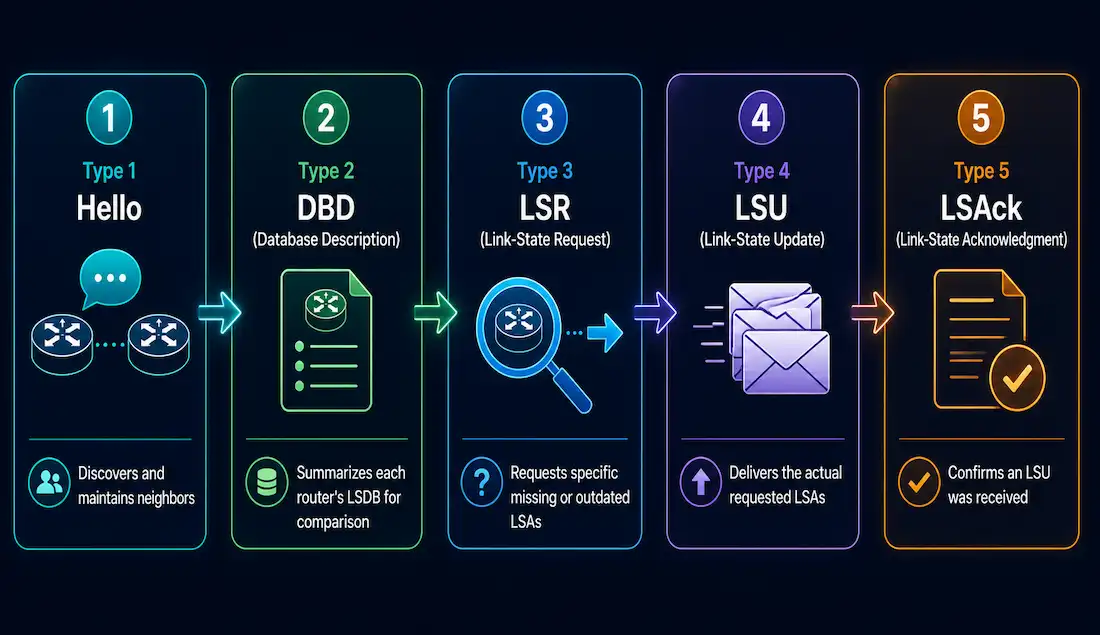
Open Shortest Path First (OSPF) is a link-state routing protocol widely used in enterprise networks, and a key topic for CCNA and CCNP certifications. OSPF relies on five distinct packet types to establish neighbor adjacencies, exchange routing information, and maintain a consistent Link-State Database (LSDB) across every router in an area. Understanding these packets — Hello, Database Description (DBD), Link-State Request (LSR), Link-State Update (LSU), and Link-State Acknowledgment (LSAck) — is essential for both exam preparation and real-world OSPF troubleshooting.
OSPF Packet Header Structure
Every OSPF packet shares a standard 24-byte header carrying the information a receiving router needs to process it correctly. Understanding this header is essential for troubleshooting and for analyzing OSPF behavior with a packet capture tool like Wireshark.
| Field | Length | Description |
|---|---|---|
| Version | 1 byte | OSPF version — 2 for IPv4, 3 for IPv6 |
| Type | 1 byte | Packet type: 1 = Hello, 2 = DBD, 3 = LSR, 4 = LSU, 5 = LSAck |
| Packet Length | 2 bytes | Total length of the packet, including this header |
| Router ID | 4 bytes | Unique identifier of the sending router |
| Area ID | 4 bytes | The OSPF area this packet belongs to |
| Checksum | 2 bytes | Verifies packet integrity |
| Authentication Type | 2 bytes | Authentication method: 0 = None, 1 = Cleartext, 2 = Cryptographic |
| Authentication Data | 8 bytes | Authentication information — a password or a cryptographic hash, depending on the type |
This header is what allows OSPF packets to be correctly identified, processed, and authenticated by receiving routers, regardless of which of the five packet types follows it.
The Hello Packet (Type 1)
The Hello packet is fundamental to OSPF’s operation, letting routers discover neighbors and form adjacencies. Sent periodically — every 10 seconds by default on broadcast networks — Hello packets are multicast to 224.0.0.5 (AllSPFRouters) to dynamically identify neighboring routers. They drive the early stages of the OSPF neighbor state machine, moving a relationship from Down through Init and 2-Way, eventually toward Full adjacency.
Key fields carried in a Hello packet:
- Network Mask — confirms both routers are on the same subnet.
- Hello Interval — time between Hello packets; must match between neighbors for adjacency to form.
- Dead Interval — time to wait before declaring a silent neighbor down, typically four times the Hello Interval.
- Designated Router (DR) — the IP address of the segment’s DR, if one has been elected.
- Backup Designated Router (BDR) — the IP address of the segment’s BDR, if elected.
- Neighbor List — the routers this router has already discovered on this interface.
For CCNA study, understanding Hello packets is essential for configuring and verifying OSPF neighbors with show ip ospf neighbor. Mismatched Hello or Dead Intervals between two routers are one of the most common reasons an adjacency never forms.
The Database Description (DBD) Packet (Type 2)
The DBD packet contains a summary of the sending router’s LSDB — not the full database itself, just enough of a summary for the receiving router to compare against its own. DBD packets are exchanged during the Exchange state of adjacency formation, letting both routers identify which LSAs are missing or outdated on either side. This synchronization step is essential for every router in an area to eventually build an identical LSDB, which is what allows each router’s independently calculated SPF tree to stay consistent with every other router’s.
DBD packets are sent as a numbered sequence rather than all at once, using flags — including Master/Slave and More — to manage which router leads the exchange and whether additional DBD packets are still to come.
The Link-State Request (LSR) Packet (Type 3)
After processing a neighbor’s DBD packets, a router compares what it learned against its own LSDB and identifies any entries that are missing or out of date. It requests those specific entries using an LSR packet, which references exactly which LSAs it needs — by LSA type, link-state ID, and advertising router — rather than requesting the entire database again. A router can send multiple LSR packets in sequence if several entries need updating.
The Link-State Update (LSU) Packet (Type 4)
The LSU packet is sent in reply to an LSR, and carries one or more Link-State Advertisements (LSAs) — the actual building blocks of the OSPF LSDB. LSUs are also sent proactively whenever a genuine topology change occurs, such as a link failure or recovery, independent of any specific request.
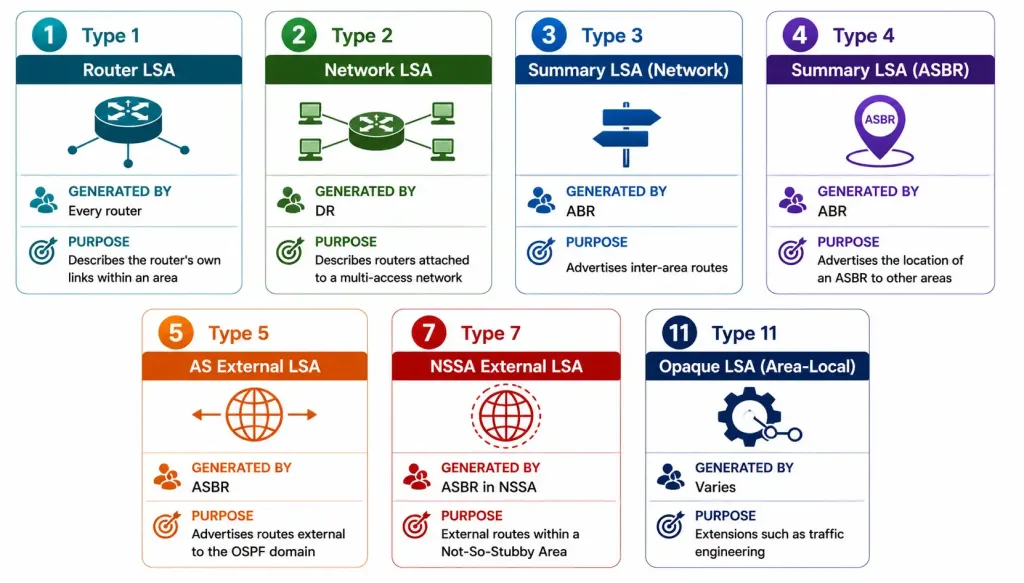
There are seven LSA types used in OSPF for IPv4, each serving a distinct purpose:
| LSA Type | Name | Description |
|---|---|---|
| 1 | Router LSA | Describes a router’s own links and their states within an area |
| 2 | Network LSA | Generated by the DR; describes the set of routers attached to a multi-access network |
| 3 | Summary LSA (Network) | Advertises inter-area routes, generated by ABRs |
| 4 | Summary LSA (ASBR) | Advertises the location of an ASBR to other areas, generated by ABRs |
| 5 | AS External LSA | Advertises routes external to the OSPF domain, such as redistributed routes |
| 7 | NSSA External LSA | Used within Not-So-Stubby Areas for external routes |
| 11 | Opaque LSA (Area-Local Scope) | Used for extensions like traffic engineering; less common at the CCNA/CCNP level |
For CCNP study, understanding these LSA types in detail is essential for configuring OSPF areas correctly and for troubleshooting LSDB inconsistencies between routers.
The Link-State Acknowledgment (LSAck) Packet (Type 5)
When a router receives an LSU packet, it sends an LSAck packet back to the sender to confirm receipt. The LSAck carries no actual routing data of its own — its entire purpose is confirmation. A single LSAck packet can acknowledge multiple LSAs at once, which keeps the acknowledgment process efficient even when a large batch of updates was just flooded.
How the Five Packet Types Drive the OSPF Neighbor State Machine
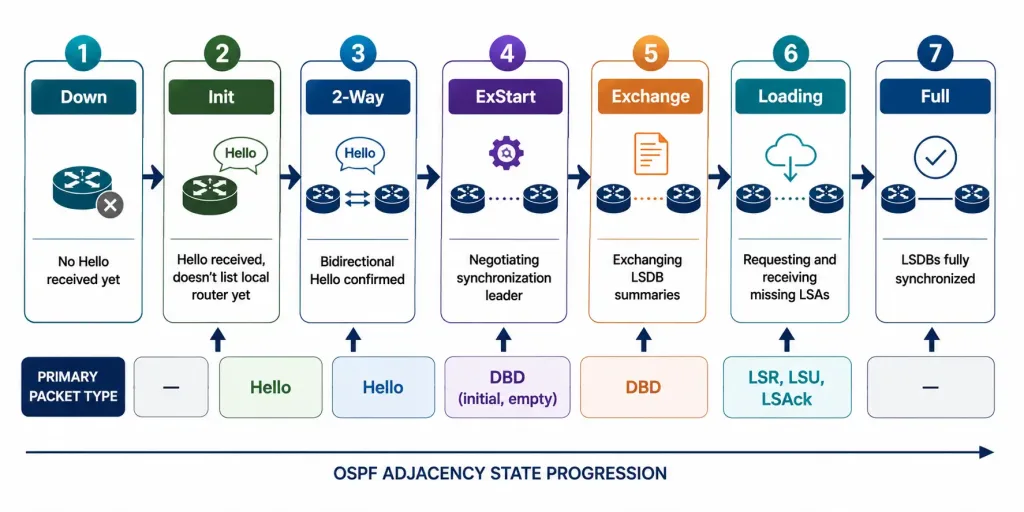
Understanding each packet type in isolation is useful, but seeing how they combine to move a neighbor relationship through OSPF’s defined state machine ties the whole process together — and it’s a genuinely useful troubleshooting skill, since a stuck adjacency’s current state tells you exactly which packet exchange to investigate.
| State | What’s Happening | Primary Packet Type Involved |
|---|---|---|
| Down | No Hello received yet from this neighbor | — |
| Init | A Hello has been received, but it doesn’t list the local router’s own ID yet | Hello |
| 2-Way | Both routers see each other in their Hello packets — bidirectional communication confirmed | Hello |
| ExStart | Routers negotiate which one leads the database synchronization process | DBD (initial, empty) |
| Exchange | Routers exchange DBD packets summarizing their LSDBs | DBD |
| Loading | Routers request and receive any LSAs they’re missing | LSR, LSU, LSAck |
| Full | LSDBs are fully synchronized — the adjacency is complete | — |
show ip ospf neighbor displays each neighbor’s current state directly, which makes it the natural first command to check when an adjacency isn’t forming. A neighbor stuck at 2-Way on a point-to-point link points toward a different problem than one stuck at ExStart, since they represent different packet exchanges failing at different points in the sequence.
Capturing OSPF Packets for Analysis
For CCNP-level troubleshooting, capturing live OSPF traffic with Wireshark is a genuinely useful skill beyond just reading show command output. Filtering a capture with ospf isolates OSPF traffic specifically, and Wireshark decodes the Type field automatically, labeling each packet as Hello, DBD, LSR, LSU, or LSAck rather than showing the raw numeric value. This is particularly useful for confirming Hello and Dead Interval values actually match between two routers that refuse to form an adjacency, since a capture shows the real values being sent rather than relying on configuration review alone, which can miss a value inherited from a default rather than explicitly set.
Worked Example: A Full Adjacency Formation, Packet by Packet
Seeing all five packet types in the actual order they’d occur between two routers, R1 and R2, ties the whole process together.
- R1 → R2, Hello. R1 sends a Hello packet, multicast to 224.0.0.5, with no neighbors listed yet. R2 receives it; R1 is now in R2’s Init state.
- R2 → R1, Hello. R2 replies with its own Hello, this time listing R1’s Router ID in its neighbor field. R1 sees itself listed and moves to 2-Way with R2; R2 does the same once it sees its own ID echoed back.
- R1 ↔ R2, DBD (ExStart). Both routers send an initial, empty DBD packet to negotiate which one leads the synchronization — determined by router priority and, as a tiebreaker, router ID.
- R1 ↔ R2, DBD (Exchange). The leading router sends a sequence of DBD packets summarizing its LSDB; the other router compares each summary against its own database and replies with its own DBD packets in turn.
- R1 → R2, LSR. Having identified specific LSAs it’s missing after comparing DBD summaries, R2 sends one or more LSR packets requesting exactly those entries.
- R2 → R1, LSU. R1 replies with an LSU packet carrying the requested LSAs in full.
- R1 → R2, LSAck. R2 confirms receipt of the LSU with an LSAck packet, closing out that exchange.
- Full. Once every requested LSA has been received and acknowledged, both routers’ LSDBs are identical, and the adjacency reaches the Full state.
This entire sequence typically completes in well under a second on a stable link, but seeing it broken into its individual packet exchanges makes it much easier to interpret a debug ip ospf adj capture or a Wireshark trace when an adjacency is stuck partway through.
Frequently Asked Questions
What is the purpose of OSPF Hello packets?
Hello packets discover and maintain neighbor adjacencies by exchanging parameters like Router ID, Hello Interval, and Dead Interval between directly connected routers. Sent every 10 seconds by default on broadcast networks and multicast to 224.0.0.5, they confirm neighbors are still reachable, which is essential for both initial adjacency formation and ongoing OSPF stability. A mismatch in Hello or Dead Interval values between two routers is one of the most common reasons an adjacency never progresses past the Init state.
How does the DBD packet help in OSPF operations?
DBD packets summarize the sending router’s LSDB, letting a receiving neighbor identify which specific LSAs are missing or outdated compared to its own database, without needing to exchange the full database contents up front. This happens during the Exchange state of adjacency formation, and it’s an essential step toward every router in an area maintaining an identical LSDB — which is exactly what allows each router’s independently calculated SPF tree to stay consistent with every other router’s.
What is the role of LSU and LSR packets in OSPF?
LSR packets request specific LSAs that a router identified as missing or outdated after processing a neighbor’s DBD packets, referencing the exact entries needed rather than requesting the whole database again. LSU packets carry the actual LSA data in response to those requests, and are also sent proactively whenever a genuine topology change occurs, ensuring every router’s LSDB stays current with the real state of the network.
Why is the LSAck packet important in OSPF?
LSAck packets confirm that an LSU was actually received, which prevents the sending router from unnecessarily retransmitting the same update and helps ensure reliable delivery of LSDB information across the network. A single LSAck can acknowledge multiple LSAs at once, which keeps the acknowledgment process efficient even after a large flood of updates following a significant topology change.
How can I tell which packet exchange is failing when an OSPF adjacency won’t form?
Check the neighbor’s current state with show ip ospf neighbor and match it against the OSPF state machine: a neighbor stuck at Init suggests the remote router isn’t seeing the local router’s Hello packets correctly, while one stuck at ExStart or Exchange points toward a DBD negotiation or LSDB synchronization problem instead. Capturing live traffic with Wireshark, filtered to ospf, can confirm exactly which packet type is failing to exchange correctly, which narrows troubleshooting down considerably compared to reviewing configuration alone.



