
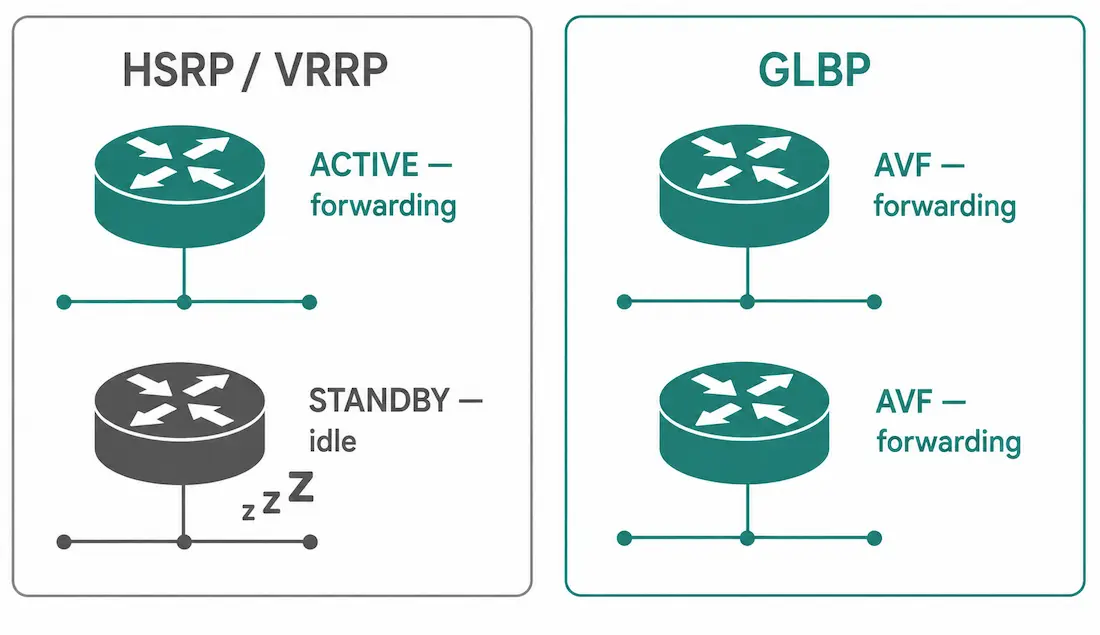
HSRP and VRRP both solve gateway failover the same way: one router is active, everything else sits idle until it fails. GLBP (Gateway Load Balancing Protocol), Cisco’s own extension, was built specifically to fix that waste — it lets every router in the group actively forward traffic simultaneously, not just the one that happens to win the election.
AVG and AVF: The Two Roles
GLBP splits responsibility into two distinct roles, which is the key difference from HSRP’s single active/standby model of one router doing everything and the rest doing nothing:
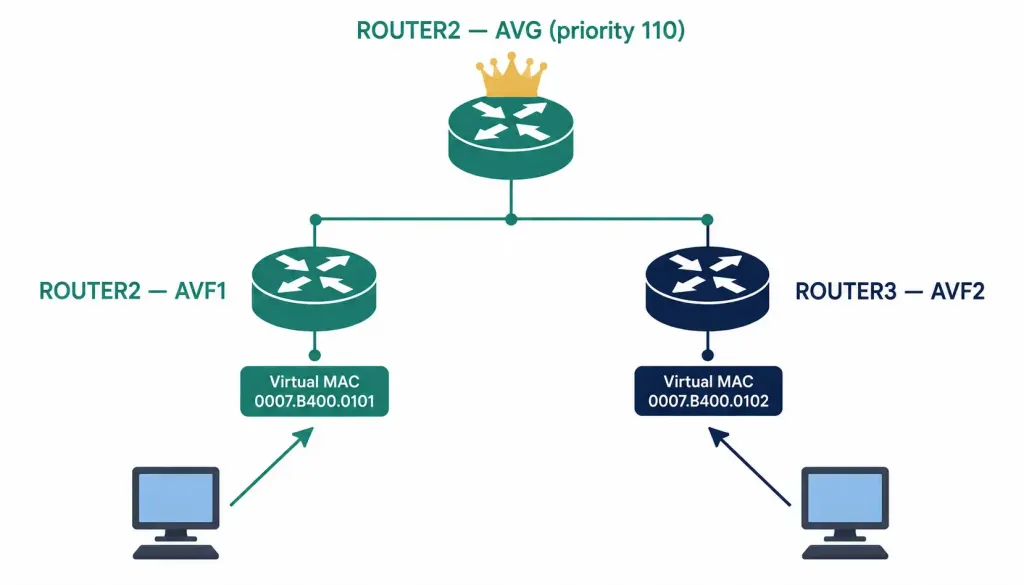
- Active Virtual Gateway (AVG). Exactly one router per group holds this role, elected the same way HSRP elects its active router — highest priority wins, default priority is 100 on every router. The AVG’s job is deciding which physical router (which AVF) gets assigned to answer each host’s ARP request for the virtual IP. Unlike HSRP’s active router, the AVG doesn’t necessarily forward the majority of traffic itself — its role is coordination, not primary forwarding.
- Active Virtual Forwarder (AVF). Every router in the group, including the AVG itself, is also an AVF. Each AVF is assigned its own virtual MAC address, and the AVG hands out these different virtual MAC addresses to different hosts, spreading actual traffic forwarding across all of them. A GLBP group supports up to four AVFs, meaning up to four physical routers can share forwarding duties for a single virtual IP.
This is the mechanism that makes active-active possible: instead of every host resolving the gateway IP to the same virtual MAC address the way HSRP or VRRP would, different hosts on the same segment get pointed to different virtual MAC addresses, each one answered by a different physical router.
Basic GLBP Configuration
Using the same Router2/Router3 topology established in the HSRP guide:
Router2:
Router2> enable
Router2# configure terminal
Router2(config)# interface gigabitEthernet 0/1
Router2(config-if)# no shutdown
Router2(config-if)# ip address 192.168.10.2 255.255.255.0
Router2(config-if)# glbp 1 ip 192.168.10.1
Router2(config-if)# glbp 1 priority 110
Router2(config-if)# glbp 1 preempt
Router2(config-if)# glbp 1 load-balancing round-robin
Router2(config-if)# exit
Router2(config)# do wr
Router3:
Router3> enable
Router3# configure terminal
Router3(config)# interface gigabitEthernet 0/1
Router3(config-if)# no shutdown
Router3(config-if)# ip address 192.168.10.3 255.255.255.0
Router3(config-if)# glbp 1 ip 192.168.10.1
Router3(config-if)# glbp 1 priority 100
Router3(config-if)# glbp 1 preempt
Router3(config-if)# glbp 1 load-balancing round-robin
Router3(config-if)# exit
Router3(config)# do wr
Both routers join GLBP group 1 and share virtual IP 192.168.10.1. Router2’s priority (110) beats Router3’s default (100), so Router2 becomes AVG. The preempt command must always include the group number — glbp 1 preempt, not a bare glbp preempt — the same way every other GLBP command is scoped to a specific group.
With preempt enabled on both, whichever router has the highest priority will hold the AVG role — including reclaiming it automatically after recovering from a failure, the same preemption logic covered in detail for HSRP.
Verify with:
Router2# show glbp briefThis shows the group, the forwarder number for each AVF, priority, state, and which router is currently AVG.
GLBP Round-Robin (Default)
Round-robin is the default load-balancing algorithm — no additional configuration needed beyond the basic setup above. The AVG answers each incoming ARP request for the virtual IP by cycling through each AVF’s virtual MAC address in turn, so with two AVFs, roughly every other host ends up assigned to each router. Over enough hosts, traffic ends up close to evenly split.
GLBP Weighted
The weighted algorithm assigns traffic proportionally to each AVF’s configured weight, rather than splitting evenly. This makes sense when the routers in the group have meaningfully different forwarding capacity — a newer, more powerful router can be given a larger share of hosts than an older, less capable one still doing useful work in the group.
The weight range is 1 to 254, with a default of 100. The configuration keyword is weighting, not weight — this is a common typo that will fail to execute on real Cisco IOS:
Router2:
Router2(config-if)# glbp 1 load-balancing weighted
Router2(config-if)# glbp 1 weighting 150
Router3:
Router3(config-if)# glbp 1 load-balancing weighted
Router3(config-if)# glbp 1 weighting 200
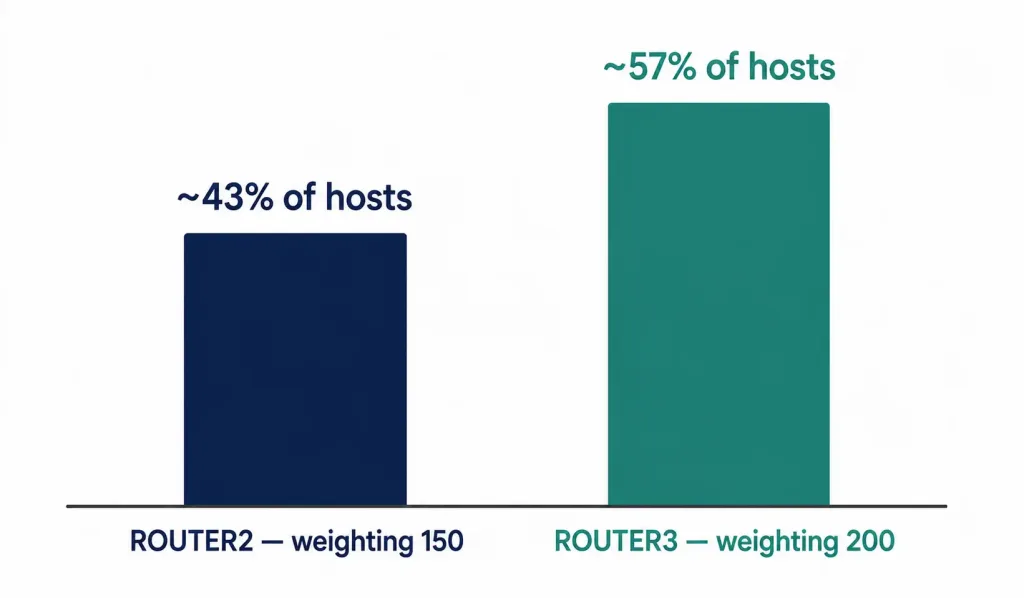
With these values, Router3 (weighting 200) receives roughly 200/(200+150) ≈ 57% of hosts, and Router2 (weighting 150) receives roughly 43% — proportional to their relative weights, not a flat 50/50 split.
GLBP Host-Dependent
Host-dependent load balancing uses each host’s own MAC address to consistently determine which AVF’s virtual MAC it gets assigned, rather than round-robin or weighted cycling. As long as the number of active AVFs in the group doesn’t change, a given host reliably gets the same virtual MAC address every time it re-ARPs for the gateway.
This matters specifically for stateful NAT and similar situations where a host’s traffic needs to consistently pass through the same physical router — switching which router handles a host’s traffic mid-session can break an in-progress NAT translation or stateful firewall session.
Router2(config-if)# glbp 1 load-balancing host-dependentRouter3(config-if)# glbp 1 load-balancing host-dependentNote the spelling: host-dependent, not “host-dependant” — Cisco IOS command parsing is exact, and the misspelled version will not be recognized.
Advantages of GLBP Over HSRP/VRRP
- No idle hardware. Every router in the group actively forwards traffic under normal conditions, rather than one standby router doing nothing until a failure.
- Automatic load distribution across multiple gateways, using a single virtual IP address that every host still points to — the load balancing is invisible to host configuration.
- Multiple virtual MAC addresses behind one virtual IP, which is the actual mechanism enabling active-active forwarding.
- Automatic failover still works exactly as it would under HSRP — if an AVF fails, the AVG reassigns its hosts to a surviving AVF.
Common GLBP Configuration Mistakes
- Forgetting the group number on subsequent commands. Every GLBP command — priority, preempt, weighting, load-balancing — needs the group number specified, since a single interface can run multiple GLBP groups simultaneously. Omitting it, as in a bare
glbp preempt, is invalid syntax rather than a command that silently applies to “the” group. - Using “weight” instead of “weighting.” This is the single most common GLBP typo. The command is
glbp [group] weighting [value]— there is noweightkeyword in GLBP configuration. - Misspelling “host-dependent.” IOS command parsing is exact; “host-dependant” will not be recognized as valid input.
- Expecting a perfectly even split under weighted load balancing. Distribution is proportional to configured weights, calculated across ARP requests over time — it’s a statistical average, not a guarantee that traffic volume splits exactly along weight ratios at every instant.
- Assuming host-dependent guarantees permanent forwarder assignment. The assignment holds only as long as the number of active AVFs in the group stays constant. If an AVF fails or a new one joins, previously-assigned hosts can be reassigned to a different forwarder, which is worth remembering when troubleshooting an apparent inconsistency in stateful NAT behavior after a topology change.
Worked Example: Failover Under Round-Robin
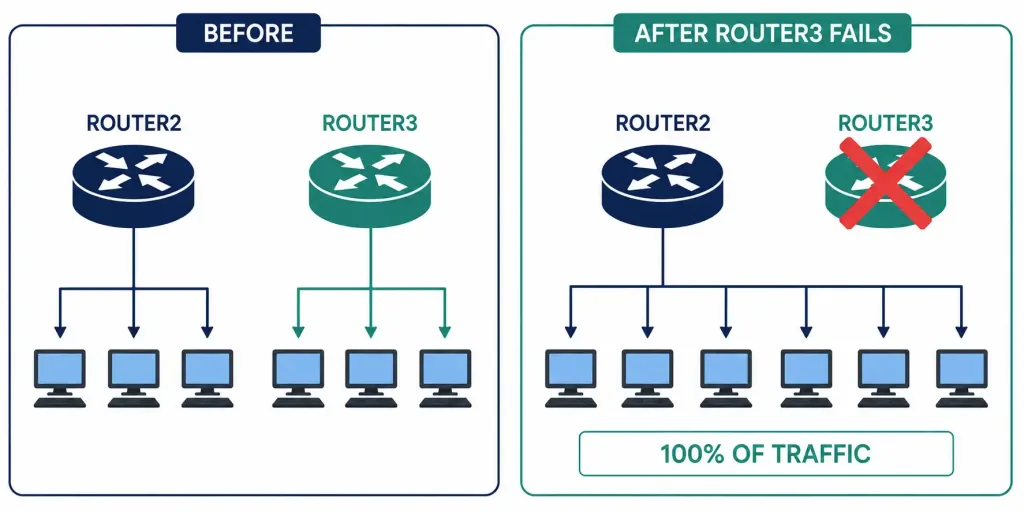
Continuing the Router2/Router3 topology from earlier, both configured for round-robin load balancing: under normal operation, roughly half the hosts on 192.168.10.0/24 resolve the gateway ARP to Router2’s virtual MAC and half to Router3’s, so both routers are actively forwarding.
Now Router3 fails. The AVG — Router2, given its higher priority — detects the missing hello packets and reassigns Router3’s previously-assigned hosts to Router2’s virtual MAC, using a Gratuitous ARP the same way HSRP does on failover. Every host on the segment ends up forwarding through Router2 alone until Router3 recovers, at which point the AVG resumes splitting new ARP assignments across both routers again.
This is the practical trade-off of GLBP’s active-active model: it gets full utilization of every router under normal conditions, but during a single-router failure, the survivors absorb 100% of the traffic just as they would under HSRP or VRRP — GLBP doesn’t reduce the capacity a surviving router needs to handle during an outage, it only improves utilization when everything is healthy. Capacity planning for a GLBP deployment should always account for this worst case, sizing each router to individually handle the full segment’s traffic load, not just its normal share.
Frequently Asked Questions
What’s the difference between AVG and AVF in GLBP?
The AVG (Active Virtual Gateway) is the single router elected to control the group and decide which AVF each host gets assigned to. Every router in the group, including the AVG itself, is also an AVF (Active Virtual Forwarder) — each with its own virtual MAC address actively forwarding traffic for whichever hosts the AVG assigned to it.
How is GLBP different from HSRP in practice?
HSRP has every host resolve the gateway to the same single virtual MAC address, so only the active router ever forwards traffic. GLBP hands out different virtual MAC addresses to different hosts, so multiple physical routers forward traffic simultaneously under normal conditions — GLBP gets both redundancy and active load distribution, where HSRP only gets redundancy.
Why would you use weighted load balancing instead of round-robin?
Round-robin assumes every router in the group has roughly equal forwarding capacity. Weighted load balancing lets you assign a proportionally larger share of hosts to a more capable router using the glbp [group] weighting [value] command, useful when the group includes routers with meaningfully different hardware capacity.
When should you use host-dependent load balancing instead?
When a host’s traffic needs to consistently route through the same physical router across multiple sessions — most commonly with stateful NAT or stateful firewall inspection, where switching the forwarding router mid-session can break an in-progress translation or connection state.
What’s the correct command to enable GLBP preemption?
glbp [group] preempt, always including the group number — for example, glbp 1 preempt. A bare glbp preempt without the group number is invalid syntax and won’t configure anything.
Why might a GLBP weighted configuration fail to apply?
The most common cause is using the wrong keyword — the correct command is glbp [group] weighting [value], not glbp [group] weight [value]. “Weighting” is what Cisco IOS actually recognizes; “weight” is a common but incorrect shorthand that will produce a syntax error, and it’s easy to type without noticing since both words look reasonable at a glance.
Conclusion
GLBP’s real advantage over HSRP and VRRP is straightforward: every router in the group does useful work under normal conditions, instead of one sitting idle waiting for a failure. The AVG/AVF split, the three load-balancing algorithms, and the exact command syntax — weighting not weight, host-dependent not “host-dependant,” and always including the group number — are what actually make that active-active behavior configurable correctly on real hardware.
During a failure, GLBP still behaves like any other FHRP: the surviving routers absorb the full load, exactly as they would under HSRP, since GLBP’s benefit is utilization under normal conditions, not reduced failover capacity requirements. Getting the syntax exactly right matters more here than with HSRP, since a single misspelled keyword silently fails to configure anything rather than producing an obviously broken result.



