
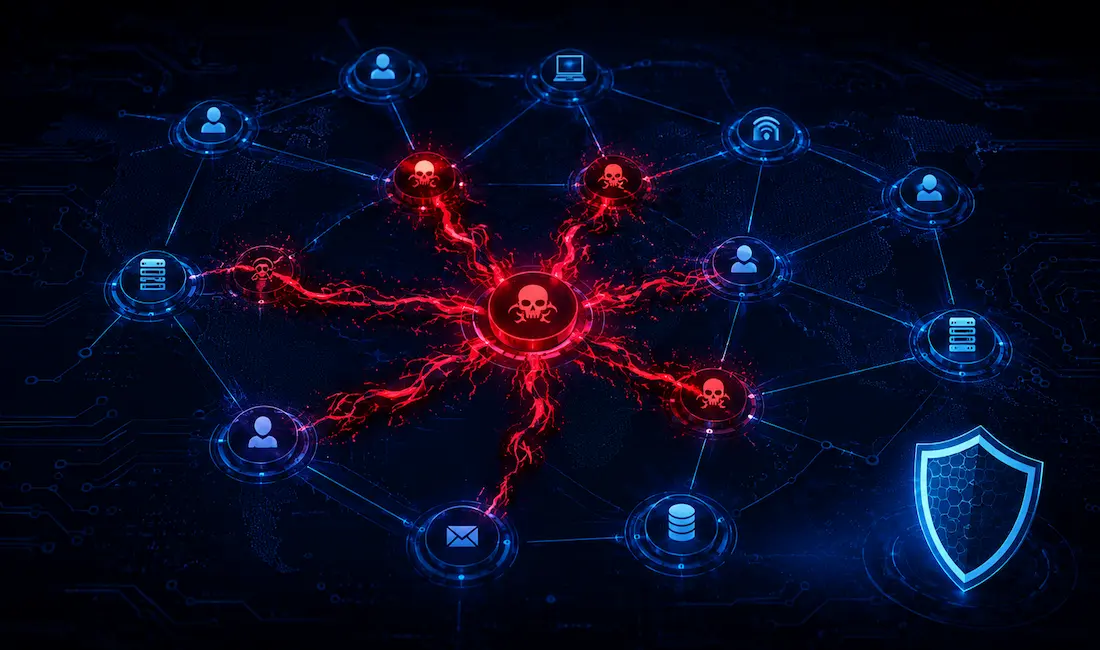
Malware, or malicious software, is a program or file designed to disturb computer processes and operations or gain unauthorized entry to a computer system, often via network protocols like RDP or SMB, without the user’s knowledge or permission. Malware has become a common term for all hostile or intrusive software: computer viruses, worms, Trojan horses, ransomware, spyware, adware, scareware, and other malicious programs.
These programs can perform a variety of functions, including stealing, encrypting, or deleting sensitive data, altering or hijacking core computing functions, and monitoring users’ computer activity without their permission. Cybercriminals target end devices through the installation of malware, then use the network itself — file shares, remote access protocols, and cloud sync tools — to move deeper into an organization.
Evolution of Malware: A Network Perspective
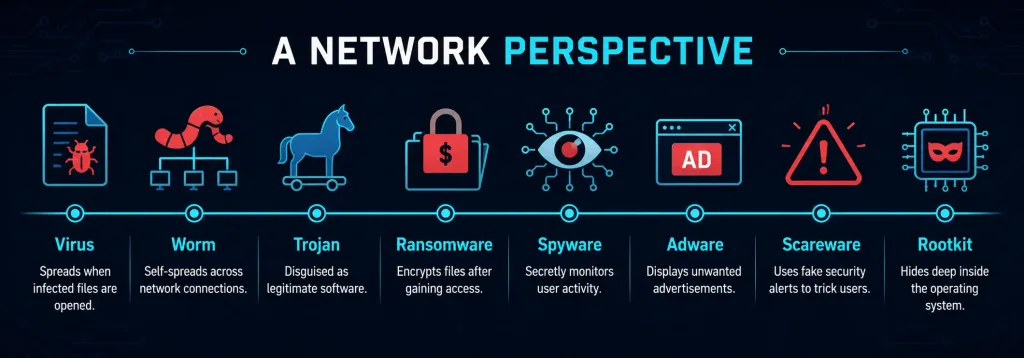
Malware has evolved from simple file-based infections spread by hand to sophisticated, network-exploiting threats that move on their own. Understanding this progression helps network engineers design more resilient architectures.
| Year | Malware Type | Network Impact |
|---|---|---|
| 1986 | Brain Virus | Spread via floppy disks; minimal network involvement. |
| 2001 | Code Red | Exploited IIS servers, caused DDoS-like slowdowns across the internet. |
| 2017 | WannaCry | SMB worm; caused global network disruption, including hospital systems. |
| 2022 | AcidRain | Wiper malware that bricked satellite modems, cutting off remote network access. |
| 2024–2026 | AI-assisted malware | Uses machine learning to adapt payloads and evade network-based detection. |
Viruses
A virus is executable code attached to another executable file. Most viruses require end-user initiation and can be set to activate at a particular time or date. They generally spread in one of three ways:
- Removable media
- Downloads off the internet
- Email attachments
Detecting a virus is not easy. Some viruses are harmless and simply display a picture, while others are destructive and change or delete data outright. To avoid detection, a virus can rewrite itself into different forms each time it replicates, a technique known as polymorphism. In many cases, simply opening an infected file is enough to trigger the payload.
While USB drives remain a common vector, modern viruses increasingly spread through network file shares by exploiting protocols like SMB — the EternalBlue vulnerability being the best-known example. A boot sector or file system virus can reach a system’s hard disk through an infected USB drive or a compromised network share. Once a specific program executes the virus, it infects other programs and, from there, other computers on the network.
Trojan Horses
A Trojan horse disguises itself as legitimate software to trick a user into installing it voluntarily. Unlike viruses and worms, a Trojan does not self-replicate — it relies entirely on social engineering, arriving as a cracked application, a fake software update, or an attachment that appears to come from a trusted sender. Once installed, a Trojan can open a backdoor, deploy ransomware, or quietly exfiltrate data over the network while appearing to function normally.
Because Trojans depend on deception rather than a technical exploit, the most effective network-level defenses are application allowlisting, email attachment filtering, and user training that teaches staff to verify software sources before installation.
Spyware
Spyware monitors network activity and can log keystrokes and credentials sent over unencrypted HTTP connections. It often runs silently in the background, reporting collected data back to an attacker-controlled server. Defending against it starts with enforcing encrypted protocols (HTTPS) across the network and monitoring for unusual outbound traffic patterns.
Adware
Adware injects unwanted advertisements, often through browser hijacks, and can consume significant bandwidth as it repeatedly calls out to ad servers. On the network side, DNS filtering that blocks known ad-injection domains is one of the more effective controls.
Scareware
Scareware fakes security alerts or system warnings to frighten users into downloading additional malware or paying for fraudulent “fixes.” It typically arrives through malicious or compromised websites and preys on urgency rather than a technical vulnerability, making user awareness the primary defense.
Worms
Worms are malicious code, just like viruses, but they don’t need a host file or user action to spread — they replicate by independently exploiting vulnerabilities across a network. This generally slows the network down and lets the worm run entirely on its own. Worms share a common pattern: an activating vulnerability, a way to spread themselves, and a payload.
Worms are responsible for some of the internet’s most devastating attacks. In 2001, the Code Red worm infected more than 359,000 hosts in under 14 hours by exploiting a buffer overflow in Microsoft’s IIS web server. More recently, the WannaCry worm (2017) exploited SMB vulnerabilities, affecting over 200,000 computers across roughly 150 countries and causing network outages in hospitals and factories worldwide.
Logic Bombs
A logic bomb is malicious code that lies dormant until a specific trigger condition is met — a date, a time, a particular program running, or even the deletion of a user account. Once triggered, it can corrupt or alter data, reformat a hard drive, or delete critical files. Because the code sits inactive until the trigger fires, logic bombs are especially hard to catch with signature-based scanning alone.
A more recent example of destructive, trigger-style malware is the AcidRain wiper (2022), which was used against Viasat’s KA-SAT satellite network at the start of the Russia-Ukraine war. AcidRain worked by brute-forcing file names across a modem’s flash storage and overwriting them, permanently bricking the device and cutting tens of thousands of users off the network — it did not damage hardware through overheating or by disabling cooling systems, but by destroying the firmware the modems needed to function. The attack also knocked out remote monitoring for thousands of wind turbines across Europe, since their control systems relied on the same satellite links.
Ransomware
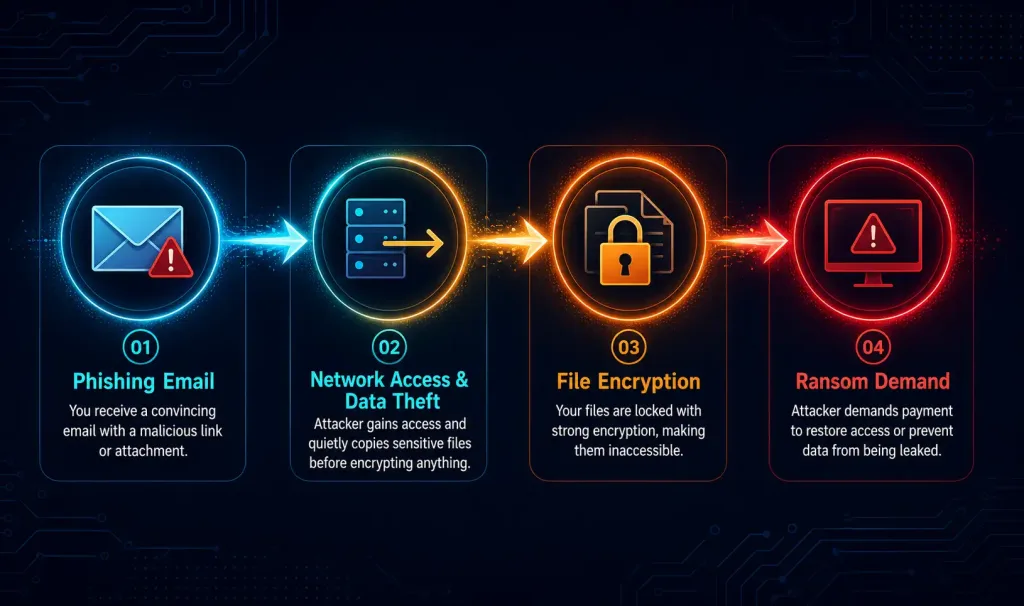
Ransomware restricts access to a user’s computer and files. It typically displays a message demanding payment to remove the restriction, usually by encrypting data with a key unknown to the victim. The user must pay the attacker — with no guarantee of success — to receive the decryption key.
Some ransomware exploits system vulnerabilities directly to lock down a machine; the most common infection vector, however, remains a malicious email attachment or a deceptive pop-up ad. Ransomware frequently propagates as a Trojan horse, and if the victim pays, the criminal may send a program that decrypts the files or an unlock code — though payment offers no legal or technical guarantee of recovery.
In 2023, LockBit ransomware targeted networks primarily via phishing, exfiltrating data over encrypted channels before encrypting local files — a “double extortion” tactic that pressures victims even if they can restore from backup. This underscores the need for network traffic monitoring that can catch large, unusual data transfers before encryption even begins.
Fileless Malware
Fileless malware lives in system memory rather than on disk, which lets it evade traditional file-based antivirus scans. It commonly spreads and executes through legitimate system tools like PowerShell, “living off the land” by abusing software that’s already trusted on the network. Because there’s no malicious file to quarantine, detection relies on endpoint detection and response (EDR) tools that watch for suspicious process behavior and unusual network calls rather than known file signatures.
Backdoors and Rootkits
A backdoor is a way of accessing a computer without going through normal authentication, such as entering a username and password. It bypasses the checks a system would otherwise require. NetBus and Back Orifice are classic examples of backdoor programs that let unauthorized users access remotely without detection.
A backdoor grants attackers future access even after the original vulnerability used to install it has been patched, which is what makes it so dangerous. Attackers commonly get victims to unknowingly install a backdoor by bundling it inside a Trojan horse program that appears to be legitimate software.
A rootkit is used to mask malicious files and processes so hackers can avoid detection, and it’s often used to open or protect a backdoor, allowing remote access without authentication. Rootkits typically exploit software vulnerabilities to escalate privileges and modify core system files.
Because rootkits tamper with the very forensics and monitoring tools that would normally detect them, they are extremely hard to find and remove — in most cases, the safest fix is to wipe the infected machine and reinstall the operating system from a known-clean source. The SolarWinds Orion backdoor (2020) is a modern example: attackers compromised the software supply chain itself, distributing a backdoored update to thousands of organizations and gaining persistent, long-term access to their networks.
Defending Against Malware and Malicious Software
- Antivirus software – Most antivirus programs catch many known forms of malware, but criminals develop new threats daily. Keeping signatures updated is essential, though signature-based tools alone won’t catch fileless or zero-day attacks.
- Up-to-date software – Many attacks succeed by exploiting unpatched operating system and application vulnerabilities. OS vendors tend to patch quickly, but application vendors often lag, which is why network engineers increasingly recommend zero-trust architectures to limit lateral movement even after a device is compromised.
- Network segmentation – Use VLANs and firewall rules to contain worm and ransomware spread, so a single infected host can’t reach the entire network.
- Behavioral analysis – Tools like Suricata flag anomalous traffic patterns that signature-based tools miss.
- Backups – Maintain off-network, air-gapped backups so ransomware can’t encrypt or delete your recovery copies along with production data.
- User training – Run simulated phishing campaigns on internal networks to build awareness before a real attack lands.
- Multi-factor authentication – MFA significantly reduces the value of stolen credentials, making it harder for backdoors and compromised accounts to be exploited.
Case Studies in Malware Attacks
- NotPetya (2017): Disguised as ransomware but was actually a destructive wiper. It spread through the EternalBlue exploit and credential-harvesting techniques, causing billions of dollars in damage across shipping, logistics, and manufacturing companies worldwide — a stark reminder that not every “ransomware” note is a real ransom offer.
- WannaCry (2017): A self-propagating worm that used the same EternalBlue SMB exploit, infecting over 200,000 computers in roughly 150 countries within days and forcing UK hospitals to divert emergency patients.
- Viasat / AcidRain (2022): A wiper attack against satellite modems that knocked tens of thousands of users offline at the outset of the Russia-Ukraine war, demonstrating how a single supply-chain compromise can disrupt both civilian internet access and critical infrastructure like wind farm monitoring.
- SolarWinds Orion (2020): A supply-chain backdoor inserted into legitimate software updates, giving attackers stealthy, long-term access to thousands of government and enterprise networks before discovery.
FAQs
What is the difference between a virus and a worm?
A virus needs user action to spread, such as opening an infected file or running a program, and it attaches itself to existing executable files. A worm, by contrast, self-propagates across networks by independently exploiting vulnerabilities, requiring no user interaction at all. Because worms spread on their own, they tend to move faster and cause broader network slowdowns than viruses.
How does ransomware impact networks?
Ransomware encrypts files across infected systems and demands payment for the decryption key, but modern variants like LockBit also exfiltrate data over the network before encrypting it, a tactic known as double extortion. This means a victim can be pressured to pay even if they can restore from backup, since the attacker threatens to leak stolen data publicly. Network defenses like IDS/IPS monitoring, egress filtering, and offline backups all help reduce both the encryption and extortion risk.
Can logic bombs damage hardware?
Yes, though the mechanism is usually data destruction rather than physical overheating. Wiper-style logic bombs like AcidRain (2022) work by overwriting firmware and flash storage on devices such as modems, permanently bricking them and requiring physical replacement or reflashing rather than a simple software fix. The damage is functionally similar to hardware failure, even though it’s achieved by corrupting stored data rather than by manipulating temperature or cooling systems.
What is fileless malware and how do you detect it?
Fileless malware runs entirely in system memory instead of writing a malicious file to disk, which lets it slip past traditional antivirus scans that look for known file signatures. It commonly abuses legitimate tools like PowerShell or WMI to execute its payload, a technique often called “living off the land.” Detecting it requires endpoint detection and response (EDR) tools that monitor process behavior and network calls in real time, rather than relying on scanning files at rest.
How can network engineers defend against backdoors?
Backdoors bypass normal authentication entirely, so the strongest defenses focus on limiting what a compromised credential or session can actually do. Multi-factor authentication makes stolen passwords far less useful on their own, while zero-trust models ensure that gaining access to one system doesn’t automatically grant access to others. Actively monitoring SSH and RDP traffic for unusual login times, locations, or command patterns can also catch a backdoor being used even after it evades initial detection.



