
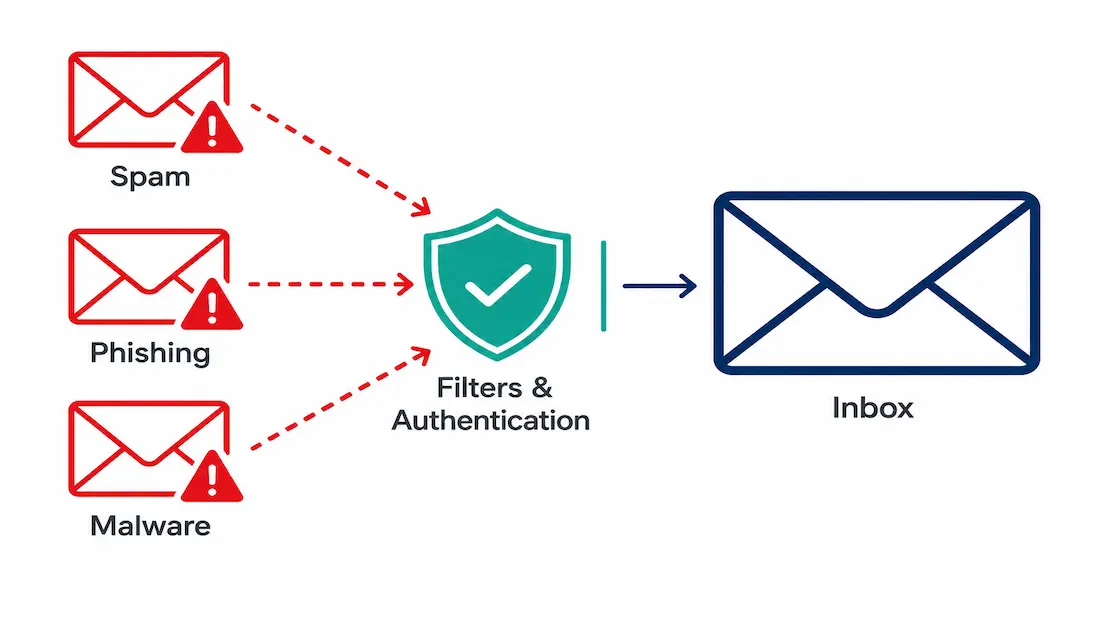
Email remains one of the most widely used communication tools in existence, which is exactly why it’s also one of the most heavily exploited. Unsolicited bulk email — spam — ranges from harmless advertising to deliberate attempts to steal credentials, install malware, or extract money through fraud. Much of it originates from botnets: networks of compromised devices, controlled remotely through command-and-control (C2) infrastructure, sending bulk email without their owners’ knowledge.
This guide covers the main categories of spam, the indicators worth recognizing before opening a suspicious message, practical email authentication for network engineers, and how to verify a domain’s anti-spam configuration directly.
Types of Spam Email
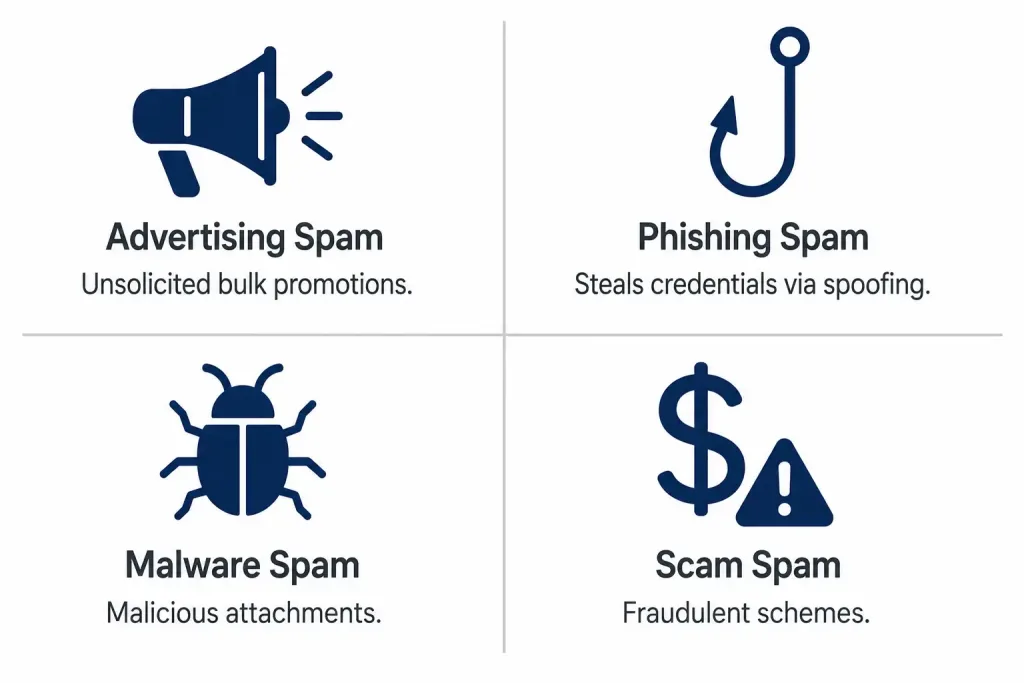
- Advertising Spam: bulk promotional messages from legitimate businesses, sent without consent.
- Phishing Spam: deceptive emails aiming to steal credentials or personal data, often using spoofed sender addresses.
- Malware Spam: emails carrying malicious attachments designed to install malware once opened.
- Scam Spam: fraudulent schemes — lottery wins, inheritance claims, and similar — designed to extract money or information directly, frequently exploiting the same SMTP-based email protocols that carry legitimate mail.
AI-generated spam has grown as a real concern in recent years, with automated tools making phishing content more grammatically convincing and harder to distinguish from legitimate correspondence at a glance than older, more obviously broken spam text used to be.
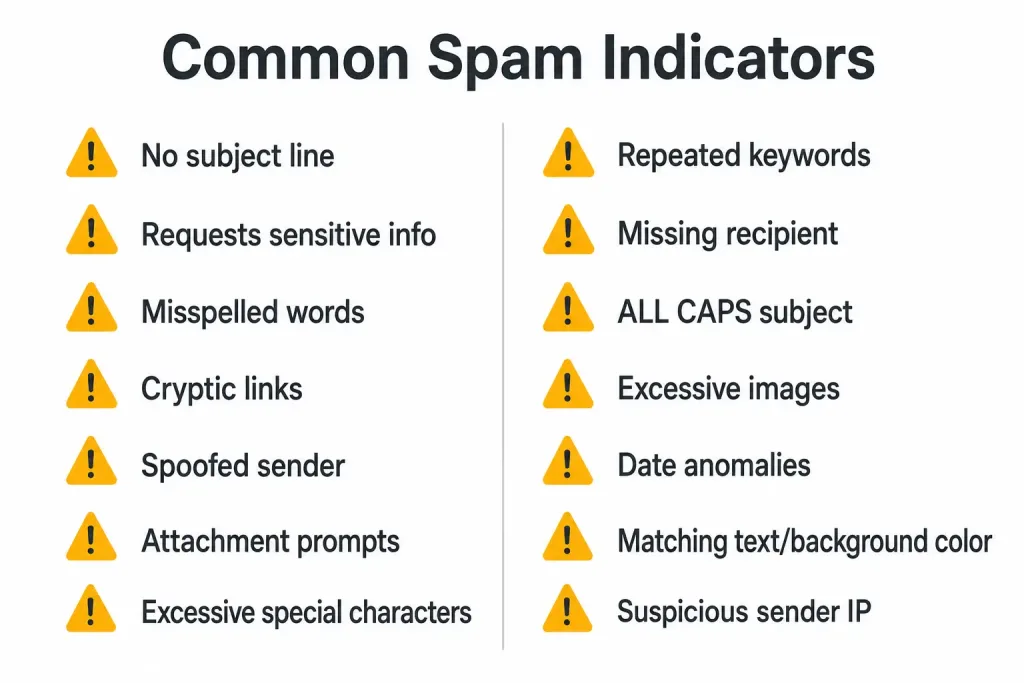
Common Indicators of Spam
- No subject line, or a generic one like “Update Required.”
- A request for an account update or other sensitive information.
- Misspelled words, strange punctuation, or unnaturally stiff, AI-generated-sounding phrasing.
- Long, cryptic links, or links leading to a domain that doesn’t match the sender’s claimed identity (check via WHOIS).
- Imitation of a legitimate business paired with spoofed sender headers — verifiable through SPF/DKIM checks, covered below.
- Requests to open attachments, especially
.exeor.zipfiles. - Repeated special characters, like
!!!!or$$$. - Repeated keywords or over-optimized, unnatural SEO-style phrasing.
- Missing or generic recipient address.
- All-capital-letters subject lines.
- Excessive embedded images or tracking pixels.
- Date anomalies — a future-dated message, sometimes used deliberately to bypass filters based on chronological sorting.
- Text and background colors nearly matching, hiding content from a human reader while still being readable to spam filters and search crawlers.
- A suspicious sender IP, traceable with tools like MX Toolbox.
If a message shows one or more of these signs, don’t open it or any attachments. Most email providers filter spam automatically, but even filtered spam still consumes bandwidth and processing time on the recipient’s server before it’s caught.
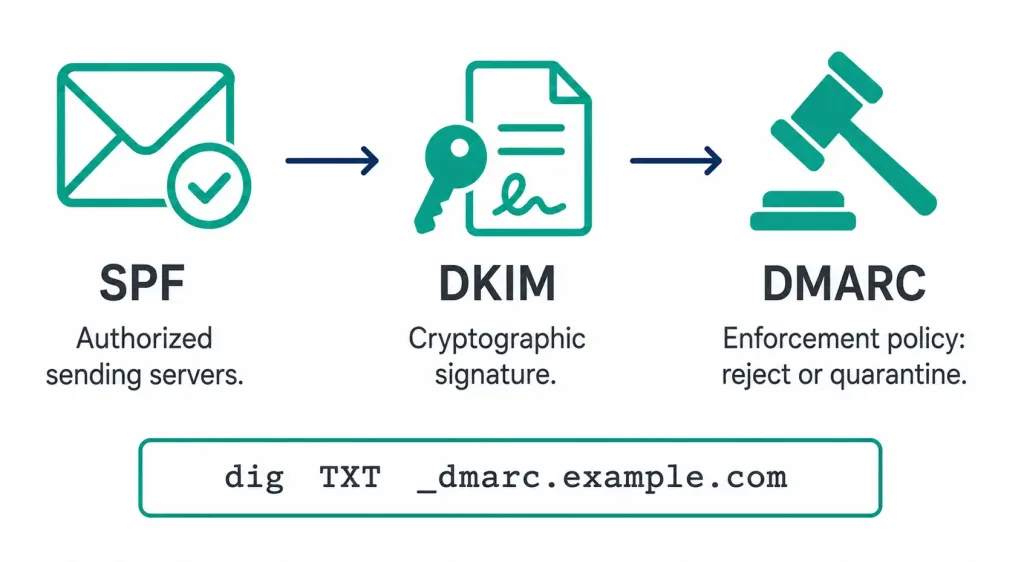
Verifying Email Authenticity: SPF, DKIM, and DMARC
These three mechanisms work together to make email spoofing significantly harder, and understanding how to actually check them — not just what they stand for — is genuinely useful, whether you’re investigating a suspicious message or configuring outbound mail for your own domain.
SPF (Sender Policy Framework) publishes a DNS record listing which mail servers are authorized to send email on behalf of a domain. Check a domain’s SPF record directly:
dig TXT example.com | grep spfDKIM (DomainKeys Identified Mail) adds a cryptographic signature to outgoing messages, letting the receiving server verify the message wasn’t altered in transit and genuinely originated from the claimed domain. Check for a DKIM record at its selector-specific location:
dig TXT selector._domainkey.example.comDMARC (Domain-based Message Authentication, Reporting, and Conformance) builds on both, telling receiving servers what to do when a message fails SPF or DKIM checks — reject it, quarantine it, or simply report the failure without blocking delivery. DMARC also enables aggregate reporting, sending domain owners regular summaries of authentication results across all mail claiming to be from their domain, which is genuinely useful for spotting spoofing attempts even when no individual recipient reports one.
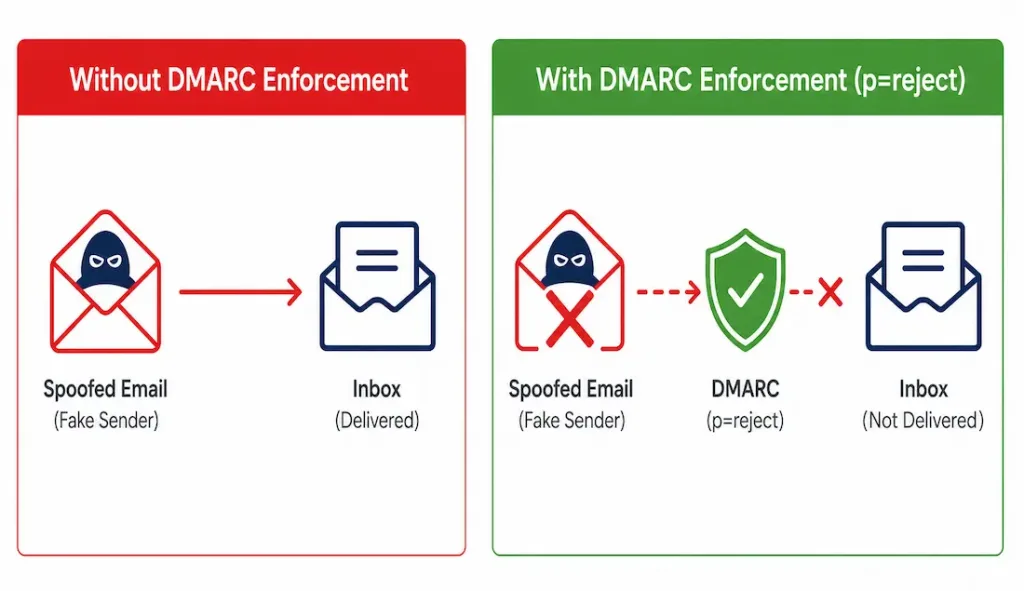
dig TXT _dmarc.example.comA domain with no DMARC record at all, or a DMARC policy set to p=none, offers essentially no enforcement — spoofed messages claiming to be from that domain won’t be automatically rejected, even if SPF and DKIM are both configured correctly. This is a genuinely common gap worth checking specifically, since a partial authentication setup can create a false sense of security.
How to Prevent and Mitigate Spam as a Network Engineer
- Implement full email authentication — SPF, DKIM, and DMARC together, not just one or two of the three — to prevent your own domain from being spoofed and to help your mail servers reject spoofed incoming mail from others.
- Deploy network monitoring, using intrusion detection systems to spot botnet-pattern traffic on SMTP-related ports (25, and 587 for authenticated submission).
- Train users regularly on recognizing phishing, including realistic simulated phishing campaigns — since AI-generated phishing content has closed much of the gap that made older, obviously broken spam easy to spot on sight.
- Use AI-assisted filtering tools from major providers (Google Workspace, Microsoft 365) or dedicated email security platforms, which continuously update against emerging spam patterns far faster than a static rule-based filter could.
- Report and block using established blacklists like Spamhaus to block known malicious sending IPs at the network edge.
Combining full SPF/DKIM/DMARC authentication with active monitoring and user training addresses spam and spoofing from multiple angles simultaneously — relying on any single layer alone leaves real gaps that a combined approach closes. No individual measure on this list is sufficient by itself; it’s the combination, applied consistently, that meaningfully reduces both the volume of spam reaching users and the damage caused by whatever does slip through.
Why Spam Remains a Real Problem
Beyond the obvious time cost of cluttered inboxes, spam consumes real network bandwidth and processing resources at scale — botnets are capable of generating enormous volumes of bulk email, and even correctly filtered spam still has to be received and processed before it’s discarded. The security stakes are real too: the global average cost of a data breach reached $4.88 million in IBM’s 2024 Cost of a Data Breach Report, and phishing remains one of the most common initial access vectors behind breaches of that scale.
Legal and policy frameworks like the CAN-SPAM Act impose requirements on legitimate bulk senders, but they have limited reach against genuinely malicious actors operating outside any jurisdiction’s easy enforcement — which is exactly why technical defenses (authentication, filtering, monitoring) matter more than legal deterrence alone for stopping the more dangerous end of the spam spectrum.
Case Studies
Real-world examples help ground these categories in something more concrete than abstract definitions — both of the following illustrate how spam and phishing tactics evolve over time, even when the underlying goal (stealing credentials, money, or access) stays the same.
Emotet: first identified around 2014, Emotet grew into one of the most significant malware-distribution botnets, spreading primarily through spam email attachments. A major international law enforcement operation disrupted its infrastructure in January 2021 — a genuinely significant takedown, not a minor setback — though the malware and associated criminal infrastructure later re-emerged under continued activity. This history is worth knowing accurately: Emotet’s timeline includes a real disruption, not continuous uninterrupted operation. Treating a major law enforcement takedown as a non-event understates just how significant that kind of coordinated international action actually is, even when the underlying threat later resurfaces in some form.
AI-assisted business email compromise: deepfake audio and video, combined with AI-generated text mimicking an executive’s writing style, has made business email compromise (BEC) — fraudulent requests appearing to come from a company executive, typically requesting an urgent wire transfer — considerably more convincing than earlier, more obviously fake versions of the same scam. This remains one of the costliest categories of email-based fraud precisely because it targets human trust and urgency rather than a technical vulnerability — no amount of SPF, DKIM, or DMARC configuration stops an employee from wiring funds in response to a convincingly-written, well-timed request that never actually needed to pass through a spam filter to reach them.
Troubleshooting Spam and Authentication Issues
Legitimate mail from your domain is landing in recipients’ spam folders: this often points to an incomplete or misconfigured authentication setup rather than anything about the message content itself. Check all three records together:
dig TXT example.com
dig TXT selector._domainkey.example.com
dig TXT _dmarc.example.com
A missing DKIM record, or an SPF record that doesn’t actually include your real sending mail server, is a common and easily-missed cause — especially after switching email providers or adding a new outbound mail relay without updating the SPF record to match.
Spoofed messages claiming to be from your domain are reaching recipients: verify your DMARC policy is actually set to enforce, not just monitor.
dig TXT _dmarc.example.comA policy of p=none only requests reporting on failures, without actually blocking or quarantining spoofed mail — moving to p=quarantine or p=reject (after confirming your own legitimate mail reliably passes SPF and DKIM first) closes this gap directly.
Suspected botnet-driven spam originating from inside your own network: check for unusual outbound SMTP traffic, particularly from hosts that have no legitimate reason to be sending mail directly.
netstat -an | grep :25A workstation or server generating unexpected outbound connections on port 25, especially at high volume, is a strong signal of a compromised host being used to relay spam — worth isolating and investigating immediately rather than just blocking the traffic and moving on, since the underlying compromise still needs remediation. Blocking the traffic alone treats the symptom while leaving the actual infection in place, which typically resurfaces in some other form once the immediate spam-relay activity is cut off.
FAQs
What is spam email?
Spam is unwanted bulk email, typically sent by advertisers or malicious actors, and often distributed through botnets — networks of compromised devices sending mail without their owners’ knowledge. It ranges from harmless (if annoying) advertising to messages carrying malware or designed to steal sensitive information like credentials or financial details.
What are the common indicators of spam emails?
Common signs include a missing or generic subject line, requests for account or sensitive information updates, misspelled words or unnatural phrasing, cryptic or mismatched links, spoofed sender headers, unexpected attachment requests, repeated special characters, and date anomalies like a future-dated message. Recognizing several of these together is a stronger signal than any single indicator alone.
Why is spam considered a problem beyond just being annoying?
Beyond wasting time and cluttering inboxes, spam consumes real bandwidth and server processing resources at scale, and it remains a primary vector for phishing, malware distribution, and business email compromise. The financial stakes are real too — the global average cost of a data breach reached $4.88 million in IBM’s 2024 report, and phishing remains among the most common ways attackers gain initial access.
How do spammers distribute emails at scale?
Most large-scale spam originates from botnets — networks of malware-infected devices that send bulk email automatically, without their legitimate owners’ knowledge or consent. Criminals embed malicious links or attachments in these messages, or craft convincing scam content, exploiting both technical vulnerabilities in email systems and human trust.
What should I do if I receive a suspicious email?
Don’t open attachments or click links in the message. Delete it, and report it to your email provider to help improve spam filtering for others. If you’re a network administrator, checking the sender domain’s SPF, DKIM, and DMARC configuration can help determine whether the message is a genuine spoofing attempt or simply low-quality legitimate marketing.
How can I check if a domain has proper email authentication configured?
Use dig TXT example.com (filtering for SPF), a selector-specific DKIM lookup, and dig TXT _dmarc.example.com for DMARC policy, to check all three mechanisms directly from the command line. A domain with SPF and DKIM but no enforced DMARC policy still leaves a real spoofing gap, since DMARC is what actually tells receiving servers how to handle a message that fails the other two checks.



