Access Control Lists are a fundamental component of network security, and understanding IPv6 ACLs matters more every year as networks transition from IPv4 to accommodate the growing number of connected devices. IPv6 ACLs share the same core purpose as their IPv4 counterparts — filtering traffic based on permit and deny statements — but differ enough in structure and default behavior that treating them as a drop-in IPv6 translation of IPv4 syntax leads to real mistakes.
This builds on the Extended ACLs and Standard ACLs configuration guides — IPv6 ACL syntax closely mirrors extended ACL syntax, which matters since IPv6 has no standard/extended split at all.
Comparing IPv4 and IPv6 ACLs
| Feature | IPv4 ACLs | IPv6 ACLs |
|---|---|---|
| Types | Standard, Extended | Extended-style only |
| Naming | Numbered or Named | Named only |
| Application Command | ip access-group | ipv6 traffic-filter |
| Wildcard/Prefix | Wildcard masks | Prefix lengths |
| Implicit Statements | deny any (standard) or deny ip any any (extended) | permit icmp any any nd-na, permit icmp any any nd-ns, deny ipv6 any any |
Key Differences
Applying an IPv6 ACL. IPv4 uses ip access-group on an interface; IPv6 uses ipv6 traffic-filter for the same purpose. For VTY line protection specifically, IPv4 uses access-class, while IPv6 requires the distinct ipv6 access-class command — these are not interchangeable, and using the IPv4 command name for an IPv6 ACL simply won’t work. The full VTY-specific configuration for both is covered in the VTY port security guide.
Wildcard masks vs. prefix length. IPv6 ACLs don’t use wildcard masks at all. They use prefix lengths — /64, for instance — directly in the ACL statement to specify how much of a source or destination address to match, functioning similarly to a subnet mask but written inline rather than as a separate inverted value.
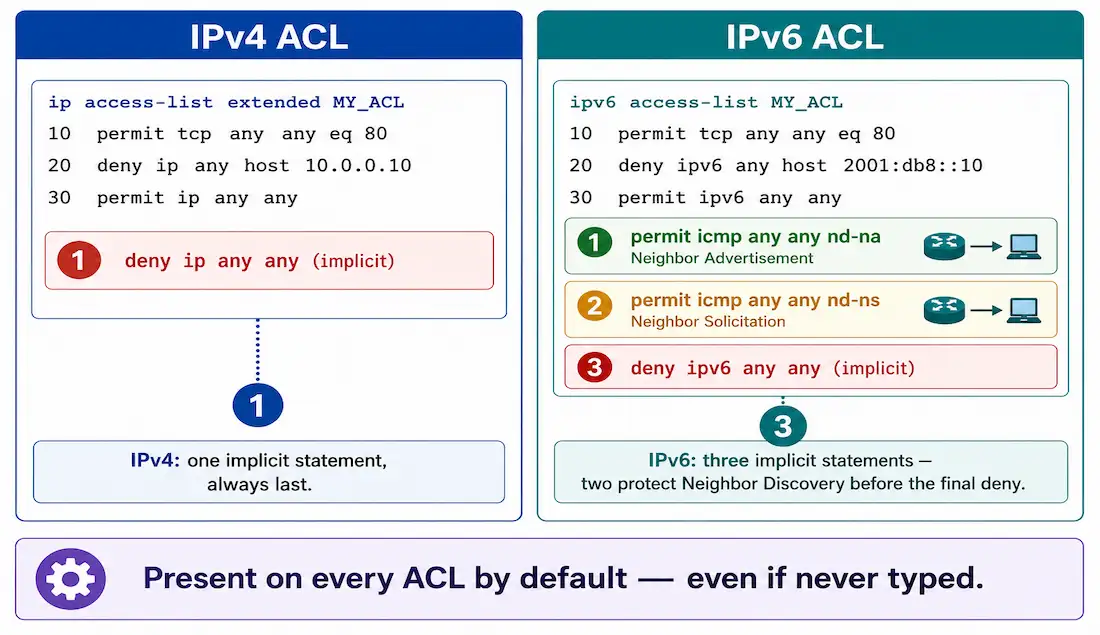
Implicit statements. This is the most important structural difference. IPv4 ACLs end with a single implicit deny — deny any for standard ACLs, deny ip any any for extended. IPv6 ACLs carry three implicit statements at the end of every ACL, in this order:
permit icmp any any nd-napermit icmp any any nd-nsdeny ipv6 any any
The two ICMPv6 permits allow Neighbor Discovery messages — Neighbor Advertisement (NA) and Neighbor Solicitation (NS) — which IPv6 uses in place of IPv4’s ARP for resolving Layer 2 addresses. Unlike ARP, which operates at Layer 2 and is entirely unaffected by IP-layer ACLs, IPv6 Neighbor Discovery runs over ICMPv6 at the network layer, meaning it’s genuinely subject to ACL filtering unless these implicit permits exist to protect it by default.
| Feature | IPv4 ARP | IPv6 Neighbor Discovery |
|---|---|---|
| Purpose | Resolves MAC addresses | Resolves MAC addresses |
| Protocol layer | Layer 2 | Layer 3 (ICMPv6) |
| Messages | ARP Request/Reply | Neighbor Solicitation/Advertisement |
| ACL impact | Not affected by IP ACLs | Requires implicit permits in every IPv6 ACL |
This distinction matters directly for the link-local addressing covered elsewhere in this series — Neighbor Discovery is part of what makes link-local addressing function at all, and an IPv6 ACL that accidentally overrides these implicit permits can break basic address resolution on a segment, not just block a specific application.
IPv6 ACL Syntax
The command syntax closely parallels IPv4 extended ACL syntax, substituting prefix length for wildcard mask:
ipv6 access-list <name>
permit|deny protocol {source-ipv6-prefix/prefix-length | any | host source-address} [operator port] {destination-ipv6-prefix/prefix-length | any | host destination-address} [operator port]
Configuration follows three steps:
- Create the ACL with
ipv6 access-list <name>— the name must be alphanumeric, case-sensitive, and unique. There’s no standard-versus-extended choice to make, since IPv6 ACLs are inherently extended-style. - Enter
permitordenystatements inside the resulting named ACL configuration mode. - Apply the ACL to an interface with
ipv6 traffic-filter.
Step 1: Create the IPv6 ACL
This example creates an ACL named NO-ACCESS-SERVER0, denying the 2001:DACA:4::/64 network access specifically to Server0 (at 2001:DACA:7::10), while permitting all other IPv6 traffic:
R2(config)# ipv6 access-list NO-ACCESS-SERVER0
R2(config-ipv6-acl)# deny ipv6 2001:DACA:4::/64 host 2001:DACA:7::10
R2(config-ipv6-acl)# permit ipv6 any any
R2(config-ipv6-acl)# exit
The destination is specified explicitly as host 2001:DACA:7::10 — Server0’s actual address — rather than any. This is what makes the ACL match its own name: since IPv6 ACLs can match destination directly, the deny statement should name the specific destination the policy intends to protect, not the entire IPv6 address space. A deny statement using any as the destination would block that source from reaching everywhere, not just the one server the ACL’s name implies.
Step 2: Apply the ACL to an Interface
Link the ACL to an interface with ipv6 traffic-filter:
R2(config-if)# ipv6 traffic-filter <access-list-name> {in | out}Applied outbound on Fa0/0:
R2(config)# interface FastEthernet 0/0
R2(config-if)# ipv6 traffic-filter NO-ACCESS-SERVER0 in
R2(config-if)# exit
To remove an ACL from an interface, first run no ipv6 traffic-filter on the interface, then no ipv6 access-list <name> globally to delete the ACL itself. For VTY line protection instead of a regular interface, use ipv6 access-class — a distinct command from both ipv6 traffic-filter and IPv4’s access-class, covered fully in the VTY port security guide.
Step 3: Verify the Configuration
Verification uses largely the same commands as IPv4 ACLs, with one notable display difference. show ipv6 interface confirms whether an ACL is applied inbound or outbound on a given interface. show access-lists displays both IPv4 and IPv6 ACLs configured on the router — but for IPv6 entries specifically, the sequence number appears at the end of each line rather than the beginning, the opposite of IPv4’s display convention:
R2# show access-lists
IPv6 access list NO-ACCESS-SERVER0
    deny ipv6 2001:DACA:4::/64 host 2001:DACA:7::10 (4 match(es)) sequence 10
    permit ipv6 any any (12 match(es)) sequence 20
    permit icmp any any nd-na sequence 30
    permit icmp any any nd-ns sequence 40
    deny ipv6 any any sequence 50
Notice the three implicit statements appear at the end, exactly as they exist on every IPv6 ACL by default, whether or not they were explicitly typed. IPv6 ACE sequence numbers default to incrementing by 10, the same as IPv4 — they only deviate from that pattern if sequence numbers were manually specified during entry, which can produce irregular spacing between entries. show running-config also displays the full IPv6 ACL configuration for a complete cross-check against show access-lists.
Common Mistakes and Best Practices
Common Mistakes
- Forgetting the implicit statements exist. Since
permit icmp any any nd-naandpermit icmp any any nd-nsare always present unless explicitly overridden, ND traffic is allowed by default on every IPv6 ACL — administrators expecting IPv4-style behavior sometimes assume nothing is permitted until they explicitly configure it, which isn’t true for these two specific message types. - Incorrect prefix length. Using
/128(a single host) where/64(a full subnet) was intended, or the reverse, either blocks far more or far less traffic than planned. - Wrong interface direction. Applying the ACL
inwhenoutwas intended, or vice versa, can render it completely ineffective — always confirm the actual direction of the traffic being filtered before applying. - Overly broad rules placed too early. A
permit ipv6 any anypositioned ahead of specific deny statements shadows them entirely, the same first-match-wins pattern covered throughout this series’ ACL troubleshooting guide.
Best Practices
- Use descriptive names —
BLOCK-HTTP-SERVER0communicates intent far better than a generic label, and since IPv6 ACLs are always named, this cost nothing extra to get right. - Test in a lab environment — Packet Tracer or GNS3 — before deploying any IPv6 ACL in production, given how easy it is to accidentally interfere with Neighbor Discovery.
- Document each ACL’s purpose and applied interfaces, since a policy that made sense at configuration time isn’t always obvious months later just from reading the address ranges.
- Verify regularly with
show access-listsandshow ipv6 interfaceafter any change, not just at initial configuration.
Troubleshooting IPv6 ACLs
- Basic connectivity works, but neighbors seem to lose track of each other over time. Check whether an explicit
deny icmpordeny ipv6 any anystatement was placed before the point where the implicit ND permits would normally apply — an explicit deny earlier in the list can shadow the implicit permits the same way any broader statement shadows a later one. - ACL configured correctly but has no effect. Confirm
ipv6 traffic-filterwas actually applied to the interface, and in the intended direction — an ACL that’s created but never linked filters nothing. - Unexpected traffic pattern with no explanation in the visible statements. Remember the three implicit statements exist even when not typed —
show access-listsreveals them at the end of the output, which is often the missing piece when the visible explicit statements alone don’t explain observed behavior. - Sequence numbers look inconsistent. This typically means sequence numbers were manually specified for some entries and auto-assigned for others — check
show access-listsfor the actual sequence values rather than assuming a clean increment-by-10 pattern.
Illustrative Scenario: An ACL That Broke Neighbor Discovery
Here’s a common scenario, meant to show the troubleshooting logic in action rather than describe a specific real event.
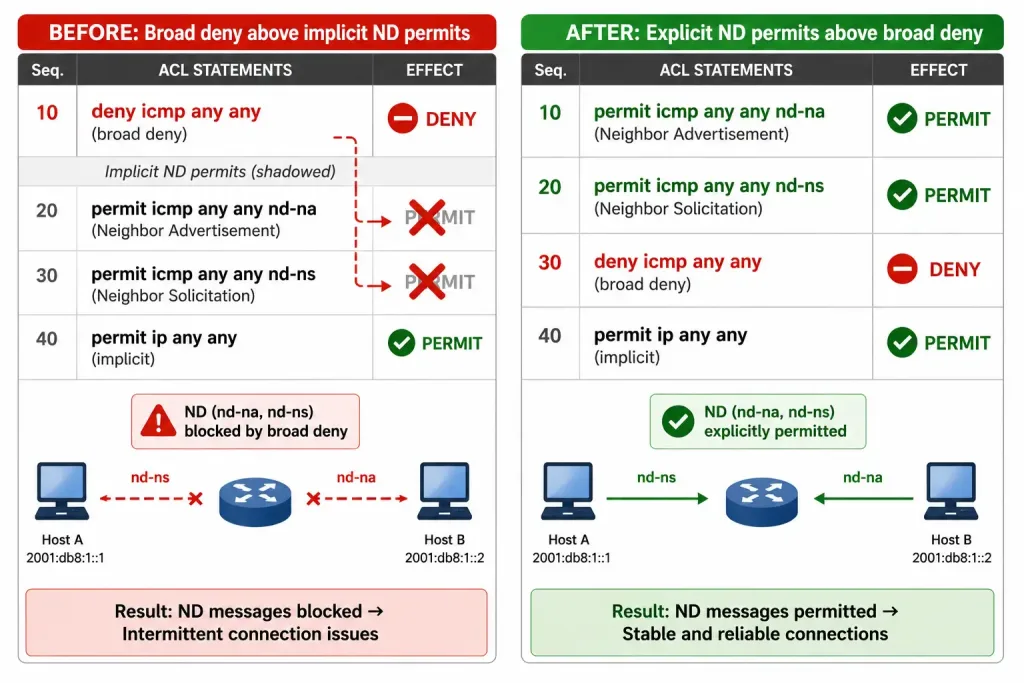
An administrator configures an IPv6 ACL intended to block all ICMPv6 traffic from an untrusted segment, reasoning that ICMP is unnecessary for that subnet’s normal traffic. Shortly after applying it, hosts on that segment report intermittent connectivity — devices that were reachable moments earlier suddenly become unreachable, then work again after a while, with no consistent pattern.
Reviewing the ACL shows a broad deny icmp any any statement placed ahead of where the implicit ND permits would otherwise sit — meaning this explicit statement shadows both permit icmp any any nd-na and permit icmp any any nd-ns before they ever get a chance to apply. Without functioning Neighbor Discovery, hosts periodically lose their ability to resolve each other’s Layer 2 addresses, producing exactly the intermittent, seemingly random connectivity pattern reported.
Adding explicit permit statements for icmp any any nd-na and icmp any any nd-ns ahead of the broader ICMP deny resolves it — Neighbor Discovery resumes functioning while the original intent (blocking other ICMP traffic) stays intact. The lesson generalizes: a broad ICMP deny on an IPv6 ACL isn’t just blocking pings the way it might on IPv4 — it can quietly break the mechanism IPv6 relies on for basic address resolution, unless the ND-specific permits are explicitly preserved ahead of it.
Conclusion
IPv6 ACLs share extended ACL syntax and top-down, first-match processing with their IPv4 counterparts, but the three implicit statements — two ICMPv6 Neighbor Discovery permits and a final deny — are a genuinely different default behavior worth internalizing, not just memorizing. Practice configuring, applying, and verifying IPv6 ACLs in a lab environment, paying particular attention to what happens to Neighbor Discovery when broader ICMP rules are introduced, since that’s where IPv6 ACL mistakes most often produce confusing, intermittent symptoms rather than a clean, obvious failure.
FAQs
What are the steps to configure an IPv6 ACL?
Create a named ACL with ipv6 access-list <name>, enter permit or deny statements inside the resulting configuration mode, and apply it to an interface with ipv6 traffic-filter <name> {in|out}. Unlike IPv4, there’s no standard-versus-extended choice to make and no numbered-ACL option — every IPv6 ACL is named and extended-style by design.
What is the role of prefix-length in IPv6 ACLs?
Prefix length replaces the wildcard mask IPv4 ACLs use, specifying directly how much of a source or destination address must match — /64 for a full subnet, /128 for a single host. Getting this wrong is one of the most common IPv6 ACL mistakes, since a prefix length that’s too broad or too narrow either blocks unintended traffic or fails to block traffic that should have been filtered.
Why are additional implicit statements added to IPv6 ACLs?
Every IPv6 ACL ends with three implicit statements: permit icmp any any nd-na, permit icmp any any nd-ns, and deny ipv6 any any. The two ICMPv6 permits protect Neighbor Discovery — the mechanism IPv6 uses in place of ARP for Layer 2 address resolution — from being accidentally blocked by the final implicit deny, since ND runs over ICMPv6 at the network layer and would otherwise be just as subject to filtering as any other traffic.
How do I apply an IPv6 ACL to an interface?
Use ipv6 traffic-filter <access-list-name> {in|out} in interface configuration mode, after the ACL itself has been created and populated with permit/deny statements. This is a different command from the access-class used for IPv4 VTY protection or the ipv6 access-class used for IPv6 VTY protection specifically — ipv6 traffic-filter is for regular interfaces, not VTY lines.
How can I verify an IPv6 ACL is actually filtering traffic?
Use show access-lists to see match counts on each statement, remembering that IPv6 entries display their sequence number at the end of the line rather than the beginning, unlike IPv4. show ipv6 interface confirms the ACL’s applied direction on a specific interface, and comparing both outputs together is the fastest way to confirm a suspected misconfiguration — a statement with zero matches despite expected traffic often points to the same shadowing or direction mistakes that affect IPv4 ACLs.