
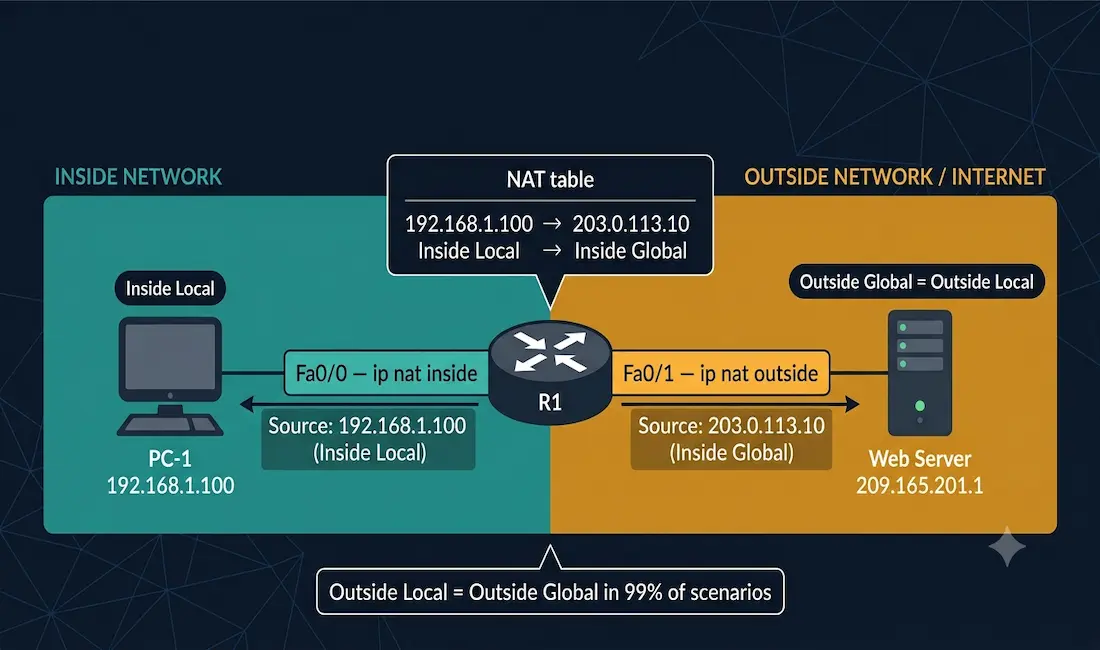
As discussed before, NAT translates private IP addresses into public IP addresses. In the process of translation, there are different operations involved, and understanding each of them requires understanding NAT terminology. Before understanding NAT in detail, it is important to understand the four NAT address types — inside local, inside global, outside local, and outside global — and how they relate to each other during the translation process.
In NAT terminology, the inside network is the set of networks subject to translation (your private LAN), and the outside network refers to all other networks (the internet or any network beyond the NAT router).
Understanding Inside, Outside, Local, and Global
NAT terminology uses two pairs of terms that combine to create the four address types. Understanding each pair first makes the four-way classification much easier:
Inside vs Outside:
- Inside — the network where translation occurs; your private LAN side
- Outside — the destination network; the internet or remote network side
Local vs Global:
- Local — the address as seen from the inside network’s perspective
- Global — the address as seen from the outside network’s (internet’s) perspective
These two pairs combine into four address types. NAT terminology is always applied from the perspective of the NAT router — the demarcation point between inside and outside.
The Four NAT Address Types
The following topology is used throughout this article. All IP addresses are consistent across all examples, diagrams, and commands.
[See Topology Diagram 1: Outbound NAT Translation — all four address types labeled]
Topology
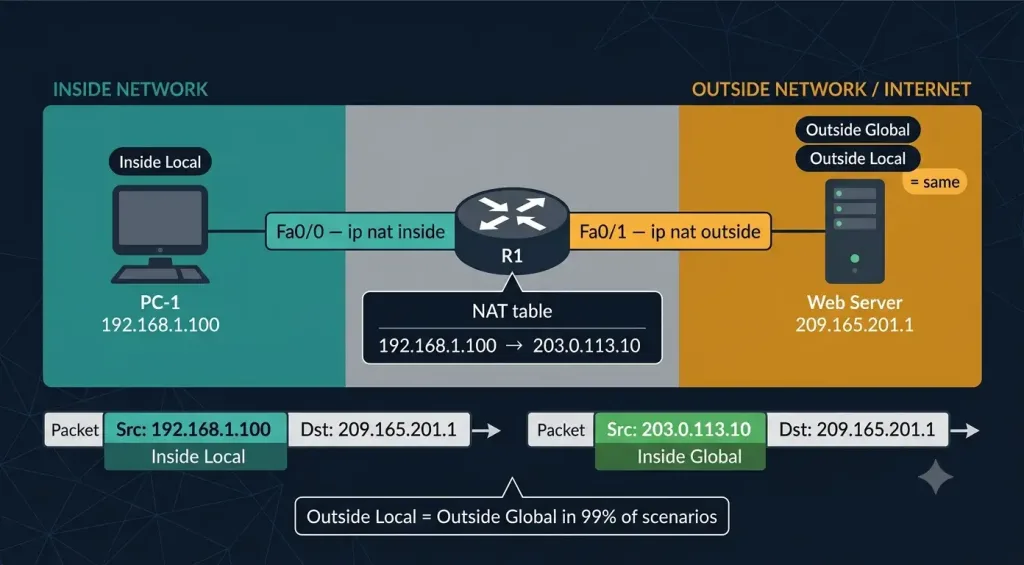
- PC-1: 192.168.1.100 (private IP on the inside LAN)
- R1 inside interface (Fa0/0): connected to the inside network; configured with
ip nat inside - R1 outside interface (Fa0/1): connected to the internet; configured with
ip nat outside - NAT pool / Inside Global address: 203.0.113.10 (public IP representing PC-1 on the internet)
- Web Server: 209.165.201.1 (public IP on the internet)
Inside Local Address
The Inside Local address is the private IP address assigned to a host on the inside network. It is the address that exists before NAT translation occurs.
In this topology: 192.168.1.100 — the IP address configured on PC-1. This address is valid only within the inside network. It cannot be routed on the internet.
Inside Global Address
The Inside Global address is the public IP address that represents the inside host after NAT translation. It is the address the internet sees as the source of traffic from PC-1.
In this topology: 203.0.113.10 — the public IP from the NAT pool (or the router’s outside interface IP in PAT). When PC-1’s packet leaves R1, the source address is translated from 192.168.1.100 (Inside Local) to 203.0.113.10 (Inside Global).
Outside Global Address
The Outside Global address is the real, publicly routable IP address of the destination host on the internet. This address is assigned to the external server and is globally reachable.
In this topology: 209.165.201.1 — the public IP of the web server. This is the address PC-1 is trying to reach.
Outside Local Address
The Outside Local address is the IP address of the outside host as seen from the inside network’s perspective.
In this topology: 209.165.201.1 — the same as the Outside Global address.
In the vast majority of real-world and CCNA exam scenarios, Outside Local = Outside Global. They differ only when destination NAT (sometimes called “twice NAT” or overlapping network NAT) is configured — a rare scenario where the NAT router also translates the destination address. Unless the exam question specifically describes overlapping address spaces, assume Outside Local and Outside Global are the same IP.
Summary Table
| NAT Term | Definition | Example | Perspective |
|---|---|---|---|
| Inside Local | Private IP of the internal host (before translation) | 192.168.1.100 | As seen inside the network |
| Inside Global | Public IP representing the internal host (after translation) | 203.0.113.10 | As seen from the internet |
| Outside Global | Real public IP of the external destination | 209.165.201.1 | Actual destination IP |
| Outside Local | Destination IP as seen from inside (usually = Outside Global) | 209.165.201.1 | As seen inside the network |
NAT Translation Process: Step by Step
Outbound Traffic (PC-1 → Web Server)
[See Topology Diagram 1: Outbound NAT Translation]
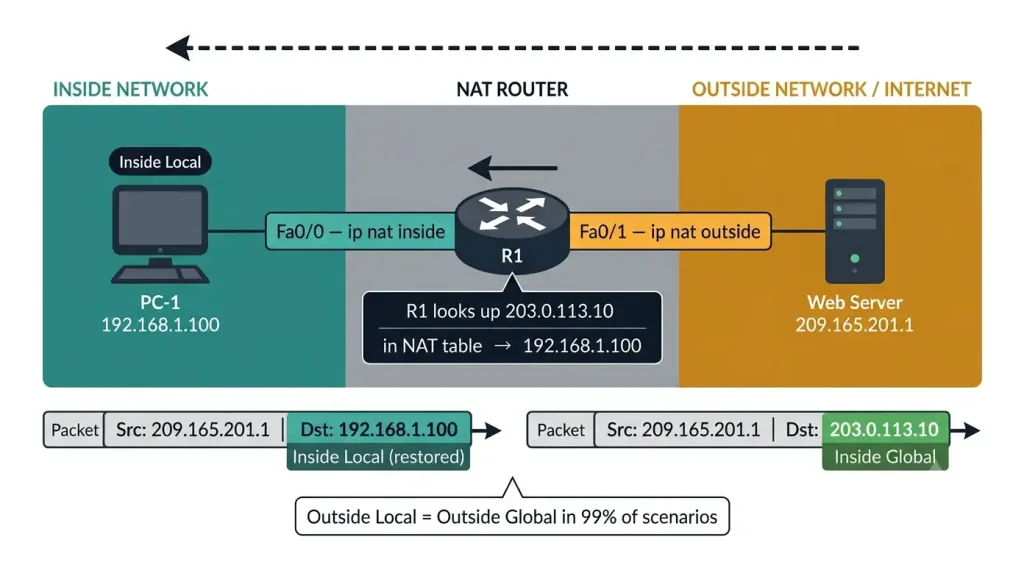
- PC-1 (192.168.1.100) sends a packet to the web server (209.165.201.1)
- The packet arrives at R1’s inside interface (Fa0/0) with:
- Source IP: 192.168.1.100 (Inside Local)
- Destination IP: 209.165.201.1 (Outside Global)
- R1 performs NAT translation — replaces the source IP:
- Source IP translated: 192.168.1.100 → 203.0.113.10 (Inside Global)
- The packet leaves R1’s outside interface (Fa0/1) with:
- Source IP: 203.0.113.10 (Inside Global)
- Destination IP: 209.165.201.1 (Outside Global)
- R1 creates an entry in the NAT translation table mapping Inside Local ↔ Inside Global
Return Traffic (Web Server → PC-1)
[See Topology Diagram 2: Return NAT Translation]]
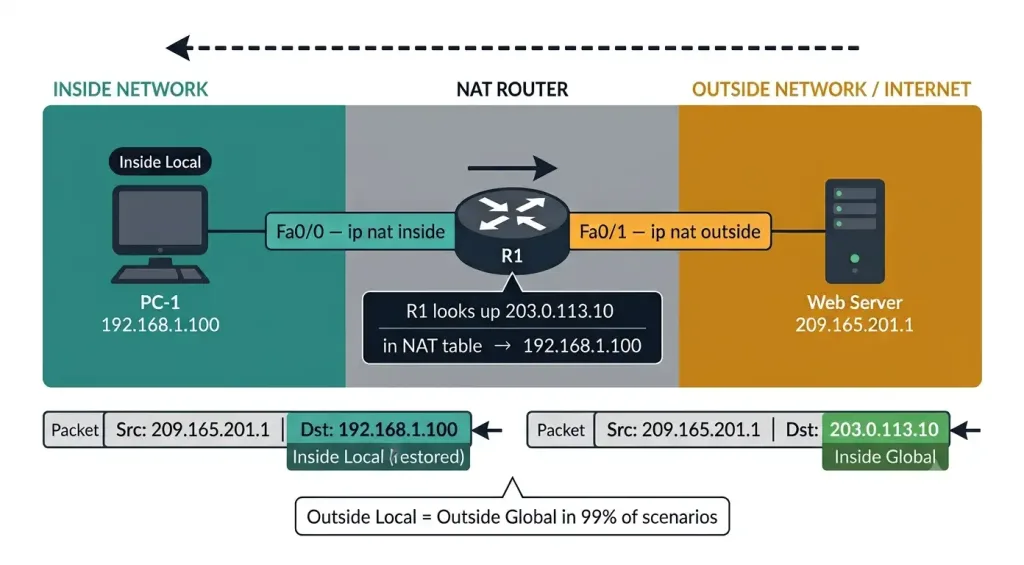
- The web server responds — the packet arrives at R1’s outside interface with:
- Source IP: 209.165.201.1 (Outside Global)
- Destination IP: 203.0.113.10 (Inside Global)
- R1 looks up 203.0.113.10 in its NAT table and reverses the translation:
- Destination IP translated: 203.0.113.10 → 192.168.1.100 (Inside Local)
- The packet is delivered to PC-1 with:
- Source IP: 209.165.201.1
- Destination IP: 192.168.1.100
Outbound:  192.168.1.100 → [R1 NAT] → 203.0.113.10 ——→ 209.165.201.1
           Inside Local     translates  Inside Global      Outside Global

Return:    209.165.201.1 ——→ 203.0.113.10 → [R1 NAT] → 192.168.1.100
           Outside Global     Inside Global   reverses    Inside Local
Types of NAT: Static, Dynamic, and PAT
IPv4 addresses have assigned different designations based on the network — private or public — and also based on whether the traffic is incoming or outgoing. NAT implements three translation methods, each determining how the Inside Local → Inside Global mapping is created.
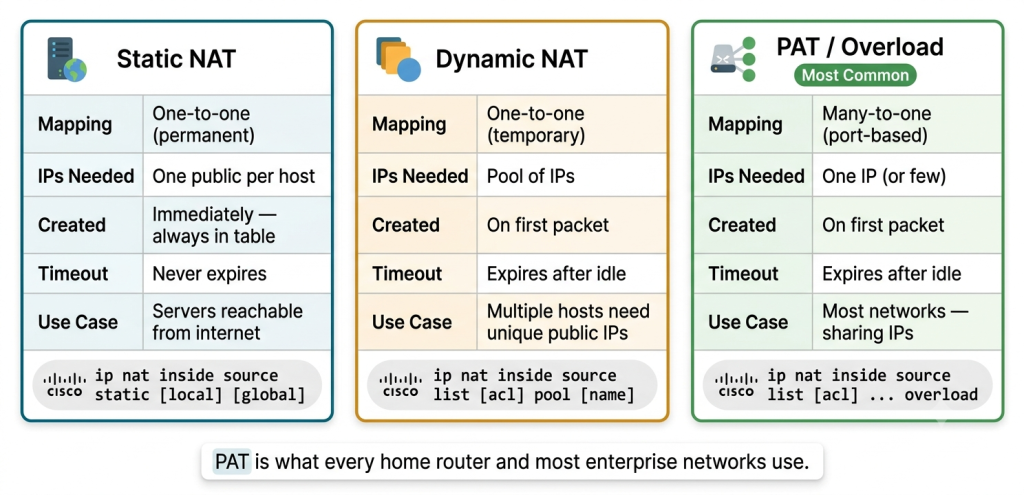
Static NAT
A permanent one-to-one mapping between one Inside Local address and one Inside Global address. The mapping exists in the NAT table permanently, even when no traffic is flowing.
Use case: Servers that must be reachable from the internet at a fixed public IP (web servers, mail servers).
R1(config)# ip nat inside source static 192.168.1.100 203.0.113.10
R1(config)# interface FastEthernet0/0
R1(config-if)# ip nat inside
R1(config-if)# exit
R1(config)# interface FastEthernet0/1
R1(config-if)# ip nat outside
Dynamic NAT
Maps Inside Local addresses to Inside Global addresses from a pool of public IPs. The mapping is created dynamically when traffic flows and expires after a timeout. Each inside host gets a unique public IP from the pool — when the pool is exhausted, new connections are denied until an existing mapping expires.
Use case: Networks with multiple hosts needing individual public IPs (less common today).
R1(config)# ip nat pool PUBLIC-POOL 203.0.113.10 203.0.113.20 netmask 255.255.255.0
R1(config)# access-list 1 permit 192.168.1.0 0.0.0.255
R1(config)# ip nat inside source list 1 pool PUBLIC-POOL
R1(config)# interface FastEthernet0/0
R1(config-if)# ip nat inside
R1(config-if)# exit
R1(config)# interface FastEthernet0/1
R1(config-if)# ip nat outside
PAT — Port Address Translation (NAT Overload)
Maps multiple Inside Local addresses to a single Inside Global address by using unique source port numbers to distinguish each session. This is the most common NAT type — it is what every home router and most enterprise networks use.
The address of the device that needs to be translated is mapped to the router’s outside interface IP with port multiplexing.
Use case: Any network where multiple internal hosts share one or a few public IPs.
R1(config)# access-list 1 permit 192.168.1.0 0.0.0.255
R1(config)# ip nat inside source list 1 interface FastEthernet0/1 overload
R1(config)# interface FastEthernet0/0
R1(config-if)# ip nat inside
R1(config-if)# exit
R1(config)# interface FastEthernet0/1
R1(config-if)# ip nat outside
The overload keyword enables PAT — multiple Inside Local addresses share one Inside Global address, differentiated by port numbers.
Comparison Table
| Feature | Static NAT | Dynamic NAT | PAT (Overload) |
|---|---|---|---|
| Mapping | One-to-one (permanent) | One-to-one (temporary) | Many-to-one (port-based) |
| Inside Global IPs needed | One per inside host | Pool of IPs | One IP (or few) |
| When mapping created | Immediately (permanent) | On first packet | On first packet |
| Timeout | Never expires | Expires after idle timeout | Expires after idle timeout |
| Use case | Servers reachable from internet | Multiple hosts need unique public IPs | Most networks — sharing public IPs |
| Cisco keyword | source static | source list [acl] pool [name] | source list [acl] ... overload |
Verifying NAT
show ip nat translations
R1# show ip nat translations
Pro  Inside global      Inside local       Outside local      Outside global
---  203.0.113.10       192.168.1.100      209.165.201.1      209.165.201.1
tcp  203.0.113.10:1024  192.168.1.100:1024 209.165.201.1:80   209.165.201.1:80
This output shows all four NAT address types in a single line. For PAT entries, the port numbers are appended. Notice that Outside Local = Outside Global (209.165.201.1 = 209.165.201.1) — confirming the standard scenario.
show ip nat statistics
R1# show ip nat statistics
Total active translations: 3 (1 static, 2 dynamic; 2 extended)
Peak translations: 15, occurred 00:02:33 ago
Outside interfaces:
  FastEthernet0/1
Inside interfaces:
  FastEthernet0/0
Hits: 1542  Misses: 12
Expired translations: 45
Dynamic mappings:
-- Inside Source
[Id: 1] access-list 1 pool PUBLIC-POOL refcount 2
 pool PUBLIC-POOL: netmask 255.255.255.0
        start 203.0.113.10 end 203.0.113.20
        type generic, total addresses 11, allocated 2 (18%), misses 0
Key fields: Hits (successful translations), Misses (packets that needed NAT but no mapping existed), total addresses and allocated (pool utilization).
debug ip nat
For real-time troubleshooting, watch NAT translations as they happen:
R1# debug ip nat
NAT*: s=192.168.1.100->203.0.113.10, d=209.165.201.1 [24]
NAT*: s=209.165.201.1, d=203.0.113.10->192.168.1.100 [24]
The first line shows the outbound translation (source changed from Inside Local to Inside Global). The second line shows the return translation (destination changed from Inside Global back to Inside Local). The * indicates the translation was found in the fast-switching cache.
Always disable debug after use:
R1# undebug allclear ip nat translation *
Clears all dynamic NAT entries from the translation table. Useful when troubleshooting or when changing NAT configuration:
R1# clear ip nat translation *Static NAT entries are not cleared by this command — they are permanent until the configuration is removed.
Troubleshooting NAT
Problem 1: Inside Hosts Cannot Reach the Internet
Check 1 — Are ip nat inside and ip nat outside on the correct interfaces?
R1# show ip nat statisticsVerify that the Inside and Outside interfaces listed match your topology.
Check 2 — Does the ACL match the inside hosts?
R1# show access-lists 1The ACL must permit the inside network (e.g., permit 192.168.1.0 0.0.0.255). If the ACL denies the host’s IP, NAT will not translate it.
Check 3 — Is the NAT pool exhausted (Dynamic NAT only)?
R1# show ip nat statisticsCheck allocated vs total addresses. If all addresses are allocated and misses is incrementing, the pool is full. Consider switching to PAT (overload).
Problem 2: NAT Translations Not Appearing
Check: Verify traffic is actually flowing:
R1# debug ip natIf no debug output appears, the packets are not reaching the NAT router or the ACL is not matching.
Problem 3: Return Traffic Not Reaching Inside Hosts
Cause: The outside network does not have a route back to the Inside Global address. Verify routing on the ISP side or check that the Inside Global IP is in a properly advertised subnet.
The Interface of the Router and NAT Configuration
The router interface connected to the inside (private) network is configured with ip nat inside. The interface connected to the outside (public/internet) network is configured with ip nat outside. These two commands define the NAT boundary — the router knows which direction to apply translation based on these interface designations.
It is important to recall that NAT terminology is always applied from the viewpoint of the device with the translated address when determining the type of address. NAT also uses the perception of local or global concerning addresses.
CCNA Exam Pointers
- Inside Local = private IP of the internal host (before translation)
- Inside Global = public IP representing the internal host (after translation)
- Outside Global = real public IP of the external destination
- Outside Local = destination as seen from inside — usually equals Outside Global
- Outside Local ≠ Outside Global only in overlapping network designs with destination NAT (rare)
ip nat insideon the LAN-facing interface;ip nat outsideon the WAN-facing interface- Static NAT: one-to-one permanent mapping; used for servers
- Dynamic NAT: one-to-one from a pool; temporary; pool can be exhausted
- PAT (overload): many-to-one using port numbers; most common NAT type
show ip [nat translations](https://networkustad.com/2019/10/10/types-of-nat-translation/)— displays the full NAT table with all four address typesshow ip nat statistics— shows hits, misses, pool utilization, and interface assignmentsdebug ip nat— real-time view of translation; alwaysundebug allafter useclear ip nat translation *— clears dynamic entries; static entries persist- The NAT router is the demarcation point between inside and outside networks
Conclusion
NAT terminology — Inside Local, Inside Global, Outside Local, and Outside Global — describes the same IP address from different perspectives at different points in the translation process. The Inside Local is the private address before translation; the Inside Global is the public address after translation. The Outside Global is the real destination; the Outside Local is usually identical. Understanding these four terms, the three NAT types (Static, Dynamic, PAT), and the Cisco IOS commands to configure, verify, and troubleshoot NAT provides the complete foundation needed for both the CCNA exam and real-world NAT deployment.
Frequently Asked Questions
What is the Inside Local address in NAT?
The Inside Local address is the private IP address assigned to a host on the internal (inside) network before any NAT translation occurs. In the example topology, PC-1’s Inside Local address is 192.168.1.100 — a private RFC 1918 address that cannot be routed on the public internet. When PC-1 sends a packet to the internet, the NAT router translates this Inside Local address to the Inside Global address (a public IP) before forwarding the packet. The Inside Local address is only meaningful within the inside network — external devices on the internet never see it.
What is the difference between Inside Global and Outside Global?
Inside Global is the public IP address that represents an internal host on the internet after NAT translation — it is the translated source address that the internet sees when traffic from your inside network reaches the outside. Outside Global is the real, publicly routable IP address of the external destination — the web server, email server, or cloud service you are communicating with. In the example, Inside Global is 203.0.113.10 (representing PC-1 on the internet) and Outside Global is 209.165.201.1 (the web server’s actual public IP). The Inside Global is created by NAT translation; the Outside Global exists independently and is not translated by your NAT router.
Why is the Outside Local address usually the same as the Outside Global?
The Outside Local address is the destination IP as seen from the inside network’s perspective. In standard NAT configurations, the inside network sees the destination at its real public IP — so Outside Local equals Outside Global. They differ only in rare scenarios involving overlapping network address spaces, where the NAT router must translate both the source (inside) AND the destination (outside) addresses — sometimes called “twice NAT.” Unless a CCNA exam question specifically mentions overlapping networks or destination NAT, you should assume Outside Local = Outside Global. This simplification holds true in virtually all real-world deployments and standard exam scenarios.
How do I verify active NAT translations on a Cisco router?
Use show ip nat translations to display the complete NAT table showing all four address types (Inside Local, Inside Global, Outside Local, Outside Global) for every active translation. Use show ip nat statistics to see summary information including total active translations, hit and miss counts, pool utilization, and which interfaces are configured as inside and outside. For real-time troubleshooting, debug ip nat shows each translation as it occurs — you will see the source address change on outbound packets and the destination address change on return packets. Always disable debug after use with undebug all to prevent excessive CPU load.
What is the difference between Static NAT, Dynamic NAT, and PAT?
Static NAT creates a permanent one-to-one mapping between one Inside Local address and one Inside Global address — used for servers that must be reachable from the internet at a fixed public IP. Dynamic NAT maps Inside Local addresses to Inside Global addresses from a pool of available public IPs — each host gets a unique public IP temporarily, and when the pool runs out, new translations are denied until existing ones expire.
PAT (Port Address Translation), also called NAT Overload, maps multiple Inside Local addresses to a single Inside Global address by appending unique port numbers to each session — this is the most common NAT type, used by home routers and most enterprise networks. PAT is configured with the overload keyword on the ip nat inside source command.



