
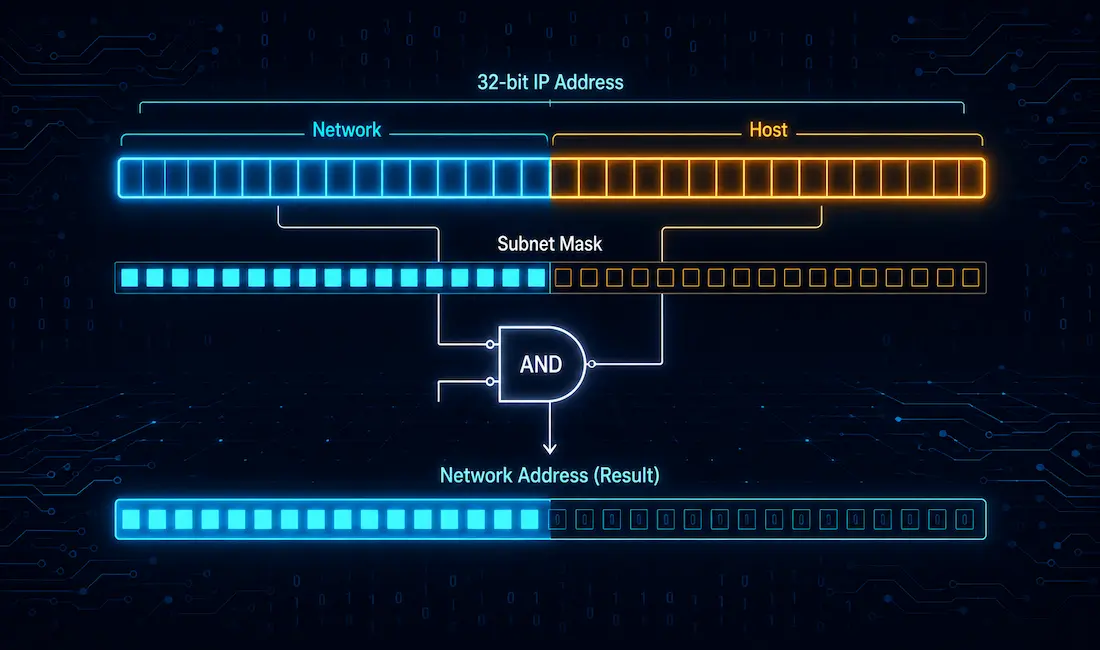
Every network needs a unique network number. Every host needs a unique IP address. The IPv4 address is a 32-bit number. It identifies both a network and a host on that network. This split is one of the very first things you learn in networking, and it stays useful for your entire career.
We usually write an IPv4 address in dotted decimal notation. That’s four 8-bit fields, separated by periods. Each field is one byte. But binary is where the real logic lives. To understand network and host portions, you need to think in binary.
The address consists of a network portion and a host portion. Some bits identify the network. The rest identify the host. Every device on the same network shares the same network bits. Every device needs its own unique host bits.
If two hosts share the same network bits, they’re on the same network. A subnet mask is what tells you where the network bits end and the host bits begin.
This isn’t just theory. Every router on the internet makes forwarding decisions based on this exact split. Get comfortable with it, and a lot of other networking topics start clicking into place too.
Three Key Parameters Every Host Needs
Every host on a network needs three things to communicate properly:
A unique IPv4 address. Every IPv4 address (say, 192.168.1.10) splits into two parts. The Host ID identifies the specific device. The Network ID identifies the network it belongs to.
A default gateway. The default gateway is used to identify the local gateway a host uses to reach other networks. Usually, this is the IP address of the router’s interface on that local network.
A subnet mask. This is what actually separates the network portion from the host portion. More on that below.
What Is a Subnet Mask?
A subnet mask is a 32-bit value. It defines the range of IP addresses available within a network. It’s also used to split large networks into smaller subnetworks.
Hosts on the same subnet can talk to each other directly. Hosts on different subnets need a router in between. The right subnet size depends on what you need. A point-to-point link only needs two addresses. A data center segment might need thousands.
A subnet mask is sometimes called an address mask. In the mask, network bits are always 1s. Host bits are always 0s.
Network and Host Portion with a Subnet Mask
Line up the subnet mask against the IP address, bit by bit, left to right. Every 1 in the mask marks a network bit. Every 0 marks a host bit.
Here’s a simple example, using an easy subnet mask that lines up with the octet boundaries:
- IP address: 200.100.254.10 →
11001000.01100100.11111110.00001010 - Subnet mask: 255.255.255.0 →
11111111.11111111.11111111.00000000
The first three octets are the network portion. The last octet is the host portion. This is easy to see because the mask lines up exactly with the octet boundaries. Not every mask does.
ANDing: How a Router Finds the Network Address
To find the network address, we use a binary operation called ANDing. This is how a source host figures out if a destination is on its own network, or somewhere else, before it builds a packet.
ANDing isn’t the only binary logic operation out there. OR and NOT exist too. But for finding a network address, only ANDing does the job.
Here’s the truth table for a single bit:
1 AND 1 = 1
1 AND 0 = 0
0 AND 1 = 0
0 AND 0 = 0
Anything ANDed with a 0 produces a 0. That’s the whole trick.
To get the network address, you AND the IP address with the subnet mask, bit by bit. In the mask, host bits are all 0s. So every host bit in the result becomes 0, no matter what the original address bit was. That’s exactly why an IPv4 address with an all-zero host portion means “this is the network address,” not a real host.
Network bits in the mask are all 1s. ANDing any bit with 1 just gives you that same bit back. So the network portion of the result matches the original address exactly.
Why does this matter? When a host wants to send a packet, it ANDs its own address with its subnet mask. It also ANDs the destination address with that same mask. If both results match, the destination is local. If they don’t match, the destination is remote, and the packet goes to the default gateway instead.
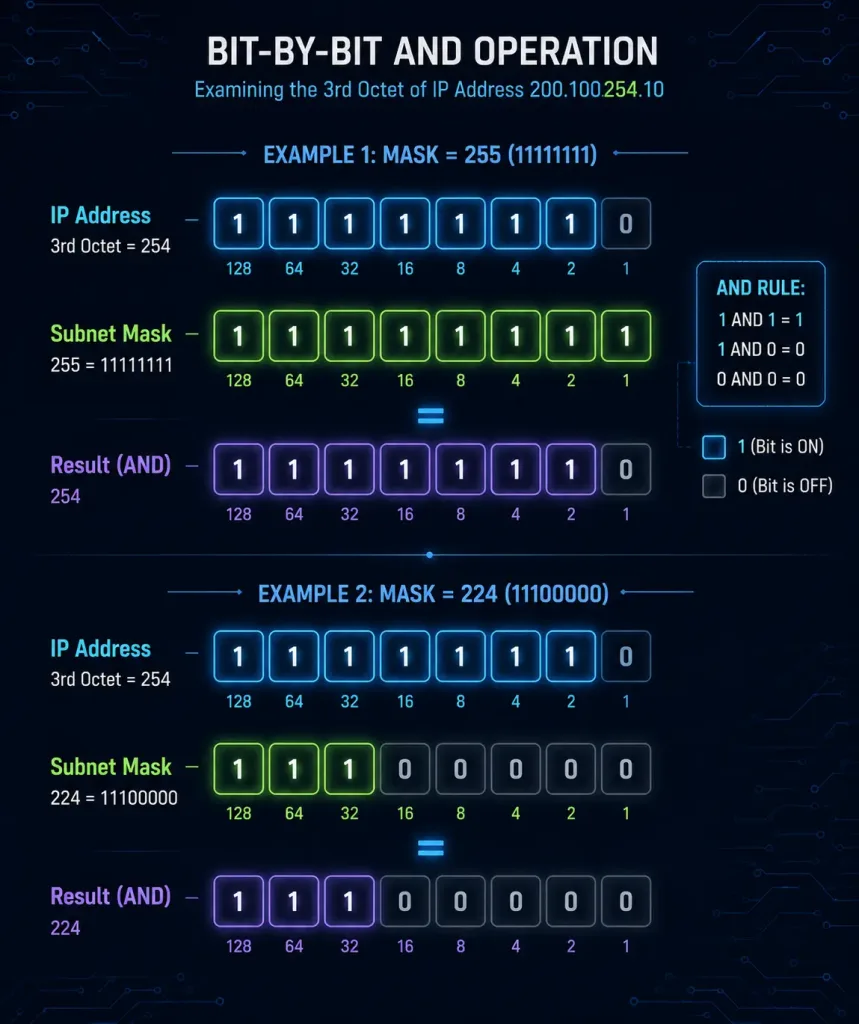
Worked Example 1: A Mask That Lines Up with Octets
Find the network ID for 200.100.254.10 / 255.255.255.0.
IP address:   11001000.01100100.11111110.00001010
Subnet mask:  11111111.11111111.11111111.00000000
------------------------------------------------- (AND)
Network ID:   11001000.01100100.11111110.00000000
In decimal, that’s 200.100.254.0. Easy, because the mask is a clean octet boundary.
Worked Example 2: A Mask That Doesn’t Line Up with Octets
Real networks often use masks that split a byte in the middle. Let’s try one.
Find the network ID for 192.168.10.150 / 255.255.255.224 (a /27 network).
IP address:   11000000.10101000.00001010.10010110
Subnet mask:  11111111.11111111.11111111.11100000
------------------------------------------------- (AND)
Network ID:   11000000.10101000.00001010.10000000
In decimal, that’s 192.168.10.128. Only the top three bits of the last octet survive the AND. The rest turn to 0, because the mask has 0s there.
This is the case where knowing binary actually pays off. You can’t just glance at the decimal numbers and guess the answer. You have to do the math.
Finding the Broadcast Address Too
Once you know the network address, the broadcast address is easy. Just flip the logic. Instead of setting every host bit to 0, set every host bit to 1.
Take our /27 example again: 192.168.10.150 / 255.255.255.224.
Network ID:        11000000.10101000.00001010.10000000
Host bits set to 1: 11000000.10101000.00001010.10011111
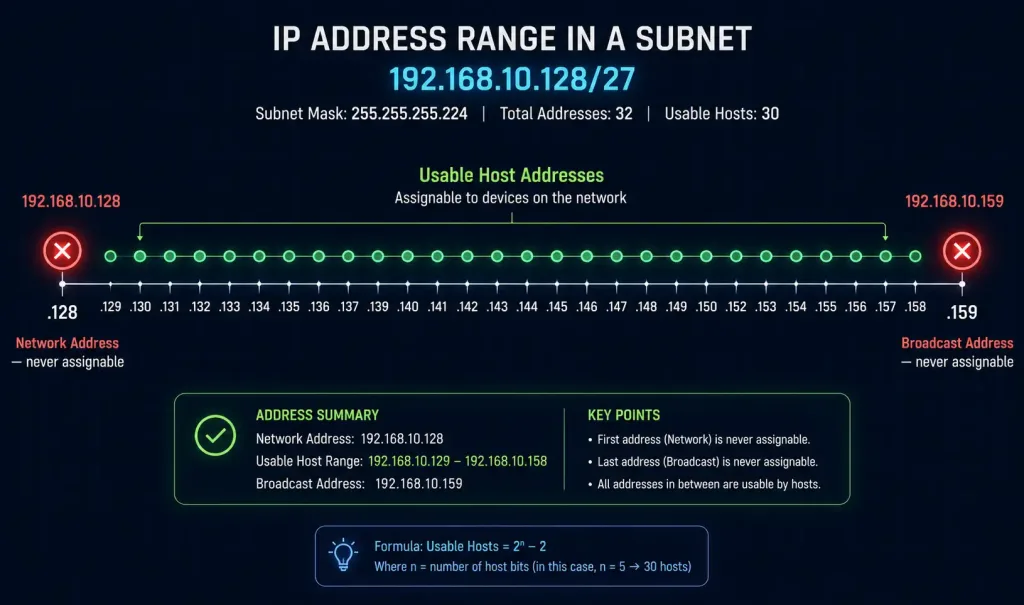
That gives us 192.168.10.159 as the broadcast address. Everything between the network address and the broadcast address is a usable host address. In this case, that’s 192.168.10.129 through 192.168.10.158.
This is worth knowing well. The network address and broadcast address are the two addresses you can never assign to a device. Every other address in the range is fair game, ready to hand out to a real host.
CIDR Notation and Subnet Masks
You’ll often see subnet masks written as a slash and a number instead of four decimal octets. This is called CIDR notation. It’s just a shorthand for counting the 1 bits in the mask.
| CIDR | Subnet Mask | Network Bits | Host Bits |
|---|---|---|---|
| /24 | 255.255.255.0 | 24 | 8 |
| /25 | 255.255.255.128 | 25 | 7 |
| /26 | 255.255.255.192 | 26 | 6 |
| /27 | 255.255.255.224 | 27 | 5 |
| /28 | 255.255.255.240 | 28 | 4 |
| /29 | 255.255.255.248 | 29 | 3 |
| /30 | 255.255.255.252 | 30 | 2 |
A /27 has 5 host bits left over. That’s 2^5, or 32 total addresses in the block. Subtract the network address and the broadcast address, and you get 30 usable host addresses. That matches our example above exactly.
Common Mistakes When Splitting Network and Host Portions
Assuming every mask lines up with an octet. Plenty of real networks use masks like /27 or /26. These split a byte right down the middle. If you only ever practice with /24, /16, and /8, you’ll get stuck the first time you see something else.
Forgetting that ANDing works bit by bit. You can’t AND two decimal numbers directly. You have to convert to binary first, AND each column, then convert back. Skipping the binary step is the most common source of wrong answers.
Mixing up the network address with a usable host address. The network address (all host bits set to 0) is never assignable to a device. Neither is the broadcast address (all host bits set to 1). Both mark the edges of the range, not real hosts inside it.
Misreading which bits are “network” and which are “host.” In the subnet mask, 1s mean network, 0s mean host. It’s easy to flip this by accident, especially when you’re new to binary. Double-check before you commit to an answer.
Conclusion
Splitting an IPv4 address into network and host portions is one of the most fundamental skills in networking. Once you understand ANDing, subnetting stops feeling like memorization. It becomes simple math. Practice with masks that don’t line up on octet boundaries. That’s where real understanding shows up. Work through a few /27 and /26 examples by hand before you trust a subnet calculator to do it for you. You’ll spot mistakes faster, and you’ll actually understand why the calculator gave you the answer it did.
FAQs
What is the purpose of dividing an IPv4 address into network and host portions?
The network portion identifies which network a device belongs to. The host portion identifies the specific device within that network. This split is what lets routers make fast forwarding decisions. A router only needs to look at the network portion to know where to send a packet next.
How does a subnet mask determine the network portion?
A subnet mask marks network bits with 1s and host bits with 0s. Line the mask up against the IP address, and the 1s tell you exactly where the network portion ends. For example, 255.255.255.0 marks the first 24 bits as network. A mask like 255.255.255.224 marks 27 bits as network, splitting the last octet right in the middle.
Can two devices have the same host portion in different networks?
Yes. Host portions only need to be unique within their own network. Two devices on two different networks can absolutely share the same host bits. What has to stay unique within its routing domain is the full combination of network ID plus host ID together, not the host portion by itself. That uniqueness isn’t actually global, either — private address ranges (like 192.168.x.x) are reused across millions of separate networks worldwide; they just need to be unique within whichever network they’re deployed on.
Why do IPv4 address classes (A, B, C) matter?
Classes A, B, and C each come with a default subnet mask, which sets a default size for the network. Class A networks are huge, with room for millions of hosts. Class C networks are small, built for a few hundred hosts at most. In modern networks, CIDR notation has mostly replaced strict class-based sizing, but the classes are still useful for understanding where default masks come from.
What happens if a host’s subnet mask is configured incorrectly?
A wrong subnet mask breaks the ANDing math on that host. It miscalculates whether a destination is local or remote. That can send local traffic to the default gateway by mistake. Or it can trap traffic that should leave the network, keeping it stuck locally instead. This is a common, sneaky misconfiguration. Check it first whenever a device can reach some hosts but not others.
How do I quickly find the number of usable hosts in a subnet?
Count the host bits left over after the network bits. Raise 2 to that power, then subtract 2. The 2 you subtract account for the network address and the broadcast address, since neither is assignable to a real device. A /27, for example, leaves 5 host bits. That’s 32 total addresses, minus 2, for 30 usable hosts. This shortcut works for any subnet size, as long as you know how many host bits remain.



