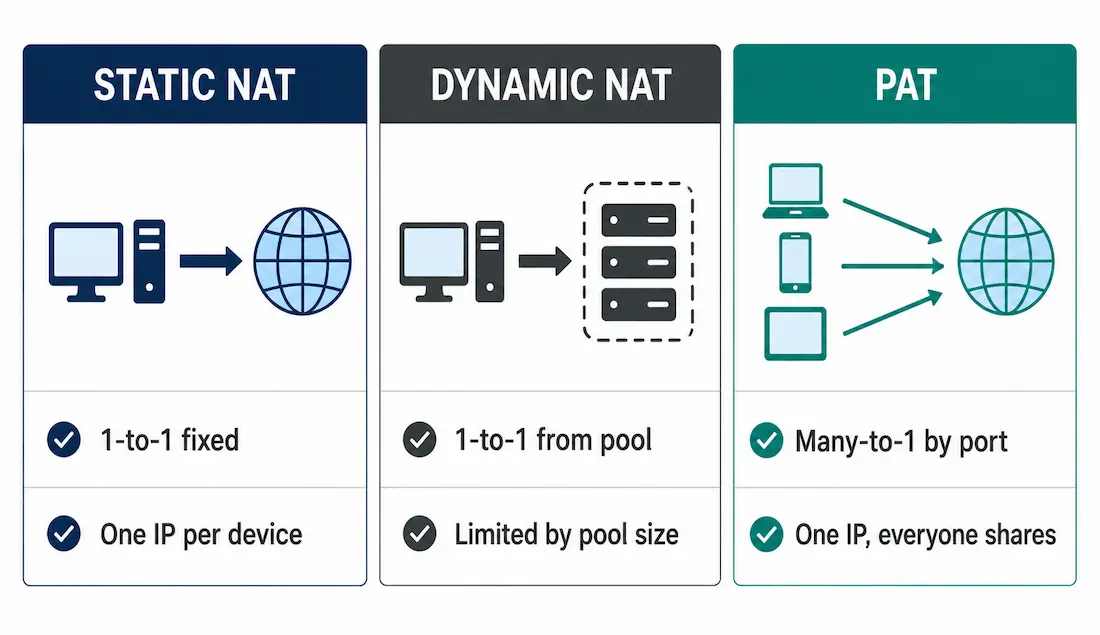
There are three types of NAT: static NAT, dynamic NAT, and Port Address Translation (PAT), also called NAT overload. They all solve the same underlying problem — mapping private addresses to public ones — but they differ significantly in how permanent the mapping is and how many public addresses they actually require to function.
This guide covers all three conceptually, the order Cisco IOS actually applies NAT in, and the PAT port allocation behavior worth knowing for CCNA. Full configuration steps for each type live in their own dedicated guides, linked throughout.
Static NAT
Static NAT is a permanent, one-to-one mapping between a specific private address and a specific public address — also called “one-to-one NAT.” Every private address that needs static translation requires its own reserved public address; no pool is involved.
Because the mapping is fixed and bidirectional, connections can be initiated from either side of the network — an outside device can reach the internal one at its mapped public address just as easily as the internal device can reach outward. That’s the key distinction from dynamic NAT, where an outside device generally can’t initiate a connection to an address that isn’t currently mapped.
Worked example: R1 has static NAT configured for PC1, PC2, and PC3’s inside local addresses. When these PCs send traffic to the internet, their addresses are translated to their permanently assigned inside global addresses — from the outside, each PC always appears at the same public address, every time.
Static NAT is also useful in reverse — for authorized remote access to an internal device rather than the internet-facing direction. A network administrator connecting from outside the network can SSH to an internal device’s mapped public address (using a documentation-range example like 203.0.113.19), and R1 translates that inbound connection to the correct internal device automatically. This works precisely because static NAT’s mapping doesn’t depend on which side initiated the conversation.
The trade-off: static NAT needs as many public addresses as there are devices requiring translation — it doesn’t conserve address space the way dynamic NAT or PAT does. It’s the right tool specifically when a device needs a predictable, unchanging public-facing address — a mail server, a web server, a device that needs remote administrative access — not for general internet access for an entire office.
Full configuration steps: Static NAT Configuration.
Dynamic NAT
Dynamic NAT maps private addresses to public addresses from a pool, first-come-first-served, rather than a permanent fixed mapping. When an internal device requests outside access, the router checks the source address against its configured internal range, and if it matches, assigns the next available address from the pool.
This is the right fit when you know roughly how many devices need simultaneous internet access, but don’t want to dedicate a permanent public address to each one specifically. Worked example: PC1 requests internet access and receives the first available address from the dynamic pool. The remaining pool addresses stay available for other devices — PC1 doesn’t keep that specific address once its session ends, unlike static NAT.
Dynamic NAT still needs enough public addresses to cover the maximum number of simultaneous sessions — if ten devices might be online at once, the pool needs at least ten addresses, even though it’s more flexible than static NAT’s one-per-device requirement.
Full configuration steps: Dynamic NAT Configuration.
Port Address Translation (PAT)
PAT — NAT overload — is where the real address-conservation happens. Every device translated through PAT shares the same single public address, distinguished from each other by source port number instead of by address. This is what lets an entire office share one public IP simultaneously.
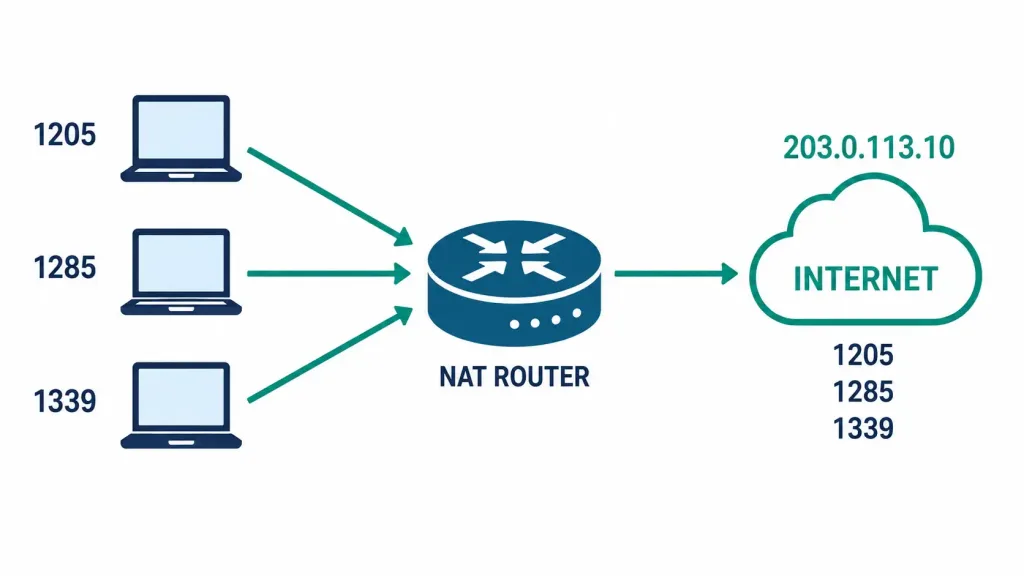
When a device starts a session, it generates a source port to identify that specific conversation. The NAT router tracks translations by that port number — if two internal devices happen to generate the same source port at the same time, the router simply reassigns one of them to keep every session distinct. When a reply comes back, the destination port on the way in is what tells the router exactly which internal device the packet belongs to — the same lookup, run in reverse.
Worked example: three PCs behind R1 each open sessions to port 80 on external servers using client ports 1205, 1285, and 1339 respectively. Since none of these ports collide, R1 preserves all three exactly as generated — no renumbering needed. R1 translates each PC’s inside local address (with its original port) to the single inside global address, and the destination address is left untouched throughout.
Full configuration steps: PAT Configuration.
How PAT Allocates Ports
Cisco IOS divides the available ports per global address into three internal ranges when assigning PAT translations:
| Range | Ports | Behavior |
|---|---|---|
| Range 1 | 0–511 | Used only when necessary; scanned first if the original port falls here |
| Range 2 | 512–1,023 | Second range scanned |
| Range 3 | 1,024–65,535 | Where most ordinary client sessions land, since most operating systems generate ephemeral source ports in this range anyway |
A clarification worth making explicitly: these three ranges are Cisco’s own internal PAT allocation grouping, verified directly against Cisco’s documentation — but they don’t correspond to the standard IANA port classifications (Well-Known 0–1023, Registered 1024–49151, Dynamic/Private 49152–65535) that you’ll encounter elsewhere. Don’t conflate the two; they’re organized around different boundaries for different purposes.
PAT always tries to preserve a session’s original port first. Only if that exact port is already in use does it scan forward within the same range to find the next free one — and only escalate to the next range, or the next pool address if one exists, if the current range is fully exhausted.
NAT Order of Operations
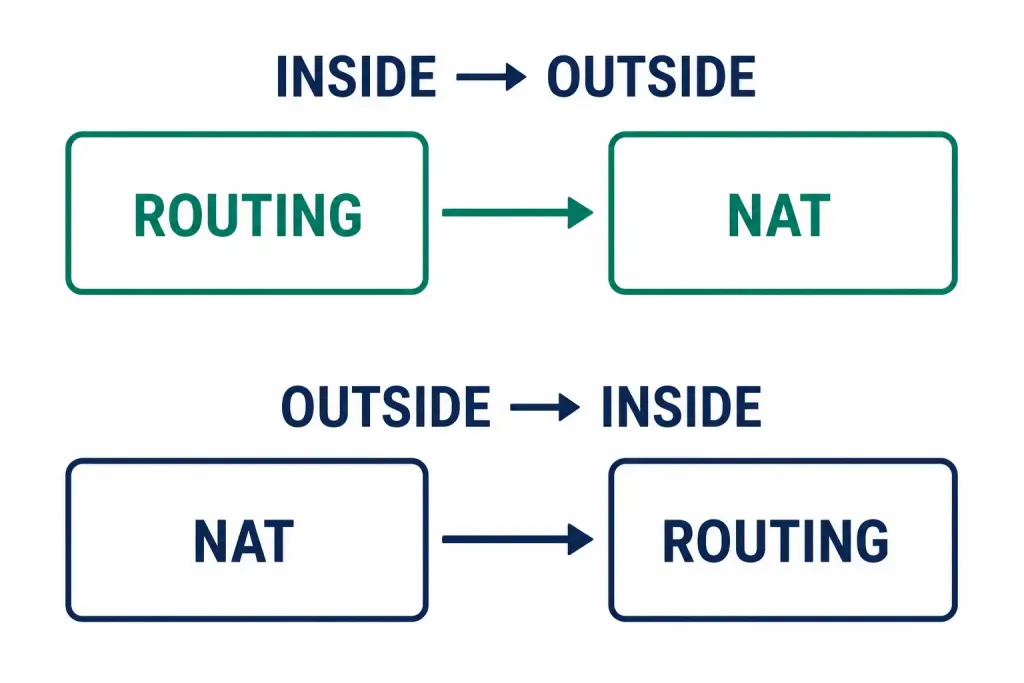
This is a specific, commonly tested CCNA point, and the direction of traffic actually changes the order:
| Direction | Order |
|---|---|
| Inside → Outside | 1. Routing lookup → 2. NAT translation |
| Outside → Inside | 1. NAT translation → 2. Routing lookup |
Outbound traffic gets routed first (to determine the correct egress interface), then translated as it leaves. Inbound traffic gets translated first — converting the destination from its public address back to the real internal address — and only then does the router make a routing decision, now based on the correct internal address rather than the public one it arrived with.
Also worth knowing: when multiple NAT types are configured simultaneously, static NAT translations are checked before dynamic NAT or PAT — a static mapping always takes precedence if one exists for a given address.
Static vs. Dynamic vs. PAT: Choosing the Right One
| Static NAT | Dynamic NAT | PAT | |
|---|---|---|---|
| Mapping | One private → one fixed public | One private → one public from a pool | Many private → one public, by port |
| Public addresses needed | One per device | One per simultaneous session | Just one |
| Predictable address? | Always the same | No — assigned as needed | Always the same single address |
| Connections can start from outside? | Yes | Generally no | Generally no |
| Best fit | A server needing a fixed, reachable address | A known, moderate number of simultaneous users | Everything else — the default choice for most networks |
Worked Scenario: Choosing the Right NAT Type for a Mixed Office
This is a composite scenario built to show the three NAT types working together, not a specific reported deployment.
A 40-person office needs three things: general internet access for every employee, a fixed reachable address for an internally-hosted email server, and remote SSH access for the two network administrators when they’re offsite.
General internet access is the easy call — PAT. Forty employees browsing, streaming, and using cloud apps simultaneously would need forty separate public addresses under dynamic NAT, or forty permanent ones under static NAT. PAT handles all forty behind a single public address, differentiated by port, at effectively no address cost beyond the one already needed for the router’s outside interface.
The email server needs a static NAT entry specifically, since external mail servers need to reliably reach it at the same address every time — a dynamic pool assignment that could change between sessions would break inbound mail delivery entirely.
Remote SSH access for the administrators is also handled with static NAT, but pointed at a different internal device entirely — the same static, predictable-address requirement as the mail server, just serving a different purpose (administrative access rather than a public-facing service).
The result: one router running all three NAT types simultaneously, each serving the specific need it’s actually suited for. This is entirely normal, not unusual — most real networks with any internet-facing services at all end up running PAT for general traffic alongside a handful of static NAT entries for anything that needs to stay reliably reachable from outside.
Common NAT Issues
| Symptom | Cause | Fix |
|---|---|---|
| No translation occurring at all | ACL referenced by the NAT rule is denying the traffic | Verify the access list actually matches the internal subnet |
| Only ever getting a 1:1 mapping instead of shared address | Missing overload keyword | Add overload to convert dynamic NAT into PAT |
| No internet access after configuring NAT | ip nat inside / ip nat outside applied to the wrong interfaces | Swap the interface designations to match the actual topology |
| Port conflicts under heavy load | Too many simultaneous sessions for the available pool | Use a larger pool, or confirm PAT overload is actually enabled |
FAQs
What is the main difference between static NAT and dynamic NAT?
Static NAT creates a permanent one-to-one mapping requiring one public address per private host. Dynamic NAT assigns public addresses temporarily from a shared pool on a first-come-first-served basis, reusing addresses once a session ends.
How does PAT conserve public IPv4 addresses compared to static or dynamic NAT?
PAT maps many private addresses to a single public address by differentiating sessions with unique source ports, rather than needing a separate address per device (static) or per simultaneous session (dynamic pool).
What is the NAT order of operation when traffic flows from inside to outside?
Routing is checked first, then NAT translation is applied as the packet leaves. Outside-to-inside traffic reverses this: NAT translation happens first, converting the destination back to the internal address, and routing is decided afterward based on that real address.
Why might a device fail to get internet access after NAT is configured?
Common causes: the inside/outside interface designation is reversed, an ACL is blocking the traffic the NAT rule depends on, the overload keyword is missing from what should be a PAT configuration, or a dynamic pool has run out of available addresses.
How does the router handle port conflicts in PAT?
It preserves the original source port if that port is free. If it’s already in use, it scans forward within the same internal port range (0–511, then 512–1,023, then 1,024–65,535) for the next available port, escalating to a different pool address only if every range is exhausted.
Are Cisco’s PAT port ranges the same as standard IANA port classifications?
No — Cisco’s internal PAT allocation uses 0–511, 512–1,023, and 1,024–65,535 specifically for how it assigns translated ports. IANA’s official classifications (Well-Known, Registered, Dynamic/Private) use different boundaries entirely. They’re separate systems serving different purposes, not interchangeable terminology.
Can a single router run static NAT, dynamic NAT, and PAT at the same time?
Yes, and it’s genuinely common — a typical office network runs PAT for general internet-bound traffic from every device, alongside separate static NAT entries for anything that specifically needs to stay reachable from outside at a fixed address, like an internal mail server or an administrator’s remote-access target.