
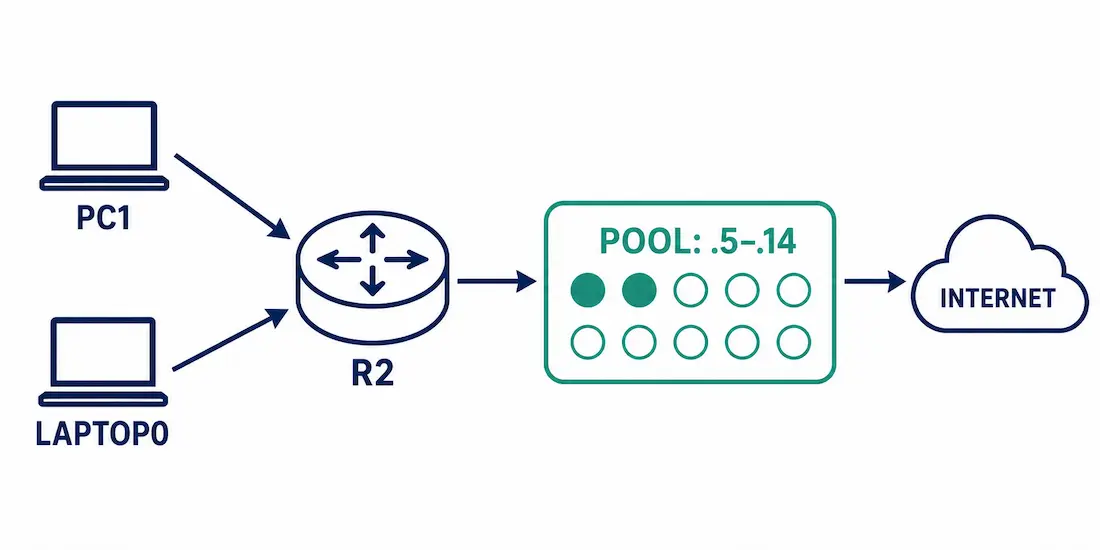
Dynamic NAT automatically maps inside local addresses to a pool of inside global addresses, first-come-first-served — the middle ground between static NAT’s permanent one-to-one mappings and PAT’s many-to-one port sharing approach. It’s the right choice when a known, moderate number of internal devices need outbound internet access, without needing a dedicated public address reserved for each one individually.
This guide uses the same topology as our Static NAT Configuration guide, extended with a dynamic pool instead of permanent mappings — so if you’ve already worked through that guide, the router, interfaces, and outside destination will already be entirely familiar to you.
Example Topology (Shared with the Static NAT Guide)
- R2 — the same Cisco IOS-XE NAT gateway used throughout this NAT series
- PC1 — 192.168.11.100, on R2’s G0/0 (192.168.11.1)
- Laptop0 — 192.168.10.101, on R2’s G0/1 (192.168.10.1)
- Outside destination — the web server at 201.128.35.2, reached via R2’s Serial0/0/0.100 (202.128.54.1)
Important overlap note: the Static NAT guide already permanently reserves 202.128.54.3 and 202.128.54.4 for its two servers on this same shared router. If you’re building both configurations on the same device, the dynamic pool in this guide is deliberately set to 202.128.54.5–202.128.54.14 specifically to avoid colliding with those already-reserved static entries — reusing the same starting address (.3) across both configs at once would create a genuine, real address conflict on the device.
| Device | Inside Local | Interface |
|---|---|---|
| PC1 | 192.168.11.100 | G0/0 |
| Laptop0 | 192.168.10.101 | G0/1 |
| Setting | Value |
|---|---|
| Dynamic pool range | 202.128.54.5 – 202.128.54.14 |
| Pool netmask | 255.255.255.240 |
| Outside interface | Serial0/0/0.100 |
How Dynamic NAT Works
Any device on either inside LAN can access the internet using this shared pool, on a strict first-come-first-served basis. When R2 receives outbound traffic, it checks the source address against the ACL defining eligible inside addresses; if it matches and no existing translation entry already exists, R2 assigns the next available address from the pool and creates a brand new entry for that device.
Like static NAT, this pool needs enough addresses to cover every device that might realistically need simultaneous access at the same time — if all pool addresses are currently assigned to active sessions, additional devices requesting access simply wait until one frees up naturally.
Configuring Dynamic NAT
Step 1: Define the Pool
R2(config)# ip nat pool DYNAMIC_POOL 202.128.54.5 202.128.54.14 netmask 255.255.255.240Step 2: Create the ACL
The ACL identifies which inside addresses are eligible for translation — both LANs from the shared topology:
R2(config)# access-list 1 permit 192.168.11.0 0.0.0.255
R2(config)# access-list 1 permit 192.168.10.0 0.0.0.255
Remember the implicit deny at the end of every ACL — anything not explicitly permitted here won’t be translated.
Step 3: Bind the ACL to the Pool
R2(config)# ip nat inside source list 1 pool DYNAMIC_POOLStep 4: Identify Inside and Outside Interfaces
R2(config)# interface GigabitEthernet0/0
R2(config-if)# ip nat inside
R2(config-if)# exit
R2(config)# interface GigabitEthernet0/1
R2(config-if)# ip nat inside
R2(config-if)# exit
R2(config)# interface Serial0/0/0.100
R2(config-if)# ip nat outside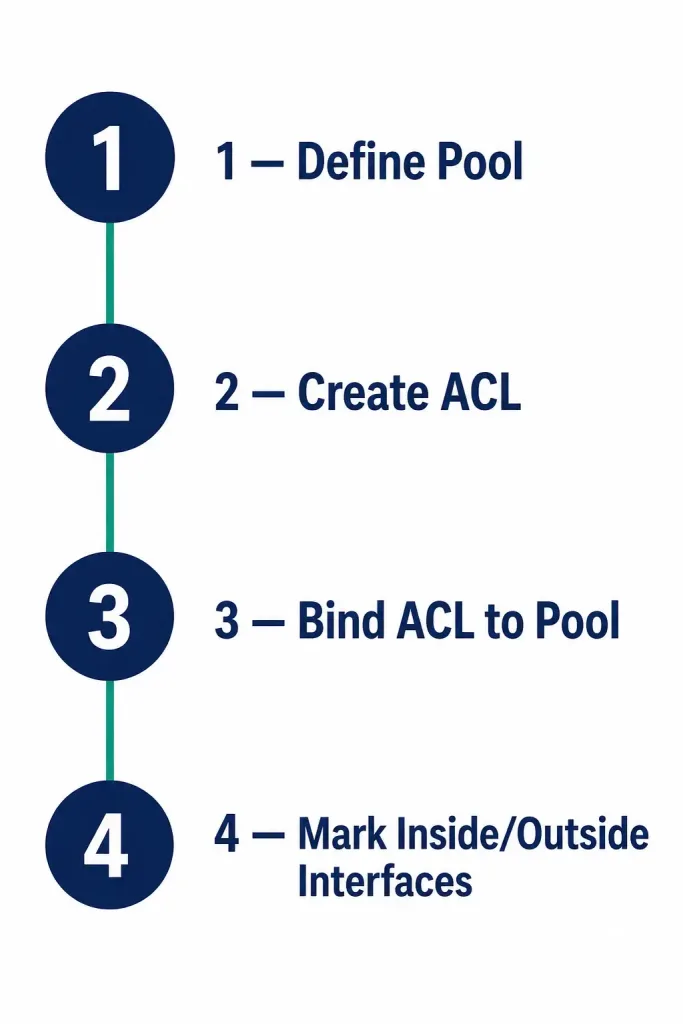
That’s the complete configuration — both PC1 and Laptop0 can now reach the internet, sharing the pool of ten addresses (202.128.54.5–202.128.54.14).
Packet Flow Walkthrough
Following the same walkthrough style as the Static NAT guide, here’s exactly what happens when PC1 (192.168.11.100) sends an ICMP request to the web server at 201.128.35.2:
- PC1 sends a packet with source 192.168.11.100, destination 201.128.35.2.
- R2 receives it on G0/0, an interface marked
ip nat inside, and checks the NAT configuration. - The ACL permits 192.168.11.0/24, so R2 checks for an existing translation entry for 192.168.11.100. None exists yet.
- R2 selects the first available address from the pool — 202.128.54.5 — and creates a new translation entry mapping 192.168.11.100 to 202.128.54.5.
- R2 rewrites the source address to 202.128.54.5 and forwards the packet out Serial0/0/0.100.
- The web server replies to 202.128.54.5. R2 receives this on its outside interface, checks the NAT table, finds the matching entry, and translates the destination back to 192.168.11.100 before forwarding it to PC1 out G0/0.
The exact same flow applies to Laptop0 (192.168.10.101) — the ACL’s second line permits it, and it receives the next available pool address, 202.128.54.6, assuming .5 is already in use by PC1’s active session.
Worked Scenario: The Pool Runs Out
This is a composite scenario built to show a real dynamic NAT limitation in action, not a specific reported incident.
The office grows to 15 devices needing simultaneous internet access, but the pool only has 10 addresses (202.128.54.5–.14). The first 10 devices to request access each get a pool address and browse normally. The 11th device’s traffic hits R2, the ACL permits it, but no pool address is free — R2 has nothing left to assign.
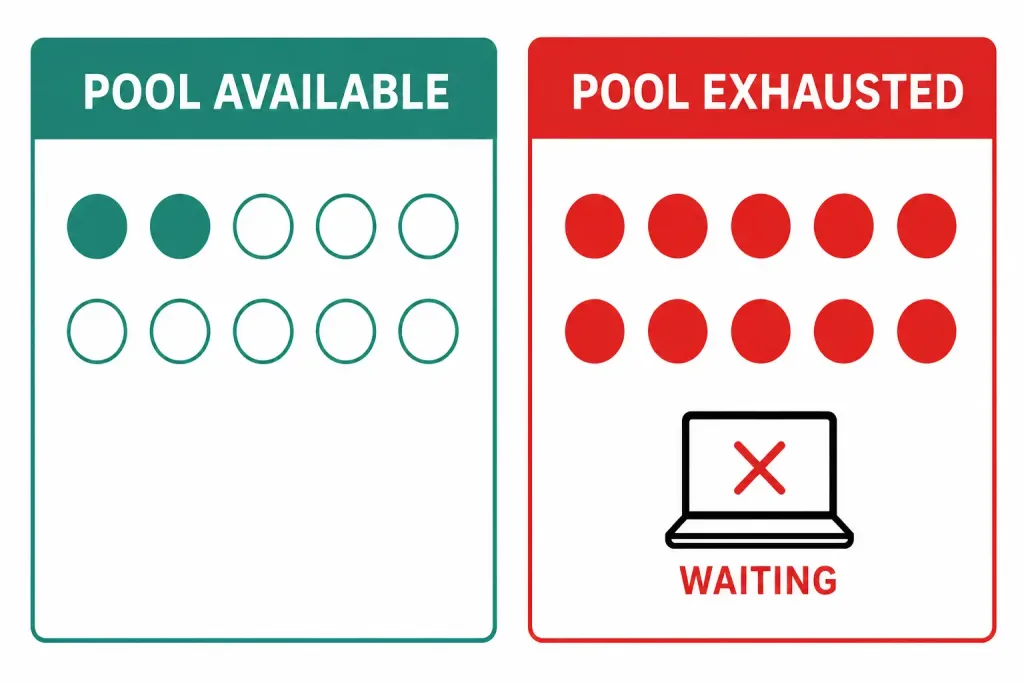
That 11th device doesn’t get an error message exactly — its outbound packets are simply dropped, since NAT can’t complete the translation without an available address, and standard connection-timeout behavior (a ping timing out, a browser eventually showing a connection error) is what the user actually experiences at their end. show ip nat statistics would show all 10 of the 10 pool addresses allocated and a rising miss count over time — the clearest confirmation that pool exhaustion, rather than some other unrelated problem, is the actual root cause here.
Two real fixes exist in this situation: expand the pool (moving to a /27 block instead of the current /28 would add 14 more usable addresses to work with), or migrate to PAT entirely — since PAT’s port-based sharing supports far more simultaneous devices per public address than dynamic NAT’s strict one-to-one pool ever could, this is usually the more scalable long-term fix once a network genuinely outgrows what a modest dynamic pool was ever designed to support.
Verifying Dynamic NAT
R2# show ip nat translations
Pro  Inside global       Inside local         Outside local       Outside global
icmp 202.128.54.5:1      192.168.11.100:1     201.128.35.2:1       201.128.35.2:1
icmp 202.128.54.6:1      192.168.10.101:1     201.128.35.2:1       201.128.35.2:1
tcp  202.128.54.5:1029   192.168.11.100:1029  201.128.35.2:80      201.128.35.2:80
The Inside global column always shows addresses drawn from the configured pool range (202.128.54.5–.14 here) — if you ever see an inside global address outside that range, or one matching a static NAT entry or the router’s own outside interface, that’s a sign something is misconfigured rather than a normal dynamic translation.
R2# show ip nat statistics
Total translations: 2 (0 static, 2 dynamic, 0 extended)
Outside Interfaces: Serial0/0/0.100
Inside Interfaces: GigabitEthernet0/0, GigabitEthernet0/1
Hits: 14  Misses: 2
Pool DYNAMIC_POOL: netmask 255.255.255.240
        start 202.128.54.5 end 202.128.54.14
        type generic, total addresses 10, allocated 2 (20%), misses 0
The pool section here is specific to dynamic NAT — it directly shows how many of the ten pool addresses are currently allocated at this moment, which is by far the fastest way to spot a pool running dangerously low before it actually runs out entirely and starts silently blocking new connections from being established.
Default entry lifetime is 24 hours (86,400 seconds) unless changed with ip nat translation timeout <seconds> in global configuration mode. clear ip nat translation * clears dynamic entries manually — static entries elsewhere on the same router aren’t affected by this command.
Troubleshooting Dynamic NAT
| Symptom | Command to Check | Likely Cause |
|---|---|---|
| No translation appears at all | show ip nat translations | ACL doesn’t match the actual inside subnet, or ip nat inside/ip nat outside missing on an interface |
| Devices on one LAN work, the other doesn’t | show access-lists 1 | ACL only permits one of the two inside networks — a common mistake when adding a second LAN after the fact |
| Works initially, then stops for new connections | show ip nat statistics | Pool exhausted — check allocated count against total pool size |
| Translation uses an unexpected address | show ip nat translations, compare against pool range | Overlap with a static NAT entry or the router’s own outside interface address — verify the pool doesn’t include reserved addresses |
| Entries never seem to clear | show ip nat translations over time | Normal — dynamic entries persist up to 24 hours by default; use clear ip nat translation * to reset manually if needed for testing |
Dynamic NAT vs. Static NAT vs. PAT
| Static NAT | Dynamic NAT | PAT | |
|---|---|---|---|
| Mapping | 1:1, fixed | 1:1, from a pool | Many:1, by port |
| Public IPs needed | One per device | Equal to pool size | Just one |
| Best for | Servers needing a fixed address | A known, moderate number of outbound users | General outbound access for many devices |
| Command | ip nat inside source static | ip nat pool + ACL | Adds overload to the dynamic command |
Real-World Applications
In enterprise deployments, dynamic NAT commonly pairs with firewalls (Cisco ASA, Firepower) for controlled outbound access alongside proper inspection policy applied at the same boundary. As IPv4 pools get tight over time, most networks eventually migrate general outbound traffic to PAT instead, which needs only a single shared address rather than a carefully sized pool of many. For IPv4-to-IPv6 transition scenarios specifically, NAT64 — not NAT66 — is the actually relevant technology here, since it lets IPv6-only clients reach IPv4-only resources during a gradual migration period.
Security note: dynamic NAT hides internal topology as a side effect of translation happening at all, but it doesn’t inspect or filter traffic in any way — pair it with real access control (ACLs, a stateful firewall, or IPsec for anything genuinely sensitive) rather than treating the address obscurity alone as a meaningful security measure on its own.
FAQs
What is the purpose of the NAT pool in dynamic NAT?
It defines the range of public addresses available for translation — in this guide, 202.128.54.5 through 202.128.54.14. Inside local addresses are mapped to these on a first-come-first-served basis as devices request outbound access.
How do you bind an ACL to a dynamic NAT pool?
ip nat inside source list <acl-number> pool <pool-name>, after the pool has been defined with ip nat pool and the ACL has been configured to permit the eligible inside networks.
Which command verifies active dynamic NAT translations?
show ip nat translations shows live mappings including protocol and port. show ip nat statistics adds pool-specific utilization — how many of the pool’s addresses are currently allocated, which is the more useful command for catching a pool nearing exhaustion.
Why must both inside and outside interfaces be identified in NAT?
ip nat inside and ip nat outside tell the router which side of the translation each interface represents — without both correctly marked, NAT has no way to know which direction to apply translation in, regardless of how correctly the pool and ACL are configured.
How long do dynamic NAT entries remain in the translation table?
24 hours (86,400 seconds) by default, adjustable with ip nat translation timeout <seconds> in global configuration mode. clear ip nat translation * removes dynamic entries manually without affecting any static translations configured elsewhere on the router.
Why does this guide’s pool start at 202.128.54.5 instead of .3?
Because .3 and .4 are already permanently assigned by static NAT to Server1 and Server2 in this same NAT lab series. Starting the dynamic pool at .5 avoids a real address conflict if both configurations are ever built on the same router.
What happens to a device’s traffic when the dynamic NAT pool is full?
Its outbound packets are dropped rather than translated, since the router has no address left to assign — the user experiences this as a timeout or connection failure, not a specific NAT error message. show ip nat statistics showing the pool fully allocated alongside a rising miss count is the clearest way to confirm pool exhaustion is the actual cause.



