
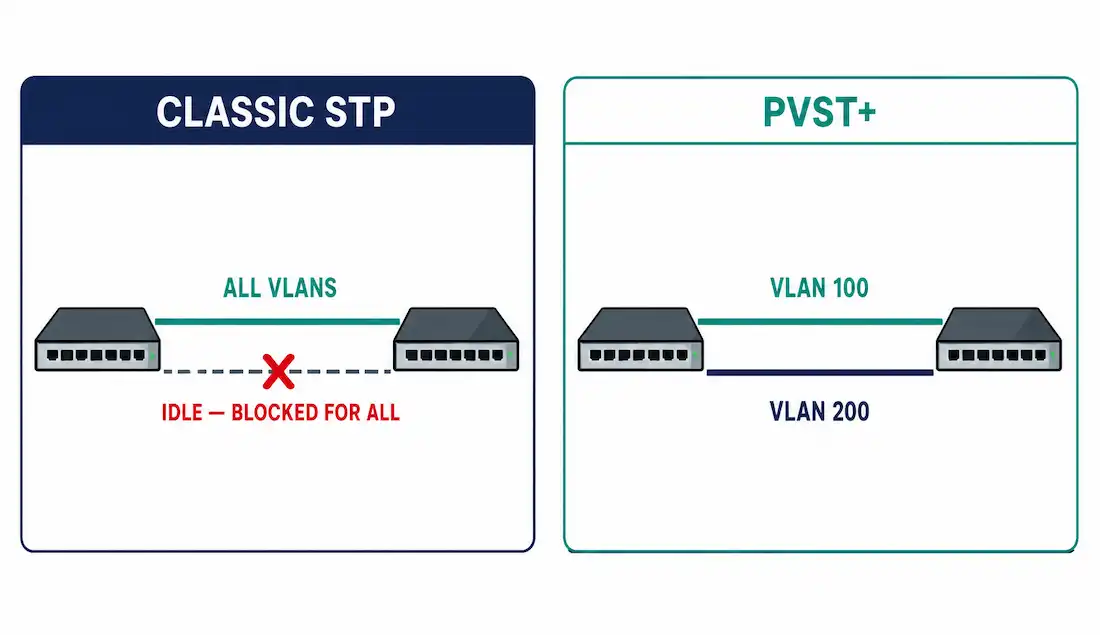
Classic STP runs one spanning tree for the entire switched network, no matter how many VLANs exist. That means every VLAN shares the same root bridge and the same blocked links — one uplink ends up carrying nothing while every other uplink carries everything, regardless of which VLANs actually need which paths. PVST+ (Per-VLAN Spanning Tree Plus) fixes this by giving every VLAN its own independent spanning tree instance, which is what actually makes VLAN-aware load balancing possible.
What PVST+ Actually Changes
PVST+ is Cisco’s enhancement of classic 802.1D, running a completely separate instance of the spanning tree algorithm for each VLAN. Because each instance elects its own root bridge independently, a single physical trunk port can be forwarding for one VLAN while simultaneously blocking for another — something classic STP’s single shared instance can never do.
This is the entire point of PVST+: with different VLANs able to elect different root bridges, traffic for different VLANs can be deliberately routed across different physical uplinks, using both redundant paths instead of leaving one permanently idle.
The cost is resource overhead. Every VLAN instance sends its own BPDUs and runs its own election independently, so CPU load and BPDU traffic both scale with VLAN count — a network with 100 VLANs runs 100 separate spanning tree computations instead of classic STP’s one.
PVST+ vs. CST vs. RPVST+
| Feature | CST (802.1D) | PVST+ (Cisco) | Rapid PVST+ (Cisco) |
|---|---|---|---|
| STP Instances | 1 for all VLANs | 1 per VLAN | 1 per VLAN, RSTP-based |
| Load Balancing | No | Yes | Yes |
| Convergence Time | 30-50 seconds | 30-50 seconds | 3-6 seconds, often sub-second on point-to-point links |
| BPDU Overhead | Low | High (per VLAN) | High but optimized |
| Historical Default | N/A | Older Cisco IOS releases | Current default on modern Cisco platforms |
| Interoperability | Full | Requires ISL, or 802.1Q with Cisco’s PVST+ tunneling | Full 802.1w support |
| Best For | Small, flat networks | Medium VLAN counts on older gear | Recommended for virtually all current deployments |
Rapid PVST+ combines PVST+’s per-VLAN load balancing with RSTP’s fast, handshake-based convergence, covered in full in the types of Spanning Tree article — it’s the practical successor to plain PVST+ in nearly every modern deployment, and the only reason to stay on plain PVST+ today is a specific legacy interoperability requirement.
PVST+ Port States
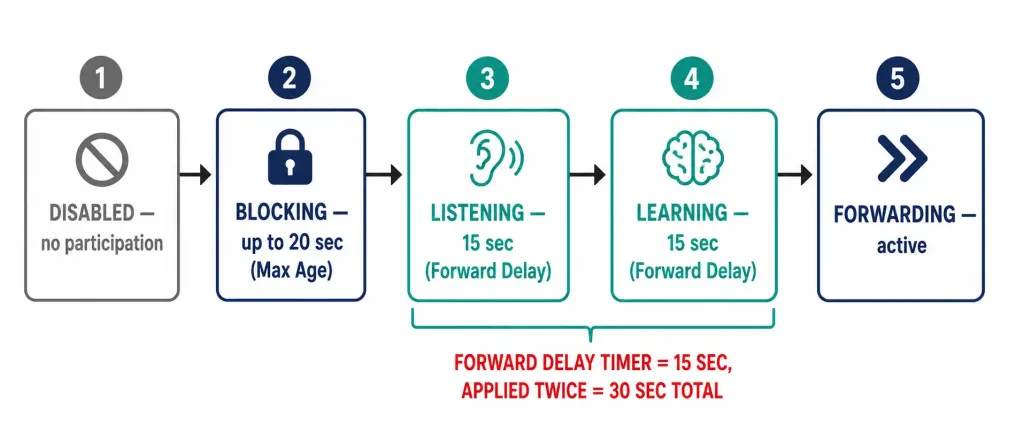
Just like classic STP, every PVST+ port instance transitions through a defined set of states before it can forward traffic, using the same timers established in the core STP article — but here, this happens independently, per VLAN, on every trunk port.
Blocking
The port receives BPDUs to help determine the root bridge, path cost, and port roles, but neither sends nor forwards user traffic. A port sits here by default until spanning tree determines it should move toward forwarding, bounded by the Max Age timer (20 seconds by default) for detecting a failed upstream neighbor.
Listening
The port stops purely receiving and starts actively participating: it sends its own BPDUs and processes received ones to help build the active topology, but still doesn’t forward user frames or learn MAC addresses. This state lasts for one Forward Delay interval — 15 seconds by default.
Learning
The port begins populating its MAC address table from frames it receives, but still doesn’t forward those frames onward. This state also lasts one Forward Delay interval — another 15 seconds.
Forwarding
The port sends and receives traffic normally. This is the only state where user data actually moves through the port.
Disabled
The port is administratively shut down. It doesn’t participate in spanning tree at all — no BPDUs sent or received, no role assigned.
Summary of PVST+ Port States
| State | Duration | Behavior |
|---|---|---|
| Disabled | — | Administratively down; no STP participation |
| Blocking | Up to 20 sec (Max Age) | Receives BPDUs only; no forwarding or learning |
| Listening | 15 sec (one Forward Delay) | Builds topology awareness; no forwarding or learning |
| Learning | 15 sec (one Forward Delay) | Builds MAC table; no forwarding |
| Forwarding | — | Normal operation |
A note on the Forward Delay timer specifically, since it’s easy to get backward: the Forward Delay parameter itself defaults to 15 seconds, and it’s applied twice in sequence — once for Listening, once for Learning — which is why the combined Listening-plus-Learning elapsed time totals 30 seconds. If you configure spanning-tree vlan [id] forward-time [value], that value sets the 15-second figure, not 30. Confusing the two can lead to doubling convergence delay by accident when tuning timers.
How PVST+ Builds Each VLAN’s Tree
PVST+ runs the same four-step process as classic STP, just once independently per VLAN:
- Elect one root bridge per VLAN. Same criteria as classic STP: the switch with the lowest Bridge ID for that specific VLAN becomes root for that VLAN. Every port on that root bridge becomes a designated port for that VLAN’s instance.
- Select the root port on each non-root switch. Based on lowest cumulative path cost to that VLAN’s root bridge, exactly as covered in the path cost article — except the calculation runs separately for every VLAN, potentially producing a different root port per VLAN on the same physical switch.
- Select the designated port on each segment. The switch with the lowest cost to that VLAN’s root wins the designated role for that segment, for that VLAN.
- Everything else blocks. Any port that’s neither root nor designated for a given VLAN blocks that VLAN’s traffic specifically — while the same physical port might simultaneously be forwarding for a different VLAN entirely.
Worked Example: Load Balancing Two VLANs Across Two Uplinks
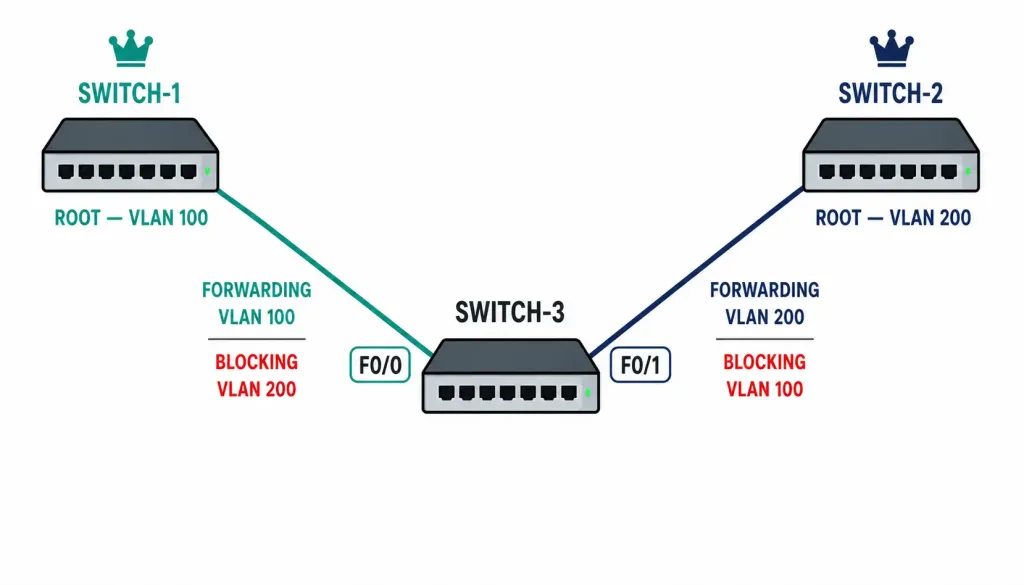
Consider three switches: Switch-1 and Switch-2 both connect via trunk to Switch-3, carrying VLAN 100 and VLAN 200. Without PVST+, one of those two trunk links would sit completely idle for all traffic, regardless of VLAN. With PVST+, configure Switch-1 as root for VLAN 100 and Switch-2 as root for VLAN 200:
Switch-1(config)# spanning-tree vlan 100 priority 4096
Switch-2(config)# spanning-tree vlan 200 priority 4096
Now Switch-3 runs two independent elections on its two trunk ports:
- For VLAN 100: Switch-1 is root. Switch-3’s port toward Switch-1 (F0/0) becomes its root port for VLAN 100 and forwards. Switch-3’s port toward Switch-2 (F0/1) has no useful path to VLAN 100’s root through it, so it blocks VLAN 100 traffic specifically.
- For VLAN 200: Switch-2 is root. Switch-3’s port toward Switch-2 (F0/1) becomes its root port for VLAN 200 and forwards. Switch-3’s port toward Switch-1 (F0/0) blocks VLAN 200 traffic specifically.
The result: F0/0 forwards VLAN 100 and blocks VLAN 200. F0/1 forwards VLAN 200 and blocks VLAN 100. Both physical uplinks are now actively carrying traffic — just for different VLANs — instead of one uplink sitting entirely idle the way it would under classic STP’s single shared instance.
Verifying PVST+ Operation
Switch# show spanning-treeShows port roles and states across every VLAN instance running on the switch.
Switch# show spanning-tree vlan 100Narrows the output to a specific VLAN’s instance — root ID, local Bridge ID, root port, and per-port cost and role for that VLAN only.
Switch# show spanning-tree summaryConfirms the active spanning tree mode (PVST+, Rapid PVST+, or MST) and gives a per-VLAN instance count overview, useful for confirming a switch is actually running the mode you expect before troubleshooting further.
Common PVST+ Pitfalls
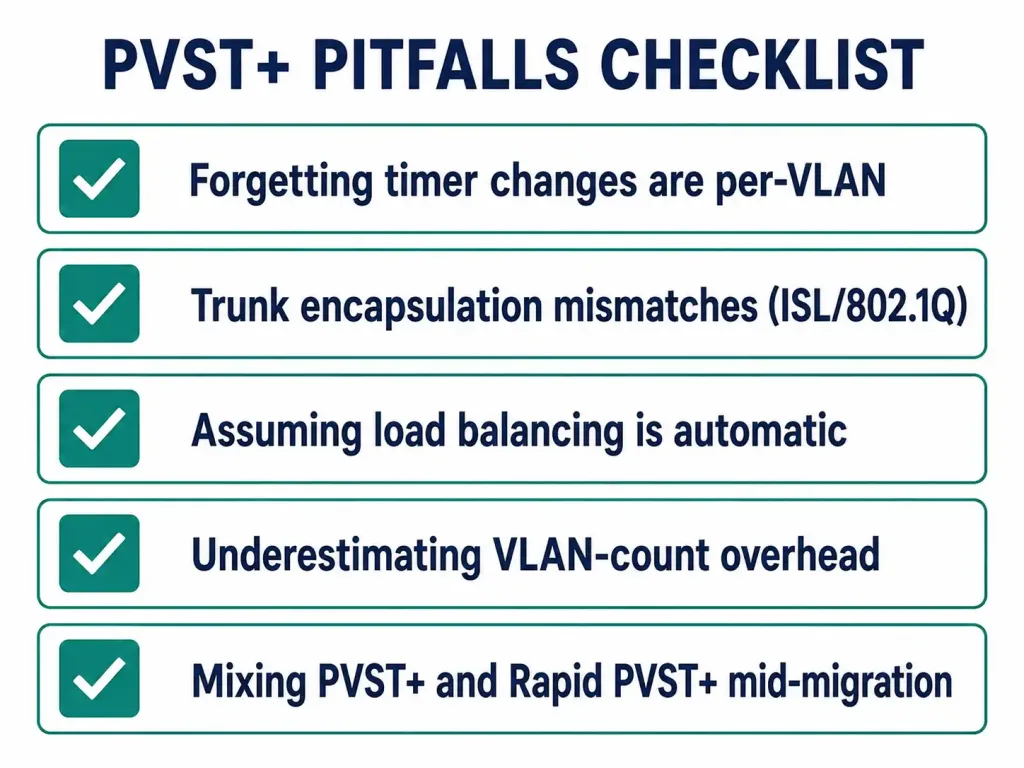
- Forgetting that timer changes are per-VLAN. Since each VLAN runs its own instance,
spanning-tree vlan [id] forward-time [value]only affects that specific VLAN’s timers — a common source of confusion when an administrator expects a global change from a per-VLAN command. - Trunk encapsulation mismatches. PVST+ historically relied on Cisco’s ISL trunking to carry per-VLAN BPDU information; running it over 802.1Q trunks requires Cisco’s PVST+ tunneling mechanism, and mismatched encapsulation between switches breaks per-VLAN BPDU exchange silently.
- Treating “load balancing” as automatic. PVST+ only load-balances if root priorities are deliberately set differently per VLAN. Left at default priority everywhere, every VLAN’s instance elects the same root bridge by the same MAC-address tiebreaker, producing the exact same single-path behavior classic STP would.
- Underestimating VLAN-count overhead. BPDU volume and CPU load scale directly with VLAN count under PVST+. Networks growing past a few dozen VLANs are usually better served migrating to Rapid PVST+ or MSTP rather than continuing to add PVST+ instances.
- Mixing PVST+ and Rapid PVST+ during a migration. Cisco allows only one spanning tree mode active per switch at a time — you can’t run PVST+ on some VLANs and Rapid PVST+ on others on the same device. Migrating requires switching the whole device’s mode at once, which briefly triggers a full reconvergence across every VLAN, so plan the cutover for a maintenance window rather than doing it live.
Frequently Asked Questions
What is the primary advantage of PVST+ over classic STP (CST)?
PVST+ runs a separate spanning tree instance per VLAN instead of one instance for the entire network, which lets different VLANs use different physical paths and actually load-balance traffic across redundant uplinks. Classic STP’s single shared instance forces every VLAN onto the same tree, leaving redundant links completely idle for all traffic.
What are the five PVST+ port states?
Disabled (administratively down, no participation), Blocking (receives BPDUs only, bounded by the 20-second Max Age timer), Listening (15 seconds, builds topology awareness), Learning (15 seconds, builds the MAC table), and Forwarding (normal operation). A port that jumped straight from Blocking to Forwarding without passing through Listening and Learning could momentarily create a loop, which is exactly why those intermediate states exist.
How does PVST+ elect a root bridge and assign port roles?
Per VLAN, PVST+ elects the switch with the lowest Bridge ID as that VLAN’s root, and every port on that root bridge becomes designated for that VLAN. Non-root switches select a root port based on lowest cumulative path cost, and each segment elects one designated port the same way. Every other port blocks that VLAN’s traffic specifically — a port can be blocking for one VLAN while forwarding for another on the exact same physical interface.
What commands verify PVST+ operation on a Cisco switch?
show spanning-tree shows roles and states across all VLAN instances at once. show spanning-tree vlan [id] narrows to a single VLAN’s root ID, local Bridge ID, and port details. show spanning-tree summary confirms which mode (PVST+, Rapid PVST+, or MST) is actually active before troubleshooting anything more specific.
Why does PVST+ use more resources than classic STP in large networks?
Every VLAN under PVST+ runs its own complete spanning tree computation and sends its own BPDUs — 100 VLANs means 100 separate elections and 100 times the per-instance BPDU traffic, compared to classic STP’s single shared instance. This is a real, scaling cost, which is why migrating to Rapid PVST+ or MSTP becomes worthwhile once VLAN count grows large enough for that overhead to matter.
Is the Forward Delay timer 15 seconds or 30 seconds?
The Forward Delay parameter itself defaults to 15 seconds, and Cisco’s forward-time command configures that same 15-second value. It gets applied twice in a row — once during Listening, once during Learning — so the combined elapsed time across both states adds up to 30 seconds, but the timer’s actual configured value is 15, not 30.



