
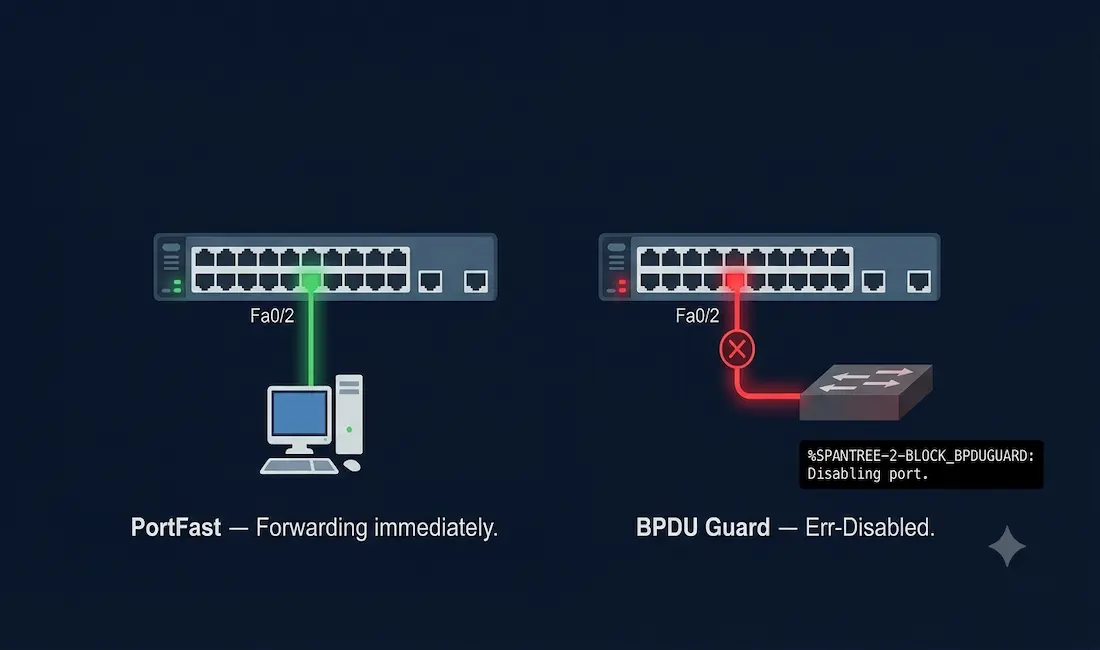
This guide covers PortFast and BPDU Guard configuration for CCNA (200-301) and CCNP (ENARSI) exams, including hands-on labs, best practices, and how these features interact with RSTP.
The switch port directly connected to an end station cannot create a bridging loop, so the port can safely skip straight to the forwarding state rather than progressing through the normal listening and learning states. PortFast is a Cisco proprietary solution that allows the switch port to skip listening and learning entirely, immediately entering the forwarding state. It works across PVST+, RSTP, and MSTP environments.
Using PortFast on access ports allows attached devices to connect to the network immediately, rather than waiting for 802.1D STP to converge on each VLAN. Access ports are typically connected to a single workstation or server, and a PortFast-enabled interface does not generate a topology change notification, since the switch trusts that no loop-capable device is on the other end.
PortFast
When to Use PortFast: Best Practices
- Use on end-user PCs and servers only, never on trunk links or inter-switch connections, where it genuinely risks creating loops.
- Test convergence time with
show spanning-treeto confirm the expected behavior. - Always pair PortFast with BPDU Guard: this prevents accidental loops from misconnected devices, providing network stability without requiring manual intervention every time.
Why PortFast Requires BPDU Guard
In a PortFast configuration, the port should never receive a BPDU, since receiving one indicates another bridge or switch is connected where only an end device was expected. Receiving BPDUs on a PortFast port can lead to a spanning tree loop if left unmanaged, since the port has already skipped the normal loop-detection delay. BPDU Guard, a Cisco-proprietary feature, closes this gap by immediately placing the port into an error-disabled state the moment a BPDU is received.
PortFast and DHCP
PortFast has a direct, practical effect on Dynamic Host Configuration Protocol (DHCP) behavior. Without PortFast, a host can send its DHCP request before the port has actually reached the forwarding state, causing the request to be dropped and the host to fail to receive an IP address. With PortFast enabled, the port transitions to forwarding immediately, and the DHCP exchange succeeds without delay. This matters directly in CCNA labs, where classic STP’s 30-50 second convergence delay is more than enough to cause a DHCP timeout and fail a topology test. In production environments, PortFast should be combined with DHCP Snooping for security, discussed further below.
Configuring PortFast and BPDU Guard
Enable PortFast on a single access port with spanning-tree portfast in interface configuration mode. To configure PortFast globally on every non-trunking interface, use spanning-tree portfast default in global configuration mode.
Configuration Example
Switch-3> enable
Switch-3# configure terminal
Switch-3(config)# interface fastEthernet0/2
Switch-3(config-if)# spanning-tree portfast
Switch-3(config-if)# spanning-tree bpduguard enable
Switch-3(config-if)# exit
Switch-3(config)# exit
Switch-3# write memory
To enable BPDU Guard on a single port, use spanning-tree bpduguard enable in interface configuration mode. To enable it globally on every PortFast-configured port at once, use spanning-tree portfast bpduguard default in global configuration mode, this global command applies specifically to ports that already have PortFast enabled, not to every interface on the switch, which makes it the safer, more selective choice for CCNP-level designs where trunk ports should never have PortFast or BPDU Guard applied.
BPDU Guard in Action: What Happens on Violation?
If a rogue switch connects to a PortFast-enabled port, BPDU Guard detects the incoming BPDU and immediately err-disables the port to prevent a loop:
- Log entry:
%SPANTREE-2-BLOCK_BPDUGUARD: Received BPDU on port Fa0/2 with BPDU Guard enabled. Disabling port.- Port status:
show interfaces statusshows the port as err-disabled. - Manual recovery:
  Switch-3(config)# interface Fa0/2
  Switch-3(config-if)# shutdown
Switch-3(config-if)# no shutdown- Automatic recovery (recommended for production):
  Switch-3(config)# errdisable recovery cause bpduguard
  Switch-3(config)# errdisable recovery interval 300
Verify PortFast and BPDU Guard configuration with show running-config, check per-interface status with show spanning-tree interface FastEthernet0/2, and identify which specific guard feature triggered an err-disable state with show interfaces status err-disabled. Both PortFast and BPDU Guard are disabled by default on all interfaces.
Security Implications of PortFast and BPDU Guard
While PortFast speeds up connectivity, it introduces real risk if misconfigured: connecting a switch (rather than an end device) to a PortFast-enabled access port can trigger broadcast storms or a denial-of-service condition through an accidental loop. BPDU Guard mitigates this specific risk by isolating the violation immediately, but it should be paired with broader security features for full CCNA-level robustness:
- Port Security: limit the number of MAC addresses allowed on an access port, for example
switchport port-security maximum 1. - DHCP Snooping: prevents rogue DHCP servers from exploiting the fast-forwarding behavior PortFast provides.
- BPDU Guard on trunks vs. access ports: enable BPDU Guard on access ports only; for trunk ports, use Root Guard instead to protect specifically against unexpected superior BPDUs from an unauthorized device attempting to become the new root bridge.
Hands-On CCNA Lab: Configuring and Testing PortFast and BPDU Guard
Estimated duration: 30-45 minutes in Packet Tracer.
Lab Topology
- Three Cisco 2960 switches: Switch-1 (root), Switch-2 and Switch-3 (access layer)
- A PC connected to Switch-3’s Fa0/2 (VLAN 10)
- A rogue switch, used later to simulate a BPDU Guard violation
- Switch-1 Fa0/1 connects to Switch-2 Fa0/1; Switch-1 Fa0/2 connects to Switch-3 Fa0/1
Step 1: Basic STP Setup (All Switches)
Switch> enable
Switch# configure terminal
Switch(config)# vlan 10
Switch(config-vlan)# exit
Switch(config)# interface range fastEthernet0/1 - 24
Switch(config-if-range)# switchport mode access
Switch(config-if-range)# switchport access vlan 10
Switch(config-if-range)# exit
Switch(config)# spanning-tree mode pvst
Switch(config)# end
Switch# write memory
Verify the root bridge on each switch with show spanning-tree.
Step 2: Enable PortFast and BPDU Guard (Switch-3, PC Port)
Switch-3> enable
Switch-3# configure terminal
Switch-3(config)# interface fastEthernet0/2
Switch-3(config-if)# switchport mode access
Switch-3(config-if)# switchport access vlan 10
Switch-3(config-if)# spanning-tree portfast
Switch-3(config-if)# spanning-tree bpduguard enable
Switch-3(config-if)# exit
Switch-3(config)# end
Switch-3# write memory
Optionally, apply both features globally instead: spanning-tree portfast default and spanning-tree portfast bpduguard default.
Step 3: Test DHCP and Convergence
Power on the PC and ping the gateway; the connection should succeed within a few seconds, compared to up to 30-50 seconds without PortFast enabled. Use debug spanning-tree events to confirm the port transitions immediately to forwarding.
Step 4: Simulate a Violation
Connect the rogue switch to Fa0/2. Observe the port entering err-disabled state, with the corresponding BPDU block message in the logs. Verify with show interfaces Fa0/2 (status will show err-disabled), then recover manually:
Switch-3(config)# interface Fa0/2
Switch-3(config-if)# shutdown
Switch-3(config-if)# no shutdown
Expected Outputs
show spanning-tree interface Fa0/2 should show “VLAN0010 … Portfast enabled.” If issues arise, check show logging for the specific BPDU Guard violation event.
CCNA Exam Pointers
- PortFast skips STP’s listening and learning states, moving an access port directly to forwarding
- Use PortFast only on access ports to end devices; never on trunk or inter-switch links
- BPDU Guard err-disables a PortFast port immediately upon receiving any BPDU
spanning-tree portfast/spanning-tree bpduguard enable— per-interface commandsspanning-tree portfast default/spanning-tree portfast bpduguard default— global commands; the BPDU Guard global command applies only to PortFast-enabled ports, not every interface- Both PortFast and BPDU Guard are disabled by default
- BPDU Guard protects access ports; Root Guard protects trunk ports against unexpected superior BPDUs, know the distinction
- Without PortFast, classic STP’s 30-50 second convergence delay can cause DHCP requests to time out
errdisable recovery cause bpduguard+errdisable recovery interval [seconds]— automatic recovery, preferred over manualshutdown/no shutdownin production
Conclusion
PortFast and BPDU Guard work together as a matched pair: PortFast eliminates unnecessary delay for legitimate end-device connections, while BPDU Guard closes the safety gap that speed creates, immediately shutting down the port if anything other than an end device turns up on the other end. Understanding exactly when to apply each, access ports only, paired together, never on trunks, and knowing the distinct role of Root Guard on trunk links, is foundational CCNA knowledge with direct, everyday relevance in real switch deployments.
FAQs
What is the difference between PortFast and BPDU Guard in Cisco STP?
PortFast skips the STP listening and learning states on access ports, allowing faster connectivity for end devices. BPDU Guard is a separate, complementary security feature that immediately err-disables a PortFast-enabled port if it receives a BPDU, protecting against the loop risk that PortFast’s skipped states would otherwise create. Best practice is to always enable both together on access ports.
What is PortFast and how does it work in Cisco STP?
PortFast is a Cisco feature that allows access ports connected to end stations to skip the STP listening and learning states, moving immediately to the forwarding state instead. It’s designed for workstations and servers in PVST+, RSTP, or MSTP environments, eliminating the connectivity delay STP would otherwise impose, but it requires BPDU Guard as a companion feature to remain safe against accidental or malicious misconnection.
Why enable BPDU Guard with PortFast on Cisco switches?
BPDU Guard protects PortFast-enabled ports by immediately err-disabling them if a BPDU is received, which indicates a switch or bridge has been connected where only an end device was expected. Since PortFast has already skipped the normal loop-detection delay, BPDU Guard is the safety mechanism that catches this specific scenario. It can be enabled per-port or globally across all PortFast-enabled ports with spanning-tree portfast bpduguard default.
How does PortFast impact DHCP in CCNA labs?
Without PortFast, classic STP’s convergence delay, typically 30 to 50 seconds, can cause a host’s initial DHCP request to time out before the port even reaches the forwarding state, blocking IP address assignment entirely. Enabling PortFast moves the port to forwarding immediately, allowing the DHCP exchange to complete quickly. In production networks, PortFast should be paired with DHCP Snooping to prevent this same fast-forwarding behavior from being exploited by a rogue DHCP server.
What commands configure PortFast and BPDU Guard per port?
Use spanning-tree portfast in interface configuration mode to enable PortFast, and spanning-tree bpduguard enable for BPDU Guard on that same interface. Verify the configuration with show running-config. For global deployment across all non-trunking interfaces, use spanning-tree portfast default and spanning-tree portfast bpduguard default; both features are disabled by default on Cisco IOS.
How do I verify PortFast and BPDU Guard on a Cisco switch?
Run show running-config to confirm the commands are applied under the relevant interfaces. Check per-interface PortFast status with show spanning-tree interface fa0/2, looking for “Portfast enabled” in the output. Monitor for BPDU Guard violations with show interfaces status err-disabled, which identifies any port currently shut down due to a triggered guard feature.



