
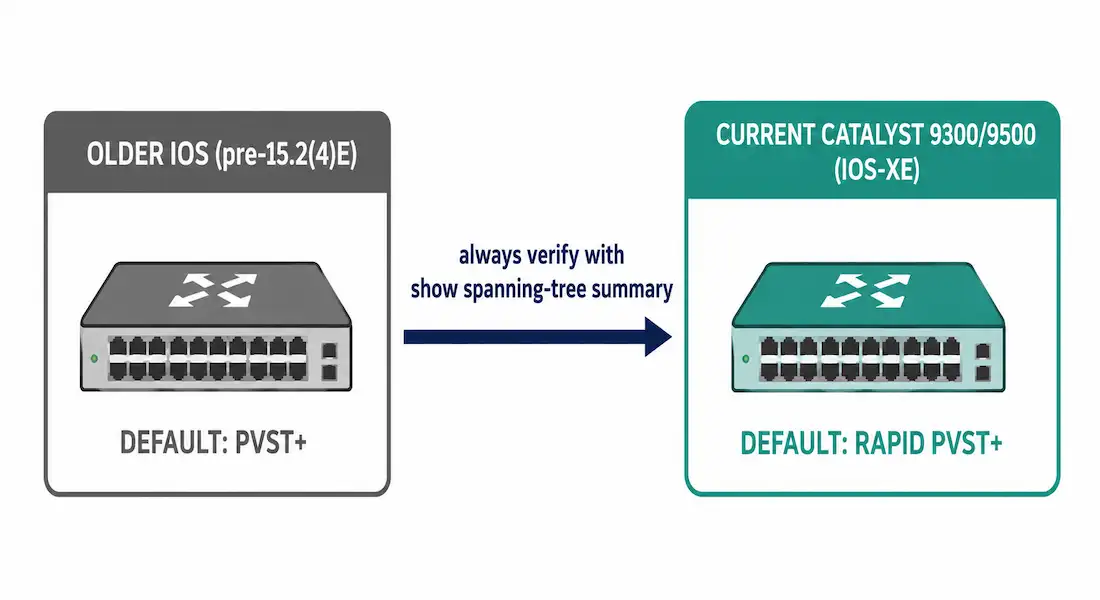
Rapid Per-VLAN Spanning Tree Plus (Rapid PVST+) is Cisco’s per-VLAN implementation of RSTP, and it’s the default spanning tree mode on current Cisco Catalyst hardware, including the 9300 and 9500 series running IOS-XE. This guide walks through configuration, verification, and troubleshooting on Cisco Catalyst switches — whether simulating in Packet Tracer or deploying in production.
Catalyst switches support PVST+, Rapid PVST+, and MST, but only one mode can be active for all VLANs at a time. Rapid PVST+ runs RSTP independently per VLAN, combining PVST+’s VLAN-level load balancing with RSTP’s fast, handshake-based convergence — covered in full comparison here.
Rapid PVST+ Fundamentals
Classic STP (IEEE 802.1D) prevents loops but converges slowly — typically 30 to 50 seconds — because of the fixed listening and learning delays covered in the core STP article. RSTP (IEEE 802.1w) replaces that fixed-timer approach with an active proposal/agreement handshake between neighbors, cutting typical convergence to 3-6 seconds, often sub-second on point-to-point links, using defined port roles — root, designated, alternate, and backup — instead of a single passive blocking role.
Rapid PVST+ builds directly on this by running that RSTP logic as a separate instance per VLAN, rather than one shared instance for the whole network. This means:
- Fast, per-VLAN failover. Each VLAN’s instance converges independently in the same 3-6 second range RSTP achieves.
- VLAN-aware load balancing, inherited directly from PVST+ — different VLANs can use different physical uplinks.
- Backward compatibility with legacy PVST+ neighbors through BPDU translation, allowing a phased migration rather than an all-or-nothing cutover.
- A real scaling ceiling. Every additional VLAN is another full spanning tree instance and another set of BPDUs; Cisco generally recommends moving to MSTP once VLAN count grows large enough for this per-instance overhead to matter, covered in the types of STP article.
In CCNP-level designs, Rapid PVST+ is frequently deployed alongside first-hop redundancy protocols like HSRP for a complete Layer 2/3 resilience design.
PVST+ vs. Rapid PVST+ vs. MST
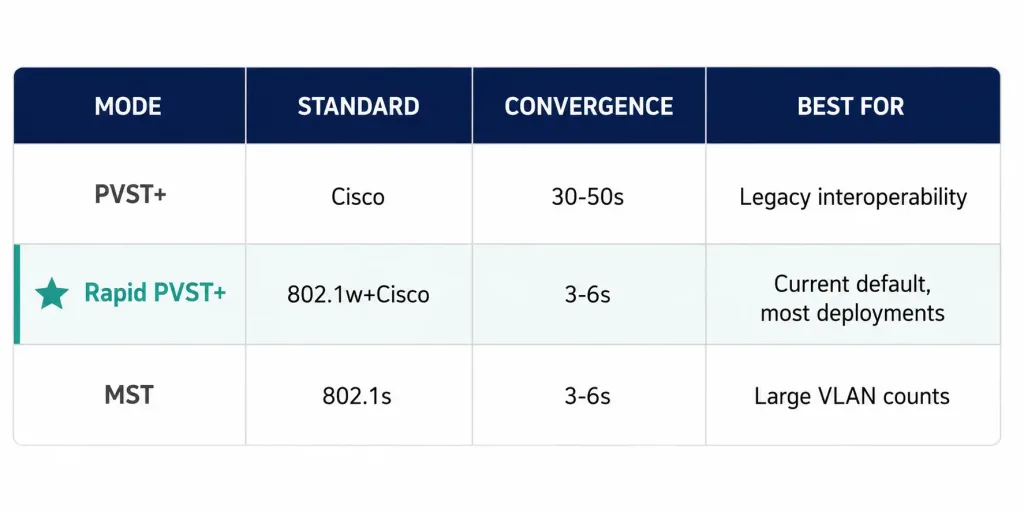
| STP Mode | Standard | Convergence Time | VLAN Support | Best For |
|---|---|---|---|---|
| PVST+ | Cisco proprietary | 30-50 seconds | Per-VLAN | Older Cisco networks, legacy interoperability |
| Rapid PVST+ | IEEE 802.1w + Cisco | 3-6 seconds, often sub-second on point-to-point links | Per-VLAN | Current default on modern Cisco Catalyst hardware |
| MSTP/MST | IEEE 802.1s | 3-6 seconds | Regions mapping many VLANs to few instances | Large-scale deployments with many VLANs |
Rapid PVST+ is the right default for the overwhelming majority of current deployments — and on modern Catalyst hardware, it already is the shipped default, so in most cases there’s nothing to change. MSTP’s regional grouping becomes the better-scaling choice once VLAN count grows large enough that per-VLAN instance overhead becomes a real CPU or BPDU-volume concern. Always verify the actual configured mode directly with show spanning-tree summary rather than assuming based on platform generation, since older platforms and earlier IOS releases did default to plain PVST+.
Configuring Spanning-Tree Mode
The command to set Rapid PVST+ explicitly is spanning-tree mode rapid-pvst, entered in global configuration mode. The same command switches between all three modes — PVST+, Rapid PVST+, and MST.
Step-by-Step Configuration
1. Enter global configuration mode:
Switch> enable
Switch# configure terminal
Switch(config)#
2. Set the mode explicitly (even if it’s already the default, this documents intent):
Switch(config)# spanning-tree mode rapid-pvstThis activates RSTP on a per-VLAN basis globally. No per-port changes are required — that’s the key operational difference from manually tuning classic PVST+ timers port by port.
3. Set root bridge priority deliberately, on your intended core switch:
Switch(config)# spanning-tree vlan 10 priority 4096
Switch(config)# spanning-tree vlan 20 priority 4096
Use multiples of 4096, as covered in the root bridge article — the lowest value wins the root election, with MAC address as the tiebreaker at equal priority.
4. Confirm trunk link type, if needed:
Cisco IOS correctly auto-detects full-duplex trunk links as point-to-point by default, so this rarely needs manual configuration. If a link is incorrectly detected, force it explicitly:
Switch(config-if)# spanning-tree link-type point-to-pointVerification Commands
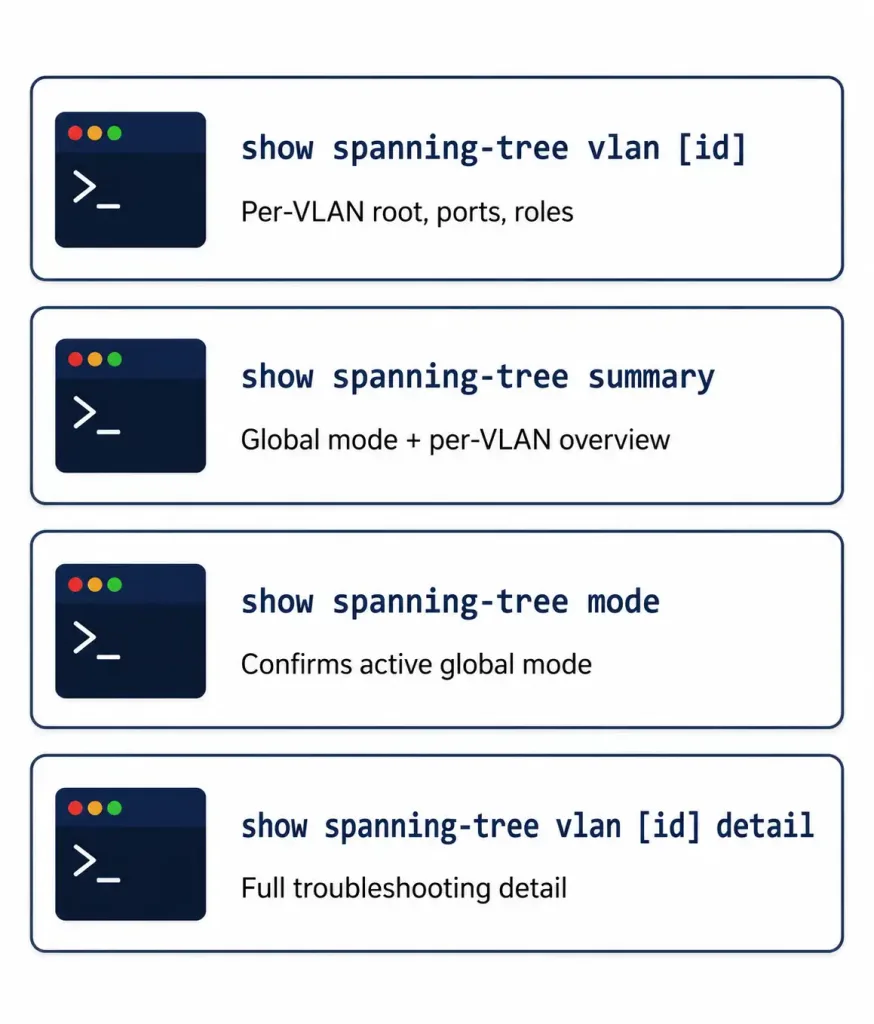
Switch# show spanning-tree vlan 10Sample output:
VLAN0010
  Spanning tree enabled protocol rstp
  Root ID    Priority    4096
             Address     0001.42A4.1234
             This bridge is the root
             Hello Time   2 sec  Max Age 20 sec  Forward Delay 15 sec

Interface           Role Sts Cost      Prio.Nbr Type
-------------------- ---- --- --------- -------- --------------------------------
Gi1/0/1              Desg FWD 4         128.1    P2p
Gi1/0/2              Altn BLK 4         128.2    P2p
The line “protocol rstp” confirms Rapid PVST+ is active for this VLAN. Both Gigabit interfaces correctly show a path cost of 4, matching the short-method cost table. Roles shown: Desg = Designated, Altn = Alternate; status: FWD = Forwarding, BLK = Blocking.
Switch# show spanning-tree summaryGives a compact, per-VLAN overview of root bridge status and confirms the active global mode without the full per-interface detail. On modern IOS-XE, this output also reports the state of two features worth knowing:
- PVST Simulation, which detects legacy PVST+ neighbors and warns if a Rapid PVST+ switch is connected to one without proper BPDU translation — it’s enabled by default but inactive while the switch itself is running in rapid-pvst mode.
- Bridge Assurance, a Rapid PVST+/MST-only feature (not supported under plain PVST+) that continuously verifies bidirectional BPDU exchange on point-to-point links, catching a unidirectional link failure faster than Loop Guard alone would.
Switch# show spanning-tree modeConfirms the currently configured global mode directly — the fastest single command to check before troubleshooting anything else.
Hands-On Lab: Three-Switch Topology
Build this topology for practice: three switches (SW1 as root, SW2 and SW3 as access/distribution), VLAN 10 (Sales) and VLAN 20 (Engineering), with redundant trunks between SW1-SW2 and SW1-SW3.
Create VLANs and trunks (all switches):
SW1> enable
SW1# configure terminal
SW1(config)# vlan 10
SW1(config-vlan)# name Sales
SW1(config-vlan)# exit
SW1(config)# vlan 20
SW1(config-vlan)# name Engineering
SW1(config-vlan)# exit
SW1(config)# interface range gigabitEthernet1/0/1 - 2
SW1(config-if-range)# switchport mode trunk
SW1(config-if-range)# switchport trunk allowed vlan 10,20
SW1(config-if-range)# exit
SW1(config)# end
SW1# write memory
Enable Rapid PVST+ and set the root (SW1 only):
SW1(config)# spanning-tree mode rapid-pvst
SW1(config)# spanning-tree vlan 10,20 root primary
Enable on the other switches:
SW2(config)# spanning-tree mode rapid-pvst
SW3(config)# spanning-tree mode rapid-pvst
Test convergence: shut, then no-shut, a trunk (for example, SW1’s Gi1/0/2), and monitor with show spanning-tree vlan 10. Expect failover in the low single-digit seconds — dramatically faster than classic STP’s 30-50 second range.
Best Practices for Production Networks
- Enable BPDU Guard on access ports:
spanning-tree bpduguard defaultautomatically shuts down a port that unexpectedly receives a BPDU, protecting against accidental switching loops or rogue devices. - Use PortFast on edge ports:
spanning-tree portfast defaultskips the listening/learning delay for ports connecting only to end hosts, and should always be paired with BPDU Guard. - Enable Bridge Assurance on inter-switch links where both ends support it, for continuous bidirectional BPDU verification beyond what Loop Guard alone provides.
Troubleshooting Rapid PVST+
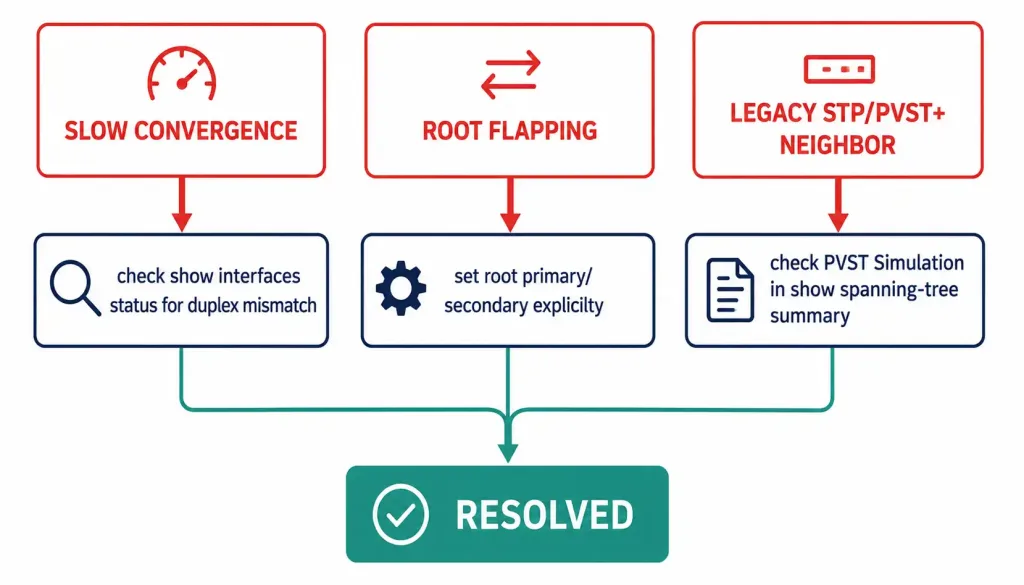
Slow convergence (failover taking longer than expected): verify link type with show spanning-tree vlan [id] detail, and check for duplex mismatches with show interfaces status — a half-duplex link won’t be correctly treated as point-to-point, silently falling back to slower convergence behavior.
Root bridge flapping (repeated root election churn in logs): set explicit static priorities on your intended root and backup root switches rather than leaving every switch at default, using spanning-tree vlan [id] root primary / root secondary for a predictable outcome.
Incompatible ports with legacy STP or PVST+: when interoperating with switches still running classic 802.1D or plain PVST+, confirm BPDU translation is functioning and check show spanning-tree summary for PVST Simulation warnings, which flag exactly this kind of mismatch.
Sample log message: %SPANTREE-2-ROOTGUARD_BLOCK: Root guard blocking port Gi1/0/1 on VLAN0010 indicates Root Guard has blocked a port because it received a superior BPDU from an unexpected direction — typically a misconfiguration or an attempted rogue root bridge injection, covered in the root bridge article.
Exam and lab tip: debug spanning-tree events shows real-time STP events for deep troubleshooting, but should be used sparingly on a production or heavily-loaded switch, and always followed by undebug all once finished.
CCNA Exam Pointers
- Rapid PVST+ is Cisco’s per-VLAN implementation of RSTP (802.1w); only one STP mode can be active per switch at a time
- Convergence: classic STP 30-50s; RSTP/Rapid PVST+ 3-6s, often sub-second on point-to-point links
- Rapid PVST+ is the default mode on current Cisco Catalyst hardware — always confirm with
show spanning-tree summaryrather than assuming spanning-tree mode rapid-pvst— global command to set the mode explicitly; no per-port changes requiredspanning-tree vlan [id] priority [value](multiples of 4096) orroot primary/root secondary— deliberate root bridge controlshow spanning-tree vlan [id]for per-VLAN detail,show spanning-tree summaryfor a compact overview,show spanning-tree modeto confirm the global mode- BPDU Guard and PortFast should always be paired together on edge ports
- Bridge Assurance is a Rapid PVST+/MST-only feature, not available under plain PVST+
- Root Guard blocking a port (
ROOTGUARD_BLOCKin logs) signals an unexpected superior BPDU
Frequently Asked Questions
What is Rapid PVST+?
Rapid PVST+ is Cisco’s implementation of IEEE 802.1w RSTP, running a separate spanning tree instance per VLAN for faster convergence — typically 3-6 seconds, often sub-second on point-to-point links — compared to the 30-50 second convergence of classic STP. It’s the default spanning tree mode on current Cisco Catalyst hardware.
Is PVST+ or Rapid PVST+ the default on modern Catalyst switches?
Rapid PVST+ is the default on current Catalyst 9300, 9500, and similar IOS-XE platforms — Cisco’s own configuration documentation states this directly. Older platforms and earlier IOS releases did default to plain PVST+, so always verify the actual active mode on a specific device with show spanning-tree summary rather than assuming based on platform generation alone.
How do you configure Rapid PVST+ on a Cisco switch?
Enter global configuration mode and use spanning-tree mode rapid-pvst. To control root bridge placement, use spanning-tree vlan [id] priority [value] in multiples of 4096, or the simpler spanning-tree vlan [id] root primary. Verify with show spanning-tree vlan [id], and test in a lab before touching production.
Can Rapid PVST+ coexist with legacy PVST+ switches?
Yes, through BPDU translation, which allows a mixed environment during a phased migration. show spanning-tree summary reports PVST Simulation status, a feature that specifically watches for this kind of legacy-neighbor mismatch. For the best convergence speed network-wide, migrating every switch to Rapid PVST+ fully is still recommended over a permanently mixed deployment.
What is Bridge Assurance, and does PVST+ support it?
Bridge Assurance continuously verifies bidirectional BPDU exchange on point-to-point links, catching a unidirectional link failure faster than Loop Guard alone. It’s available under Rapid PVST+ and MST, but not under plain PVST+ — one more practical reason to run Rapid PVST+ rather than the legacy mode.
How do you troubleshoot unexpected root bridge changes in Rapid PVST+?
Use show spanning-tree vlan [id] detail to review current root bridge information and port states. If the root is flapping, the reliable fix is setting explicit static priorities on your intended root and backup root switches with root primary and root secondary, removing the ambiguity of leaving multiple switches at default priority.
Conclusion
Rapid PVST+ delivers dramatically faster convergence than classic STP by running RSTP independently per VLAN, and on current Cisco Catalyst hardware, it’s already the factory default rather than something you need to configure from scratch. Confirm the active mode with show spanning-tree summary, set root priority deliberately with root primary/root secondary, and pair BPDU Guard with PortFast on every edge port. Practice the lab above in Packet Tracer or GNS3 to build the hands-on familiarity both the CCNA exam and real deployments require.



