
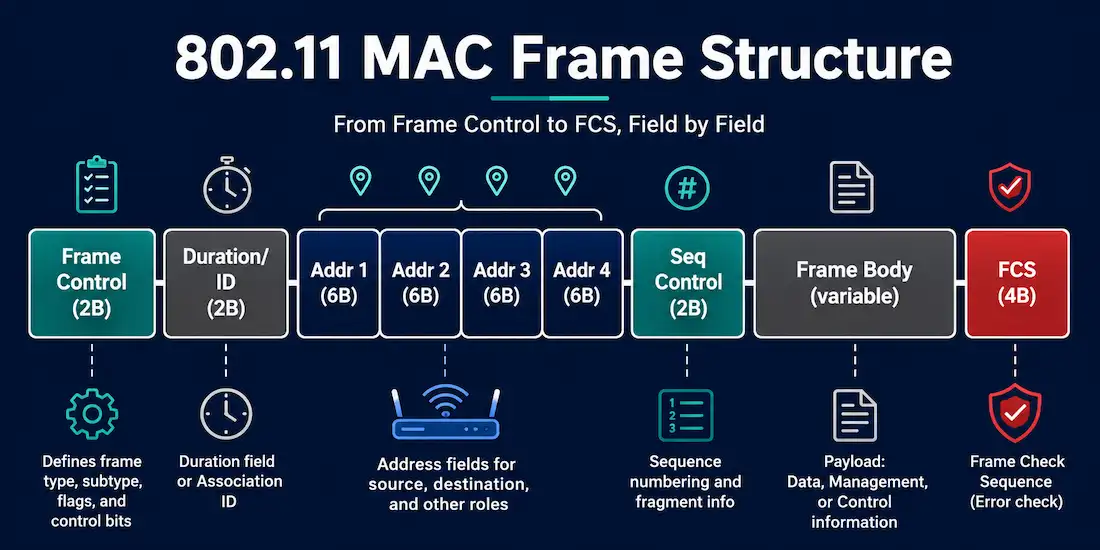
Every piece of data that travels over Wi-Fi is wrapped inside an 802.11 frame before it hits the air. Like any Layer 2 frame, an 802.11 frame consists of a header, a payload (frame body), and a Frame Check Sequence (FCS) for error detection. The 802.11 frame format is closely related to the Ethernet frame format, but it carries several additional fields that Ethernet doesn’t need — a direct consequence of managing a shared, unreliable wireless medium instead of a dedicated cable.
This guide breaks down each field in the 802.11 MAC header, what it does, and why wireless needed more overhead than wired Ethernet in the first place.
Frame Control (2 bytes)
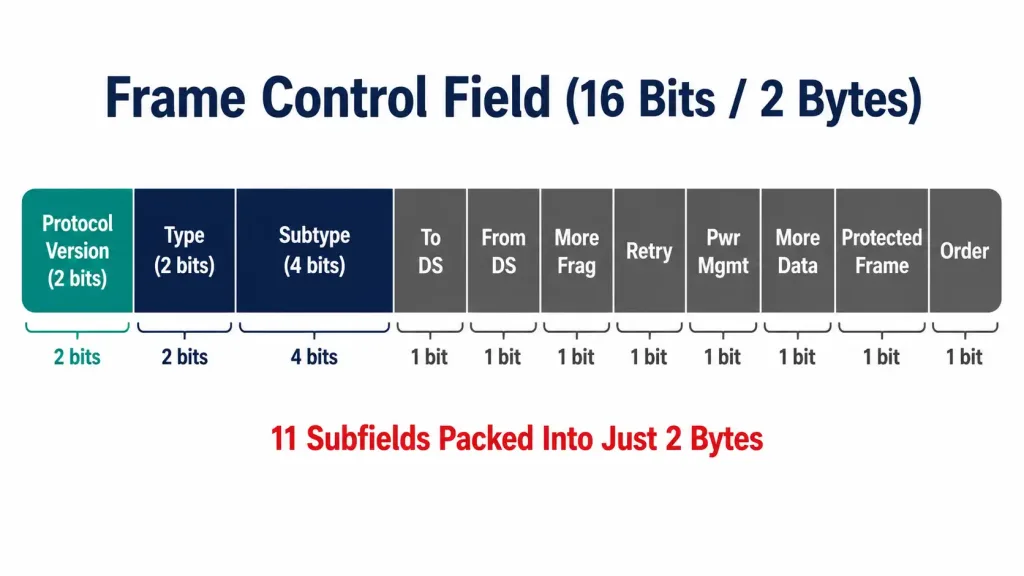
The Frame Control field opens every 802.11 frame and determines what kind of frame it is. It’s 2 bytes (16 bits) long and packs in eleven separate subfields:
- Protocol Version (2 bits) — currently always 0, reserved for future incompatible revisions of the standard.
- Type (2 bits) — identifies the frame as Management (00), Control (01), or Data (10).
- Subtype (4 bits) — narrows the frame down further within its type, such as Beacon, Association Request, RTS (Request to Send), or CTS (Clear to Send).
- To DS / From DS (1 bit each) — indicate whether the frame is headed toward the Distribution System (the wired backbone an AP connects to) or coming from it. These two bits together determine how the address fields below should be interpreted.
- More Fragments (1 bit) — set to 1 when additional fragments of a larger frame will follow.
- Retry (1 bit) — set to 1 when the frame is a retransmission of an earlier, unacknowledged frame.
- Power Management (1 bit) — indicates whether the sending station will enter power-save mode after this transmission.
- More Data (1 bit) — tells a station in power-save mode that the AP has additional buffered frames waiting for it.
- Protected Frame (1 bit) — set to 1 when the frame body is encrypted (WEP, TKIP, or CCMP/AES).
- Order (1 bit, sometimes shown as +HTC/Order) — indicates strict ordering is required, or signals the presence of an HT Control field on newer frames.
Duration/ID (2 bytes)
The Duration/ID field is 2 bytes long — not 4, a figure that circulates in some older material but doesn’t match the standard. It typically carries a duration value, in microseconds, that tells other stations how long the current transmission (and its expected acknowledgment) will occupy the medium. Every station that hears the frame updates its Network Allocation Vector (NAV) — an internal countdown timer — based on this value, and defers its own transmissions until the NAV expires. This is the core mechanism behind 802.11’s collision-avoidance behavior.
In certain frame subtypes, such as PS-Poll frames used during power-save operation, this field is repurposed to carry an Association ID (AID) instead of a duration value — hence the “/ID” in its name.
Address 1 through 4 (6 bytes each)
Each address field is 6 bytes long and holds a standard 48-bit IEEE 802 MAC address, exactly like the addresses used in Ethernet. What makes 802.11 different is that a frame can carry up to four address fields, where Ethernet only ever needs two.
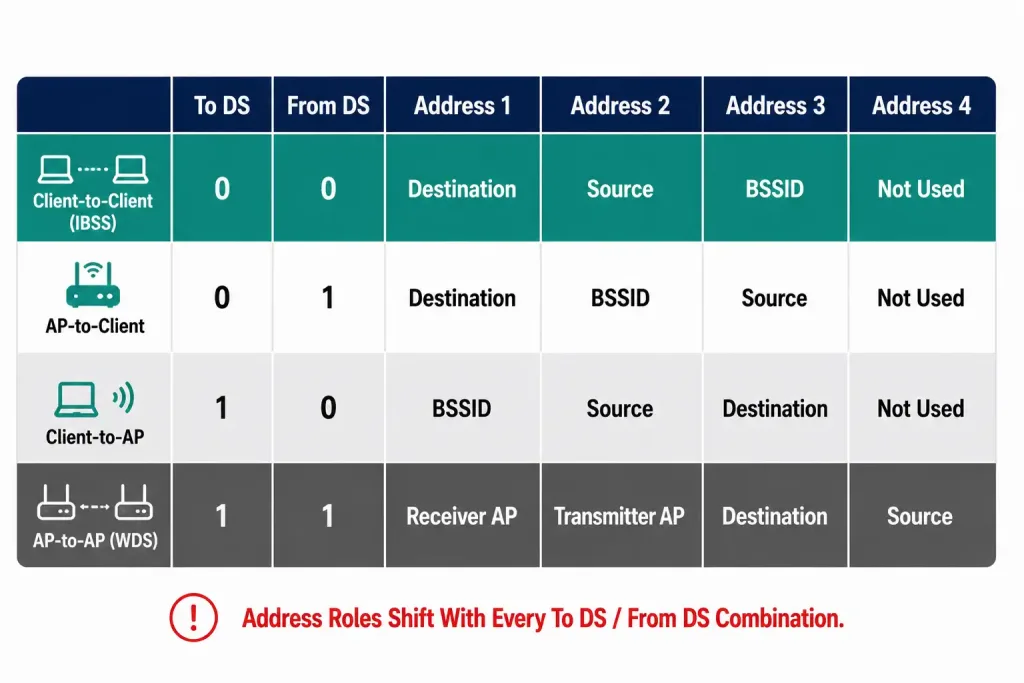
The meaning of each address field shifts depending on the To DS and From DS bits in Frame Control:
- Address 1 is always the immediate receiver — typically the destination station or the AP the frame is being handed to.
- Address 2 is always the immediate transmitter — the station or AP actually sending this frame over the air.
- Address 3 typically carries either the original source address or the final destination address, depending on the To DS/From DS combination — for example, the router interface the AP is bridging traffic toward.
- Address 4 is used only when both To DS and From DS are set to 1, which happens specifically in wireless distribution system (WDS) frames traveling AP-to-AP. It’s absent from the vast majority of ordinary client traffic.
This four-address design exists because a wireless frame often needs to describe more than just “who sent this” and “who should receive it” — it also needs to track the original source and final destination separately once an access point is bridging traffic between the wireless and wired sides of the network.
Sequence Control (2 bytes / 16 bits)
The Sequence Control field is 16 bits long and splits into two subfields: a 12-bit Sequence Number and a 4-bit Fragment Number. The Sequence Number increments with each new frame a station transmits, letting the receiver detect and discard duplicate frames — a real possibility on wireless links, where an acknowledgment can be lost even though the original frame was received successfully, prompting an unnecessary retransmission. The Fragment Number identifies each piece when a single frame has been split into multiple fragments for transmission, letting the receiver reassemble them in the correct order.
QoS Control (2 bytes, optional)
Added with the 802.11e amendment, the QoS Control field appears only in QoS data and QoS management frames. It carries a Traffic Identifier (TID) that maps the frame to one of several Access Categories used by Wi-Fi Multimedia (WMM) prioritization — voice and video traffic can be given priority over background data traffic, for example. This field is absent from frames that don’t need QoS handling, such as basic control frames.
HT Control (4 bytes, optional)
Introduced with 802.11n, the HT Control field is an optional 4-byte field that appears only when the Order bit in Frame Control is set on frames using High Throughput (HT) or later capabilities. It carries link adaptation and channel state information used to support features like MIMO feedback. Because it’s optional and frame-type dependent, a full 802.11 MAC header can range from as little as 10 bytes (in a minimal control frame like an ACK) up to 36 bytes when every optional field is present.
Frame Body and FCS
Following the MAC header, the Frame Body carries the actual payload — anything from a beacon’s network information to an encapsulated IP packet — and varies in length, with an unencrypted upper limit of 2,304 bytes before overhead from encryption or aggregation is added. The frame ends with a 4-byte Frame Check Sequence (FCS), a cyclic redundancy check (CRC) the receiver uses to detect transmission errors; a frame that fails its FCS check is silently discarded rather than passed up the stack.
[See Infographic: Full 802.11 Frame Layout, Header to FCS]
Reading 802.11 frames in a packet capture
Anyone working with tools like Wireshark to capture wireless traffic will encounter these fields directly, since Wireshark decodes and labels each one in its 802.11 dissector. A few practical notes for reading real captures:
- Frame Control appears as a collapsible tree in most capture tools, with each subfield broken out individually — useful for quickly confirming whether a frame is management, control, or data without manually decoding the raw hex.
- The Duration/ID value directly explains NAV behavior visible in a capture: a station that appears to “wait” before transmitting is very often just respecting the NAV value set by a Duration field it heard from another station’s frame.
- Retry-flagged frames are a useful health signal. A capture with a high proportion of frames showing the Retry bit set often points to RF interference, marginal signal strength, or channel congestion, since retries only happen when an expected acknowledgment doesn’t arrive.
- Address field roles flip depending on direction. When filtering a capture for traffic to or from a specific device, remember that the same MAC address might appear in Address 1 in one frame and Address 2 in the reply, since those roles are about immediate sender/receiver, not fixed source/destination.
Frame types beyond data frames
While this guide has focused on the general MAC header structure, it’s worth noting that the same header format underlies all three 802.11 frame categories, with some fields present or absent depending on type:
- Management frames (beacons, probe requests/responses, association and authentication frames) use the full address and sequence control fields but never carry a QoS Control field, since prioritization doesn’t apply to network management traffic.
- Control frames (RTS, CTS, ACK, Block Ack) are the leanest frame type, often omitting Sequence Control and using only one or two address fields, since their entire purpose is brief medium coordination rather than carrying data.
- Data frames carry the full header complexity described above, including QoS Control when WMM prioritization is in use, and are the only frame type that regularly carries a substantial Frame Body payload.
Why 802.11 needs more overhead than Ethernet
An Ethernet frame gets by with two 6-byte address fields because a switched wired network can rely on a stable point-to-point or switched topology. Wireless can’t make that assumption: frames need to identify up to four different roles (immediate sender, immediate receiver, original source, final destination) because an access point is constantly bridging traffic between the air and the wire, radio conditions mean frames get lost and retransmitted far more often than on copper, and stations regularly enter and exit power-saving states that the MAC header has to account for.
Every extra field in the 802.11 header — Duration/ID for collision avoidance, the extra address fields for AP bridging, Sequence Control for deduplication, Power Management for battery life — exists to solve a problem that simply doesn’t come up on a wired Ethernet segment.
Summary Table: 802.11 MAC Header Fields
| Field | Size | Always Present? | Purpose |
|---|---|---|---|
| Frame Control | 2 bytes | Yes | Identifies frame type/subtype and control flags |
| Duration/ID | 2 bytes | Yes | Sets NAV timer, or carries AID in PS-Poll frames |
| Address 1–4 | 6 bytes each | 1–3 always; 4th only in WDS frames | Immediate/original sender and receiver roles |
| Sequence Control | 2 bytes | In most frame types | Deduplication and fragment reassembly |
| QoS Control | 2 bytes | Only in QoS frames | Traffic prioritization (WMM) |
| HT Control | 4 bytes | Only when Order bit is set | Link adaptation, MIMO feedback |
| Frame Body | Variable | Not in all control frames | Actual payload |
| FCS | 4 bytes | Yes | Error detection (CRC) |
Frequently Asked Questions
How big is the Duration field in an 802.11 frame? 2 bytes (16 bits). This is a common point of confusion in some study material, but every current 802.11 reference — including CWAP certification material — confirms the field is 2 bytes, matching the size of Frame Control and Sequence Control.
Why does an 802.11 frame need four address fields when Ethernet only needs two? Because an access point routinely bridges traffic between the wireless and wired sides of a network, a frame sometimes needs to distinguish the immediate wireless sender/receiver from the original source and ultimate destination. The fourth address field is reserved for the rarer case of AP-to-AP wireless distribution system traffic.
What’s the difference between the Duration field and the Sequence Control field? Duration/ID tells other stations how long to defer transmission (medium reservation); Sequence Control identifies and orders individual frames and their fragments for deduplication and reassembly. They solve completely different problems despite both being 2-byte fields near the start of the header.
Do all 802.11 frames contain every field described here? No. Only Frame Control, Duration/ID, and Address 1 are guaranteed in every frame, along with the FCS. Simple control frames like ACK omit most other fields entirely, while QoS Control and HT Control only appear when the frame type and station capabilities call for them.
Conclusion
The 802.11 frame carries the same core idea as an Ethernet frame — header, payload, error check — but adds the fields a wireless medium actually needs: Duration/ID for collision avoidance, up to four address fields to support AP bridging, Sequence Control for handling the retransmissions that wireless links are prone to, and optional QoS and HT Control fields for prioritization and modern PHY features. Getting the field sizes and roles right matters for anything from packet capture analysis to CCNA-level exam prep, and it’s worth double-checking Duration/ID specifically, since a 4-byte figure for that field is a mistake that still circulates in some older study material.



