
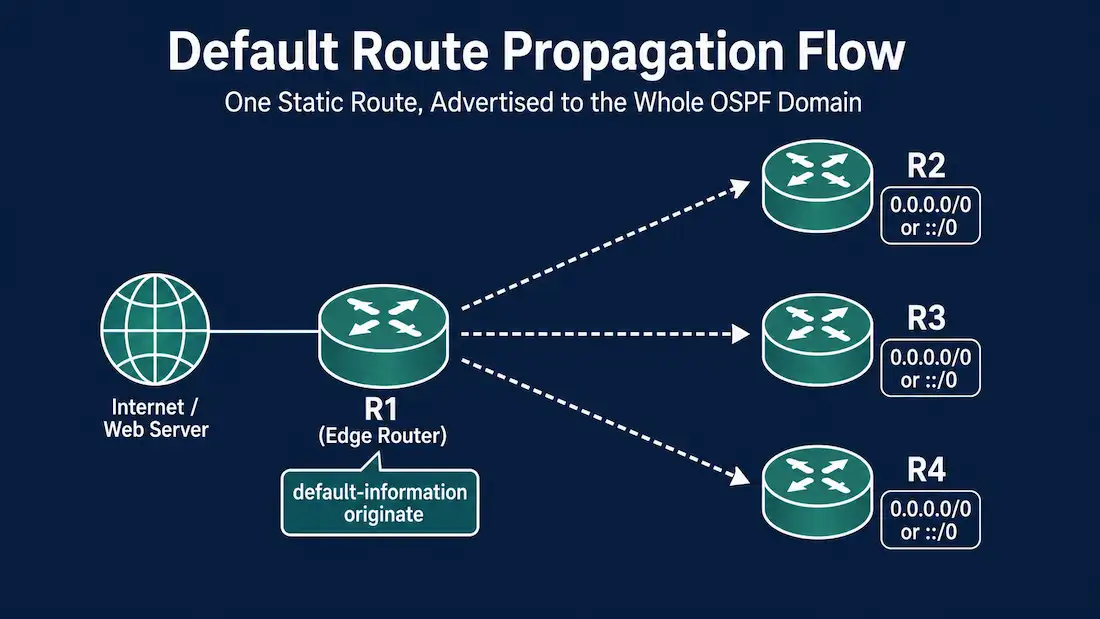
When a network has a single exit point to the internet or another external service, it’s usually more efficient to advertise one default route through that exit point than to inject every specific external route into OSPF. This guide covers how to configure a default static route on an edge router and propagate it through OSPF to the rest of the network, for both OSPFv2 (IPv4) and OSPFv3 (IPv6) — and it corrects an invalid IPv6 command that circulates in some older material.
This is a companion to Propagate Default Route in RIP, which covers the same concept for RIP. The underlying goal is identical — get a single default route out to the whole network from one exit point — but the mechanism differs by protocol.
Why Propagate a Default Route Instead of Every External Route
If an edge router has a static route to the internet, every other router in the OSPF domain still needs a way to reach destinations outside the network. Two options exist: inject every individual external route into OSPF via redistribution, or advertise a single default route (0.0.0.0/0 for IPv4, ::/0 for IPv6) that catches everything not matched by a more specific route already in the routing table. For a single exit point, the default route approach is simpler, generates far less routing overhead, and is the standard, expected design.
Propagating a Default Static Route in OSPFv2
Consider a topology where R1 is the only router with a path to a web server outside the OSPF domain — R2, R3, and R4 all rely on R1 to reach it. To make that reachable network-wide, R1 needs two things configured:
- A default static route pointing toward the exit point, using
ip route 0.0.0.0 0.0.0.0 <next-hop-ip-address | exit-interface>. - The
default-information originatecommand, entered in OSPF router configuration mode. This instructs R1 to act as the source of default route information and advertise it into the OSPF domain.
The configuration on R1:
R1(config)# ip route 0.0.0.0 0.0.0.0 10.10.10.5
R1(config)# router ospf 1
R1(config-router)# default-information originate
R1(config-router)# do write
The always Keyword and Other Options
By default, default-information originate only advertises the default route if R1 already has one in its own routing table — if the static route to 10.10.10.5 were to disappear, the advertisement stops too. Adding the always keyword changes this behavior, forcing R1 to advertise the default route regardless of whether it currently has one:
R1(config-router)# default-information originate alwaysThe command also accepts optional metric and metric-type parameters to control the advertised cost and whether the route is advertised as External Type 1 or Type 2:
R1(config-router)# default-information originate always metric 20 metric-type 1If no metric type is specified, OSPF defaults to External Type 2.
Verifying the Propagated Default Route (OSPFv2)
First, confirm the default route exists on R1 itself with show ip route:
R1# show ip route
Gateway of last resort is 10.10.10.5 to network 0.0.0.0
S*    0.0.0.0/0 [1/0] via 10.10.10.5
Then check R2, R3, and R4 — routers that never had a default route configured locally — to confirm R1 successfully propagated it:
R2# show ip route
Gateway of last resort is 192.168.1.1 to network 0.0.0.0
O*E2  0.0.0.0/0 [110/1] via 192.168.1.1, 00:05:12, GigabitEthernet0/0
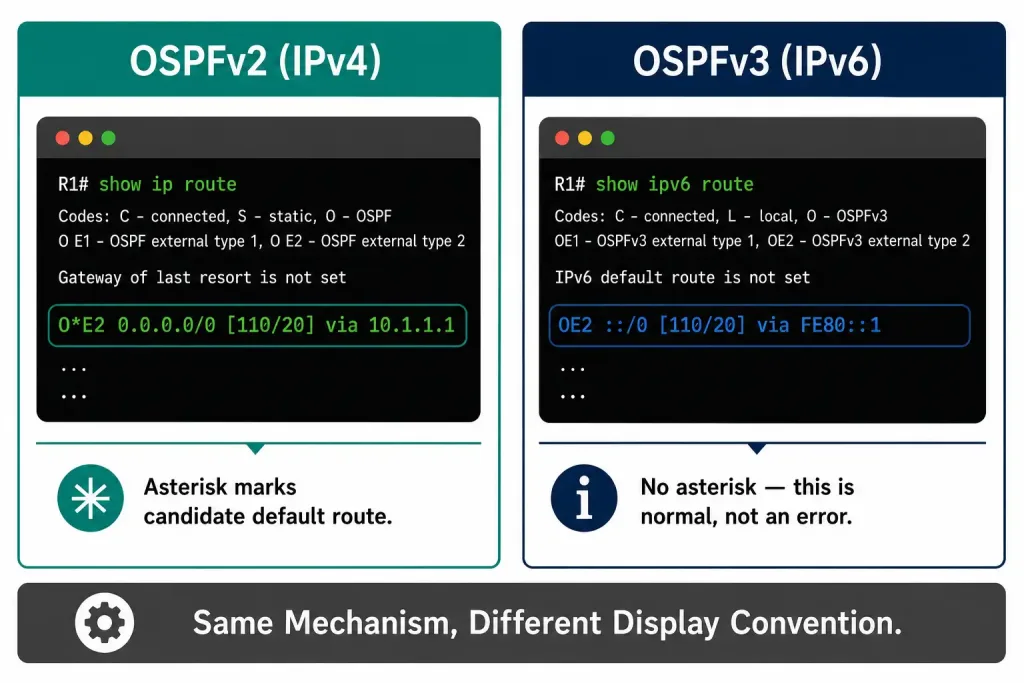
The route source O*E2 tells you everything you need at a glance: O means it was learned via OSPF, the asterisk (*) marks it as a candidate default route, and E2 identifies it as an OSPF External Type 2 route rather than an intra-area or inter-area route.
External Type 1 vs. Type 2 Routes
OSPF external routes come in two flavors, and the difference is entirely in how the route’s cost is calculated:
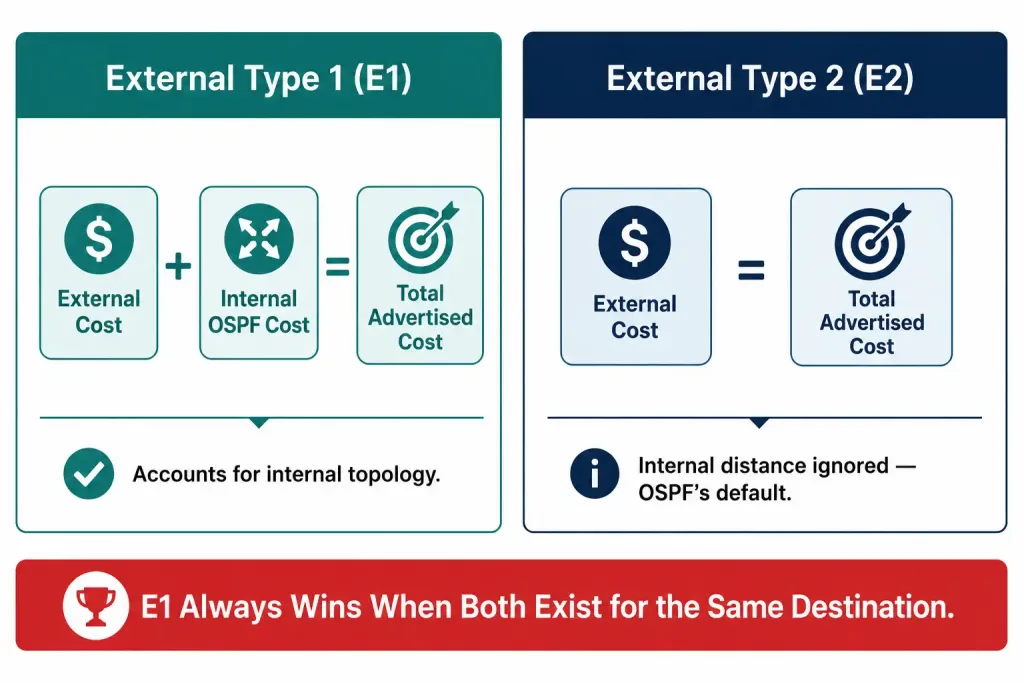
- External Type 1 (E1): the advertised cost is the sum of the external cost (assigned when the route entered OSPF) plus the internal OSPF cost to reach the advertising router. E1 routes account for internal topology differences between routers, so they’re generally preferred when comparing multiple paths to the same external destination.
- External Type 2 (E2): the advertised cost is only the external cost, regardless of how far away the ASBR advertising it is internally. E2 is OSPF’s default for redistributed and default routes, and it’s simpler to reason about in a single-exit-point design, since internal topology doesn’t factor into the comparison at all.
When both an E1 and an E2 route exist for the same destination, OSPF always prefers the E1 route, since it more accurately reflects total path cost.
Propagating a Default Static Route in OSPFv3
The IPv6 equivalent follows nearly identical logic, with two changes: the static route syntax uses IPv6 addressing, and the default-information originate command is entered under the OSPFv3 process instead.
Using the same topology, with R1 as the single exit point to the web server over IPv6, R1’s IPv6 routing table initially has no way to reach it. To fix that, configure a default static IPv6 route and enable default route origination in OSPFv3.
Important syntax note: an IPv6 static route’s next-hop argument must be a single host address — never a network prefix with a mask length. A common mistake (and one that appears in some older material) is writing something like ipv6 route ::/0 2001:DB8:1::/64 — this is invalid, because 2001:DB8:1::/64 describes a network, not a specific next-hop router. The correct form uses either a specific next-hop address or an exit interface (or both together, for link-local next-hops):
! Using a global unicast next-hop address (correct)
R1(config)# ipv6 route ::/0 2001:DB8:1::1

! Using an exit interface (works only on true point-to-point links)
R1(config)# ipv6 route ::/0 Serial0/0/0

! Using a link-local next-hop, which requires the exit interface too
R1(config)# ipv6 route ::/0 GigabitEthernet0/0 FE80::1
With the default static route correctly configured, enable OSPFv3 to originate it:
R1(config)# ipv6 router ospf 1
R1(config-rtr)# default-information originate
R1(config-rtr)# do write
The always, metric, and metric-type options work identically to OSPFv2, since both versions share the same underlying route-type and redistribution logic.
Verifying the Propagated IPv6 Default Route (OSPFv3)
Use show ipv6 route on a router that never had the static route configured locally — for example, R2:
R2# show ipv6 route ospf
OE2  ::/0 [110/1]
     via FE80::5054:FF:FE10:8031, GigabitEthernet0/0
The route source OE2 confirms it was learned via OSPFv3 as an External Type 2 route, exactly parallel to the O*E2 notation in OSPFv2.
One notable difference from OSPFv2: IPv6 routing table output does not use the asterisk (*) to flag a candidate default route the way IPv4 does. The absence of an asterisk in show ipv6 route output is normal and expected — it doesn’t mean anything is wrong with the route.
Default Routes and Stub Areas
Default route origination interacts differently with OSPF’s stub area types, which is worth understanding beyond a simple single-exit-point design.
In a normal area, default-information originate is required on the ASBR to generate a default route, exactly as covered above — nothing happens automatically.
In a stub area, the Area Border Router (ABR) automatically generates a default route into the stub area, without needing default-information originate configured anywhere. This happens because stub areas are specifically designed to block external (Type 5) LSAs, so routers inside the stub area need some way to reach destinations outside the area — the ABR’s automatically generated default route fills that role.
In a totally stubby area (a Cisco-specific extension), the ABR similarly auto-generates a default route, but also blocks inter-area (Type 3) summary LSAs in addition to external routes, making the default route the only way out of the area for both external and inter-area destinations.
This distinction matters practically: if a network design uses stub or totally stubby areas, manually configuring default-information originate on a router inside those areas is usually unnecessary and can sometimes conflict with the ABR’s automatic behavior. The manual configuration covered in this guide is specifically for normal (non-stub) areas, where OSPF has no built-in mechanism to originate a default route on its own.
Common Mistakes
Using a network prefix as an IPv6 next-hop. As covered above, ipv6 route ::/0 <prefix>/<mask> is invalid syntax. The next-hop must be a specific address or interface.
Forgetting the static default route must exist before origination works (without always). Without the always keyword, default-information originate only advertises the default route while R1’s own routing table actually contains one. If the static route is removed or fails, the advertisement silently stops — a common source of confusion when troubleshooting a default route that “used to work.”
Expecting the same output format between OSPFv2 and OSPFv3. The absence of an asterisk in show ipv6 route is a display difference, not a functional one — the IPv6 default route works exactly the same way operationally as its IPv4 counterpart.
Mixing up the router configuration mode commands. OSPFv2 uses router ospf <process-id>; OSPFv3 uses ipv6 router ospf <process-id>. Entering default-information originate under the wrong process won’t produce the expected result.
Frequently Asked Questions
Does default-information originate work without the always keyword?
Yes, but only conditionally: the router must already have a default route (static or otherwise) in its own routing table for the advertisement to go out. If that underlying route disappears, so does the advertisement. Adding always removes this dependency and advertises the default route unconditionally.
Why is the default route always shown as an External route (E1 or E2), never intra-area or inter-area?
Because default-information originate works by redistributing a static (or otherwise non-OSPF) route into OSPF, the originating router becomes an Autonomous System Boundary Router (ASBR) for that route, and OSPF classifies anything redistributed this way as an external route. This is true whether the route being advertised is IPv4 or IPv6.
What’s the correct syntax for an IPv6 default static route?
ipv6 route ::/0 <next-hop-address> or ipv6 route ::/0 <exit-interface>, and for link-local next-hops, both the exit interface and the link-local address together. The next-hop must always be a specific address or interface — never a network prefix with a mask length.
Why doesn’t show ipv6 route show an asterisk next to the default route the way show ip route does for IPv4?
This is simply a display convention difference between the two command outputs on Cisco IOS. IPv4’s show ip route marks a candidate default route with an asterisk; show ipv6 route doesn’t use that notation at all. The route still functions identically regardless of the display formatting.
Do I need default-information originate if my router is in a stub area?
No, not on the ABR itself for the stub area’s own default route — the ABR generates that automatically as part of how stub areas work, specifically because external LSAs are blocked from entering the area. default-information originate is the tool for normal (non-stub) areas, where nothing happens automatically and an ASBR has to be explicitly configured to originate the default route.
Conclusion
Propagating a default static route in OSPF — whether IPv4 via OSPFv2 or IPv6 via OSPFv3 — comes down to two steps: configure the static default route on the exit-point router, then use default-information originate to advertise it into the OSPF domain. The concepts carry over directly between the two protocol versions, with the main practical differences being IPv6’s stricter next-hop syntax (a specific address or interface, never a network prefix) and the missing asterisk in show ipv6 route output.
Both are cosmetic or syntax-level distinctions rather than differences in how the underlying mechanism works. The one design-level distinction worth remembering is that this manual configuration only applies to normal areas — stub and totally stubby areas get their default route generated automatically by the ABR, with no default-information originate required at all.



