
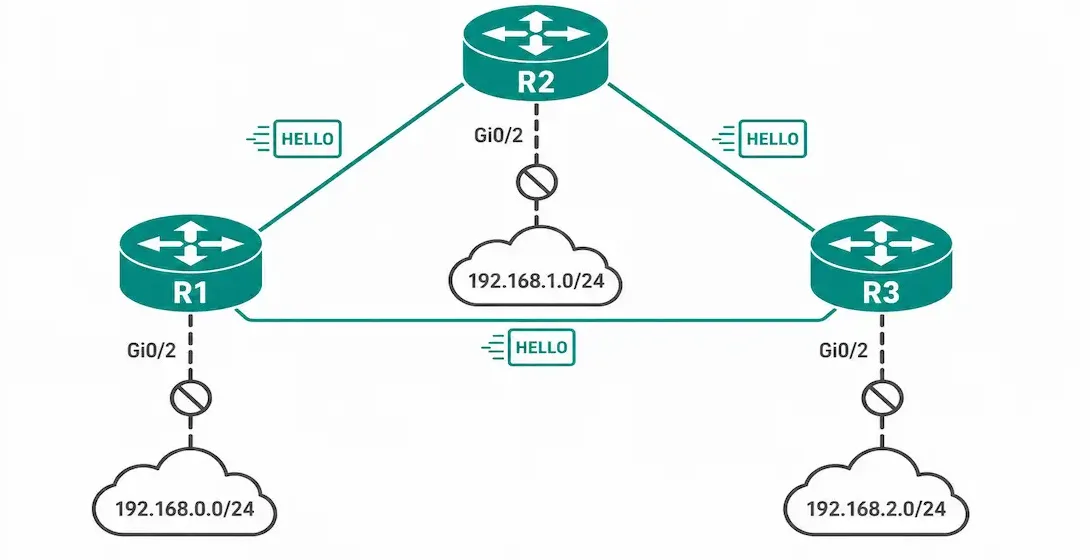
A passive interface is a feature used across routing protocols that stops routing updates from being sent and received on a specific interface, though the exact mechanics vary from one protocol to another. In EIGRP specifically, configuring the passive-interface command stops the router from sending outgoing hello packets on that interface. Because EIGRP neighbor adjacencies can only form after hello packets are exchanged, the router cannot form any neighbor relationship through a passive interface, and as a direct result, no EIGRP updates are sent or received through that specific interface.
This is the single most important, and most commonly misunderstood, fact about EIGRP passive-interface: while no EIGRP protocol traffic passes through the passive interface itself, the subnet directly connected to that passive interface is still advertised to EIGRP neighbors through all of the router’s other active interfaces. The passive interface stops EIGRP from communicating through that specific connection, but it does not hide the existence of that network from the rest of the EIGRP domain.
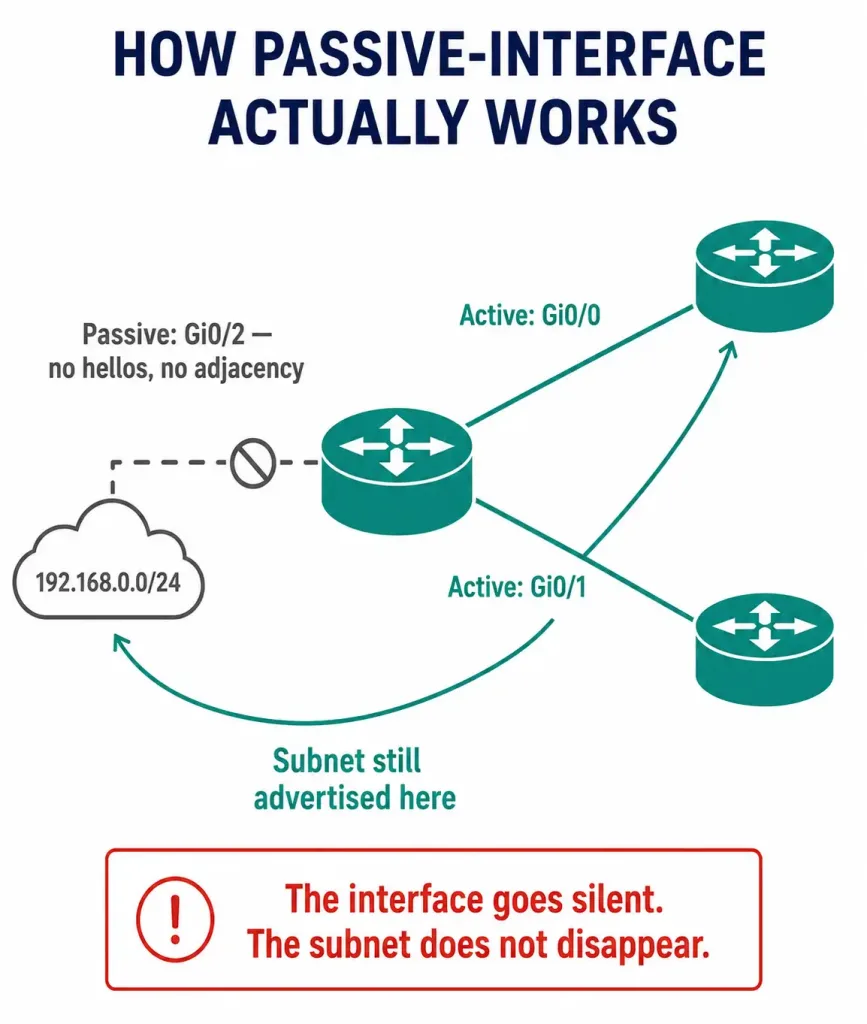
The passive-interface command can be used in router configuration mode, once EIGRP is already running via the network command. It is commonly enabled to suppress unnecessary update traffic, for example on a LAN interface with no other routers connected, and it also increases security by preventing an unknown or untrusted device from receiving EIGRP updates on that interface.
The command syntax is:
Router(config-router)# passive-interface [interface-type interface-number]Example Topology
This article reuses the same three-router topology from the EIGRP network command article: R1, R2, and R3 connected in a triangle over point-to-point links, with each router also owning its own LAN segment on a GigabitEthernet 0/2 interface:
- R1 — GigabitEthernet0/2 connects to 192.168.0.0/24
- R2 — GigabitEthernet0/2 connects to 192.168.1.0/24
- R3 — GigabitEthernet0/2 connects to 192.168.2.0/24
None of these LAN segments have another EIGRP router attached — they’re end-user or server segments. Because no EIGRP neighbor exists on the other end of these interfaces, forming EIGRP adjacencies there would be pointless, and leaving hello packets active on them is unnecessary overhead as well as an unneeded security exposure. Each router’s point-to-point links to the other two routers (its EIGRP router-id configuration and its 10.10.10.0/30, 10.10.10.4/30, and 10.10.10.8/30 links) stay fully active, since those are the links that actually need to form EIGRP adjacencies.
Configuring the Passive Interface
The passive-interface command prevents EIGRP hello packets and route exchange traffic on the specified interface, but as established above, EIGRP still includes that interface’s connected subnet in the updates it sends out its other active interfaces — provided that subnet is already covered by a network statement.
Router R1:
R1(config)# router eigrp 1
R1(config-router)# passive-interface GigabitEthernet0/2
Router R2:
R2(config)# router eigrp 1
R2(config-router)# passive-interface GigabitEthernet0/2
Router R3:
R3(config)# router eigrp 1
R3(config-router)# passive-interface GigabitEthernet0/2
Each router marks its own LAN-facing interface passive. GigabitEthernet0/2 is the same interface name on all three routers here purely because the topology is symmetric — each router’s passive interface still carries its own distinct subnet (192.168.0.0/24, .1.0/24, .2.0/24 respectively), not a shared one.
Making All Interfaces Passive by Default
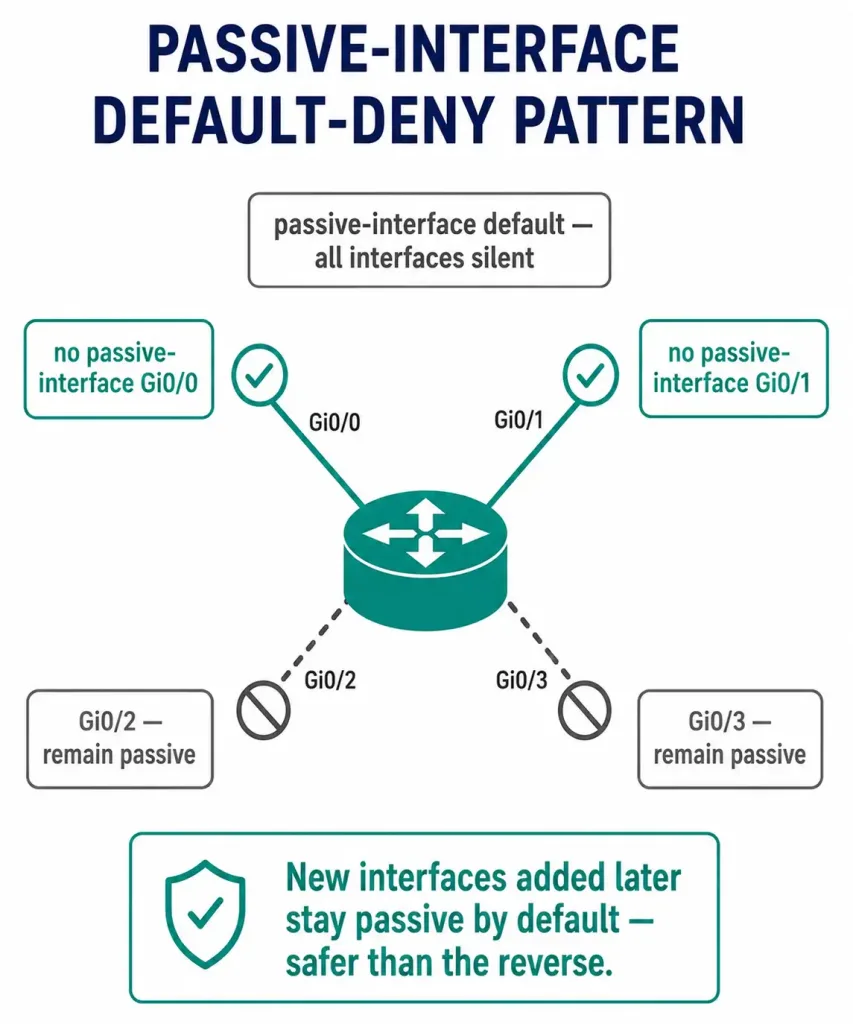
Using the passive-interface default command configures every interface on the router as passive at once, a common baseline security practice on routers with many interfaces. To then selectively re-enable EIGRP on a specific interface, use no passive-interface [interface-type interface-number] in router configuration mode:
R1(config-router)# passive-interface default
R1(config-router)# no passive-interface GigabitEthernet0/1
R1(config-router)# no passive-interface GigabitEthernet0/0
This pattern, default-deny with explicit exceptions, is generally considered better security practice than manually marking each individual interface as passive one at a time, since any new interface added later is passive by default rather than accidentally left active. On R1 in this topology, that means explicitly re-enabling the two point-to-point interfaces facing R2 and R3, while GigabitEthernet0/2 stays passive without needing its own explicit command.
Passive-Interface as a Security Control
Beyond simply suppressing unnecessary update traffic, passive-interface is a genuine security control. Consider a network that connects to a third-party organization the local administrator does not control, such as an internet service provider’s network, over a directly connected interface. If that interface is left as a normal active EIGRP interface, the local router will form an EIGRP neighbor adjacency with anything on the other end of that link that also speaks EIGRP, and will both send and receive routing updates across it.
This creates a real security risk: a compromised or misconfigured device on the ISP’s side could inject false routing information into the local network, or could receive detailed routing information about the local network’s internal topology that it has no legitimate need to see.
Configuring the interface connected to the ISP as passive closes this exposure. The local router no longer forms an EIGRP adjacency across that link at all, so no routing information is sent to or accepted from anything on the other side of it, while the local network’s own internal EIGRP domain continues operating normally across all of its other active interfaces.
Verifying the Passive Interface
Use the show ip protocols command in privileged EXEC mode to confirm which interfaces are configured as passive:
R1# show ip protocols
Routing Protocol is "eigrp 1"
  Outgoing update filter list for all interfaces is not set
  Incoming update filter list for all interfaces is not set
  Default networks flagged in outgoing updates
  Default networks accepted from incoming updates
  EIGRP-IPv4 Protocol for AS(1)
    Metric weight K1=1, K2=0, K3=1, K4=0, K5=0
    NSF-aware route hold timer is 240
  Automatic Summarization: disabled
  Maximum path: 4
  Routing for Networks:
    192.168.0.0
    10.0.0.0
  Passive Interface(s):
    GigabitEthernet0/2
  Routing Information Sources:
    Gateway         Distance      Last Update
  Distance: internal 90 external 170
Note two things in this output. First, the “Passive Interface(s):” field explicitly lists GigabitEthernet0/2, confirming it is configured as passive. Second, under “Routing for Networks:”, the 192.168.0.0 network — the subnet directly connected to that same passive interface — is still listed. This directly demonstrates the core behavior explained above: the interface itself is passive and forms no EIGRP adjacency, but its connected network is still part of what EIGRP advertises out the router’s other active interfaces.
You can pair this with show ip eigrp interfaces for a second confirmation angle — a passive interface will not appear in that command’s output at all, since the command only lists interfaces EIGRP is actively running on.
Troubleshooting Passive-Interface Misconfigurations
Symptom: An expected EIGRP neighbor relationship never forms on a given interface. Check whether that interface has been accidentally left passive, especially if passive-interface default was used elsewhere in the configuration without the corresponding no passive-interface exception for this interface. Confirm with show ip protocols and look for the interface under “Passive Interface(s).”
Symptom: A directly connected subnet is missing from a neighbor’s routing table entirely. This is not expected passive-interface behavior; a passive interface’s subnet should still appear in updates sent from other active interfaces. If the subnet is missing entirely, check that the network is correctly included under the EIGRP process with the appropriate network statement, since passive-interface alone does not add or remove a network from the EIGRP process — it only controls whether hello packets and adjacencies are permitted on that specific interface.
Symptom: passive-interface default was applied, and now no neighbors form anywhere, including on links that should be active. This means the corresponding no passive-interface exceptions weren’t added for the interfaces that actually need EIGRP. passive-interface default silences everything without exception until you explicitly re-enable specific interfaces — it’s easy to apply the default-deny half of the pattern and forget the second half.
Passive-Interface vs. Other Traffic-Control Tools
Passive-interface is often confused with other EIGRP filtering tools that sound similar but do different jobs:
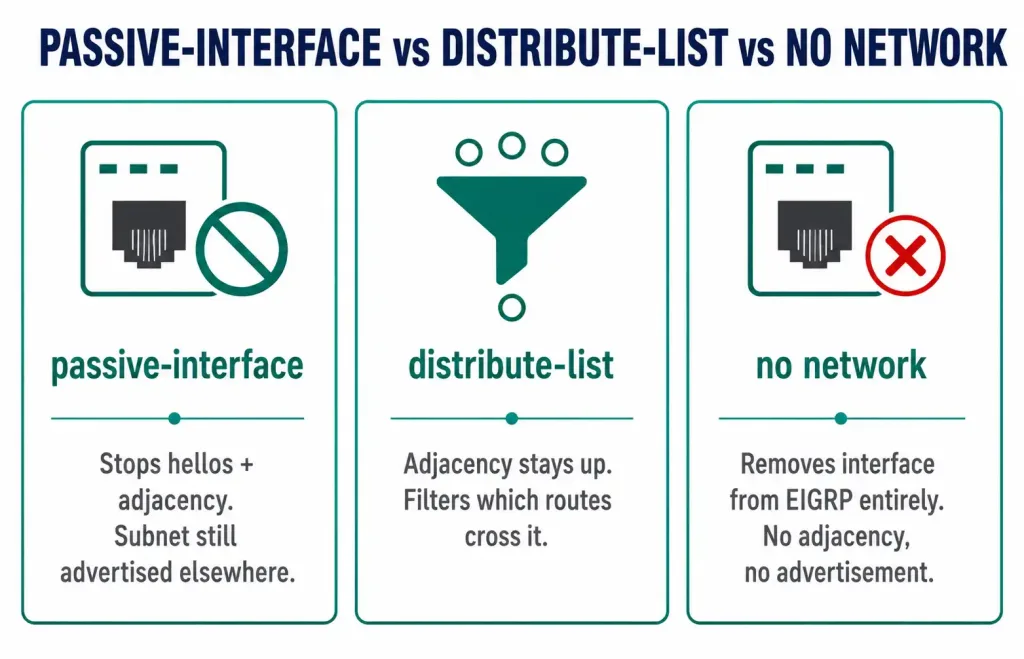
| Tool | What it actually controls |
|---|---|
passive-interface | Stops hello packets and adjacency formation on one interface entirely |
distribute-list | Filters which specific routes are sent or accepted, while the adjacency itself still forms normally |
no network <address> | Removes an interface from the EIGRP process altogether — no adjacency AND no advertisement of its subnet |
| Route summarization | Reduces how many individual routes are advertised, without disabling any interface |
The key distinction worth remembering for exam purposes: passive-interface silences one interface but keeps its subnet in the advertised set, no network removes the subnet from EIGRP entirely, and distribute-list leaves the adjacency and interface fully active while filtering only specific routes.
CCNA Exam Pointers
- Passive-interface stops hello packets and adjacency formation on the specified interface, not the advertisement of its connected network
- The subnet attached to a passive interface is still advertised via the router’s other active EIGRP interfaces, as long as that subnet is covered by a
networkstatement passive-interface [interface]— makes a single interface passivepassive-interface default— makes all interfaces passive; combine withno passive-interface [interface]for a default-deny security posture- Configuring an interface as passive tears down any existing neighbor adjacency on that interface immediately
show ip protocolsis the primary verification command; look for the interface listed under “Passive Interface(s):” —show ip eigrp interfacesis a useful second check, since a passive interface won’t appear there at all- This behavior applies conceptually across RIP, EIGRP, and OSPF, though the exact mechanism differs: in OSPF specifically, a passive interface’s network is still advertised as a stub network via other active interfaces, similar in spirit to EIGRP’s behavior
- Common real-world use case: mark the WAN interface facing an ISP or untrusted third party as passive to prevent unauthorized EIGRP adjacencies
Conclusion
The EIGRP passive-interface command is a precise tool: it stops hello packets and neighbor adjacency formation on a specific interface, closing off both unnecessary overhead and a real security exposure, without removing that interface’s connected network from the routing domain entirely. Understanding this distinction — that the interface itself goes silent while its subnet remains advertised elsewhere — is the single most important and most exam-relevant fact about this feature. Combined with the passive-interface default plus selective no passive-interface pattern for a stronger default security posture, and verified with show ip protocols, passive-interface is a small but genuinely useful configuration tool for both network efficiency and security.
FAQs
What is EIGRP?
EIGRP (Enhanced Interior Gateway Routing Protocol) is a Cisco-developed advanced distance-vector routing protocol that automates route discovery, selection, and updates between routers within an autonomous system. It uses a composite metric based on bandwidth and delay by default, forms neighbor adjacencies via hello packets, and is widely covered in CCNA and CCNP routing and switching curricula alongside OSPF as one of the two primary interior gateway protocols students are expected to master.
What is a passive-interface in EIGRP?
A passive interface in EIGRP is an interface on which the router has stopped sending EIGRP hello packets, which in turn prevents any EIGRP neighbor relationship from forming through that interface. Because no neighbor adjacency exists there, no EIGRP updates are sent or received through that specific interface. Importantly, the subnet directly connected to that passive interface is not hidden from the EIGRP domain; it continues to be advertised in updates sent out the router’s other active EIGRP interfaces.
Why would I use a passive-interface in EIGRP?
Passive-interface serves two practical purposes. First, it improves efficiency by suppressing unnecessary hello and update traffic on interfaces where no EIGRP neighbor will ever exist, such as a LAN segment connecting only to end-user devices. Second, and often more importantly, it improves security by preventing an EIGRP adjacency, and the routing information that comes with one, from forming across an interface connected to an untrusted or externally managed network, such as an ISP connection, where an unauthorized or compromised device could otherwise inject false routes or learn internal network topology.
How do I configure a passive-interface in EIGRP?
Enter router configuration mode for the EIGRP process with router eigrp [process-id], then use passive-interface [interface-type interface-number] to mark a specific interface as passive. This immediately stops EIGRP hello packets from being sent on that interface and tears down any existing neighbor adjacency there. To make every interface passive at once as a security baseline, use passive-interface default, then selectively restore EIGRP functionality on specific interfaces with no passive-interface [interface-type interface-number].
Can I use the passive-interface command on multiple interfaces?
Yes. Each interface must be specified with its own separate passive-interface [interface-type interface-number] command line within EIGRP router configuration mode; there is no single command that marks an arbitrary list of specific interfaces as passive in one line. For routers with many interfaces that should mostly be passive, using passive-interface default followed by individual no passive-interface exceptions for the interfaces that do need active EIGRP is typically more efficient and safer than listing every passive interface individually.
What happens to existing EIGRP neighbors when I configure an interface as passive?
Any existing EIGRP neighbor relationship on that interface is torn down immediately, since the interface stops sending the hello packets required to maintain that adjacency. This is an important operational consideration: configuring passive-interface on a live production interface with an active, working neighbor relationship will disrupt that relationship right away, so this change should be made deliberately and, in a production network, during a planned maintenance window rather than applied casually.
Is there a way to make all interfaces passive by default in EIGRP?
Yes, using the passive-interface default command within EIGRP router configuration mode makes every interface on the router passive simultaneously. You then selectively enable EIGRP on the specific interfaces that actually need to form neighbor adjacencies using no passive-interface [interface-type interface-number] for each one. This default-deny approach is generally considered a stronger security posture than the reverse, since any new interface added to the router later is passive by default rather than accidentally left open to EIGRP adjacency formation.
How can I verify the configuration of passive interfaces in EIGRP?
Use the show ip protocols command in privileged EXEC mode. The output includes a dedicated “Passive Interface(s):” section listing every interface currently configured as passive for that EIGRP process, alongside a separate “Routing for Networks:” section that will still list the subnet connected to a passive interface, directly demonstrating that the network remains advertised even though the interface itself forms no adjacency. show ip eigrp interfaces is a useful cross-check, since a passive interface is excluded from that output entirely.
How is passive-interface different from a distribute-list?
Passive-interface stops an interface from forming an adjacency at all — no hellos, no neighbor, no direct route exchange across that link. A distribute-list, by contrast, leaves the adjacency fully intact and simply filters which specific routes are sent or accepted across it. Use passive-interface when you don’t want any EIGRP relationship on an interface at all; use a distribute-list when you want the adjacency to exist but need to control exactly which routes cross it.



