
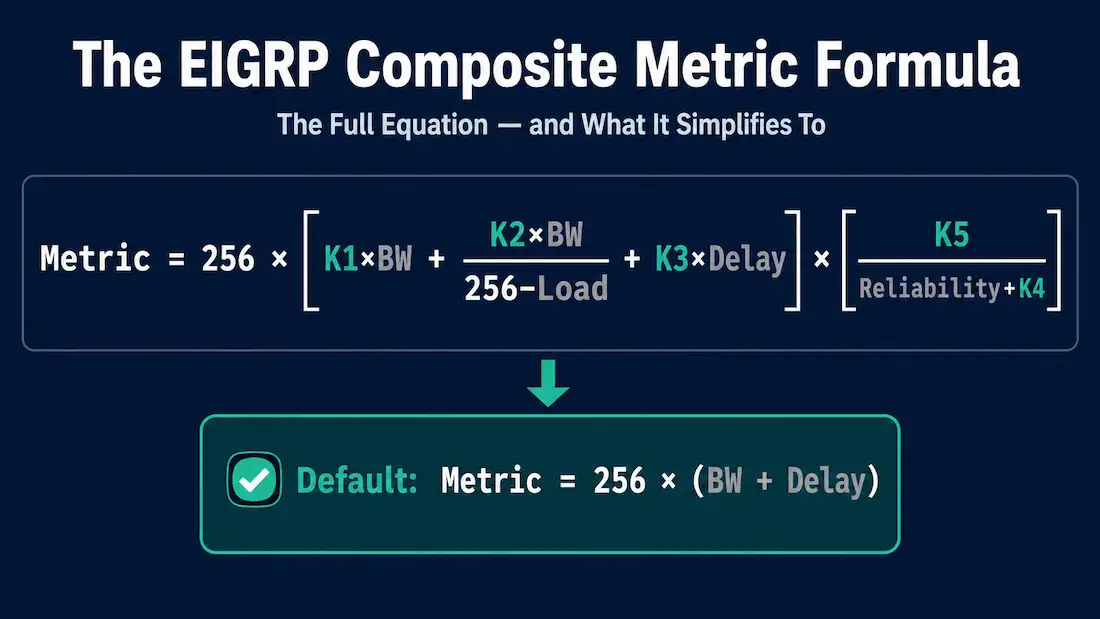
A composite metric is a single number calculated from several different path characteristics, used to determine the preferred route to a destination. EIGRP uses bandwidth and delay by default, but the formula technically accounts for two additional factors — load and reliability — that are available but not recommended for typical use. This guide covers the actual formula in full (something worth stating in text rather than relying on an image alone), what each component measures, and a worked example calculating a real metric by hand, verified independently rather than simply repeated from elsewhere.
The Four Metric Components
Bandwidth — calculated by dividing 10,000,000 by the bandwidth (in kbps) of the slowest outgoing interface anywhere along the path from source to destination. Only the minimum bandwidth matters; a path with nine fast links and one slow one is limited by that single slow link.
Delay — the cumulative sum of the delay values configured on every interface along the path, expressed in tens of microseconds. Unlike bandwidth, delay is additive across the whole path rather than taking a single worst-case value. Both bandwidth and delay can be viewed with show interfaces.
Reliability — the worst (lowest) reliability value observed anywhere along the path, based on keepalive tracking, expressed as a fraction of 255 (255/255 meaning 100% reliable).
Load — the worst (highest) load anywhere along the path, based on packet rate relative to configured bandwidth, also expressed as a fraction of 255 (255/255 meaning fully saturated).
Load and reliability exist in the formula but are disabled by default and generally not recommended, because unlike bandwidth and delay — which are essentially static, configuration-based values — load and reliability change dynamically as traffic patterns shift. Enabling them can cause EIGRP to recalculate routes far more often than necessary, simply because momentary traffic spikes or minor link quality fluctuations are constantly nudging the metric up and down.
The K-Values
Five weighting constants, called K-values, control how much each component contributes to the final metric:
| K-Value | Component | Default |
|---|---|---|
| K1 | Bandwidth | 1 |
| K2 | Load | 0 |
| K3 | Delay | 1 |
| K4 | Reliability | 0 |
| K5 | Reliability (modifier) | 0 |
Each K-value can be set anywhere from 0 to 255. With the default values (K1=1, K3=1, everything else 0), only bandwidth and delay actually factor into the metric — which is exactly why “EIGRP uses bandwidth and delay” is the standard, simplified way this is usually explained, even though the full formula technically supports more.
EIGRP for IPv4 and EIGRP for IPv6 use the identical formula and identical default K-values — the metric calculation doesn’t change based on which protocol is being used.
The Full Composite Metric Formula
The complete formula, exactly as EIGRP calculates it:
Metric = 256 × [ K1×BW + (K2×BW)/(256−Load) + K3×Delay ] × [ K5/(Reliability+K4) ]Where BW is 10,000,000 divided by the minimum bandwidth (kbps) along the path, and Delay is the sum of delay values (in tens of microseconds) along the path.
One detail worth knowing about the trailing bracket: if K5 is set to 0 (the default), that entire final term collapses to exactly 1, rather than causing a division-by-zero or nonsensical result — Cisco’s implementation specifically defines this behavior. With K5 at 0, the reliability term simply drops out of the calculation entirely.
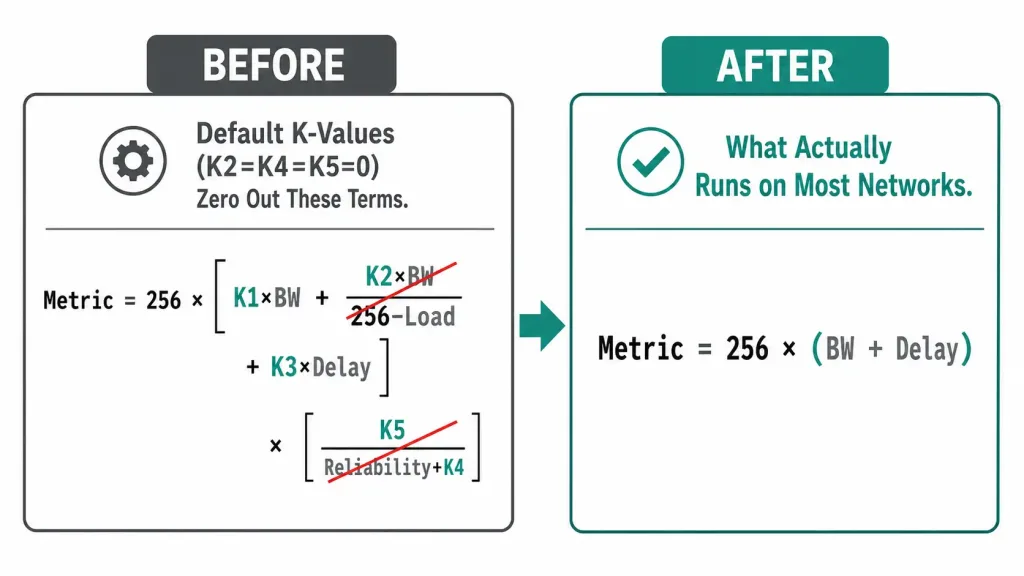
Plugging in the default K-values (K1=1, K2=0, K3=1, K4=0, K5=0) simplifies the formula dramatically, since every term touching Load or Reliability disappears:
Metric = 256 × (BW + Delay)This is the version of the formula that actually runs on the overwhelming majority of EIGRP deployments, since load- and reliability-based metrics are rarely enabled.
Worked Example
Consider a path where the slowest link is a T1 serial connection at 1,544 kbps, with a total path delay of 2,011 tens-of-microseconds (the sum of delay across every interface along the path):
Step 1 — Calculate the bandwidth component:
BW = 10,000,000 / 1,544 = 6,476 (integer division truncates, not rounds)Step 2 — Delay is already given as a sum:
Delay = 2,011Step 3 — Apply the simplified default formula:
Metric = 256 × (6,476 + 2,011) = 256 × 8,487 = 2,172,672This final value — 2,172,672 — is exactly the number that would appear as the Feasible Distance in show ip eigrp topology output for this path. Every EIGRP metric visible on a router is the result of this same calculation, just with different bandwidth and delay inputs depending on the specific path — there’s no additional hidden factor beyond what’s shown here once the default K-values are in effect.
Common Mistakes
Enabling load or reliability without understanding the stability tradeoff. Turning on K2 or K4 without a specific, deliberate reason can cause EIGRP to recalculate routes constantly as traffic conditions shift, since those inputs are dynamic rather than static. This is why the near-universal recommendation is to leave the default K-values alone unless there’s a very specific reason to change them.
Forgetting that a K-value mismatch silently blocks adjacency. Like an AS number mismatch, a K-value mismatch doesn’t produce an obvious, explicit error pointing directly at the cause — the symptom is simply that two routers never become neighbors. Checking show ip protocols on both sides to confirm identical K-values is a standard early troubleshooting step when an expected adjacency won’t form.
Confusing the delay units shown in show interfaces with the units used in the metric formula. The interface command displays delay in raw microseconds, but the metric formula itself operates in tens of microseconds. Reading a DLY value of 20000 usec and plugging it directly into the formula without dividing by 10 first produces a metric ten times too large.
Assuming MTU affects route selection the same way bandwidth or delay does. Since MTU is displayed right alongside the actual metric-relevant fields in show interfaces, it’s an easy assumption to make. MTU only comes into play in specific tiebreaker scenarios involving multiple equal-cost paths — it never contributes to the composite metric value itself.
Configuring and Verifying K-Values
To change the default K-values, use the metric weights command in router configuration mode:
Router(config-router)# metric weights <tos> <k1> <k2> <k3> <k4> <k5>The tos argument stands for Type of Service — a legacy field intended for quality-of-service marking that was never fully implemented for this purpose in EIGRP. This value must always be 0; it exists in the command syntax for historical reasons but has no functional effect today.
K-values must match exactly between two routers for them to form an adjacency, alongside the autonomous system number. A mismatch in either one — even if only one K-value differs — prevents the neighbor relationship from forming at all, exactly the same failure mode as an AS number mismatch covered in The “router eigrp” Command.
To verify the currently active K-values:
Router# show ip protocols
...
EIGRP metric weight K1=1, K2=0, K3=1, K4=0, K5=0
Reading Interface Values with show interfaces
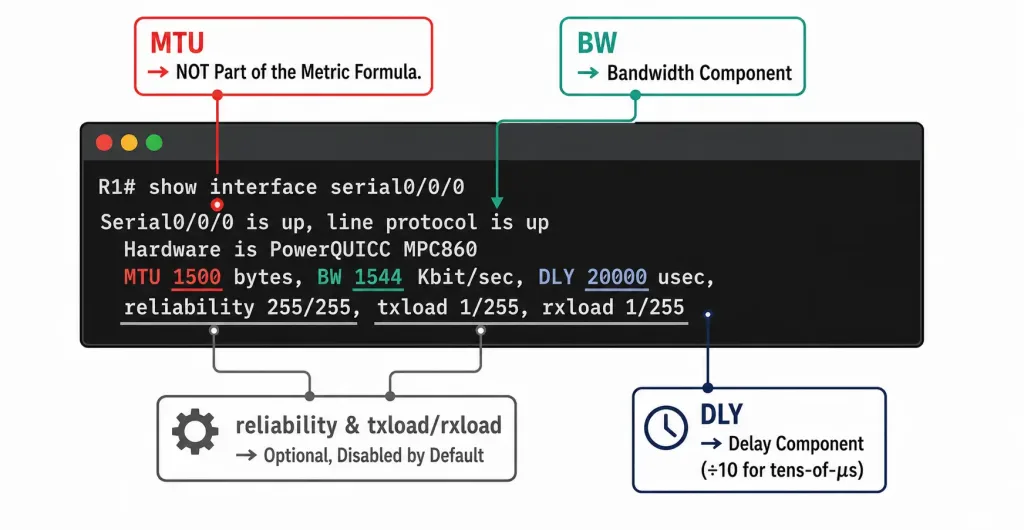
The show interfaces command displays the raw values EIGRP’s metric calculation actually draws from:
Router# show interfaces Serial0/0/0
Serial0/0/0 is up, line protocol is up
  ...
  MTU 1500 bytes, BW 1544 Kbit/sec, DLY 20000 usec,
reliability 255/255, txload 1/255, rxload 1/255- BW — the interface’s configured bandwidth, in kilobits per second. This is the value EIGRP plugs into the bandwidth component of the formula.
- DLY — the interface’s delay, in microseconds. Note this is displayed in raw microseconds here, while the metric formula itself works in tens of microseconds, so a displayed value of 20000 usec contributes 2000 to the delay sum.
- reliability — shown as a fraction of 255; 255/255 means 100% reliable, calculated as an exponential average over roughly five minutes.
- txload / rxload — transmitted and received load, also as a fraction of 255, with 255/255 meaning the interface is fully saturated. Also calculated as an exponential average over roughly five minutes.
- MTU — despite appearing right alongside the metric-relevant values, MTU is not part of the composite metric formula at all. It’s carried in EIGRP Update messages and used only as a tiebreaker in specific load-balancing scenarios, never as a metric input itself.
EIGRP Wide Metrics: A Modern Addition
The classic metric formula above has a real limitation on very high-speed modern links: the bandwidth component’s scaling can’t meaningfully distinguish between anything faster than roughly 10 Gigabit Ethernet, since the formula was designed decades before multi-gigabit and 100 Gigabit interfaces were common.
To address this, current EIGRP implementations support wide metrics, using a 64-bit metric value with different units (throughput scaled differently, and latency expressed in picoseconds rather than the older tens-of-microseconds granularity), specifically to avoid metric saturation at very high link speeds. Wide metrics are enabled by default on modern IOS XE releases, while older deployments may still run in classic mode for backward compatibility. The underlying K-value weighting concept carries over unchanged — only the units and precision differ.
Frequently Asked Questions
Why does EIGRP use bandwidth and delay by default instead of all four components?
Bandwidth and delay are essentially static values that only change when a link’s actual capacity or configured delay changes. Load and reliability fluctuate dynamically with traffic conditions, and enabling them would cause EIGRP to recalculate routes far more frequently than necessary, adding unnecessary instability for very little practical benefit in most networks.
What happens if K5 is set to 0?
The entire trailing reliability term in the formula collapses to exactly 1, per Cisco’s defined behavior — this is what allows K5=0 (the default) to effectively remove reliability from the calculation without causing a mathematical error.
Do K-values need to match between EIGRP neighbors?
Yes. K-values must match exactly, just like the autonomous system number, for two routers to form an EIGRP adjacency at all. Even a single differing K-value prevents the neighbor relationship from forming.
Is MTU part of the EIGRP metric calculation?
No. Despite being displayed alongside bandwidth, delay, reliability, and load in show interfaces output, MTU plays no role in the composite metric formula itself. It’s only used as a tiebreaker in specific unequal-path scenarios.
What are EIGRP wide metrics, and do I need to configure them?
Wide metrics are a 64-bit metric format designed to avoid the classic formula’s inability to distinguish between very high-speed links (anything faster than roughly 10 Gigabit Ethernet). They’re enabled by default on modern IOS XE, so most current deployments already use them without any explicit configuration required.
Why does changing a delay value from show interfaces sometimes require dividing by 10 first?
Because show interfaces displays delay in raw microseconds for readability, while the actual composite metric formula operates in units of tens of microseconds. A displayed DLY of 20000 usec contributes 2000, not 20000, to the delay sum used in the metric calculation — mixing up these units is a common source of manual metric-calculation errors.
Conclusion
EIGRP’s composite metric boils down, in its default configuration, to a single simplified formula: 256 × (bandwidth term + delay term). The full formula supports load and reliability too, but both are disabled by default for good reason — they’re dynamic values that would otherwise trigger unnecessary recalculation. Working through the bandwidth and delay math by hand, as shown in the worked example above, turns the metric from an abstract number in a routing table into something directly traceable back to actual interface characteristics.



