
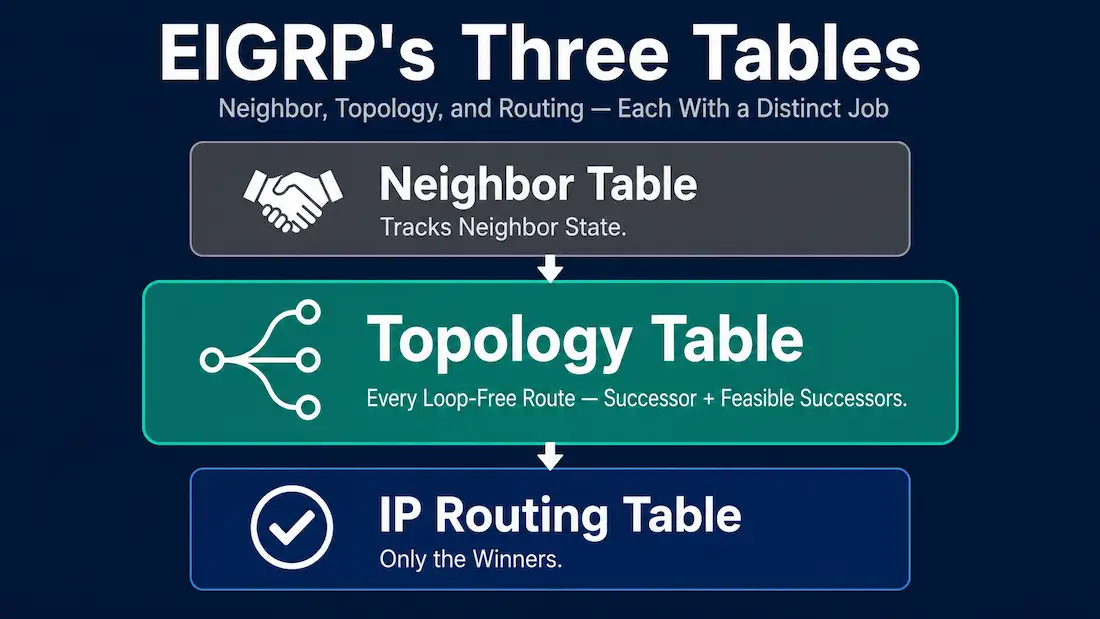
EIGRP maintains three tables on every router: a neighbor table, a topology table, and an IP routing table. The neighbor table tracks the state of directly connected EIGRP neighbors. The topology table is where the real decision-making material lives — it stores every route each neighbor has advertised, not just the winner. This guide covers how the topology table gets built, the successor/feasible successor concepts that make it useful, and how to actually read it with show ip eigrp topology, including the specific command variant needed to see routes that don’t make the default cut.
What the Topology Table Actually Stores
The topology table is a database of possible routes, built from EIGRP Update packets exchanged between neighbors. Each router maintains a separate topology table for IPv4 and IPv6, consistent with EIGRP’s Protocol-Dependent Module architecture, which handles the two protocols through entirely independent tables.
Critically, the topology table doesn’t just hold the single best route to each destination — it holds every loop-free route a neighbor has advertised, giving DUAL the raw material it needs to select both a primary path and, where one exists, an instantly available backup. The IP routing table, by contrast, only ever holds the winning routes DUAL has actually selected for active use. This is the practical distinction worth keeping straight: topology table = every viable candidate; routing table = only the winners actually being used for forwarding decisions.
How the Topology Table Gets Built
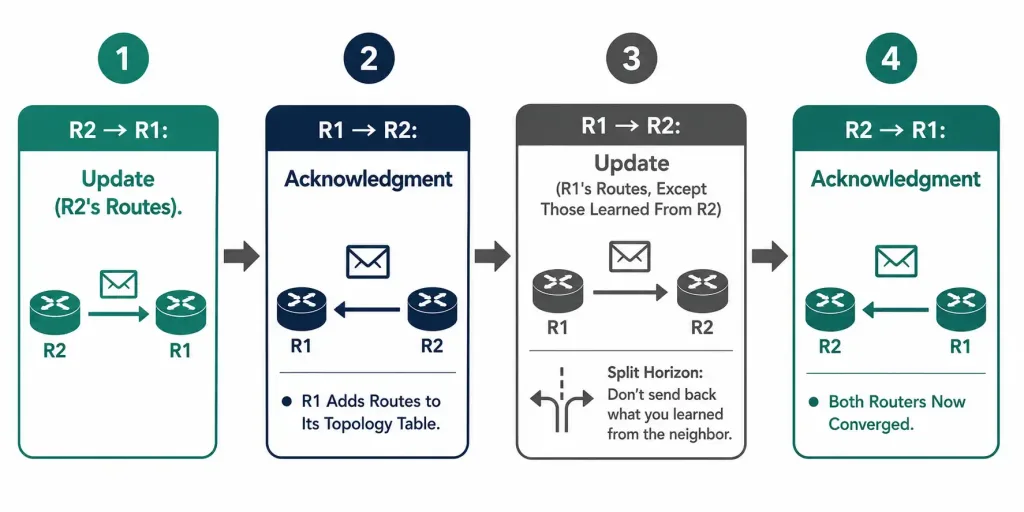
When two EIGRP routers first become neighbors, they exchange their topology tables directly, and each router’s table grows from that exchange:
- Router R2 sends an EIGRP Update to router R1, advertising the routes in R2’s own topology table.
- R1 receives the Update, adds the new routing information into its own topology table, and replies with an EIGRP Acknowledgment confirming receipt.
- R1 then sends its own Update back to R2, advertising the routes in R1’s topology table — except any route R1 originally learned from R2 itself. This is EIGRP’s split-horizon behavior: there’s no reason to advertise a route back to the exact neighbor it came from, since that neighbor already knows about it and re-advertising it back could create confusion about the route’s true origin.
- R2 receives R1’s Update, adds the new information to its own topology table, and replies with its own Acknowledgment.
Once both routers have processed each other’s Updates and installed the resulting best paths into their respective IP routing tables, both routers have reached the converged state — each has a complete, synchronized view of reachable destinations and the best path to each.
Successor and Feasible Successor
Two terms define how EIGRP actually uses the topology table’s contents, and they’re the real reason a topology table exists in the first place rather than just a routing table alone:
Successor — the current best route to a destination, based on EIGRP’s composite metric. This is the route DUAL has installed in the IP routing table and is actively using.
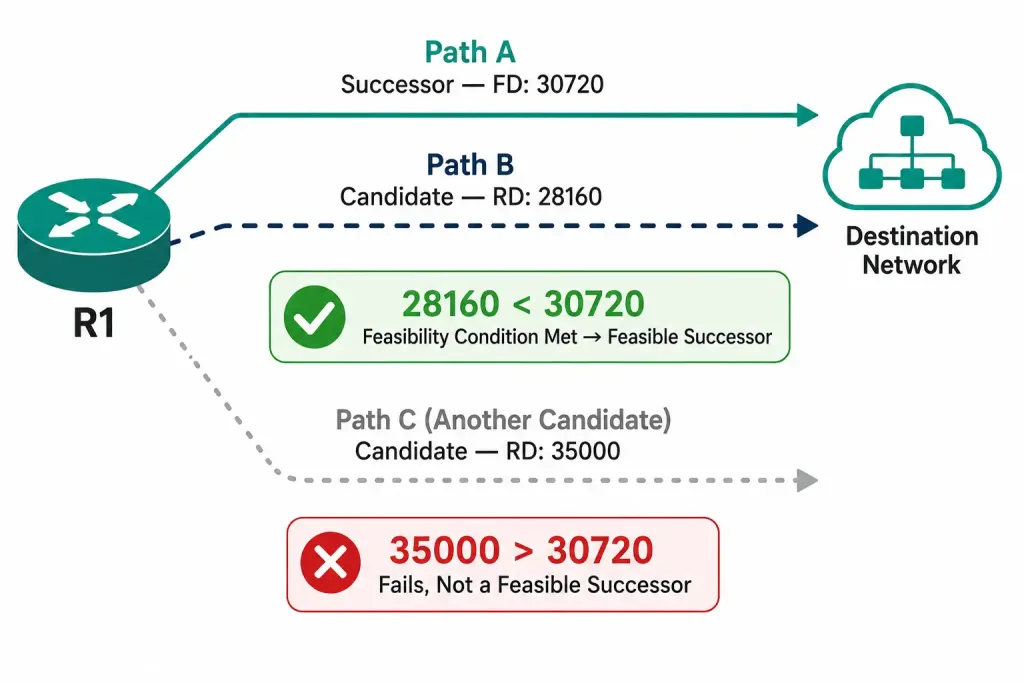
Feasible Successor (FS) — a backup route to the same destination that DUAL has already verified is loop-free, meaning it can be promoted to successor immediately if the successor fails, with no need to send Query packets or wait for a new computation. Not every destination has a feasible successor; it depends entirely on whether a qualifying backup path actually exists in the topology.
A candidate route only qualifies as a feasible successor if it satisfies the Feasibility Condition: its Reported Distance must be strictly less than the current successor’s Feasible Distance. Two terms worth being precise about:
- Feasible Distance (FD) — the total metric from this router to the destination via the successor route.
- Reported Distance (RD), sometimes called Advertised Distance (AD) — the metric the next-hop neighbor reports for reaching that same destination, from that neighbor’s own perspective.
If a candidate route’s RD is lower than the successor’s FD, that route is guaranteed to not loop back through the local router, so DUAL can safely mark it as a feasible successor and keep it ready. If no candidate route satisfies this condition, no feasible successor exists for that destination — and if the successor then fails, the router has to go active and query its neighbors for a new path, a slower process than switching to an already-qualified backup. For the full mechanics of FD and RD with worked examples, see Reported Distance and Feasible Distance in EIGRP.
Reading the Topology Table with show ip eigrp topology
The most direct way to see all of this in practice is the show ip eigrp topology command:
R1# show ip eigrp topology
IP-EIGRP Topology Table for AS 1/ID(192.168.0.1)
Codes: P - Passive, A - Active, U - Update, Q - Query, R - Reply, r - Reply status

P 10.0.1.0/24, 1 successors, FD is 30720
        via 192.168.0.2 (30720/28160), FastEthernet0/0
Reading this line: FD is 30720 is the Feasible Distance — R1’s total cost to reach 10.0.1.0/24 via its successor. The parenthetical (30720/28160) shows two numbers: the first (30720) is this route’s own Feasible Distance from R1’s perspective, and the second (28160) is the Reported Distance — the cost the neighbor at 192.168.0.2 reports for reaching that same destination from its side.
P at the start of the line stands for Passive, meaning this route is stable and not currently being recomputed — the normal, healthy state for a route to sit in. A route showing A for Active means DUAL is currently recalculating it, typically because the successor failed and no feasible successor was available, so the router is out querying neighbors.
By default, show ip eigrp topology only displays the successor and any feasible successors — routes that exist in the topology table but failed the Feasibility Condition are hidden. To see everything, including those non-qualifying alternate paths, add the all-links keyword:
R1# show ip eigrp topology all-linksThis is particularly useful for understanding why a specific route has no feasible successor — all-links will reveal any alternate paths that exist but didn’t pass the Feasibility Condition, making it clear the gap isn’t due to a missing route entirely, just a route that didn’t qualify as a safe backup.
[See Infographic: Reading a show ip eigrp topology Entry]
What Happens When the Successor Fails
This is where the distinction between having and not having a feasible successor really matters in practice, and it’s the single biggest factor separating EIGRP’s reputation for fast convergence from a more sluggish recovery process:
With a feasible successor available: the backup route is promoted to successor immediately. No Query packets are sent, no neighbors need to respond, and the route stays in the Passive state throughout — from an outside perspective, convergence is close to instantaneous.
Without a feasible successor available: the route transitions to Active state, and the router sends Query packets to its remaining neighbors asking whether any of them have a usable path. Only once Reply packets come back from every queried neighbor can DUAL select a new successor and return the route to Passive state — a meaningfully slower process, and the one responsible for EIGRP’s occasional Stuck-in-Active (SIA) failure mode when a Reply never arrives.
This is precisely why network designs that care about fast convergence pay attention to topology and redundancy specifically with feasible successors in mind — a redundant physical link doesn’t automatically guarantee a feasible successor exists; it depends on the actual metrics involved satisfying the Feasibility Condition.
Common Mistakes
Assuming the routing table and topology table always match in size. It’s easy to expect a 1:1 relationship, but the topology table is almost always larger, since it holds every feasible successor alongside every successor, while the routing table holds only the successors currently in active use.
Misreading the FD/RD parenthetical order. The two numbers in (FD/RD) are easy to swap mentally, especially under time pressure in a lab or exam scenario. The first number is always this router’s own Feasible Distance to the destination via that path; the second is the Reported Distance the neighbor advertises. Getting this backwards leads directly to miscalculating whether a candidate route actually satisfies the Feasibility Condition.
Expecting show ip eigrp topology to reveal every physically available path. As covered above, the default output deliberately hides non-feasible-successor routes. A path can exist physically and even appear in the interface’s routing capability, yet never show up in the default topology table output because it failed the Feasibility Condition — all-links is required to see it.
Treating Active state as always a serious problem. A route briefly entering Active state after a topology change is completely normal, expected EIGRP behavior — it’s exactly the mechanism DUAL uses to find a new best path when no feasible successor was available. It only becomes a genuine concern if a route stays Active for an extended period, which points toward a Stuck-in-Active condition worth investigating specifically.
Frequently Asked Questions
What’s the difference between the topology table and the routing table in EIGRP?
The topology table holds every loop-free route a neighbor has advertised for a destination — the successor and any feasible successors. The routing table holds only the winning routes DUAL has actually selected for active use. The topology table is the working material; the routing table is the output.
Does every destination have a feasible successor?
No. Whether a feasible successor exists depends entirely on whether an alternate path satisfies the Feasibility Condition (its Reported Distance must be lower than the successor’s Feasible Distance). Some destinations only have a single known path and no feasible successor at all.
Why doesn’t show ip eigrp topology show every possible route to a destination?
By default, it only shows the successor and any feasible successors, since those are the only routes DUAL considers immediately usable. Routes that exist in the topology table but failed the Feasibility Condition are hidden unless the all-links keyword is added.
What does it mean when a route shows as Active instead of Passive?
Active means DUAL is currently recalculating that route, almost always because the successor failed and no feasible successor was available, so the router is out sending Query packets to its neighbors. Passive is the normal, stable state.
Why doesn’t a router re-advertise a route back to the neighbor it learned it from?
This is EIGRP’s split-horizon behavior. Since that neighbor already knows about the route (it’s the one that advertised it in the first place), re-advertising it back adds no useful information and could create confusion about the route’s true origin — so EIGRP simply omits it from Updates sent back in that direction.
Can a destination have more than one feasible successor at once?
Yes. If multiple candidate routes each independently satisfy the Feasibility Condition against the current successor’s Feasible Distance, all of them are retained as feasible successors in the topology table simultaneously, giving DUAL more than one instantly available backup option if the successor fails.
Conclusion
EIGRP’s topology table exists specifically so DUAL always has more than one candidate route to work with, not just the single best path a simpler routing table would hold. Understanding the Feasibility Condition — comparing a candidate route’s Reported Distance against the successor’s Feasible Distance — explains exactly why some destinations converge almost instantly after a failure while others require the slower Query/Reply process. Reading show ip eigrp topology (and all-links when a deeper look is needed) turns these concepts from abstract theory into something directly verifiable on a live router, which is ultimately the most useful skill for troubleshooting a real convergence problem rather than just reasoning about it in the abstract.



