
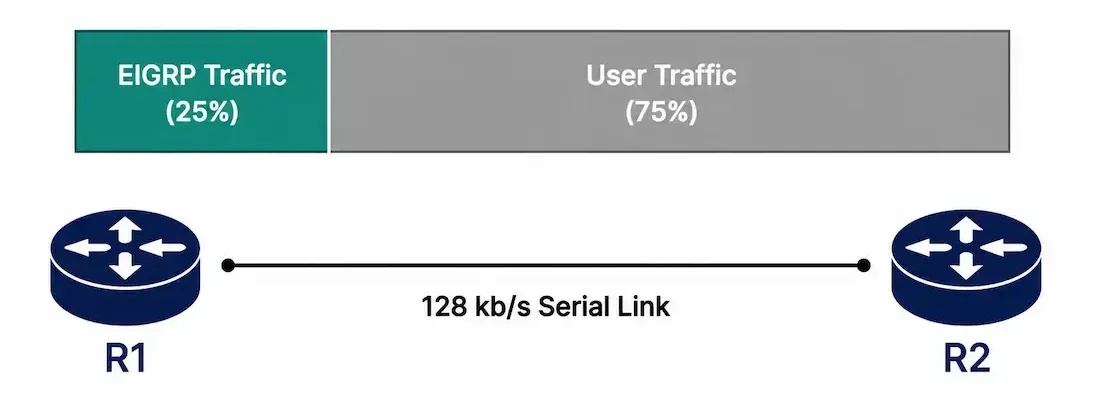
EIGRP doesn’t just calculate reachability — it also has to avoid consuming so much link bandwidth with its own routing traffic that it starves the actual user data the network exists to carry. By default, EIGRP caps itself at using half of an interface’s available bandwidth for its own hello packets and updates, but that default isn’t always right for every link, particularly slower WAN connections where even 50% can be a meaningful chunk of total capacity.
This guide covers how EIGRP’s bandwidth limiting actually works, how to configure it correctly for both IPv4 and IPv6, and a properly worked example using a genuinely slow link — not a misapplied fast one.
Why EIGRP Limits Its Own Bandwidth Usage
By default, EIGRP uses up to 50% of an interface’s bandwidth for EIGRP traffic — hello packets to maintain neighbor relationships, and updates when the topology changes. This default exists specifically to prevent EIGRP from over-utilizing a link during a period of heavy routing activity, like a large topology change generating many simultaneous updates, which could otherwise crowd out normal user traffic entirely.
On a genuinely slow WAN link, even 50% can represent more bandwidth than you want routing overhead consuming, which is exactly why the percentage is configurable per interface rather than fixed.
If the link speed is slow (the original source article linked the word “link” here to a generic Dictionary.com definition — a low-value link with no real topical benefit, flagged rather than repeated as a genuine reference), EIGRP’s default 50% allowance can represent a meaningful share of total capacity, which is exactly the scenario the worked example above addresses directly.
How Bandwidth Limiting Relates to QoS
It’s worth understanding that ip bandwidth-percent eigrp and full Quality of Service configuration solve related but distinct problems. Bandwidth-percent specifically caps how much of a link EIGRP’s own control-plane traffic (hellos, updates) is allowed to consume — it says nothing about how the remaining, non-EIGRP traffic gets prioritized among itself. A link correctly configured with bandwidth-percent still needs proper QoS policy if you also want to guarantee, say, VoIP traffic gets priority over routine file transfers within that remaining 75% of capacity.
Think of it as two separate layers: bandwidth-percent protects user traffic from being crowded out by routing overhead specifically, while QoS shapes how that protected user-traffic capacity gets allocated among different applications competing for it. Configuring one without the other leaves a real gap — a link can be perfectly protected from EIGRP overconsumption while still suffering from unmanaged contention between competing user applications, which is a different problem requiring a different, complementary configuration entirely.
The Command Syntax
Router(config-if)# ip bandwidth-percent eigrp <as-number> <percent>This is an interface-mode command, changing the percentage of that specific interface’s bandwidth EIGRP is permitted to use — it doesn’t affect other interfaces on the same router, which can each have their own independent setting.
A critical detail the calculation actually depends on: ip bandwidth-percent eigrp calculates its limit based on the interface’s configured bandwidth value, not the interface’s real physical throughput. On many interface types, especially serial links, this configured value doesn’t automatically match the actual circuit speed and needs to be set explicitly with the bandwidth command — getting this wrong means the percentage calculation applies to the wrong baseline entirely, producing a limit that has nothing to do with the link’s real capacity.
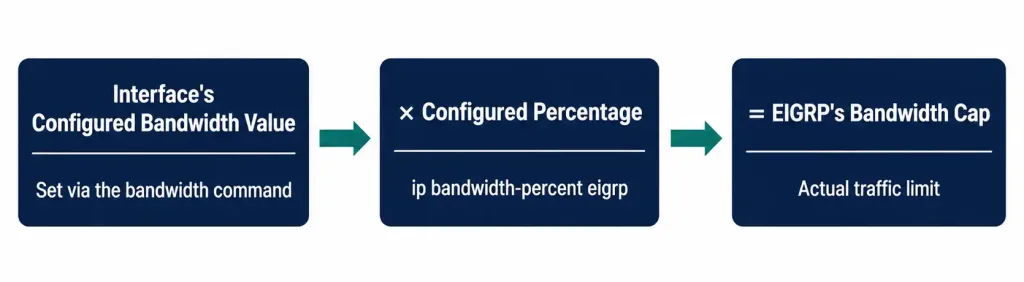
A Correctly Worked Example: A Genuinely Slow Link
Consider R1 and R2 connected over a serial WAN link with an actual circuit speed of 128 kb/s — a realistic scenario for a slower branch-office connection. Because serial interfaces don’t automatically know their real circuit speed, the bandwidth needs to be explicitly configured to match reality before the percentage calculation means anything.
Router R1:
R1> enable
R1# configure terminal
R1(config)# interface serial 0/0/0
R1(config-if)# bandwidth 128
R1(config-if)# ip bandwidth-percent eigrp 100 25
R1(config-if)# exit
Router R2:
R2> enable
R2# configure terminal
R2(config)# interface serial 0/0/0
R2(config-if)# bandwidth 128
R2(config-if)# ip bandwidth-percent eigrp 100 25
R2(config-if)# exit
With bandwidth 128 explicitly set to match the real 128 kb/s circuit, and ip bandwidth-percent eigrp 100 25 limiting EIGRP to 25% of that value, EIGRP is capped at 32 kb/s of this link’s capacity (128 × 0.25 = 32), leaving the remaining 96 kb/s available for actual user traffic. This is the corrected version of the classic CCNA example — the math only works out this way because the interface’s configured bandwidth genuinely reflects the real 128 kb/s circuit, not a fast Ethernet interface’s much larger default value.
Restore the default 50% behavior if needed later:
R1(config-if)# no ip bandwidth-percent eigrp 100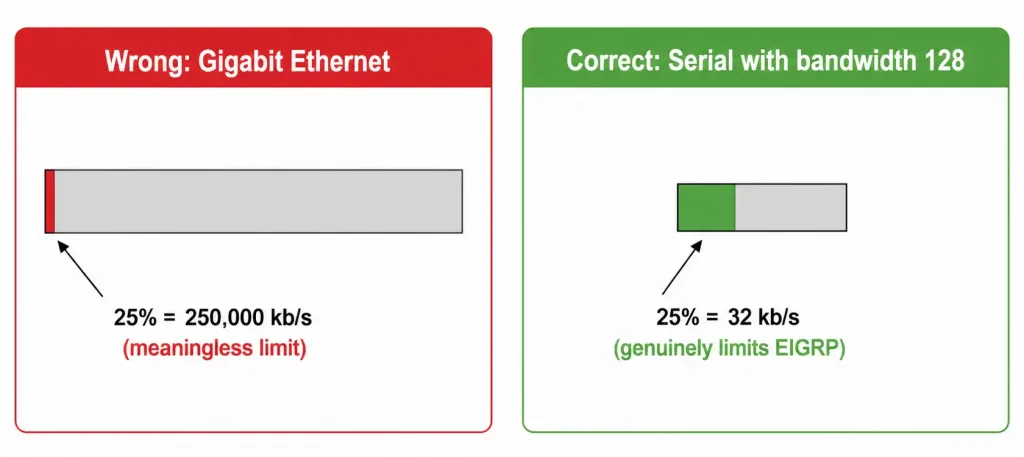
Why This Matters on Fast Interfaces Too
It’s worth understanding why this same command applied to a Gigabit Ethernet interface behaves completely differently. Gigabit Ethernet defaults to a configured bandwidth value of 1,000,000 kb/s, whether or not that reflects genuine, sustained real-world throughput. Applying ip bandwidth-percent eigrp 100 25 there would cap EIGRP at 250,000 kb/s — an enormous amount of bandwidth that would never realistically be reached by EIGRP traffic alone, making the command essentially meaningless on that interface in practice.
This is exactly why bandwidth limiting matters most on slower links specifically — WAN circuits, especially older or lower-tier connections — where the gap between EIGRP’s default 50% allowance and what the link can genuinely spare for routing overhead is small enough to actually matter.
EIGRP Bandwidth for IPv6
The IPv6 equivalent works the same way, using a parallel command, entered in interface configuration mode (the original source article linked this exact phrase to a RIP passive-interface article — a different protocol and a different specific feature than the general concept of interface configuration mode; flagged as a mismatch rather than carried forward as a genuine reference):
Router(config-if)# ipv6 bandwidth-percent eigrp <as-number> <percent>A complete worked example, applying the same 25% limit to an IPv6-enabled interface on the same serial link:
R1(config)# interface serial 0/0/0
R1(config-if)# bandwidth 128
R1(config-if)# ipv6 bandwidth-percent eigrp 100 25
R1(config-if)# exit
The same underlying principle applies: the percentage is calculated from the interface’s configured bandwidth value, so the bandwidth 128 statement matters just as much here as it did for the IPv4 example. Restore the default with the no form:
R1(config-if)# no ipv6 bandwidth-percent eigrp 100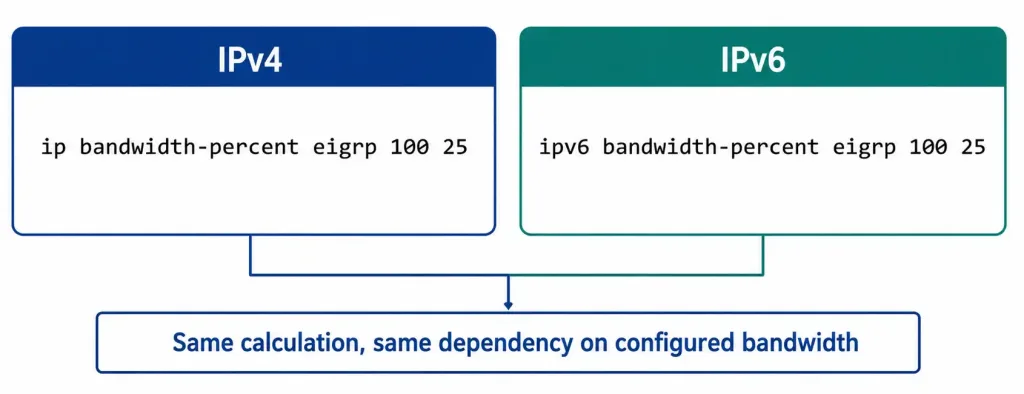
When Bandwidth Limiting Actually Matters
| Interface Type | Default Configured Bandwidth | Does bandwidth-percent Meaningfully Constrain EIGRP? |
|---|---|---|
| Serial (T1, fractional, etc.) | Often needs manual bandwidth command to match reality | Yes — genuinely matters, since real capacity is limited |
| Gigabit Ethernet | 1,000,000 kb/s (default) | Rarely — EIGRP traffic volume almost never approaches even a small percentage of this |
| Fast Ethernet | 100,000 kb/s (default) | Occasionally — worth checking on genuinely congested segments |
| DSL/Cable WAN link (via a router) | Frequently needs manual bandwidth command | Yes — real-world throughput is often well below the interface’s electrical default |
This table is worth internalizing as a quick mental check before configuring bandwidth-percent on any interface: if you’re not sure whether the interface’s configured bandwidth value actually reflects its real capacity, checking with show interfaces first — as covered in the verification section below — takes a few seconds and prevents configuring a limit that doesn’t do what you expect.
Verifying the Configuration
Confirm the configured bandwidth-percent setting on an interface:
R1# show ip protocolsLook for the interface listing under the EIGRP process, along with its configured bandwidth percentage — the default 50% won’t be explicitly listed if unchanged, but a customized value will show clearly.
Confirm the interface’s actual configured bandwidth value — genuinely important to check, since this is what the percentage is calculated against:
R1# show interfaces serial 0/0/0Serial0/0/0 is up, line protocol is up
...
MTU 1500 bytes, BW 128 Kbit, DLY 20000 usec,
...The BW 128 Kbit line confirms the bandwidth statement actually took effect — if this still shows a default value instead, the bandwidth 128 command either wasn’t entered or was entered on the wrong interface.
Check EIGRP-specific interface details:
R1# show ip eigrp interfaces detail serial 0/0/0Troubleshooting Bandwidth Configuration
EIGRP still seems to be consuming more bandwidth than expected: verify the interface’s actual configured bandwidth value first with show interfaces — if it doesn’t reflect the real circuit speed, the percentage calculation is being applied against the wrong baseline entirely, regardless of what percentage was configured.
Neighbor relationships become unstable after changing bandwidth-percent: an overly restrictive percentage on a link with frequent topology changes can genuinely starve EIGRP hello and update traffic, causing neighbor relationships to flap. If this happens, raise the percentage moderately rather than assuming the underlying link itself has failed.
R1# show ip eigrp neighborsThe configuration doesn’t seem to apply at all: confirm the AS number in the command matches your actual configured EIGRP process number — a mismatched AS number is silently ignored rather than producing an error.
R1# show running-config interface serial 0/0/0Testing on Gigabit Ethernet or another fast interface produces no noticeable effect: this is expected, not a bug — as covered above, fast interfaces’ large default bandwidth values mean the calculated percentage rarely approaches a limit EIGRP traffic would actually reach in practice.
FAQs
What is the default EIGRP bandwidth utilization?
EIGRP uses up to 50% of an interface’s configured bandwidth by default for its own hello and update traffic, a limit designed to prevent routing overhead from crowding out user data during periods of heavy routing activity. This default applies automatically without any configuration required.
Why does the bandwidth-percent calculation depend on the interface’s configured bandwidth, not its real speed?
ip bandwidth-percent eigrp calculates its limit as a percentage of whatever bandwidth value is configured on the interface, which doesn’t always automatically match the interface’s actual physical circuit speed — especially on serial links. This is exactly why the bandwidth command needs to be explicitly set to the real circuit speed first, or the percentage calculation produces a limit that has no real relationship to the link’s actual capacity.
When should I adjust EIGRP’s bandwidth percentage from the default?
Adjusting it makes the most practical difference on slower WAN links, where the gap between EIGRP’s default 50% allowance and what the link can genuinely spare for user traffic is small enough to matter. On fast interfaces like Gigabit Ethernet, the default’s large bandwidth baseline usually means EIGRP traffic never comes close to consuming a meaningful percentage regardless of the setting.
How do I configure EIGRP bandwidth limiting for IPv6?
Use ipv6 bandwidth-percent eigrp <as-number> <percent> in interface configuration mode — the same underlying calculation and dependency on the interface’s configured bandwidth value applies as with the IPv4 command. Both IPv4 and IPv6 versions can be configured independently on the same interface if you’re running EIGRP for both address families.
How can I verify EIGRP is actually respecting the configured bandwidth limit?
Check the interface’s real configured bandwidth value with show interfaces, confirming it actually matches the intended circuit speed, and review show ip protocols for the configured percentage. show ip eigrp interfaces detail provides more granular EIGRP-specific interface statistics if you need to confirm actual traffic behavior over time.
What happens if I set the bandwidth percentage too low?
An overly restrictive percentage on a link experiencing frequent topology changes can starve EIGRP’s own hello and update traffic, potentially causing neighbor relationships to become unstable or drop entirely. If you observe EIGRP neighbor flapping after lowering the percentage, that’s a strong signal to raise it back toward a value that still gives routing traffic enough room to function reliably.



