

Commissioning a new website and treating SEO as a later add-on is one of the most common and expensive sequencing mistakes a business can make. Fixing on-page SEO fundamentals after a site is already built and indexed is genuinely harder than building them in from the first draft — here’s what actually matters at the build stage, and what a developer should be doing by default rather than skipping.
Why This Needs to Happen at Build Time, Not After
Search engines form their first impression of a page’s structure, content, and metadata when they first crawl it. A site built without basic on-page SEO considerations can still be fixed later, but that means re-crawling, re-indexing, and in some cases losing whatever initial ranking signal the site had already accumulated. Building these fundamentals in from the start avoids that rework entirely — and it’s also simply less work overall than retrofitting SEO onto a finished site.
It’s worth being realistic about scope here, though: on-page fundamentals (what this article covers) are necessary but not sufficient for ranking well. They set the foundation; they don’t replace the ongoing work of content quality, backlinks, and site performance that actually drives rankings over time.
The Core On-Page Elements That Matter
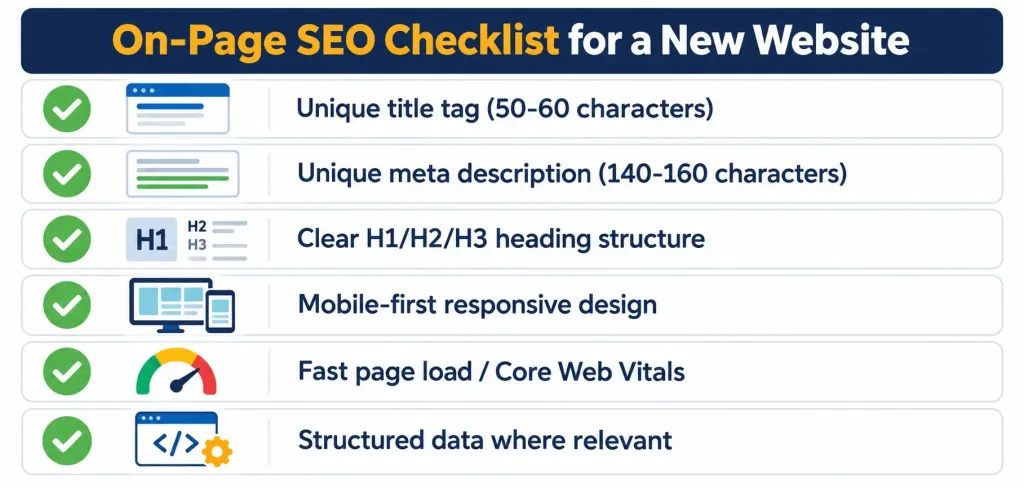
- Title tags: the single most important on-page element for both rankings and click-through rate. Keep them to roughly 50–60 characters (about 580–600 pixels) on desktop to avoid Google truncating or rewriting them; mobile search results can display somewhat longer titles, around 70–80 characters, but staying closer to the desktop limit keeps things consistent across devices. Each page needs a unique, descriptive title — not a template repeated across the site with only the page name swapped in.
- Meta descriptions: the snippet shown under a search result. Google doesn’t always use the meta description you write (it sometimes generates its own snippet from page content based on the search query), but a well-written one gives you influence over how the page is presented when it is used. Keep it to roughly 140–160 characters so it doesn’t get cut off, and write it as an accurate, compelling summary of the page — not a place to stuff keywords. Google’s own guidance focuses on writing descriptions that are genuinely useful to a person deciding whether to click, not on keyword density.
- Heading structure (H1, H2, H3): a single, clear H1 per page describing the main topic, with H2/H3 subheadings organizing the content logically. This helps both search engines and actual readers understand the page’s structure.
- The meta keywords tag is not worth your time. It’s worth saying this directly: major search engines, including Google, stopped using the meta keywords tag as a ranking signal years ago, specifically because it was heavily abused with irrelevant keyword stuffing. Any current guidance still recommending it is outdated.
What Actually Matters Beyond the Basic Tags
A handful of additional considerations have become genuinely important for how sites are built and ranked, beyond the classic meta-tag advice:
- Core Web Vitals and page experience: Google has incorporated real-world loading performance, interactivity, and visual stability metrics into how it evaluates page quality. A site that’s slow to load or shifts content around as it loads creates a worse experience for visitors and can be disadvantaged in rankings as a result — this is a build-stage consideration, not something to patch in afterward.
- Mobile-first indexing: Google predominantly uses the mobile version of a site’s content for indexing and ranking. A site that looks fine on desktop but is poorly structured or slow on mobile is being evaluated primarily on that weaker mobile experience, not the desktop version.
- Structured data (schema markup): adding structured data markup helps search engines understand specific content types (products, articles, reviews, FAQs) more precisely, and can enable richer search result displays. It’s not mandatory for basic ranking, but it’s a meaningful, low-cost addition at build time.
- Clean URL structure and internal linking: descriptive, readable URLs and a logical internal linking structure between related pages help both search engines and visitors navigate the site — this is far easier to design correctly from the start than to restructure later.
What to Actually Ask a Developer Before Signing Off
Since you likely can’t audit the technical SEO work directly, ask these questions instead:
- “Will every page have a unique title tag and meta description?” — a template-generated, identical tag across many pages is a red flag.
- “Are you implementing structured data for [your specific content type]?” — relevant if you have products, reviews, events, or similar structured content.
- “What’s your plan for page load performance and Core Web Vitals?” — a vague answer here suggests performance wasn’t considered during the build.
- “Is the site being built mobile-first, or is mobile an afterthought?” — given how Google actually indexes sites, this matters more than it used to.
The Bottom Line
Building SEO fundamentals in from the start — proper title tags and meta descriptions, clean heading structure, mobile-first design, and reasonable page performance — is both less work overall and more effective than retrofitting them after launch. The meta keywords tag specifically isn’t worth any attention at this point; it’s been functionally obsolete as a ranking factor for years. Choosing a developer based purely on the lowest price, without asking how they handle these basics, is the most common way businesses end up needing a second, more expensive round of SEO work shortly after launch.
Frequently Asked Questions
What’s the ideal length for a title tag?
Roughly 50–60 characters (about 580–600 pixels) on desktop to avoid truncation or rewriting by Google. Mobile search results can display somewhat longer titles, around 70–80 characters.
Does the meta keywords tag still matter for SEO?
No. Major search engines, including Google, stopped using it as a ranking signal years ago due to widespread abuse through irrelevant keyword stuffing. It’s safe to skip entirely.
What’s the ideal meta description length?
Roughly 140–160 characters, which helps prevent it from being cut off in search results. Note that Google sometimes generates its own snippet instead of using your written description, depending on the search query.
Do Core Web Vitals actually affect search rankings?
Yes, as part of Google’s broader page experience evaluation. A slow-loading or visually unstable page can be disadvantaged compared to a fast, stable one, which is why performance should be a build-stage consideration rather than an afterthought.



