A 9-year-old is old enough to want genuinely engaging games, not just toddler-level tap-and-giggle apps — but still young enough that a game’s age rating, in-app purchases, and online features actually matter a lot. This guide covers six genuinely good picks for this age, with the real details most lists skip: exact App Store ratings, whether a game has in-app purchases or ads, and what to check before handing over the iPad.
Unlike most lists of iPad games for 9-year-olds, this one treats the safety details — age ratings, purchases, and online chat features — as just as important as how fun a game actually is.
How These iPad Games for 9-Year-Olds Were Chosen
Every pick below was checked directly against its current App Store listing for its actual age rating, price, and in-app purchase disclosure, rather than relying on a general reputation or an older review that may no longer reflect the current version of the app. Where a game’s numeric age rating didn’t tell the full story — Minecraft’s multiplayer chat, for instance — that gap is called out explicitly rather than glossed over, which is the single biggest difference between this list of iPad games for 9-year-olds and a typical roundup built from App Store rankings alone.
What to Check Before Downloading Any Game for a 9-Year-Old
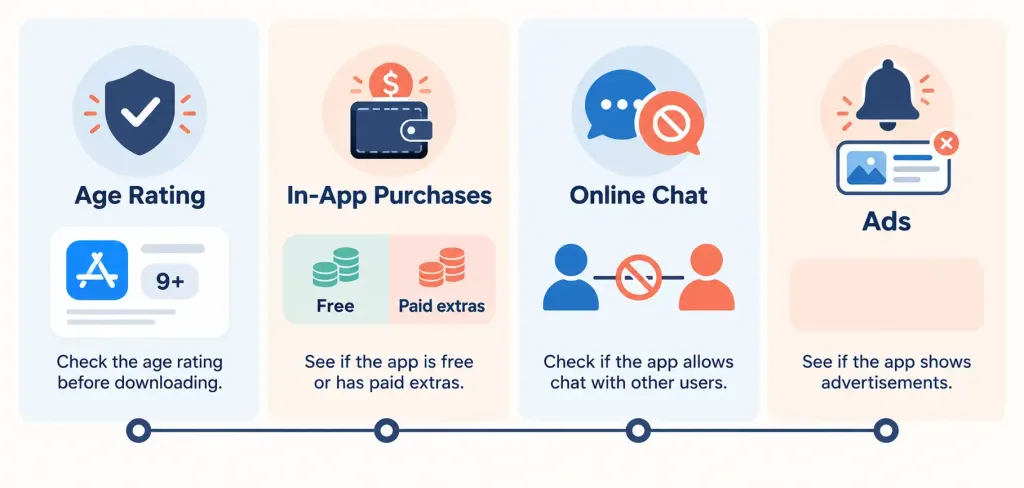
A game’s App Store age rating is a starting point, not the whole picture. Here’s what actually matters.
The age rating itself. Apple’s App Store rating system is built from a developer questionnaire about sensitive content — violence, scary themes, mature content, gambling-style mechanics — and Apple assigns a minimum age from the answers. As of late 2025, Apple has been rolling out a more granular five-tier system (4+, 9+, 13+, 16+, 18+) specifically to give better guidance for different ages, rather than lumping every younger kid into one broad category. For a 9-year-old, both 4+ and 9+ rated games are generally reasonable starting points, but the rating alone doesn’t tell you everything.
Whether the game has in-app purchases. The App Store product page discloses this directly. Some games are a flat price with nothing further to buy; others are free to download but built around repeated small purchases. Knowing which kind you’re dealing with before downloading avoids a surprise bill later.
Whether the game has online chat or multiplayer with strangers. This is the detail most buying guides skip entirely, and it matters more than almost anything else on this list. A game that lets a child communicate with people outside your household — even through in-game text or voice chat — carries real risk that a single-player or local-only game doesn’t.
Whether the game shows ads, and what kind. Ad-supported free games sometimes show ads for other games that aren’t age-appropriate, and some ad formats can’t be skipped for a set number of seconds. Checking this in advance avoids an unpleasant surprise mid-session.
Setting Up Apple’s Parental Controls First
Before installing anything, it’s worth spending five minutes on Screen Time (Settings → Screen Time → Content & Privacy Restrictions), where you can cap app downloads at a specific age rating, so a 9-year-old’s device simply can’t download anything rated above what you’ve chosen. Ask to Buy, part of Family Sharing, requires your approval before any download or in-app purchase goes through on a child’s account — this single setting prevents the large majority of surprise charges and age-inappropriate downloads before they happen.
1. Monument Valley — Best Overall Pick
A visually stunning puzzle game built around optical illusions and impossible architecture, guiding a small silent character through shifting, M.C. Escher-inspired structures. It’s genuinely clever without being frustrating, and it has real replay value as puzzles get more creative.
Age rating: 4+. Price: $3.99, with one optional $1.99 expansion (Forgotten Shores) — no ads, no multiplayer, no chat. This is about as safe and self-contained as a modern game gets, and the puzzle-solving genuinely builds spatial reasoning skills along the way.
2. LEGO Builder’s Journey — Best for Quiet, Thoughtful Play
A beautifully designed physics-based puzzle game about building bridges and paths out of LEGO bricks to help a small character reach their destination. There’s no violence, no time pressure, and no competitive element — just calm, creative problem-solving.
Age rating: 4+. Access: Included with an Apple Arcade subscription, with no ads and no additional in-app purchases beyond the subscription itself. If your family already has Apple Arcade, this is an easy, completely safe addition.
3. Alto’s Odyssey — Best for Easy Pick-Up-and-Play Sessions
An endless snowboarding-style game across beautifully drawn desert dunes, with a relaxed, meditative pace rather than high-pressure competition. It’s easy to pick up for a short session and easy to put down again.
Age rating: 4+. Price: $9.99, described by the developer as a premium game with no ads and no in-app purchases. The higher upfront price buys genuine peace of mind — nothing to accidentally purchase, nothing interrupting play.
4. Oceanhorn — Best for Kids Who Want a Real Adventure
An adventure game clearly inspired by classic top-down action-adventure titles, with exploration, light puzzle-solving, and combat against fantasy creatures. This is a step up in intensity from the other picks on this list, so it suits a 9-year-old who’s ready for a bit more challenge and mild fantasy combat.
Age rating: 9+, specifically for infrequent cartoon/fantasy violence and mild horror/fear themes — worth knowing if your child is sensitive to spooky atmosphere, even though nothing here is graphic. Price: $6.99. Check the current App Store listing for in-app purchase details before buying, since this wasn’t clearly disclosed at the time of writing.
5. Toca Life World — Best for Open-Ended Creative Play
An open-world creative sandbox where kids build stories across different settings — a home, a mall, a school — without a set goal or time pressure. It’s genuinely popular with this age group specifically because there’s no way to “lose,” which takes pressure off and lets creativity lead.
Age rating: 4+, with an App Store “Made for Ages 6–8” designation. Price: Free to download, but built around several in-app purchases — themed style packs and locations typically range from about $2 to $5 each. There’s no chat or online multiplayer with strangers, which is a genuine safety plus, but it’s worth setting a clear expectation with your child about not requesting purchases, or using Ask to Buy so every purchase needs your approval first.
6. Minecraft — Popular, But Needs Real Setup
Minecraft remains hugely popular with this age group, and the building/crafting gameplay itself is genuinely creative and open-ended. But it’s the one pick on this list that needs real parental setup before handing it over, not just a download.
Age rating: 9+ (developer-rated for infrequent/mild cartoon or fantasy violence). In-app purchases: Minecoins are sold in bundles (roughly $3 to $80), and Minecraft Realms is a paid monthly subscription for private online worlds.
The real concern: Minecraft’s multiplayer features let a child join servers and chat with other players, including strangers, unless you specifically configure it otherwise. Before letting a 9-year-old play, set the game to single-player or a private Realm limited to friends and family you actually know, disable open chat with strangers in the settings, and have a direct conversation about never sharing personal information with anyone met in-game. Handled this way, Minecraft can be a genuinely good, creative pick for this age — handled without that setup, it’s the riskiest item on this list by a clear margin.
The table below lines up all six picks side by side for quick comparison.
Best iPad Games for 9-Year-Olds at a Glance
| Game | Age Rating | Price | In-App Purchases | Online Chat Risk |
|---|---|---|---|---|
| Monument Valley | 4+ | $3.99 | One $1.99 expansion | None |
| LEGO Builder’s Journey | 4+ | Apple Arcade | None | None |
| Alto’s Odyssey | 4+ | $9.99 | None | None |
| Oceanhorn | 9+ | $6.99 | Check current listing | None |
| Toca Life World | 4+ | Free | Several, $2–$5 range | None |
| Minecraft | 9+ | Free (IAPs extra) | Minecoins, Realms subscription | Real — needs setup |
Common Mistakes Parents Make Choosing iPad Games for 9-Year-Olds
Trusting the age rating number alone without checking for in-app purchases or online chat features is the most common mistake — a 4+ or 9+ rating says nothing about whether a game lets your child talk to strangers. Downloading a free game without checking its in-app purchase structure first is another, since “free” often means the business model is built around repeated small purchases rather than a one-time fee. And letting a child set up Minecraft (or any game with online multiplayer) without configuring privacy and chat settings first is the mistake most likely to create a genuine safety problem rather than just an annoyance.
Signs a Game Isn’t a Good Fit, Even If It Passed the Checklist
Even a game that clears every item above can still turn out to be a poor fit once your child is actually playing it. Watch for a child becoming noticeably anxious, secretive, or upset after sessions with a specific game, repeated requests to spend real money inside a free game, or mentions of messages from people they don’t know in real life. Any of these is worth treating as a reason to pause that specific game and look more closely, regardless of what its App Store listing says.
Frequently Asked Questions
Is a 9+ App Store rating always safe for a 9-year-old?
It’s a reasonable starting point, but check the specific reasons behind the rating (mild violence, scary themes, etc.) and whether the game has online chat or in-app purchases, since the age number alone doesn’t cover those details.
How do I stop my child from making accidental in-app purchases?
Set up Ask to Buy through Family Sharing, which requires your approval before any download or purchase completes on a child’s linked account. This is the single most effective setting for preventing surprise charges.
Is Minecraft safe for a 9-year-old?
It can be, with the right setup — single-player or a private Realm limited to people you know, chat restrictions configured, and a conversation about not sharing personal information with strangers met in-game. Without that setup, the open multiplayer chat is a real risk worth taking seriously.
What’s the safest type of game for this age if I want zero ongoing risk?
A one-time-purchase premium game with no ads, no in-app purchases, and no online multiplayer — Monument Valley, LEGO Builder’s Journey, and Alto’s Odyssey on this list all fit that description.
Should I worry about ads in free kids’ games?
Yes, worth checking. Some ad-supported games show ads for other games that aren’t age-appropriate, and certain ad formats can’t be skipped for a set number of seconds. Checking a game’s ad policy on its App Store listing, or in reviews, before downloading avoids this.
What a Good List of iPad Games for 9-Year-Olds Should Actually Tell You
A genuinely useful list of iPad games for 9-year-olds does more than rank titles by popularity or App Store star rating. It tells you exactly what each game costs beyond the initial download, whether it puts your child in contact with strangers online, and what specific content earned it its age rating — not just the number itself. That’s the standard this guide was built to, and it’s worth holding any other list of iPad games for 9-year-olds to the same bar before trusting its recommendations with your own child’s device.
The Bottom Line
The best iPad games for 9-year-olds genuinely balance real engagement with real safety — and the safety side depends on checking details most lists skip: in-app purchases, online chat features, and what’s actually behind the age rating number. Monument Valley, LEGO Builder’s Journey, and Alto’s Odyssey offer the lowest-risk, highest-safety picks with zero ongoing cost or chat risk; Oceanhorn and Toca Life World add more depth with a small amount of setup; and Minecraft, while genuinely worth the hype, needs real parental configuration before it’s actually a safe pick for this age. Whichever picks you choose from this list of iPad games for 9-year-olds, spending five minutes on Screen Time and Ask to Buy first is the single step that protects against the most common problems before they happen.