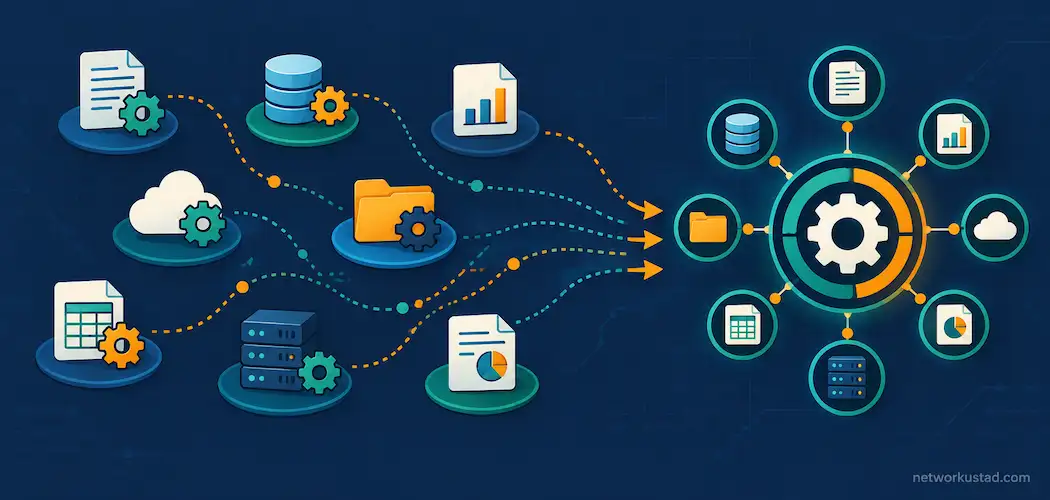
Most growing companies eventually hit the same wall: finance runs in one tool, inventory tracking lives in a spreadsheet, and sales data sits somewhere else entirely. Nobody really planned it that way on purpose. It just quietly accumulates, one quick fix at a time, until reconciling a single month’s numbers means pulling data from four completely different places. Business management software — also called an ERP (enterprise resource planning) system — exists specifically to fix that fragmentation, bringing finance, operations, and customer data into one connected platform instead of several disconnected ones.
Why This Is Worth Taking Seriously Right Now
The market size here reflects real, ongoing demand. Fortune Business Insights valued the global ERP software market at $81.15 billion in 2024 and projects it will reach $238.79 billion by 2032, a 14.4% annual growth rate. Notably, the same research expects the small-and-mid-size business segment specifically to post the fastest growth of any category going forward — this isn’t just an enterprise trend anymore. Separate research from Aberdeen found 55% of small and mid-size businesses now choose cloud-based ERP systems over on-premise installations, citing convenience and adaptability as the main reasons.
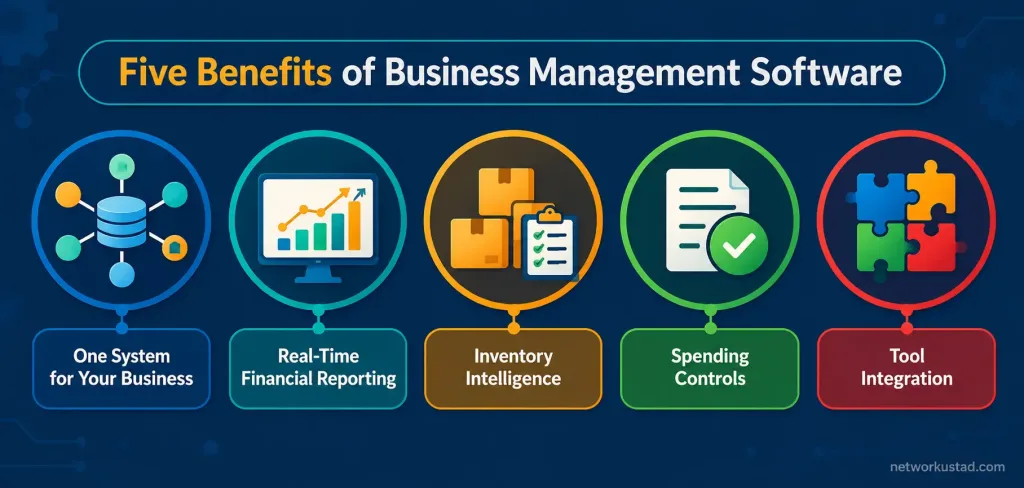
1. One System Instead of Four Disconnected Tools
The core value proposition of business management software is consolidation. Instead of separate tools for accounting, inventory, project tracking, and basic customer relationship management, everything runs through one connected platform. That matters more than it sounds like it should: when finance and operations data live in the same system, a sales order, an inventory adjustment, and a financial entry can all update automatically from a single transaction, rather than requiring someone to manually re-enter the same information three times in three different places.
2. Real-Time Financial Reporting, Not End-of-Month Guesswork
A recurring complaint in businesses still running on spreadsheets and disconnected tools is that nobody really knows the current financial picture until someone manually assembles it, usually days or weeks after the fact. Business management platforms generally support real-time access to financial data, plus built-in reporting and forecasting tools that pull from live transaction data rather than a monthly export. Account reconciliation can also run automatically in many of these systems, which shortens how long it takes to close the books and produces financial statements faster than a manual process typically allows.
3. Inventory Intelligence That Flags Problems Before They Happen
Running out of stock on a fast-moving product, or over-ordering on a slow one, is an expensive and avoidable mistake. Built-in inventory intelligence in most modern business management platforms tracks sales velocity and flags when it’s time to reorder, rather than relying on someone remembering to check stock levels manually. For a company managing dozens or hundreds of SKUs, that kind of automated signal is the difference between a smooth replenishment cycle and a scramble every time something unexpectedly sells out.
4. Approval Workflows That Catch Spending Before It Happens, Not After
Unauthorized or unnecessary purchases are easier to prevent than to claw back after the fact. Built-in approval workflows route a purchase request to the right person before it’s finalized, rather than relying on an honor system or a policy nobody consistently enforces. This is a genuinely practical benefit for any company past the size where the owner personally sees every invoice — once purchasing responsibility spreads across multiple people, a structured approval step closes a gap that otherwise shows up as unexplained budget overruns months later.
5. Integration With the Tools Your Team Already Uses
A platform that requires an entirely new workflow for everyone, with no connection to familiar tools, tends to get resisted rather than adopted. Many business management systems integrate directly with everyday office tools — exporting reports to Excel for further analysis, syncing contacts and calendars with Outlook, and supporting familiar spreadsheet functions like VLOOKUP for anyone who wants to work with exported data directly. That overlap with tools people already know meaningfully shortens the learning curve compared to a system that asks staff to abandon everything familiar at once.
What a Platform Like This Actually Costs
Pricing varies significantly by vendor and company size, so it’s worth looking at real numbers rather than vague “it depends” framing. Microsoft Dynamics 365 Business Central, one of the more widely used platforms in this category, lists Essentials licenses (financial management, sales, purchasing, inventory, and basic CRM) at around $80 per full user per month, and Premium licenses (which add manufacturing and service order management) at around $110 per full user per month, as of Microsoft’s most recent published pricing. Lighter “Team Member” licenses, for staff who mainly need read access and basic approvals rather than full functionality, run closer to $8 per user per month.
Licensing is only part of the real cost. Implementation — the work of migrating data, configuring the system, and training staff — commonly runs $25,000 to $45,000 for a 10-to-25-user company, scaling up to $90,000 or more for larger deployments, and ongoing annual support is often budgeted at roughly a quarter of the initial implementation cost. Anyone evaluating business management software should ask for implementation and support estimates up front, not just the per-user license price, since the license is rarely the majority of the total first-year cost.
Business Central Isn’t the Only Option Worth Comparing
Microsoft Dynamics 365 Business Central is a solid, widely deployed choice, but it’s not the only platform worth evaluating, and presenting it as the obvious default without comparison does readers a disservice. NetSuite, owned by Oracle, is a strong cloud-native alternative with a reputation for scaling well as a company grows. SAP Business One targets a similar small-to-mid-size segment with deep manufacturing and distribution features. Odoo offers a modular, open-source-based option that tends to cost less upfront, particularly for companies that don’t need every available module. The right choice depends heavily on existing tools, industry-specific needs, and budget — a side-by-side demo with at least two vendors is a more reliable way to choose than picking whichever platform shows up first in a search.
Security Considerations Worth Understanding
Business management platforms that centralize financial and operational data also concentrate risk, which makes access control a genuinely important part of evaluating one, not an afterthought. Many platforms now support biometric authentication — fingerprint or facial recognition tied to login — as one layer of a broader access-control strategy, alongside role-based permissions that limit what each employee can see or change. Centralizing data in one system is a real efficiency gain, but it also means a compromised login can expose more than it would have in a fragmented, tool-by-tool setup, so access controls deserve real attention during setup rather than being left on default settings.
Common Mistakes Companies Make Adopting Business Management Software
A few patterns show up often enough to name directly. Migrating years of messy, inconsistent data into a new system without cleaning it up first is one of the most common — a new platform doesn’t fix bad data, it just reflects the same inconsistencies in a more visible place. Underestimating training time is another frequent misstep; a system that consolidates several previous tools into one generally requires more upfront learning than any single tool it replaces, and skipping that investment shows up later as low adoption and workarounds. A third mistake is choosing a platform based primarily on brand recognition rather than fit — the most well-known name in this category isn’t automatically the best match for every company’s specific workflow and industry.
The Bottom Line
Business management software earns its growing market because the core problem it solves — scattered tools, slow reporting, and manual reconciliation — is a genuinely common and costly one as companies grow past their first few employees. The real benefits are consolidation, faster financial visibility, smarter inventory handling, enforced approval discipline, and integration with tools people already use. The honest caveat is that licensing cost is only part of the total investment, and the best-known platform isn’t automatically the right fit for every business — comparing at least two or three options against actual workflow needs gets more value than defaulting to whichever vendor is easiest to find.
Signs Your Company Has Actually Outgrown Spreadsheets
Not every company needs business management software yet, and adopting one too early just adds complexity without solving a real problem. A few signs tend to show up consistently once a company genuinely has outgrown spreadsheet-based tracking. Monthly financial close takes noticeably longer than it used to, often because someone is manually reconciling numbers across several disconnected files. Inventory counts in the spreadsheet regularly don’t match what’s actually on the shelf, because updates happen inconsistently across whoever last touched the file. Purchase approvals rely on someone remembering to ask, rather than a required step before an order goes out, and that gap eventually produces a surprise expense nobody signed off on. If two or more of these sound familiar, that’s a reasonably strong signal that the switch is worth evaluating seriously rather than deferring another year.
How Long a Typical Implementation Actually Takes
Vendors understandably emphasize the benefits more than the transition period, but the transition itself deserves honest expectations. A straightforward implementation for a small company, with relatively clean existing data and a modest number of users, commonly takes two to four months from kickoff to go-live. Larger or more complex deployments — multiple locations, extensive customization, integration with several other systems — can stretch to six months or longer. Rushing this timeline to hit an arbitrary deadline is a common way implementations go over budget, since cut corners during setup tend to surface as support tickets and workarounds for months afterward. Building in buffer time, and treating the original estimate as a floor rather than a guarantee, tends to produce a smoother rollout than an aggressive fixed deadline. Running the old system and the new business management software in parallel for a short overlap period, rather than switching everything over in a single weekend, also gives staff a safety net while they’re still learning the new workflow.
Frequently Asked Questions
What’s the difference between business management software and basic accounting software?
Accounting software typically handles bookkeeping and financial reporting alone. Business management software (ERP) extends that to inventory, operations, purchasing, and often basic CRM, connecting all of it to the same underlying data rather than keeping finance isolated from the rest of the business.
How much does business management software actually cost?
It varies by vendor and company size, but as a reference point, Microsoft Dynamics 365 Business Central’s full-user licenses run roughly $80–$110 per user per month, with implementation costs commonly adding $25,000 or more on top of licensing for a small-to-mid-size deployment.
Is cloud-based business management software better than on-premise?
For most small and mid-size companies, yes — Aberdeen research found 55% of SMBs now choose cloud ERP specifically for its convenience and adaptability. Larger companies with strict data-residency or customization needs sometimes still prefer on-premise deployments.
What’s the biggest mistake companies make when adopting this kind of software?
Migrating messy, inconsistent data into the new system without cleaning it up first. A new platform reflects the data it’s given — it doesn’t automatically fix underlying data-quality problems from the previous setup.
Is Microsoft Dynamics 365 Business Central the best choice for every small business?
Not automatically. It’s a strong, widely used option, but NetSuite, SAP Business One, and Odoo are all worth comparing directly, since the right fit depends on existing tools, industry, and budget rather than brand recognition alone.