
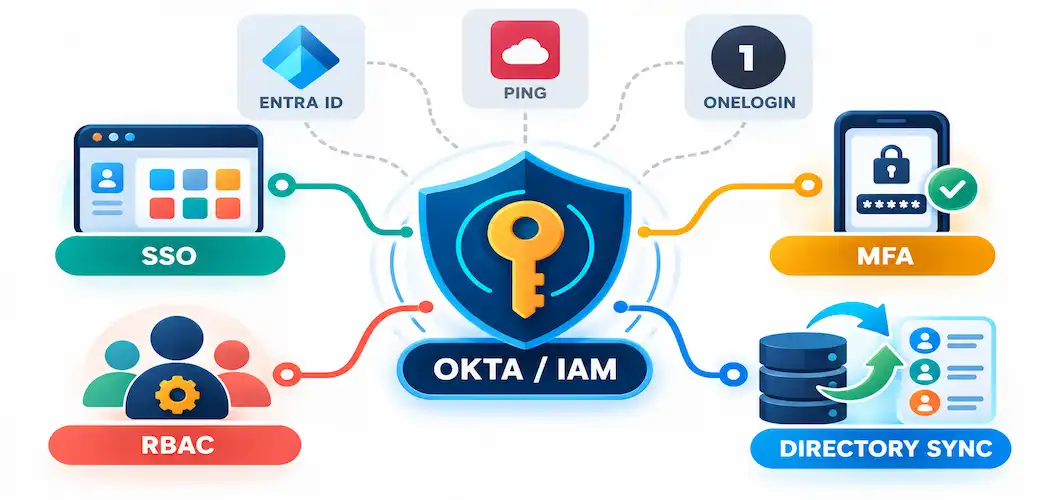
Every organization running more than a handful of cloud apps eventually hits the same wall: too many logins, too many passwords, and no clean way to know who has access to what. Identity and Access Management (IAM) is the category of tools built to solve that problem, and Okta is one of the best-known names in it. This piece covers what IAM actually means, what Okta specifically does within that category, where it fits against competing platforms, and — because security tooling deserves honest scrutiny — what’s worth knowing about Okta’s own security track record before relying on it.
What IAM Actually Means
Identity and Access Management is the set of policies and technology that controls who can access which systems, apps, and data, and under what conditions. At its core, IAM answers two questions for every login attempt: is this really the person they claim to be (authentication), and are they allowed to access this specific resource (authorization).
Done well, IAM reduces administrative overhead — IT teams aren’t manually managing permissions in a dozen disconnected systems — and creates accountability, since every access event is tied to a verified identity rather than a shared password or vague assumption. Done poorly, or not at all, IAM gaps are one of the most common entry points attackers exploit: stolen credentials, over-provisioned accounts that were never cleaned up after an employee left, and inconsistent MFA enforcement across systems.
What Okta Is
Okta is a cloud-based identity provider (IdP) that gives organizations a single, centralized point for authenticating users across many different applications. Rather than every app handling its own login system independently, apps are connected to Okta, and Okta handles the actual verification — then tells each app whether to let the user in.
In practice, this covers a defined set of capabilities:
- Single sign-on (SSO): one login grants access to every connected app, instead of a separate password for each.
- Multi-factor authentication (MFA): an additional verification step (an authenticator app push, a hardware key, a biometric check on a supported device) layered on top of the password.
- Automated provisioning and de-provisioning: when someone joins or leaves an organization, their access across connected apps can be granted or revoked automatically rather than manually, app by app.
- Role-based access control (RBAC): permissions are tied to a role rather than configured individually per person, which scales far better as an organization grows.
- Directory integration: Okta can sync with an organization’s existing directory — typically Active Directory or an LDAP-based directory — through dedicated directory integration agents, keeping user records consistent rather than duplicated across systems.
- Federation protocols: Okta supports SAML and OpenID Connect (OIDC), the standard protocols that let Okta and a connected app securely exchange identity information. It’s worth being precise here: these are federation/authentication protocols, not biometric features — biometrics are a separate authentication factor that can be layered on top of a login flow, not something SAML or OIDC themselves provide.
- App integrations: popular apps like Google Workspace, Microsoft 365, and Dropbox connect through pre-built SSO integrations (typically SAML- or OIDC-based), rather than through a generic API connection.
- Reporting and analytics: visibility into login activity, access patterns, and policy violations across connected systems.
Okta is available through a web dashboard and mobile apps (iOS and Android), and it works alongside — not instead of — platforms like Microsoft 365, since many organizations run Okta as their central identity layer while keeping Microsoft’s own directory and productivity tools in place underneath it.
Getting Started
Setting up Okta generally follows a predictable sequence: create an organizational account, import or sync users from an existing directory, connect the applications that need SSO, and define role-based access policies for who gets access to what. From there, administrators configure MFA requirements and any conditional access policies — for example, requiring an extra verification step for logins from unrecognized devices or locations.
The learning curve is real but manageable for an IT team already familiar with directory services; most of the complexity comes from mapping out an organization’s actual access requirements rather than from the Okta interface itself.
How Okta Compares to Other IAM Platforms
This is worth covering honestly, because a genuine comparison is more useful than one-sided praise. Okta competes in a field with several established alternatives, each with different strengths:
- Microsoft Entra ID (formerly Azure Active Directory) is the natural choice for organizations already deep in the Microsoft 365 ecosystem — it’s often included or discounted within existing Microsoft licensing, which makes it hard to beat on cost for Microsoft-centric environments, though it’s historically been seen as less polished for managing non-Microsoft app integrations compared to Okta.
- Ping Identity targets larger enterprises with complex, highly customized identity requirements, often in regulated industries, and is generally considered more configurable but also more complex to deploy than Okta.
- OneLogin positions itself as a lower-cost, simpler alternative aimed at small and mid-sized businesses that want core SSO and MFA without enterprise-level pricing or complexity.
- Auth0 (which Okta itself acquired in 2021) is generally aimed at developers building identity directly into their own applications, rather than managing workforce identity across off-the-shelf business apps — a different use case from Okta’s core workforce-IAM product, even though they’re now part of the same company.
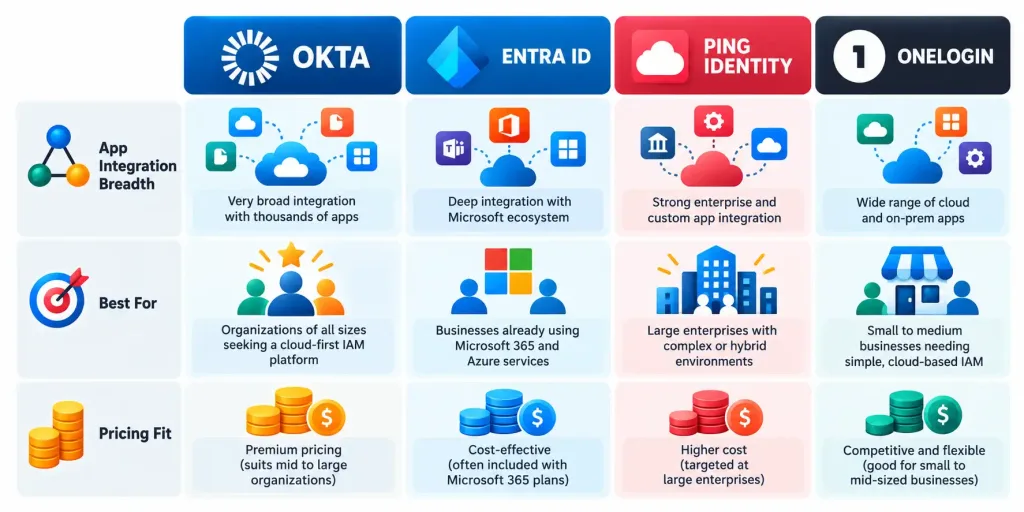
Okta’s main differentiator is breadth and polish of pre-built app integrations — it supports a very large catalog of SaaS applications out of the box — combined with an interface generally regarded as more intuitive than some enterprise-focused competitors. Whether that’s worth Okta’s typical pricing premium depends on how many different SaaS apps an organization actually needs to connect, and how much that integration catalog saves in custom setup work.
Okta’s Own Security Track Record Is Worth Knowing
Any organization evaluating an IAM vendor is, by definition, evaluating how much trust to place in that vendor’s own security — since an IAM provider is a high-value target precisely because it sits at the center of so many other systems’ access controls. Okta has had two notable security incidents worth being aware of:
In early 2022, the Lapsus$ hacking group gained access to a third-party support engineer’s laptop that had access to Okta’s internal systems, exposing a narrow window into Okta’s administrative tooling. Okta’s own investigation found a small number of customers were potentially affected, though the incident drew criticism over the delay between the breach and Okta’s public disclosure.
In October 2023, attackers compromised Okta’s customer support case management system, using stolen credentials to access files that customers had uploaded as part of support tickets. Okta disclosed that 134 customers had data exposed in that incident, according to BleepingComputer’s reporting.
None of this means Okta is uniquely insecure — every major identity provider is a high-value target, and incident history is a normal part of evaluating any vendor in this space, not a disqualifier on its own. But for a security-focused audience specifically, leaving this out entirely — while describing Okta’s security credentials in uniformly glowing terms — would be a real gap. A fair evaluation includes asking any IAM vendor directly about incident history, disclosure timelines, and what’s changed since.
Why IAM Matters Regardless of Which Platform You Choose
The platform choice matters less than actually having IAM in place at all. Organizations without centralized identity management tend to accumulate access sprawl over time — accounts that were never deprovisioned after someone left, inconsistent MFA enforcement, and no reliable way to answer “who can access this system” without checking a dozen different admin panels individually. IAM tooling — whether that’s Okta, Entra ID, Ping, or another platform — exists specifically to close that gap, and the security value comes less from which specific vendor is chosen and more from consistent enforcement across every connected system.
The Bottom Line
Okta remains one of the more capable and widely adopted identity providers, particularly for organizations juggling a large number of different SaaS applications that need a single, polished point of access control. It’s not the only credible option — Microsoft Entra ID, Ping Identity, and OneLogin each serve different organizational needs and budgets better in specific cases — and its own security incident history is worth factoring into due diligence rather than ignoring. The right choice depends on an organization’s existing ecosystem, app sprawl, and budget, more than on any single platform being universally “best.”
Frequently Asked Questions
What’s the difference between SSO and MFA?
SSO (single sign-on) lets one login grant access to multiple connected apps, replacing separate passwords for each. MFA (multi-factor authentication) is a security layer requiring an additional verification step beyond just a password, regardless of whether SSO is in use. They solve different problems and are typically used together.
Is Okta the same as Auth0?
No. Okta acquired Auth0 in 2021, but they remain distinct products serving different use cases — Okta is built for managing workforce identity and access across business applications, while Auth0 is built for developers adding identity and login functionality directly into their own custom applications.
Has Okta had security breaches?
Yes — a 2022 incident involving the Lapsus$ group accessing a third-party support engineer’s system, and an October 2023 breach of Okta’s customer support case management system that exposed data for 134 customers, per BleepingComputer. Both are worth factoring into vendor evaluation, though incident history alone isn’t a reason to rule out any major identity provider, since all of them are high-value attack targets.
Is Okta worth the cost compared to Microsoft Entra ID?
It depends on the organization. Entra ID is often more cost-effective for organizations already deeply invested in Microsoft 365 licensing, while Okta’s wider pre-built app integration catalog and generally more polished interface can justify its premium for organizations managing a large, diverse set of non-Microsoft SaaS applications.



