
A used gaming laptop should be assessed as an individual machine, not as a collection of specifications copied from its launch year. Its current condition, exact configuration, supplied charger and suitability for your software can matter as much as the product name on the listing.
The Razer Blade 15 2018 belongs in that kind of assessment. It should not be described as a current flagship or assumed to handle every recent game simply because it once occupied a premium position. A purchase decision needs a realistic account of what the particular unit can do today and what problems or additional costs may come with it.
This guide provides a practical inspection framework. It is not a hands-on review or a verified specification sheet for every 2018 configuration. Current model-specific documentation could not be retrieved during this update, so unverified figures for weight, display, battery life, storage and charging have not been repeated as facts.
Identify the exact Razer Blade 15 2018 model
Start with the model number on the actual machine and the information shown by its operating system. Ask for clear photographs of the product label and screenshots showing the processor, installed memory, storage and graphics hardware. The seller can obscure the serial number in a public listing while still providing useful model identification.
The phrase 2018 H2 is not enough to settle the specification. A year, marketing description or marketplace title may group together different configurations or contain mistakes. Do not resolve those uncertainties by selecting whichever specification looks most attractive in another listing.
For a Razer Blade 15 2018 purchase, match the hardware information to documentation for the exact model. The official Razer support website is the appropriate starting point for model-specific manuals, setup information and support questions. If you cannot establish which unit is being offered, treat that as an unresolved buying risk.
Ask whether the computer has been repaired or upgraded. A storage drive or memory configuration shown in a listing may reflect changes made after purchase rather than the original package. That is not automatically a problem, but it should be explained and checked rather than presented as proof of the factory specification.
Decide what the laptop must do for you
Write down your main tasks before judging a seller’s performance claims. Playing one older game, editing family photographs and running a particular professional application are different requirements. A machine can be suitable for one task and disappointing for another.
If gaming is the priority, identify the exact titles, intended resolution and acceptable settings. Look at their current requirements and support information, then compare those with the verified hardware. Avoid relying on phrases such as powerful gaming laptop or runs everything.
For the Razer Blade 15 2018, a useful demonstration would show your intended software or a clearly described comparable workload. Record the settings, power arrangement and observed behaviour. A short video of a game menu or an attractive desktop background does not establish sustained performance.
Think about the experience you actually need rather than the biggest number in a listing. Stable operation, clear audio, working controls and an acceptable display can be more useful than a peak benchmark result with no explanation of how it was obtained.
Inspect the chassis and screen before discussing upgrades
Look at the laptop from several angles in good light. Check the base, lid, corners, hinges and visible fasteners for damage or signs of poor reassembly. Scratches can be cosmetic, while a distorted enclosure, loose hinge or missing part deserves a more specific explanation.
Open and close the lid gently without forcing it. Confirm that the display stays in a usable position and that movement does not cause the image to disappear. Do not assume a stiff or loose hinge is harmless because the laptop still turns on.
Inspect the screen using ordinary content and suitable test images where practical. Look for damage, unusual marks, flicker, display lines and visible problems at the settings you intend to use. A photograph taken at one angle may conceal an issue that becomes apparent during normal use.
A Razer Blade 15 2018 listing should identify the actual panel configuration rather than relying on a general statement about the series. Confirm resolution and available refresh-rate settings on the unit. Do not assume that every machine sharing the product name has the display described in an old article.
Treat battery condition as a present-day question
A battery-life figure from a launch review cannot establish the runtime of a used computer years later. Battery condition, workload, brightness, connected devices and power settings all affect the result. Ask for current information and a practical demonstration rather than accepting a guaranteed number of hours.
Where the operating system provides a battery report, it can add useful context. Read it alongside the machine’s behaviour and service history rather than treating one reported figure as a complete diagnosis. Confirm that the laptop can operate unplugged if that matters to your intended use.
For a Razer Blade 15 2018, examine the exterior for unexpected distortion or separation. If a battery problem or swelling is suspected, stop using or charging the device and obtain qualified guidance. Do not press the enclosure flat, puncture a battery or turn a buying inspection into an improvised repair.
Ask about any battery replacement: who performed it, what part was used and whether supporting documentation is available. A seller’s assurance that the battery is new does not establish its quality, compatibility or installation condition. Include the possibility of professional service in your budget when the history is uncertain.

Check the charger and power behaviour carefully
Confirm that the supplied adapter is suitable for the exact model. Check its identification and rated output against the relevant official requirements, along with the condition of its cable and connector. Do not assume that a plug fitting into a socket makes an adapter appropriate.
Observe whether charging is recognised and whether the connection remains stable during ordinary movement of the laptop. A loose connector, damaged cable or intermittent connection needs attention. Avoid manipulating a damaged lead to make it work temporarily.
The original article stated that USB-C could charge the laptop without establishing the relevant model capability. That claim has been removed. For a Razer Blade 15 2018, verify charging support through the exact model’s documentation rather than inferring it from the presence of a USB-C-shaped port.
Also distinguish charging a connected accessory from powering the laptop itself. They are separate functions. If the seller cannot provide an appropriate adapter for testing, recognise that some important power and performance questions remain unanswered.
Evaluate cooling without inventing a diagnosis
A used laptop should be observed under a reasonable, clearly described workload. Listen for unusual fan sounds and watch for shutdowns, display interruptions or other instability. Normal fan activity during a demanding task is not, by itself, evidence of a fault.
Do not promise that gaming will remain cool or silent. Equally, do not diagnose every warm surface as a cooling failure. The useful questions concern observed behaviour, the workload involved and whether the unit operates as expected for its verified configuration.
For the Razer Blade 15 2018, a short performance demonstration should be interpreted cautiously. A brief burst does not establish long-session stability, and the absence of a crash during inspection does not guarantee future reliability. If you cannot test the machine adequately, weigh that uncertainty against the price and return arrangements.
Thermal paste and dust accumulation are different maintenance matters. Hardened paste should not be described as physically trapping dust in ventilation openings. If the machine shows cooling problems, seek a qualified diagnosis rather than assuming one repair will fix every cause.
Test the ports and everyday controls
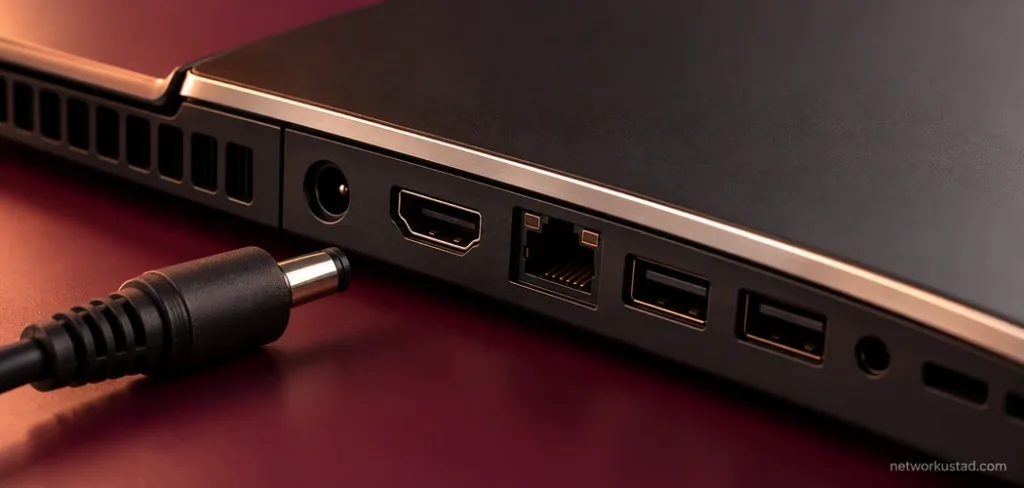
A laptop may boot successfully while having a damaged connector or unreliable input device. Test the ports and functions you expect to use with suitable, known-working accessories. Check the keyboard, touchpad, speakers, headphone connection and camera where relevant to your needs.
For external displays, verify the actual connection method and supported setup. Do not assume that every port with the same shape provides identical capabilities. If an adapter is needed, include the correct one in both the test and the budget.
With a Razer Blade 15 2018, inspect connections for obvious damage and confirm that devices are recognised reliably. Avoid forcing plugs or using a visibly damaged socket. An untested port should be described as untested, not silently counted as working.
Check wireless connectivity in a practical way too. Connect to a known network, confirm the behaviour required for your tasks and ask about any recurring problems. Keep the demonstration focused on relevant functions rather than a long list of features you will never use.
Separate storage capacity from memory
The original article confused memory and storage, including contradictory figures for each. They serve different purposes. Memory supports active workloads, while storage holds the operating system, applications and files. A claim about one does not answer a question about the other.
Check the installed configuration through the operating system and ask the seller to explain any difference from the listing. The usable storage shown after formatting and system use may differ from a drive’s advertised capacity, so understand what is being compared.
Before buying a Razer Blade 15 2018 for a planned upgrade, verify the exact model’s supported configuration and service requirements. Do not assume that another model’s guide applies or that an upgrade is simple because a component can be purchased separately.
Include labour and compatibility risk where professional work is appropriate. A low purchase price can become less attractive if the machine needs several changes before it can perform the task you bought it for. Confirm what is already installed before ordering additional parts.
Check operating-system and software support
An older computer’s ability to run an operating system is different from its eligibility for current support and security updates. Check the installed edition, activation status and applicable support arrangements. Avoid relying on a broad assurance that the laptop is fully updated.
For any operating-system change you intend to make, confirm the current requirements and supported configuration through the relevant official sources. Drivers, firmware and application requirements deserve the same attention. Do not use unofficial bypass instructions as evidence that a configuration is supported.
A Razer Blade 15 2018 should also be assessed against the software you plan to install now. Professional applications and games may change their requirements over time. A successful demonstration with an older release does not settle compatibility with the current one.
Before using a purchased machine for personal accounts or sensitive work, arrange an appropriate clean setup and confirm that the seller’s accounts and management restrictions have been removed legitimately. Do not accept an unexplained account lock or organisational restriction as a minor inconvenience to solve later.
Compare the complete cost, not the original prestige
A premium launch position does not automatically make a used device good value today. Compare the actual asking price with its condition, included accessories, return arrangements and the work needed to make it suitable. Avoid using an undated comparison with another old laptop as the main justification.
Budget for any clearly needed service, storage change, suitable charger or battery assessment. Also consider delivery and the practical cost of returning a faulty unit. A seller offering an inspection and clear terms may present a different risk from an anonymous listing with limited information.
For a Razer Blade 15 2018, condition can be more important than a small difference in advertised configuration. A slightly cheaper unit with uncertain power behaviour or an unexplained repair history may not be the economical choice. Put unresolved issues into the decision rather than treating them as free future fixes.
Consider whether another computer would meet the same needs with less uncertainty. That does not require a universal best-laptop ranking. It requires comparing available options against the tasks, budget and support expectations you established at the start.
Keep a clear record before paying
Save the listing and the seller’s answers about the model, condition, repairs and included items. Ask for unclear statements to be clarified in writing. If a return or warranty is offered, read the actual terms, including exclusions and who is responsible for handling a problem.
Do not assume that a manufacturer warranty remains active or transfers with the laptop. Verify any such claim through the relevant process. Proof of purchase or repair documentation can be useful, but inspect what it actually establishes rather than relying on its appearance alone.
When assessing a Razer Blade 15 2018 remotely, recognise the limits of photographs and video. Request the information that matters most and avoid sending payment simply because an unanswered question is met with urgency. A genuine opportunity should still allow you to understand what you are buying.
Keep your decision practical: an exact identity, a suitable workload, acceptable condition and clear transaction terms. Those factors support a more defensible purchase than repeating that the laptop is powerful, thin or expensive.
Used-laptop checklist
Before committing, confirm the following:
- The model and installed configuration match the listing.
- The screen, controls, ports and wireless functions have been checked.
- Battery and power behaviour are understood, with concerns referred for qualified assessment.
- The supplied charger is appropriate and undamaged.
- Your intended software and workload are suitable for the verified hardware.
- Required repairs, upgrades and support uncertainties are reflected in the budget.
- Included items, payment arrangements and return terms are clear.
A Razer Blade 15 2018 can only be judged properly as the particular machine offered for sale. Verify its identity, inspect its condition and set realistic expectations. If important questions remain unresolved, choose a better-documented option rather than allowing an old flagship reputation to make the decision for you.