
Introducing the right technology to your business can dramatically improve productivity and efficiency, making it easier to focus on what actually matters. Proxy servers are among the most versatile tools available to organizations today, offering a range of concrete benefits that go well beyond simple IP masking. From protecting your network perimeter to cutting bandwidth costs and enabling competitive intelligence gathering at scale, proxies have become an indispensable part of modern business infrastructure.
The global web proxy market was projected to reach $50 billion by 2026, propelled by growing demand for enterprise security, data-driven automation, and privacy compliance. Yet despite their widespread adoption, many businesses still treat proxies as a niche technical tool rather than a strategic asset. This guide explains what proxies are, how they work at an architectural level, the five most impactful ways they improve business productivity, how to choose the right type for your needs, and the questions to ask before deploying one.
What Are Proxy Servers?
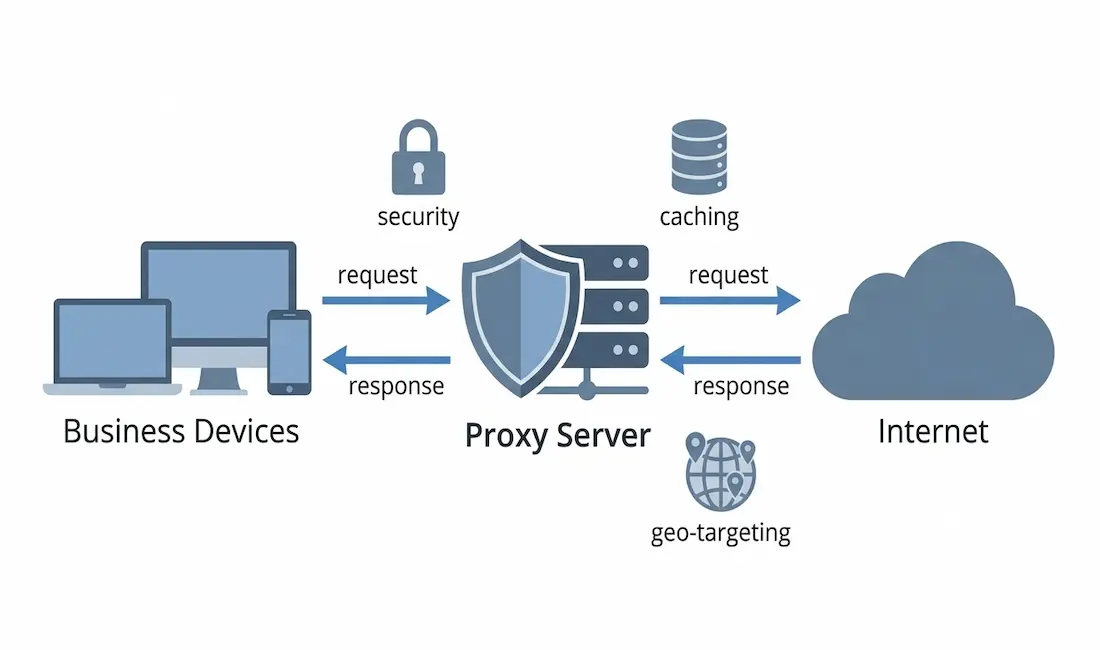
A proxy server is a dedicated system or software relay that sits between your devices and the internet. When a user or application makes a request, that request goes to the proxy first, which then forwards it to the destination server on your behalf. The destination sees the proxy’s IP address rather than your own, and the response travels back through the proxy before reaching you.
This simple architectural arrangement unlocks a wide range of capabilities: filtering and blocking content before it reaches your network, caching frequently accessed resources to speed up responses, monitoring and logging traffic for compliance, shielding your internal infrastructure from direct exposure, and enabling geographically distributed data collection.
It is worth distinguishing the two main deployment models, since they serve fundamentally different purposes.
Forward proxy. Works on behalf of clients, handling outgoing requests from your users to the internet. This is what most people picture when they hear “proxy server”: a gateway that controls what employees can access, caches content for faster delivery, and hides your internal network from external systems. Forward proxies are the standard choice for enterprise security, content filtering, bandwidth management, and market research operations.
Reverse proxy. Works on behalf of servers, sitting in front of your web-facing infrastructure and handling incoming requests from the internet before they reach your backend. Reverse proxies are used for load balancing, DDoS absorption, SSL termination, and caching static content so your servers handle fewer requests directly. Tools such as NGINX, HAProxy, and Envoy are widely deployed as reverse proxies in production environments.
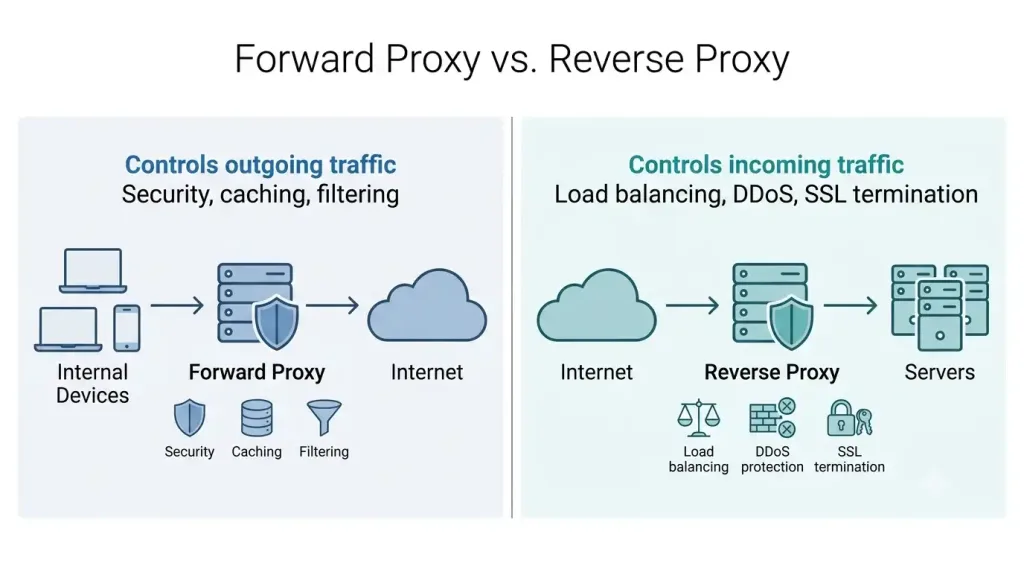
Most business productivity applications involve forward proxies, but understanding both types helps you match the tool to the problem.
5 Ways Proxy Servers Improve Business Productivity
1. Strengthened Network Security and Threat Filtering
Every request your employees send to the internet passes through the proxy, giving your security team a central point of inspection and control. A properly configured forward proxy can block connections to known malicious domains, filter out phishing sites, prevent employees from downloading infected files, and stop malware from calling home if it does reach a device. This is sometimes called content filtering or URL filtering, and it significantly reduces your attack surface without requiring changes to individual devices.
Reverse proxies add a complementary layer of defense on the inbound side. They absorb traffic before it reaches your servers, making it possible to apply web application firewall rules, rate limiting, and DDoS mitigation at the edge. In environments where your servers are under constant probing, a reverse proxy is often the difference between a manageable incident and a full outage.
The security benefit is measurable. Enterprises use forward proxies to block malicious domains, enforce acceptable-use policies, and route traffic through secure gateways, while reverse proxies inspect traffic before it hits origin servers and absorb application-layer attacks. For distributed workforces connecting from multiple locations and devices, centralizing this control at the proxy layer is far more practical than trying to enforce policy at every endpoint.
2. Competitive Intelligence: Market Research, Price Monitoring, and Ad Verification
One of the most valuable and least discussed business uses of proxies is enabling large-scale, reliable competitive intelligence. Businesses today depend on web data to make decisions, but websites implement rate limiting, CAPTCHAs, IP bans, and geo-restrictions that make systematic data collection difficult. Proxies solve this by distributing requests across multiple IP addresses and geographic locations, making large-scale data collection feasible.
The range of legitimate business use cases here is broad.
Price and inventory monitoring. Retailers and e-commerce businesses use proxies to track competitor pricing at the SKU level across markets and detect where geo-based discounting or inventory restrictions are being applied. Rotating residential proxies, which route requests through real ISP-assigned addresses, are particularly effective here because they are harder for target sites to identify as automated traffic.
Market trend analysis. A global business can use geotargeted proxies to collect data from a specific region or demographic, capturing how search results, product rankings, and social conversations differ by location. The same keyword can return entirely different results depending on where the request originates, and proxies make it possible to see all those views simultaneously.
Ad verification. Businesses spend significant budgets on digital advertising, and proxies are an essential tool for verifying that those ads are actually being displayed as intended. By routing requests through proxies in multiple locations, a marketing team can check whether their ads appear in the right regions, target the correct demographics, and are not being placed next to inappropriate content or failing to render entirely.
SERP tracking. Search engine results are personalized and localized, meaning your site’s ranking in one city may differ substantially from its ranking in another. Proxies allow SEO teams to monitor rankings accurately from multiple locations without triggering search engine rate limits.
3. Bandwidth Optimization and Caching
Every time an employee visits a website, the content has to be downloaded and delivered to their device. When multiple employees access the same resources, that data is downloaded repeatedly, consuming bandwidth unnecessarily. A caching proxy stores local copies of frequently accessed content and serves them directly to subsequent requesters, eliminating redundant trips to the origin server.
The savings are concrete. Effective caching implementation typically reduces proxy bandwidth consumption by 40 to 70 percent, translating directly to lower costs and faster response times. For organizations with large teams regularly accessing the same web-based resources, SaaS platforms, or internal documentation, caching makes a measurable difference to both the network bill and the user experience.
Reverse proxies apply the same principle to your outward-facing infrastructure. Serving static assets, compressing responses with gzip or Brotli, and offloading SSL termination from your application servers all reduce the computational load on your backend and speed up content delivery to external users. In high-traffic environments, these gains compound quickly.
4. Content Control and Acceptable-Use Policy Enforcement
Unmanaged internet access during working hours costs businesses measurable productivity. A forward proxy gives IT administrators granular control over what categories of content are accessible, when, and for which user groups, without needing to configure every individual device.
This is distinct from invasive employee monitoring. The goal is not surveillance but ensuring that bandwidth and working hours are directed toward business objectives. A marketing team might legitimately need access to social platforms that are appropriately blocked for other departments. A proxy with group-based policies can enforce different rules for different teams from a single management console, which is far more efficient than trying to configure the same rules across dozens or hundreds of devices individually.
Content filtering also supports compliance. Organizations in regulated industries have obligations around what content employees can access on company systems. A proxy that logs and filters traffic provides an auditable record, which satisfies some audit requirements and supports incident response when something does go wrong.
5. Enabling Distributed Teams and Global Operations
Businesses operating across multiple regions face a genuine problem: much of the data and content they need to access is geo-restricted, meaning it looks different or is unavailable depending on where the request originates. Proxies with geotargeted endpoints allow distributed teams to access region-specific data, tools, and platforms consistently, regardless of where team members are physically located.
This matters in several practical ways. A business entering a new market needs to understand how that market’s internet users actually experience their website, their competitors’ websites, and their advertising. Without proxies, you can only see your market as it appears from your own location. With proxies, you can see it as your customers do. Similarly, teams conducting localized research, supporting customers in multiple regions, or managing advertising accounts at scale all benefit from the ability to operate from consistent, location-specific IP addresses.
It is worth noting that proxy use for accessing geo-restricted content must always be checked against the terms of service of the platforms involved and the legal requirements of the relevant jurisdictions. Legitimate geo-targeting for market research, ad verification, and competitive analysis sits well within standard acceptable use; circumventing paywalls or platform access controls does not.
Types of Proxies for Business Use
Understanding which type of proxy suits your use case prevents costly mismatches between the tool and the job.
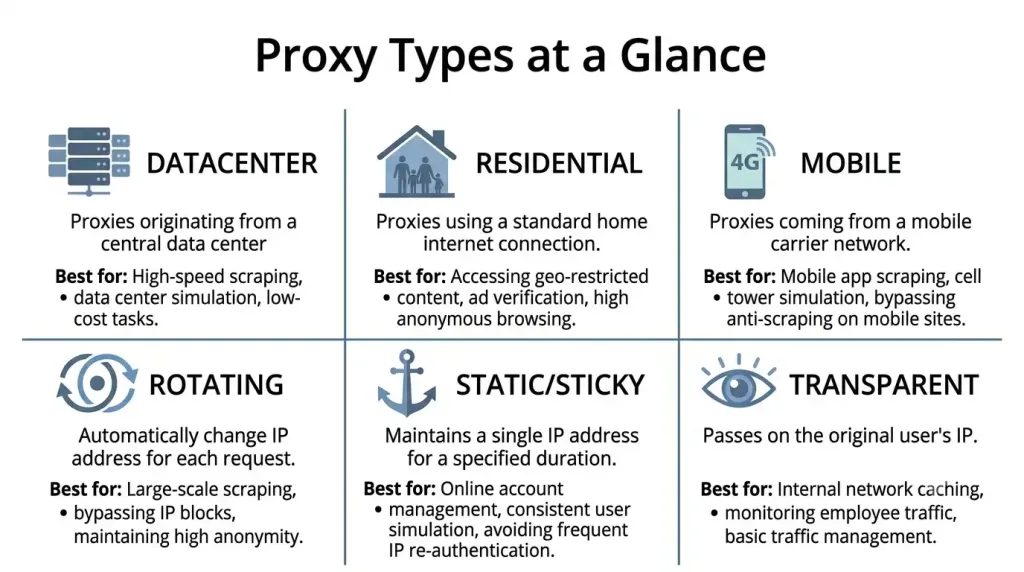
| Proxy Type | How It Works | Best For |
|---|---|---|
| Datacenter proxy | Routes through IPs hosted in data centers | High-speed tasks, budget-sensitive operations |
| Residential proxy | Routes through real ISP-assigned consumer IPs | Market research, ad verification, sites with strong bot detection |
| Mobile proxy | Routes through mobile carrier IPs | Mobile-specific ad verification, app testing |
| Rotating proxy | Automatically cycles through a pool of IPs per request | Large-scale scraping, avoiding rate limits |
| Static (sticky) proxy | Maintains the same IP for a session | Account management, tasks requiring session continuity |
| Transparent proxy | Does not hide that a proxy is in use | Internal caching, content filtering in corporate networks |
Residential proxies are harder to detect and block than datacenter ones, which makes them more suitable for data collection at scale. Datacenter proxies are faster and cheaper, which makes them effective for internal caching, security filtering, and tasks where detection avoidance is less critical.
How to Choose the Right Proxy for Your Business
Choosing the right proxy comes down to matching five key factors against your specific needs.
Proxy type. Define your primary use case first, whether it is content filtering, market research, caching, or security, and then match the type to that use case rather than starting with a specific product.
Location coverage. If your business needs to access or verify content in specific regions, your proxy provider must have IP addresses in those locations. Country-level coverage is standard; city-level and ISP-level targeting is available from some providers and matters for granular localized research.
Speed and latency. A slow proxy defeats the productivity gains it is meant to deliver. Residential proxies are generally slower than datacenter proxies because traffic routes through real consumer connections. For latency-sensitive applications, test performance before committing to a provider.
Security and compliance posture. For enterprise deployments, the proxy must support encryption, authentication, and audit logging. For data collection, consider whether the provider is GDPR- and CCPA-compliant, particularly if you are collecting data that touches personal information. Organizations with strict data-residency requirements may need to maintain on-premises proxy infrastructure rather than relying on cloud-delivered solutions.
Cost model. Most proxy providers charge based on data transfer volume, so estimating your bandwidth needs accurately before choosing a plan matters. Caching reduces consumption and therefore cost, so a provider or configuration that supports effective caching can significantly reduce the total bill. Free proxies exist but are not appropriate for business use: they typically offer no security guarantees, limited reliability, and no support, and in some cases have been documented harvesting user data.
Practical Tips Before You Deploy
Before rolling out a proxy deployment, a few planning steps prevent the most common problems.
Audit your traffic first to understand what your team actually accesses and how much bandwidth those destinations consume. This baseline makes it far easier to configure caching policies sensibly and to write content-filtering rules that are accurate rather than overly broad.
Pilot with a small group before a full rollout. Proxy misconfigurations that break legitimate business tools are disruptive, and a controlled pilot catches edge cases before they affect the whole organization.
Document your acceptable-use and content-filtering policies so that employees understand what is filtered and why. Unexplained filtering creates frustration and workarounds; transparent policies create compliance.
Review the terms of service of any platforms you plan to access through proxies, particularly for market research and competitive intelligence use cases. Rotate IPs responsibly, respect robots.txt files, and operate within rate limits to avoid IP bans and legal exposure. For further reading, see our related guides: The Cost of Using a 4G or 5G Mobile Proxy, Quickstart Guide to IPv6, Data Parsing: Fundamentals, Applications, and Challenges in the Modern World, How to Find Someone’s IP Address on TikTok, and The Ultimate Guide to Web Scraping with Lists Crawler: Tips and Tricks.
Frequently Asked Questions
What is a proxy server and how does it work for businesses?
A proxy server is an intermediary system that sits between your business’s devices and the internet, relaying requests and responses on behalf of your users. When traffic passes through a proxy, the destination server sees the proxy’s IP address rather than your own, which hides your internal network, enables traffic filtering and logging, and allows caching of frequently accessed content. For businesses, this architecture provides a central point of control over outgoing internet traffic, supporting security enforcement, bandwidth management, compliance auditing, and competitive intelligence gathering all at once.
What is the difference between a forward proxy and a reverse proxy?
A forward proxy handles outgoing requests from your internal users to the internet, acting on behalf of your clients. It is the standard tool for content filtering, bandwidth caching, and market research operations. A reverse proxy handles incoming requests from the internet, sitting in front of your servers and acting on their behalf to provide load balancing, DDoS absorption, SSL termination, and caching of static content. Both are valuable in business contexts but solve different problems: a forward proxy controls what your team can access, while a reverse proxy controls how external traffic reaches your infrastructure.
Are free proxy servers safe for business use?
No, free proxies are not appropriate for business use. Free proxy services typically offer no security guarantees, no encryption standards, no audit logging, and no support, and some have been documented harvesting user data or injecting content into traffic. For a business handling sensitive data, customer information, or proprietary research, a free proxy introduces exactly the security risks a proxy deployment is meant to address. Paid enterprise or business-grade proxy services provide the security configuration, compliance documentation, and reliability that business use requires.
How much bandwidth can a caching proxy actually save?
Effective caching implementation typically reduces proxy bandwidth consumption by 40 to 70 percent, depending on your content access patterns. Sites and resources that are accessed repeatedly by multiple users see the highest savings, since the content is served from the local cache rather than fetched again from the origin. For organizations where many employees access the same SaaS platforms, documentation, or web-based tools throughout the day, the savings compound quickly and translate directly to lower bandwidth costs and faster page load times.
What legal and ethical considerations apply to using proxies for market research?
Proxies used for competitive intelligence, price monitoring, ad verification, and market trend analysis are legitimate and widely used across industries. The key constraints are to operate within the terms of service of the platforms you are accessing, respect robots.txt files and rate limits, and ensure that any data collection involving personal information complies with applicable regulations such as GDPR and CCPA. Using proxies specifically to circumvent paywalls, bypass access controls, or violate a platform’s terms of service creates legal and reputational risk and is outside the scope of legitimate business use. When in doubt, legal review of your specific use case is worthwhile before deploying at scale.



