
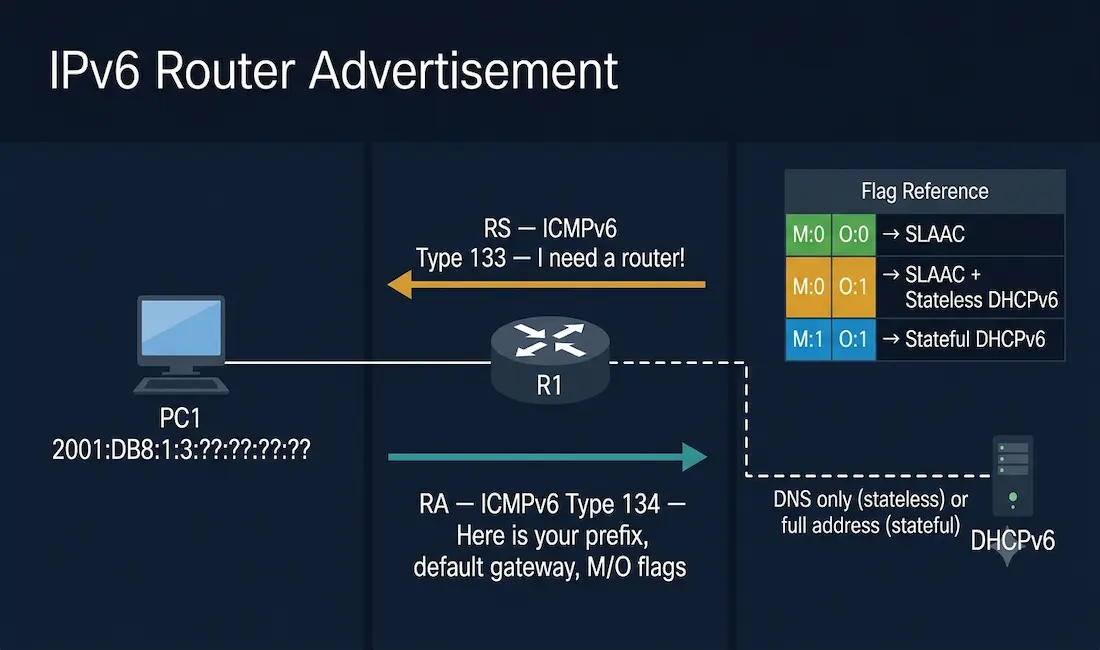
Router Advertisement (RA) messages are a cornerstone of IPv6 networking, allowing routers to broadcast their presence and share critical configuration details with devices on the network. Every IPv6 device on a LAN segment learns its addressing information, default gateway, and DNS configuration through the RA process — making RA messages the primary mechanism by which IPv6 hosts configure themselves automatically.
This guide provides an in-depth exploration of RA messages, their structure, the three address configuration options they control, how to configure each option on a Cisco IOS router, and how to verify and secure the RA process — essential knowledge for CCNA candidates and network professionals working with IPv6.
What Are Router Advertisement Messages?
RA messages belong to the Internet Control Message Protocol for IPv6 (ICMPv6), defined in RFC 4861. Routers send these messages in two ways:
- Periodically — unsolicited RAs are sent to the all-nodes multicast address FF02::1 at a configurable interval (default: every 200 seconds on Cisco IOS)
- In response to Router Solicitation (RS) messages — when a host joins the network, it sends an RS message to FF02::2 (the all-routers multicast address) requesting an immediate RA rather than waiting for the next periodic advertisement
The primary purposes of RA messages are to:
- Announce the router’s presence and provide the default gateway address (the router’s link-local address)
- Deliver network prefix information for Stateless Address Autoconfiguration (SLAAC)
- Signal whether hosts should use DHCPv6 for additional configuration
- Provide MTU, hop limit, and DNS information
Router Solicitation and Advertisement: The RS/RA Exchange
When a new IPv6 host connects to a network, the exchange works as follows:
- The host sends a Router Solicitation (RS) message — ICMPv6 Type 133 — to FF02::2, requesting configuration information from any routers on the segment.
- The router responds with a Router Advertisement (RA) message — ICMPv6 Type 134 — sent to FF02::1 (all nodes) or directly to the soliciting host’s address.
- The host reads the RA, extracts the prefix and configuration flags, and proceeds to configure its IPv6 address using SLAAC, DHCPv6, or a combination depending on the M and O flag values.
The router also sends periodic unsolicited RA messages to FF02::1 so that all hosts on the segment stay updated even without sending RS messages.
Structure of an RA Message
An RA message comprises an ICMPv6 header and optional fields. Key components include:
- Type (134) — marks the message as an RA
- Current Hop Limit — the recommended IP hop limit hosts should use for outgoing packets
- Managed Address Configuration Flag (M-bit) — when set to 1, signals that hosts should use stateful DHCPv6 to obtain a global unicast address
- Other Configuration Flag (O-bit) — when set to 1, signals that hosts should use DHCPv6 to obtain additional configuration (DNS, domain name) but not necessarily a global unicast address
- Router Lifetime — duration in seconds the router serves as the default gateway (0 means the router is not the default gateway)
- Reachable Time — time in milliseconds a neighbor is considered reachable after confirmation
- Retransmit Timer — interval between Neighbor Solicitation retransmissions
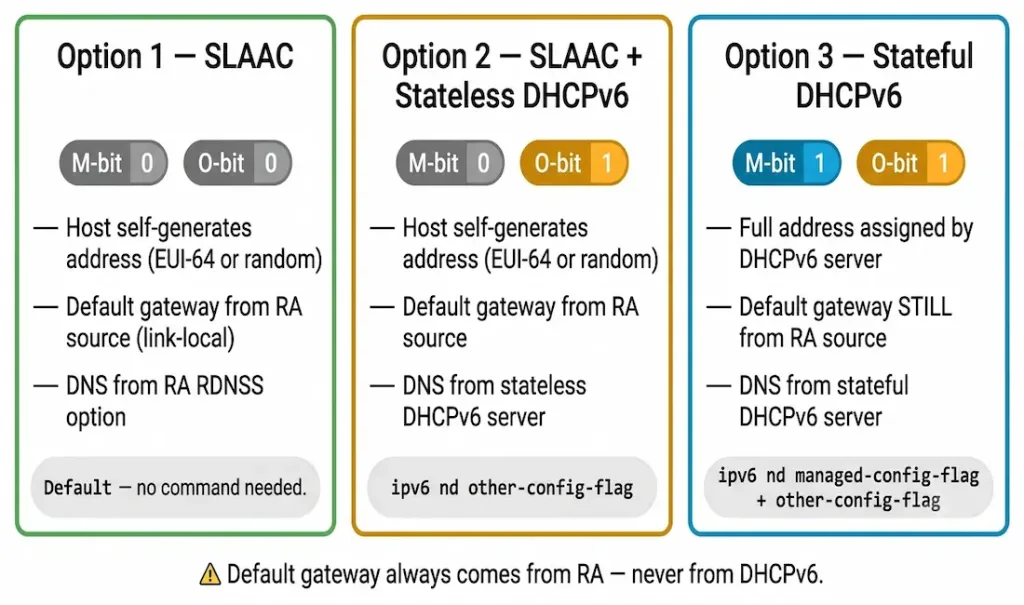
The M-bit and O-bit together determine which of the three address configuration methods a host uses. Understanding their combinations is essential for CCNA:
| M-bit | O-bit | Address Configuration Method |
|---|---|---|
| 0 | 0 | SLAAC only — host auto-configures address and uses RA for all info |
| 0 | 1 | SLAAC + Stateless DHCPv6 — host auto-configures address but gets DNS from DHCPv6 |
| 1 | 1 | Stateful DHCPv6 — host gets address, prefix length, and all info from DHCPv6 |
Options in RA Messages
The ICMPv6 RA message tells a device how to obtain its IPv6 global unicast address. The device operating system is also the final authority — it reads the M and O flags and decides how to proceed, though it is expected to follow the router’s guidance.
The RA message carries the following core information:
- Network prefix and prefix length
- Default gateway address (the router’s link-local address as the RA source)
- DNS addresses (via RDNSS — Recursive DNS Server option) and domain name (via DNSSL — DNS Search List option), or via stateless DHCPv6
We can configure the router interface for each RA option manually using Cisco IOS commands. There are three options for RA messages controlling how hosts get their IPv6 address automatically. SLAAC (Option 1) is the default.
Option 1: SLAAC (M:0 O:0)
SLAAC — Stateless Address Autoconfiguration — is the default RA option. With SLAAC, the RA message provides everything the host needs: the network prefix, prefix length, and default gateway. No DHCPv6 server is involved.
When a host receives a SLAAC RA (M:0, O:0), it:
- Takes the 64-bit prefix from the RA (e.g., 2001:DB8:1:3::/64)
- Generates the 64-bit Interface ID using the EUI-64 process or a random value (RFC 7217 privacy extensions)
- Combines the prefix and Interface ID to form its full 128-bit global unicast address
- Uses the router’s link-local address (the RA source address) as its default gateway
The EUI-64 Process
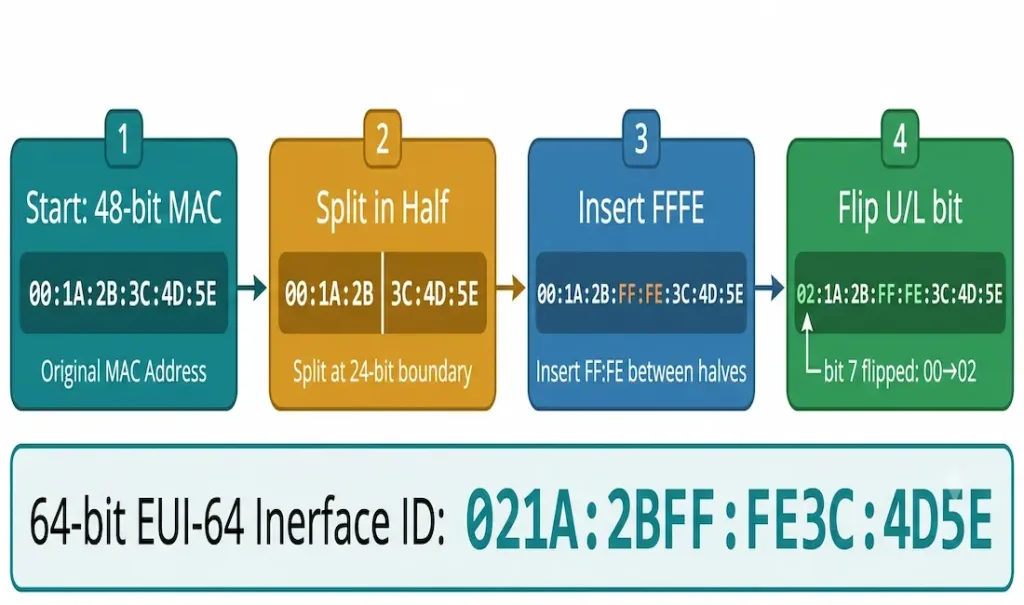
EUI-64 derives the 64-bit Interface ID from the host’s 48-bit MAC address in three steps:
- Split the MAC address in half — e.g., MAC
00:1A:2B:3C:4D:5Esplits into00:1A:2Band3C:4D:5E - Insert FFFE in the middle —
00:1A:2B:FF:FE:3C:4D:5E - Flip the U/L bit (the second-least significant bit of the first byte) —
00in binary is00000000; flipping the U/L bit (bit value 2) gives00000010=02 - Result — Interface ID:
02:1A:2B:FF:FE:3C:4D:5E→ formatted as021A:2BFF:FE3C:4D5E
Combined with the prefix 2001:DB8:1:3::/64, the host’s full address becomes 2001:DB8:1:3:021A:2BFF:FE3C:4D5E.
SLAAC Cisco IOS Configuration
SLAAC is the default behavior when IPv6 is enabled on a router interface. No additional configuration is needed beyond enabling IPv6 routing and assigning a prefix to the interface:
Router(config)# ipv6 unicast-routing
Router(config)# interface GigabitEthernet0/0
Router(config-if)# ipv6 address 2001:DB8:1:3::1/64
Router(config-if)# no shutdown
The router automatically sends RA messages with M:0 O:0 (SLAAC) once IPv6 unicast routing is enabled. No explicit RA configuration is required for the default option.
Option 2: SLAAC + Stateless DHCPv6 (M:0 O:1)
This option combines SLAAC for address configuration with a stateless DHCPv6 server for additional parameters — primarily DNS server addresses and domain names. The stateless DHCPv6 server does not allocate global unicast addresses; it provides only supplementary configuration.
With this option:
- The host uses SLAAC to self-generate its global unicast address (M:0)
- The host contacts a stateless DHCPv6 server for DNS and domain name (O:1)
- The default gateway is the router’s link-local address from the RA source
SLAAC + Stateless DHCPv6 Cisco IOS Configuration
To set the O-bit in RA messages (while leaving M at 0):
Router(config)# interface GigabitEthernet0/0
Router(config-if)# ipv6 nd other-config-flag
The ipv6 nd other-config-flag command sets O:1 in all RA messages sent from this interface. Hosts receiving this RA will use SLAAC for their address but contact a DHCPv6 server for DNS information.
The stateless DHCPv6 server configuration (providing DNS only):
Router(config)# ipv6 dhcp pool STATELESS-POOL
Router(config-dhcpv6)# dns-server 2001:DB8::53
Router(config-dhcpv6)# domain-name networkustad.com
Router(config-dhcpv6)# exit
Router(config)# interface GigabitEthernet0/0
Router(config-if)# ipv6 dhcp server STATELESS-POOL
Option 3: Stateful DHCPv6 (M:1 O:1)
Stateful DHCPv6 works similarly to DHCPv4 for IPv4. The DHCPv6 server allocates and maintains a complete record of every address it assigns — just as a DHCPv4 server tracks IPv4 leases.
With stateful DHCPv6:
- The RA message signals M:1 O:1, telling the host to contact a DHCPv6 server for everything
- The DHCPv6 server provides the global unicast address, prefix length, DNS server address, domain name, and other configuration
- The default gateway is still obtained from the RA message — specifically from the RA’s source IPv6 address (the router’s link-local address). DHCPv6 servers — stateless or stateful — never provide the default gateway address. Only the RA provides it.
Stateful DHCPv6 Cisco IOS Configuration
To set both the M-bit and O-bit:
Router(config)# interface GigabitEthernet0/0
Router(config-if)# ipv6 nd managed-config-flag
Router(config-if)# ipv6 nd other-config-flag
The stateful DHCPv6 pool configuration (providing full addressing):
Router(config)# ipv6 dhcp pool STATEFUL-POOL
Router(config-dhcpv6)# address prefix 2001:DB8:1:3::/64 lifetime 172800 86400
Router(config-dhcpv6)# dns-server 2001:DB8::53
Router(config-dhcpv6)# domain-name networkustad.com
Router(config-dhcpv6)# exit
Router(config)# interface GigabitEthernet0/0
Router(config-if)# ipv6 dhcp server STATEFUL-POOL
The DHCPv6 exchange that follows:
- The host sends a Solicit message to FF02::1:2 (all-DHCPv6-servers multicast) — “I need an IPv6 address and other information”
- The DHCPv6 server responds with an Advertise message — “Here is your IPv6 address and all other information”
- The host sends a Request to confirm the offered address
- The server sends a Reply confirming the lease
Summary: RA Message Options Compared
| Feature | SLAAC (Option 1) | SLAAC + Stateless DHCPv6 (Option 2) | Stateful DHCPv6 (Option 3) |
|---|---|---|---|
| M-bit | 0 | 0 | 1 |
| O-bit | 0 | 1 | 1 |
| Global unicast address | Self-generated (EUI-64 or random) | Self-generated (EUI-64 or random) | Assigned by DHCPv6 server |
| Default gateway | From RA source (link-local) | From RA source (link-local) | From RA source (link-local) |
| DNS server | From RA (RDNSS option) | From stateless DHCPv6 server | From stateful DHCPv6 server |
| Address tracking | None (stateless) | None (stateless) | DHCPv6 server maintains lease table |
| Cisco M-bit command | Default (no command needed) | Not set | ipv6 nd managed-config-flag |
| Cisco O-bit command | Default (no command needed) | ipv6 nd other-config-flag | ipv6 nd other-config-flag |
Verifying RA Configuration
show ipv6 interface
The show ipv6 interface [interface-id] command displays the M and O flag settings and confirms the RA interval:
Router# show ipv6 interface GigabitEthernet0/0
GigabitEthernet0/0 is up, line protocol is up
  IPv6 is enabled, link-local address is FE80::1
  Global unicast address(es):
    2001:DB8:1:3::1, subnet is 2001:DB8:1:3::/64
  Joined group address(es):
    FF02::1
    FF02::2
    FF02::1:FF00:1
  ND DAD is enabled, number of DAD attempts: 1
  ND reachable time is 30000 milliseconds
  ND advertised reachable time is 0 milliseconds
  ND advertised retransmit interval is 0 milliseconds
  ND router advertisements are sent every 200 seconds
  ND router advertisements live for 1800 seconds
  ND advertised default router preference is Medium
  Hosts use stateless autoconfig for addresses.
The line “Hosts use stateless autoconfig for addresses” confirms SLAAC (M:0 O:0). When the O-bit is set, it shows “Hosts use DHCP to get other configuration”. When the M-bit is set, it shows “Hosts use DHCP to get addresses”.
show ipv6 neighbors
After hosts configure their addresses via SLAAC or DHCPv6, verify their presence in the router’s neighbor table:
Router# show ipv6 neighbors
IPv6 Address                              Age Link-layer Addr State Interface
2001:DB8:1:3:021A:2BFF:FE3C:4D5E           0 001a.2b3c.4d5e  REACH Gi0/0
FE80::021A:2BFF:FE3C:4D5E                  0 001a.2b3c.4d5e  REACH Gi0/0
RA Security: Rogue RA Attacks and RA Guard
RA messages present a significant IPv6 security risk. Because any device on the network can send ICMPv6 Type 134 messages, an attacker can send fraudulent RA messages (Rogue RA attack) to:
- Advertise a malicious default gateway and redirect all host traffic through the attacker’s device
- Advertise a false prefix, causing hosts to generate addresses on the wrong network
- Set M:1 O:1 to force hosts to contact a malicious DHCPv6 server
RA Guard
Cisco IOS supports RA Guard (IPv6 First-Hop Security) to mitigate Rogue RA attacks. RA Guard filters RA messages on switch ports, allowing them only from trusted router ports and dropping them on host-facing ports:
Switch(config)# ipv6 nd raguard policy HOST-POLICY
Switch(config-ra-guard)# device-role host
Switch(config-ra-guard)# exit
Switch(config)# interface GigabitEthernet0/1
Switch(config-if)# ipv6 nd raguard attach-policy HOST-POLICY
This ensures that only the legitimate router can send RA messages to hosts on the segment. RA Guard is a CCNA-level IPv6 security concept and directly addresses the most common IPv6 first-hop threat.
RA Options Field Summary
| Option | Purpose |
|---|---|
| Prefix Information | Provides network prefix for SLAAC and on-link determination |
| Route Information | Advertises specific routes to other networks |
| Recursive DNS Server (RDNSS) | Supplies DNS server addresses directly in the RA (no DHCPv6 needed) |
| DNS Search List (DNSSL) | Provides domain suffixes for hostname resolution |
| MTU | Specifies the maximum packet size to avoid fragmentation |
| Source Link-Layer Address | Gives the router’s MAC address for direct Layer 2 communication |
| Neighbor Discovery Options | Supports neighbor discovery and maintenance |
CCNA Exam Pointers
- RA messages are ICMPv6 Type 134; RS messages are ICMPv6 Type 133
- RA messages are sent periodically to FF02::1 (all-nodes multicast); RS messages are sent to FF02::2 (all-routers multicast)
- M:0 O:0 = SLAAC only — no DHCPv6 involved; default behavior
- M:0 O:1 = SLAAC + stateless DHCPv6 — host self-generates address but gets DNS from DHCPv6
- M:1 O:1 = Stateful DHCPv6 — DHCPv6 server assigns the full address
- Default gateway always comes from the RA — DHCPv6 (stateless or stateful) never provides the default gateway
- Cisco IOS commands:
ipv6 nd managed-config-flag(sets M:1),ipv6 nd other-config-flag(sets O:1) - EUI-64: splits 48-bit MAC, inserts FFFE in the middle, flips U/L bit (bit 7) of first byte
- RA Guard protects against Rogue RA attacks on switch ports
show ipv6 interface— verify M/O flag settings and RA intervalshow ipv6 neighbors— verify host IPv6 addresses learned via NDP
Conclusion
RA messages are the foundation of IPv6 automatic address configuration. By controlling the M and O flags in RA messages, a Cisco router can direct hosts to use pure SLAAC, SLAAC with stateless DHCPv6 for DNS, or full stateful DHCPv6 for all addressing information. In all three cases, the default gateway is provided exclusively by the RA — never by DHCPv6. Understanding the M/O flag combinations, the Cisco IOS commands to set them, and how to verify the results with show ipv6 interface is essential for both the CCNA exam and real-world IPv6 deployment.
Frequently Asked Questions
What are Router Advertisement (RA) messages and what do they contain?
RA messages are ICMPv6 Type 134 messages sent by IPv6 routers to provide connected hosts with the information needed to configure their IPv6 addresses and network settings automatically. Each RA contains the network prefix and prefix length (for SLAAC), the router’s link-local address as the default gateway, M and O flag bits that tell the host whether to use DHCPv6 for addressing or additional configuration, the hop limit recommendation, MTU, and optionally DNS server addresses via the RDNSS option. Routers send RAs periodically to FF02::1 (all-nodes multicast) and immediately in response to a Router Solicitation (RS) from a newly connected host.
What is the difference between the M-bit and O-bit in an RA message?
The M-bit (Managed Address Configuration Flag) and O-bit (Other Configuration Flag) together determine which address configuration method a host uses. When M is 0 and O is 0, the host uses SLAAC only — it generates its own address from the RA prefix and derives all other information from the RA. When M is 0 and O is 1, the host still generates its own address via SLAAC but contacts a stateless DHCPv6 server for DNS and domain name. When both M and O are 1, the host contacts a stateful DHCPv6 server for its complete addressing configuration including the global unicast address. In all three cases, the default gateway is always the router’s link-local address from the RA — DHCPv6 never provides the default gateway.
How does SLAAC use the EUI-64 process to generate an IPv6 address?
SLAAC generates the 64-bit Interface ID portion of an IPv6 address from the host’s 48-bit MAC address using the EUI-64 process. The process involves three steps: first, the 48-bit MAC address is split into two 24-bit halves; second, the hex value FFFE is inserted between the two halves to create a 64-bit value; third, bit 7 of the first byte (the Universal/Local bit) is flipped — changing 0 to 1 or 1 to 0. The resulting 64-bit Interface ID is appended to the 64-bit prefix from the RA to form the complete 128-bit global unicast address. For example, a MAC address of 00:1A:2B:3C:4D:5E becomes the Interface ID 021A:2BFF:FE3C:4D5E after EUI-64 processing.
Why is the default gateway always obtained from the RA and not from DHCPv6?
This is a fundamental design decision in IPv6. DHCPv6 — whether stateless or stateful — was deliberately not designed to provide default gateway information. Only the Router Advertisement provides the default gateway, which is always the router’s link-local address (the source address of the RA message). This design ensures that even in stateful DHCPv6 environments where the DHCPv6 server assigns all addressing information, hosts must still receive an RA to discover their default gateway. On Cisco IOS, if IPv6 unicast routing is disabled on the router interface, RA messages are not sent, and hosts cannot discover their default gateway regardless of whether a DHCPv6 server is present.
What is a Rogue RA attack and how does RA Guard prevent it?
A Rogue RA attack occurs when an attacker on the local network segment sends fraudulent ICMPv6 Type 134 messages advertising a malicious default gateway, a false prefix, or false DHCPv6 flags. Because any device can technically send ICMPv6 messages, a compromised host or a deliberately connected device can redirect all network traffic through the attacker’s machine or cause hosts to configure incorrect addresses. RA Guard is Cisco’s first-hop security mechanism that filters RA messages at the switch port level. An RA Guard policy configured with device-role host on access ports ensures that only designated router-facing ports can forward RA messages — any RA arriving on a host-facing port is dropped silently, preventing rogue devices from advertising themselves as default gateways.



