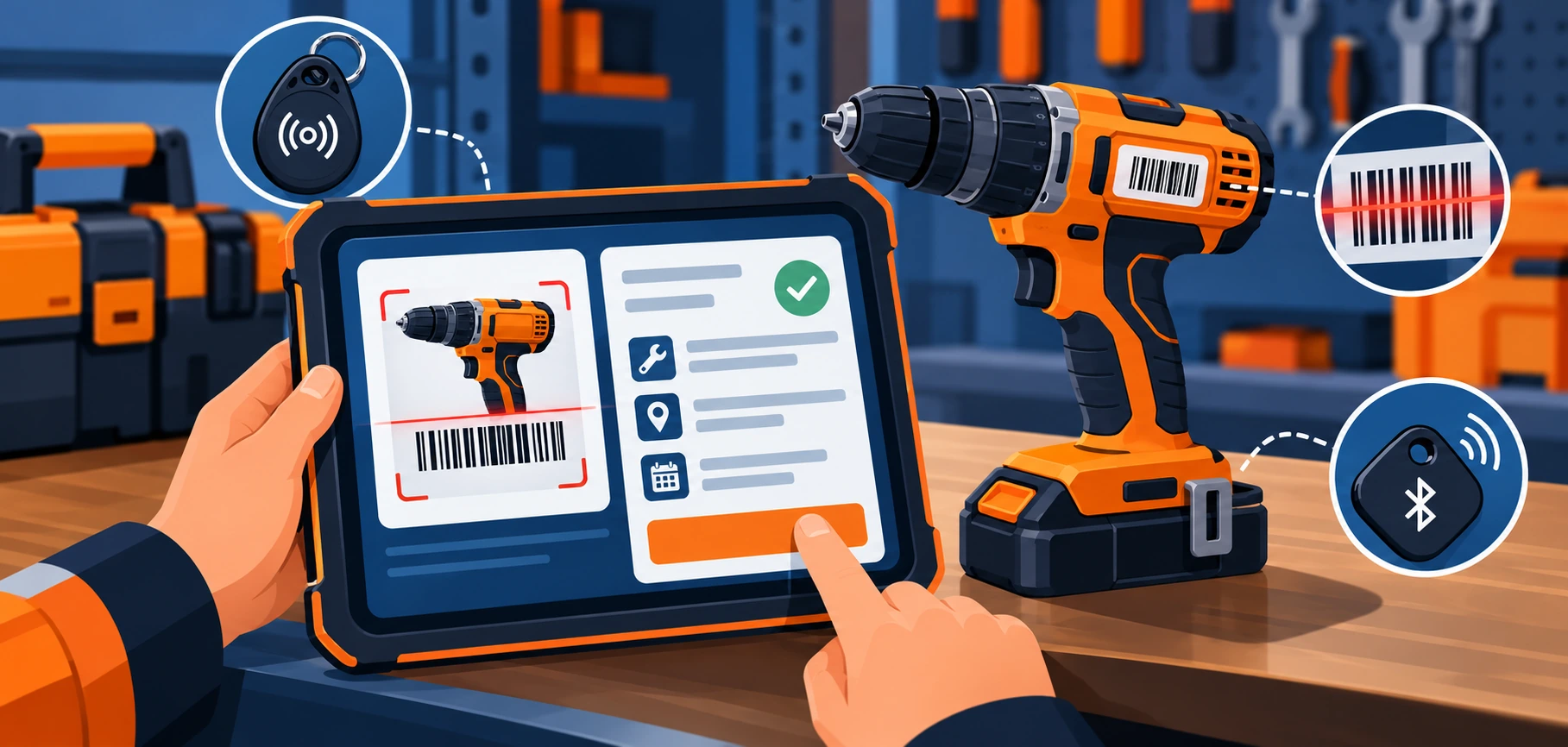
Lost and misplaced tools cost more than their replacement price — the real cost is the labor hours spent searching for them, the project delays when a crew can’t find what they need, and the compliance gaps when there’s no record of who had a piece of equipment last. Tool tracker software solves this by giving a business a real-time, searchable record of where every piece of equipment is, who has it, and when it was last maintained. Here’s what it actually does, how the underlying tagging technology works, and what separates a genuinely useful system from a basic spreadsheet with extra steps — the same accountability gap that tracking software closes for labor hours, applied to physical equipment instead.
What Tool Tracker Software Actually Does
At its core, tool tracking software replaces a manual check-out log or a guess with a real-time digital record. Each tool is tagged with an identifier (barcode, RFID, or Bluetooth tag — more on choosing between these below), and the software logs every check-out, check-in, transfer between job sites, and maintenance event tied to that identifier. The result is a searchable record that answers three questions on demand: where is this tool right now, who has it, and when does it need maintenance.
Choosing a Tagging Method: Barcode, RFID, or Bluetooth
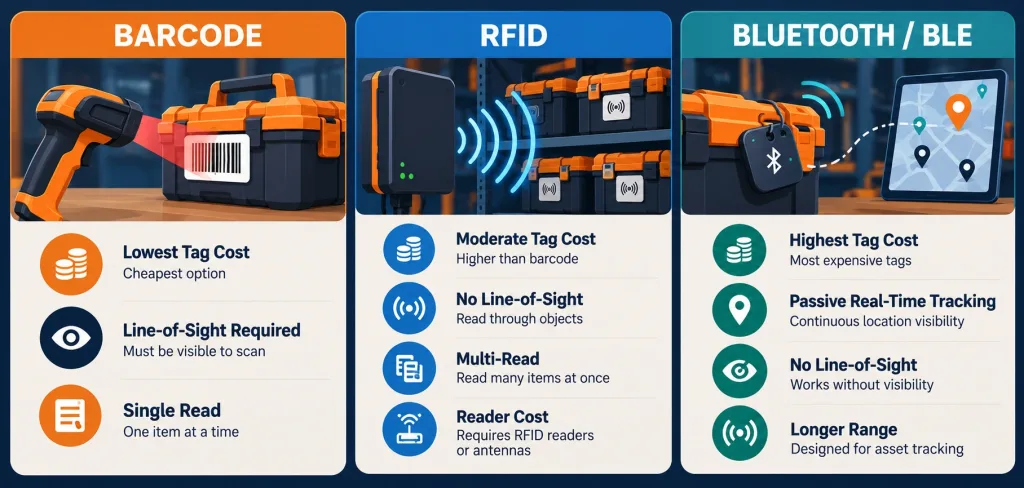
This is the decision most generic coverage of tool tracker software skips entirely, and it matters because the three main tagging approaches have real, practical tradeoffs:
- Barcode tags are the cheapest option per tag and work well for lower-cost, high-volume tools, but they require line-of-sight scanning — each tool has to be individually scanned, one at a time, which adds friction at check-out and check-in for a crew moving quickly.
- RFID tags don’t require line-of-sight and can read multiple tags at once, which makes them genuinely useful for hard-to-reach assets, storage containers, or fixed checkpoints like a job-site entrance where equipment passes through automatically. The tradeoff is that while the tags themselves are reasonably affordable, the RFID readers are a real additional cost, and a site typically needs several of them positioned at key points.
- Bluetooth (BLE) tags cost more per tag than the other two options, but they enable ongoing, passive location tracking through a smartphone app rather than requiring an active scan at all — the practical fit here is higher-value or larger equipment where knowing real-time location (not just last-scanned location) actually matters.
A reasonable approach for most operations is a hybrid one: barcodes for inexpensive, high-volume hand tools, and RFID or BLE tags reserved for the equipment that’s actually expensive enough, or hard-to-locate enough, to justify the extra per-tag cost.
Where Tool Tracking Actually Reduces Costs
- Less time lost searching. Every minute a crew member spends looking for a misplaced tool is paid labor time producing nothing — a searchable digital record turns “where did we leave the impact driver” into a lookup instead of a site-wide search.
- Fewer tools go missing entirely. A check-out record tied to a specific person creates accountability that an informal “whoever grabbed it last” system doesn’t, which measurably reduces the rate at which tools simply disappear between job sites.
- Maintenance triggered by actual usage, not guesswork. Software that logs usage hours or cycles can flag a tool for service based on real wear rather than a fixed calendar interval, catching problems before a breakdown rather than after, and avoiding premature maintenance on equipment that’s barely been used.
- Better purchasing decisions. Usage data across a tool inventory reveals which equipment is overused relative to the fleet (a candidate for buying a second unit) and which sits idle (a candidate for not reordering), turning future purchasing from a guess into a data-informed decision.
Safety and Compliance: What a Real Record Actually Enables
- Inspection and calibration tracking. Tools subject to regulatory inspection requirements (lifting equipment, pressure tools, calibrated measuring instruments) need a documented inspection history — a tool tracker with maintenance logging gives an auditor a specific, timestamped record instead of a paper log that may or may not have been kept consistently.
- Faster root-cause response after an incident. If a tool malfunctions on-site, a maintenance history tied to that specific unit (not just “the drill,” but that exact serial-tagged drill) lets a safety team quickly check whether it was overdue for service, rather than reconstructing the history from memory.
- Accountability for who had what, when. A check-out record is also a safety record — if a piece of equipment is later found to be defective, knowing exactly who used it and during what window matters both for correcting training gaps and for liability purposes.
Features Worth Actually Looking For
- Barcode or RFID scanning for check-in/out, ideally with a mobile app so field crews aren’t tied to a fixed scanning station.
- Cloud access across devices and job sites, so a tool checked out at one location shows up correctly if it’s moved to another without a manual transfer entry — the same kind of centrally managed, data accessible architecture that keeps a multi-site operation’s records both current and restricted to the people who should see them.
- Customizable usage and maintenance reports, since the reporting a small shop needs (basic check-out history) differs substantially from what a multi-site operation needs (utilization rates across locations, maintenance cost per asset).
- Maintenance scheduling tied to actual usage data, not just calendar reminders — genuinely useful systems trigger service flags based on logged hours or cycles.
- Role-based access, so check-out permissions and reporting visibility can differ between a site supervisor and a technician, which matters once an operation grows past a handful of users.
- GPS or location tracking for high-value mobile equipment specifically — this is a real capability in some platforms, distinct from basic barcode check-in/out, and worth asking about directly if an operation moves expensive equipment between remote sites.
Getting Started
- Inventory what you actually have before picking a tagging method — a rough count of low-cost hand tools versus high-value equipment tells you whether you need barcodes, RFID, BLE, or (most likely) some mix of the three.
- Pick software that matches your actual reporting needs, not just your current tool count — a growing operation benefits from choosing a platform that scales to multiple sites and role-based access before it’s urgently needed.
- Build check-out discipline into the workflow from day one — software only produces accurate records if crews actually scan tools consistently; a system that’s inconvenient to use at the point of check-out will get skipped under time pressure.
- Review usage data periodically, not just when something goes wrong — the purchasing and maintenance insights from usage history are only valuable if someone actually looks at them regularly.
The Bottom Line
Tool tracker software’s real value isn’t the tracking itself — it’s what the resulting cost management data and compliance record actually enable: fewer lost tools, maintenance triggered by real usage instead of guesswork, and an audit-ready record for tools subject to inspection requirements. Choosing the right tagging method for your specific equipment mix (barcode for low-cost high-volume tools, RFID or BLE for higher-value or hard-to-reach equipment) matters as much as which software platform you pick, and most operations do better with a hybrid approach than forcing one tagging method across an entire inventory.
Frequently Asked Questions
How does tool tracker software reduce operational costs?
Primarily by cutting the labor time spent searching for misplaced tools, reducing how often tools go missing entirely through check-out accountability, and triggering maintenance based on actual usage rather than a fixed calendar schedule that can lead to either premature service or missed problems.
How does tool tracker software improve workplace safety?
By maintaining a documented inspection and maintenance history tied to each specific tool, which matters for regulated equipment requiring calibration or inspection records, and by creating clear accountability for who had a piece of equipment during any given window — useful both for safety investigations and training follow-up.
What key features does modern tool tracker software offer?
Barcode, RFID, or Bluetooth-based check-in/out, cloud access across devices and job sites, customizable usage and maintenance reports, usage-triggered maintenance scheduling, role-based access control, and in some platforms, GPS tracking for high-value mobile equipment.
How does tool tracking software enhance team efficiency?
By replacing manual searches and informal tracking with a lookup-based system — a crew member can check a tool’s location and status in seconds rather than searching a site or asking around, and supervisors can see utilization across an entire inventory rather than guessing at purchasing needs.
Is tool tracker software compliant with industry regulations?
The software itself doesn’t automatically guarantee compliance, but a system with consistent maintenance and inspection logging gives a business the documented record that regulatory inspections for equipment like lifting gear or calibrated instruments typically require — the compliance value comes from how consistently the records are kept, not from the software alone.