
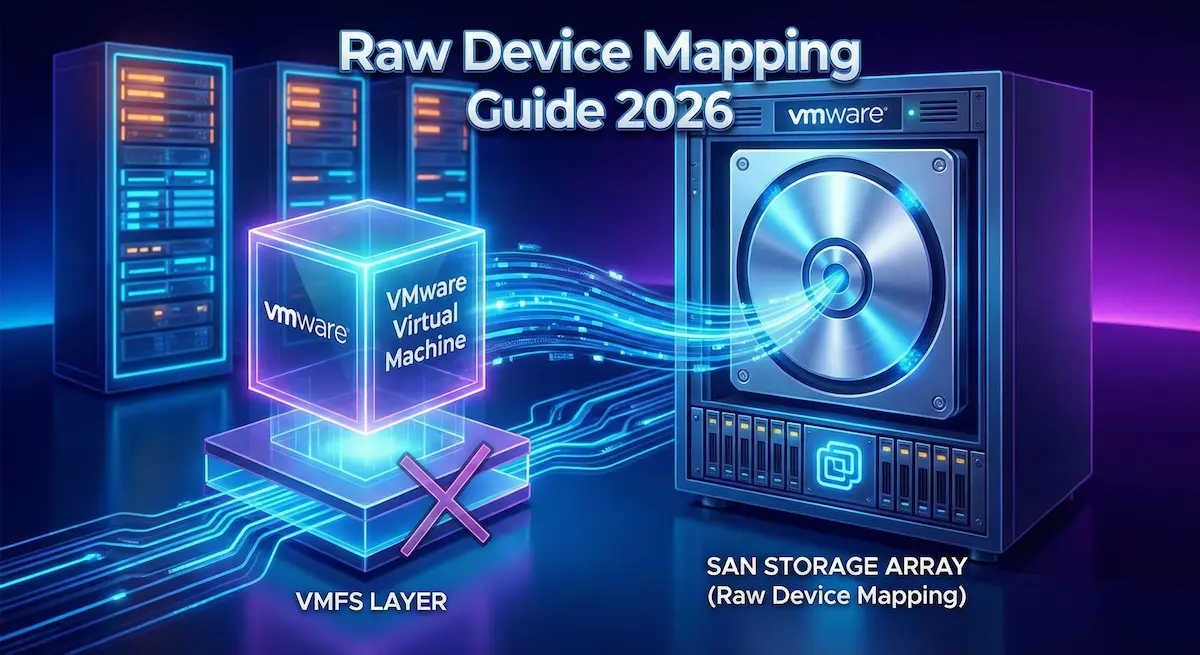
What Is Raw Device Mapping?
Raw Device Mapping (RDM) is a VMware vSphere feature that lets a virtual machine (VM) access a physical storage device — typically a Logical Unit Number (LUN) on a Storage Area Network (SAN) — without routing I/O through a VMFS datastore file. Instead of storing data inside a virtual disk (.vmdk) file, RDM creates a small mapping file on a VMFS volume that acts as a proxy, redirecting all I/O straight to the underlying physical LUN. According to Broadcom’s official vSphere documentation, “the RDM contains metadata for managing and redirecting disk access to the physical device” — it gives you some advantages of direct hardware access while retaining certain virtual-disk benefits.
RDM has been part of the VMware stack since the early ESX/ESXi days and has matured to support modern storage protocols including Fibre Channel (FC), iSCSI, and NVMe over Fabrics (NVMe-oF). The technology remains fully supported in vSphere 8.0 through the current release (8.0 Update 3e, released May 2025), making it a stable — if specialised — option for enterprise storage configurations.
Why does RDM still matter in 2026? In a standard virtualised setup, VMDK files abstract storage through the VMFS layer, which adds overhead for certain demanding applications. RDM bypasses this abstraction, delivering near-native I/O performance that is critical for high-throughput databases, clustering software, and latency-sensitive workloads. While Broadcom has deprecated Virtual Volumes (vVols) starting with VCF/VVF 9.0 in 2025 and is steering customers toward vSAN, RDM continues to serve a distinct role — especially for legacy applications and shared-disk clusters where vSAN is not a fit.
It is worth clarifying one common misconception: the article’s earlier claim that RDM “handles disks larger than 64 TB” was overstated. The accurate picture, per Broadcom’s KB article, is that virtual-mode RDM (vRDM) supports up to 62 TB on VMFS-5 or VMFS-6, while physical-mode RDM (pRDM) also supports greater than 2 TB on VMFS-5 — but actual maximum size is always constrained by the underlying storage array and HBA capabilities. Always consult your array vendor’s documentation for the hard ceiling in your environment.
Introduction to Raw Device Mapping in VMware vSphere
RDM bridges the gap between the virtual world and physical storage hardware. In a typical vSphere deployment, ESXi hosts present storage to VMs as VMDK files sitting on a VMFS datastore. That abstraction layer is excellent for general workloads — it enables snapshots, cloning, Storage vMotion, and thin provisioning — but it also adds latency and CPU overhead that can be unacceptable for I/O-intensive applications like Oracle RAC, Microsoft SQL Server clusters, or high-throughput video editing pipelines.
RDM removes that abstraction for the specific VM that needs it. The mapping file (with a .vmdk extension) lives on a VMFS datastore but contains only metadata — no actual VM data is stored there. When the guest OS issues a read or write, ESXi intercepts the command, consults the mapping file, and forwards the I/O directly to the physical LUN on your SAN. From the guest OS perspective, it sees a regular SCSI disk; from the storage array’s perspective, it is communicating with a host that has direct LUN access.
Broadcom’s stewardship of VMware since its 2023 acquisition has introduced notable shifts in the storage landscape. The company discontinued the free vSphere Hypervisor in February 2024, restructured licensing, and in 2025 deprecated vVols in VCF/VVF 9.0. Importantly for RDM users, Broadcom has committed to continuing critical bug fixes for vSphere 8.x until its end-of-support date — and the 8.0 Update 3e release notes confirm active RDM bug resolution (PR 3470732 fixed a heap exhaustion issue affecting RDM VMs). This means RDM is not going away any time soon for organisations running vSphere 8.x.
Understanding RDM’s place in the ecosystem also requires knowing what it is not: it is not a performance silver bullet for all workloads. As a 2025 analysis by DinoCloud notes, the old perception that RDMs are dramatically faster than VMDKs stems from the vSphere 4.0 era when VMFS had significant I/O bottlenecks. For most modern general-purpose VMs, a well-configured VMDK on a current VMFS-6 datastore performs comparably. RDM’s genuine advantage today is not raw speed alone — it is the ability to pass SCSI commands, persistent reservations, and hardware-level features through to the physical device, which certain applications absolutely require.
RDM Modes: Physical vs. Virtual Compatibility
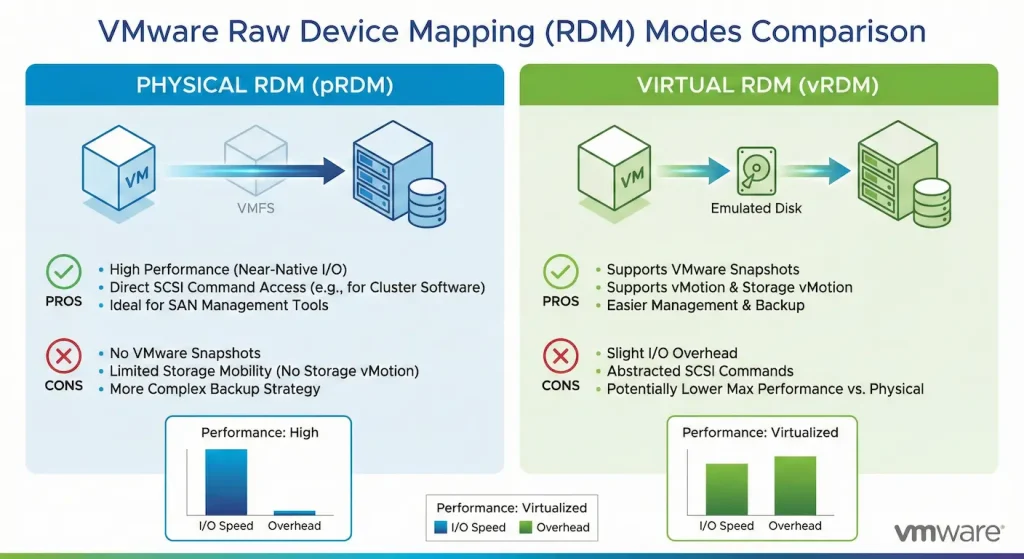
RDM operates in two distinct modes. Choosing the right one is critical — the modes differ substantially in what SCSI commands reach the physical device and which vSphere features remain available.
Physical Compatibility Mode (pRDM)
In physical mode, the VMkernel passes nearly all SCSI commands from the VM through to the physical SAN LUN, intercepting only the REPORT LUNs command. This gives the guest OS and applications running inside it the closest possible view of the underlying hardware. Physical mode is the right choice when the application needs hardware-level features that the hypervisor would otherwise block or emulate — SAN management agents, raw SCSI reservations for Windows Server Failover Clustering (WSFC), and Oracle RAC shared-disk quorums all fall into this category.
- Key Features: Supports advanced SCSI commands, persistent SCSI-3 reservations for shared clustering, direct array-based snapshots and replication, sub-millisecond latency for Fibre Channel SAN workloads.
- Limitations: VM-level snapshots are not supported in pRDM. vMotion requires the destination host to have access to the same shared storage. No thin provisioning at the VMDK layer (array-level thin provisioning is still possible). Maximum LUN size is constrained by the storage array and VMFS-5 (greater than 2 TB supported on VMFS-5 per Broadcom KB 323064).
Virtual Compatibility Mode (vRDM)
In virtual mode, the hypervisor fully virtualises the SCSI device. The VMkernel only forwards READ and WRITE commands to the physical LUN; all other SCSI commands are emulated. The RDM behaves like a standard VMDK from a vSphere management perspective, while still pointing to raw physical storage rather than a file on a datastore.
- Key Features: Full VM snapshot support. Full vMotion and Storage vMotion support. High Availability (HA) and Distributed Resource Scheduler (DRS) fully supported. Supports up to 62 TB on VMFS-5 or VMFS-6 (Broadcom KB 321231).
- Limitations: Slightly higher overhead than pRDM because SCSI commands are intercepted and emulated. Physical SCSI commands (persistent reservations, etc.) do not reach the hardware, so applications that specifically require SCSI-3 PRs cannot use vRDM for clustering.
Choosing between modes: Use pRDM when the application explicitly requires raw SCSI access — Windows Failover Clustering with shared disks, Oracle RAC, or SAN management tooling. Use vRDM when you want the portability and feature richness of a standard VM disk (snapshots, vMotion, HA) combined with the storage isolation of a dedicated LUN.
How Raw Device Mapping Works: Step-by-Step Setup
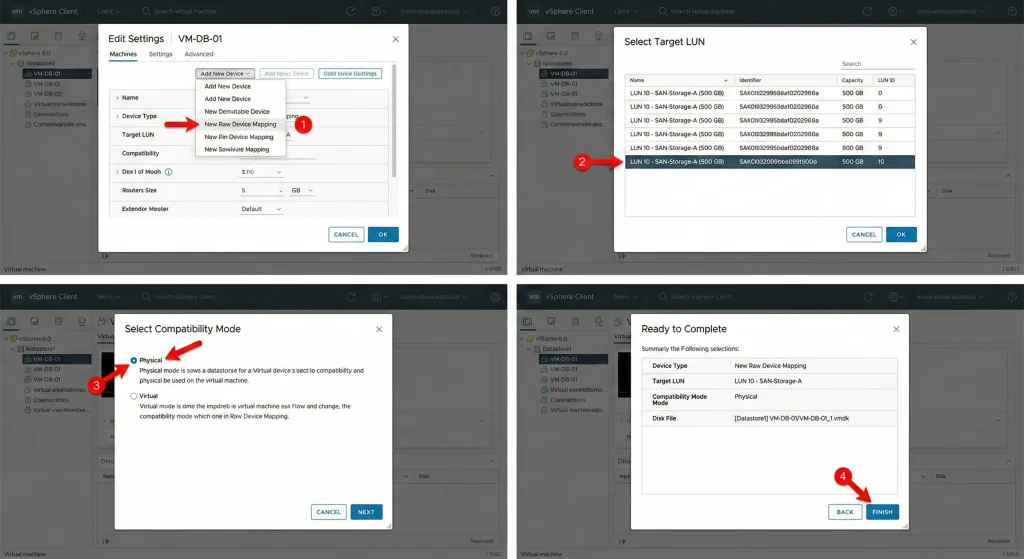
Setting up an RDM in VMware vSphere 8.0 is done through the vSphere Client. The process requires that the LUN is already zoned and presented to the ESXi host through your storage fabric before you begin.
Prerequisites:
- A SAN LUN presented to the ESXi host via Fibre Channel zoning, iSCSI, or NVMe-oF
- A VMFS datastore on a separate LUN to host the mapping file
- Sufficient permissions in vCenter (Storage Administrator role minimum)
Step-by-Step Guide:
1. Rescan Storage Adapters — In the vSphere Client, navigate to Host > Configure > Storage Adapters, click Rescan Storage to ensure the target LUN is visible.
2. Open VM Settings — Right-click the target VM in the inventory and select Edit Settings.
3. Add a Hard Disk — Click Add hard disk > New raw device mapping.
4. Select the LUN — vSphere will list all available physical devices. Choose the target LUN. Verify using the NAA identifier if you have multiple LUNs of similar size.
5. Choose Compatibility Mode — Select Physical (for clustering/SCSI-PR workloads) or Virtual (for snapshot/vMotion flexibility).
6. Set the Mapping File Location — Choose a VMFS datastore for the small proxy .vmdk file. For HA configurations, this must be on shared storage accessible to all cluster nodes.
7. Configure the SCSI Controller — Assign the disk to an appropriate controller. For clustering with Multi-Writer access, set the sharing policy accordingly.
8. Finish and Power On — Complete the wizard, power on the VM, and format the disk inside the guest OS using the appropriate tool (Disk Management on Windows, fdisk/parted on Linux).
Alternatively, you can create an RDM mapping file via CLI on the ESXi host:
vmkfstools -r /vmfs/devices/disks/naa.<device_id> /vmfs/volumes/<datastore>/<vm-folder>/rdm-disk.vmdkReplace esxcli storage core device list). Replace
Post-setup verification:
esxcli storage core device listThis command confirms the RDM mapping and lets you verify the LUN’s multipathing policy and path state.
Pros and Cons of Raw Device Mapping
Like any storage technology, RDM involves genuine trade-offs. Understanding them helps you make the right architectural choice for each workload.
Advantages
- Direct SAN Access: The VM communicates with the physical LUN with minimal hypervisor interference, preserving SCSI semantics that enterprise storage applications depend on.
- Clustering Support: pRDM enables shared-disk Windows Server Failover Clusters and Oracle RAC deployments by passing SCSI-3 persistent reservations through to the SAN — something standard VMDKs cannot do.
- Array-Level Data Services: Because the LUN is directly accessible, your storage array’s native snapshot, replication, and deduplication features work on that LUN just as they would on a physical host. This is valuable for environments using network infrastructure components such as NetApp, Pure Storage, or EMC arrays.
- Physical-to-Virtual (P2V) Migration: RDM lets you map an existing physical disk directly into a VM during migration, reducing the complexity of large P2V jobs.
- Large Disk Support: vRDM supports up to 62 TB on VMFS-5/6; pRDM supports beyond 2 TB on VMFS-5, making both suitable for large-scale database and analytics environments.
- Storage Isolation: Each RDM maps to a dedicated LUN, providing cleaner storage isolation and predictable IOPS compared to multiple VMDKs sharing the same datastore.
Disadvantages
- No VM Snapshots in pRDM: Physical compatibility mode does not support VM-level snapshots. You must rely on array-based snapshots or agent-based backup tools (e.g., Veeam, Commvault).
- Management Complexity: Moving or replicating VMs with RDMs requires careful LUN masking, zoning changes, and datastore coordination — significantly more work than relocating a VMDK.
- Reduced Portability: vMotion with pRDM requires shared storage on the destination host. Storage vMotion cannot migrate the actual RDM data — only the mapping file can be moved.
- Security Exposure: Granting a VM direct LUN access increases the blast radius if that VM is compromised. Rigorous LUN masking and zoning are essential.
- VVols Deprecation Changes the Landscape: The article’s original claim that VVols is a recommended modern alternative is now outdated. Broadcom deprecated vVols in VCF/VVF 9.0 in 2025 with full removal planned for 9.1. Broadcom’s preferred path for new deployments is now vSAN. However, vSAN is not suitable for all environments — particularly those requiring direct SAN integration with third-party arrays — which means RDM retains its relevance for those specific use cases.
- Performance Perception vs. Reality: While RDM does reduce hypervisor overhead, modern VMFS-6 VMDKs on NVMe or all-flash arrays perform comparably for most workloads. The use case for RDM performance gains is now narrower — primarily applications that generate very large sequential I/O with specific SCSI command requirements.
Use Cases for Raw Device Mapping
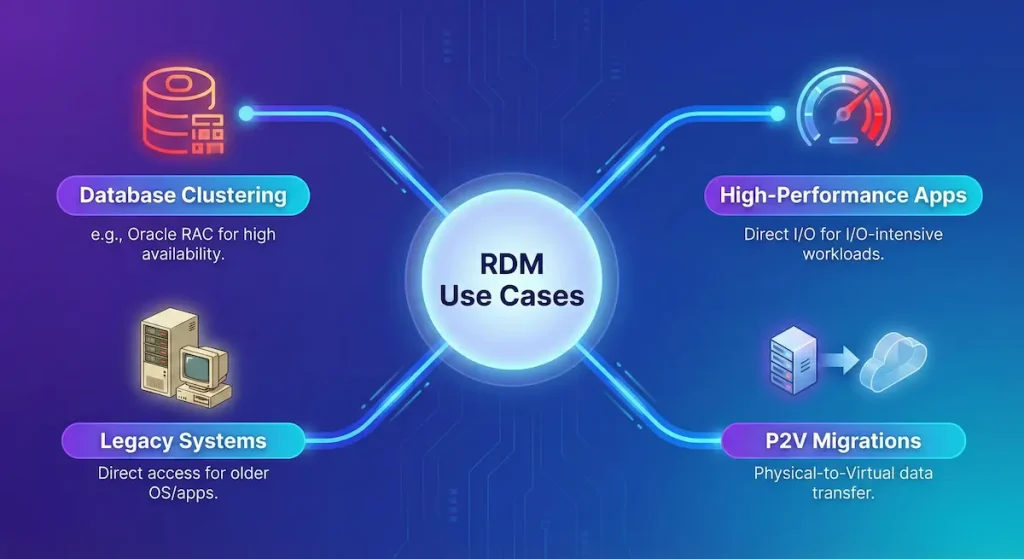
RDM is not a general-purpose storage solution — it is a targeted tool for scenarios where standard VMDK abstraction is genuinely insufficient. The following are its strongest use cases:
- Windows Server Failover Clustering (WSFC): For clustered workloads like SQL Server Always On Failover Cluster Instances (FCIs), WSFC requires shared disk resources using SCSI-3 persistent reservations. pRDM is the primary vSphere mechanism for delivering this. Microsoft SQL Server and Oracle database migration patterns on VMware commonly leverage pRDM for exactly this reason.
- Oracle Real Application Clusters (RAC): Oracle RAC nodes require shared raw disk access for the Oracle Cluster Registry (OCR) and voting disks. pRDM has historically been the recommended approach when running Oracle RAC on vSphere, though Oracle ASM on shared VMDKs is also supported in newer configurations.
- Legacy Applications with Physical Disk Dependencies: Some older applications check for physical disk signatures, issue proprietary SCSI commands, or rely on hardware serial numbers — none of which survive VMDK abstraction. pRDM preserves these characteristics.
- High-Throughput Storage Workloads: Video post-production, genomics data processing, and financial transaction systems that generate sustained high-queue-depth I/O can benefit from the reduced overhead of vRDM on a dedicated LUN versus sharing a VMFS datastore with other VMs.
- Physical-to-Virtual Migrations: During large P2V migrations, mapping existing physical disks as RDMs lets you bring the VM online quickly without copying terabytes of data first, then convert to VMDK afterward if needed.
- Hybrid On-Premises/Cloud Environments: Organisations maintaining on-premises SAN infrastructure while gradually migrating to cloud can use RDM to bridge the gap — keeping existing SAN LUNs accessible to VMs without refactoring storage architecture.
- Backup and SAN Management Agents: Some backup and storage management applications (SAN proxy agents for offload backups) require direct LUN access to function correctly. pRDM is the enabler.
Real-world example: A financial services firm running Microsoft SQL Server FCI on a Fibre Channel SAN uses pRDM for the shared data and log LUNs. This configuration ensures sub-millisecond latency, SCSI-3 PR support for cluster coordination, and the ability to use the array’s native replication for disaster recovery — none of which would be possible with standard VMDKs on a shared datastore.
Raw Device Mapping vs. Alternatives
The storage landscape in vSphere has shifted significantly since Broadcom’s acquisition. Here is an updated comparison of the main options:
| Feature | RDM (pRDM / vRDM) | VMDK on VMFS | vSAN (ESA) | VVols (vSphere 8.x only) |
|---|---|---|---|---|
| Access Type | Direct LUN (physical) / Near-direct (virtual) | Abstracted via VMFS | Hyper-converged, software-defined | Policy-based per-VM on array |
| Performance | Near-native for SCSI-intensive apps | Excellent on NVMe/all-flash | Scalable, consistent | Array-optimised |
| VM Snapshots | vRDM only | Full support | Full support | Full support (array-dependent) |
| SCSI-3 Clustering | Excellent (pRDM) | Not supported | Supported via vSAN shared VMDKs | Limited |
| vMotion | vRDM: full / pRDM: shared-storage only | Full support | Full support | Full support |
| Management | Complex (LUN masking, zoning) | Simple | Integrated | Policy-based (complex array config) |
| Broadcom Roadmap | Supported through vSphere 8.x EOL | Strategic | Strategic (primary recommendation) | Deprecated in VCF/VVF 9.0 |
| Best For | Clustering, legacy apps, SAN integration | General-purpose VMs | New HCI deployments | Legacy array integration (while supported) |
Key 2025 update: Broadcom deprecated vVols in VCF and VVF 9.0 released in 2025, with full removal planned for 9.1. VMware’s preferred alternative is vSAN. However, vSAN requires specific hardware and architectural changes that many organisations with existing SAN investments cannot immediately adopt. For those environments, RDM remains the most practical path for workloads requiring direct SAN LUN access.
For general-purpose VMs — web servers, application servers, development environments — a well-configured VMDK on VMFS-6 remains the simplest and most feature-rich option, with no meaningful performance disadvantage on modern storage hardware.
Best Practices and Troubleshooting for RDM
Best Practices
Multipathing Configuration: Always configure a Path Selection Policy (PSP) for your RDM LUNs. For active-active arrays, Round Robin distributes I/O across all paths. For active-passive arrays, use the appropriate PSP supported by your vendor. Verify with:
esxcli storage nmp device listLUN Masking and Zoning: Apply strict LUN masking at the storage array and proper FC zoning (single-initiator, single-target zoning is the best practice) so only the intended ESXi hosts can see each RDM LUN. This limits exposure if a VM is compromised.
Mapping File on Shared Storage: The RDM mapping .vmdk file must reside on a VMFS datastore that is accessible to all ESXi hosts in the cluster. If the mapping file is on local storage, HA and vMotion will fail for that VM.
Backup Strategy: Since pRDM does not support VM snapshots, you need an alternative backup approach. Options include: array-based LUN snapshots, guest-level agents (Veeam, Commvault, Rubrik), or application-consistent backups via VSS/RMAN inside the guest.
Monitor I/O: Use esxtop (press u for device view) or vCenter performance charts to monitor RDM LUN latency and throughput. Persistent latency above 20ms on a Fibre Channel SAN warrants investigation of path health and array performance.
Patch ESXi Hosts: The vSphere 8.0 Update 3e release notes (July 2025) document that PR 3470732 — a heap exhaustion bug triggered by SCSI Inquiry/Mode Sense commands on RDM LUNs — has been fixed. Ensure your hosts are patched to 8.0 U3e or later to avoid this issue.
Test Compatibility Before vSphere Upgrades: Before upgrading ESXi or vCenter major versions, verify that your RDM configurations are listed as supported in Broadcom’s compatibility guide.
Common Issues and Fixes
LUN Not Visible After Presentation: Rescan storage adapters: Host > Configure > Storage Adapters > Rescan. If still not visible, verify FC zoning on your switch and LUN masking on the array. Check the ESXi host’s HBA WWN is in the correct zone.
Mapping File Error / VM Fails to Power On: Confirm the mapping .vmdk file is on a datastore accessible to the current ESXi host. If the datastore is local or the host was moved, the mapping file may be inaccessible. Re-register the VM or reconfigure the disk path.
vMotion Fails for pRDM VM: pRDM requires shared storage on both source and destination hosts. Confirm both hosts can see the same LUN with the same NAA identifier. If the LUN is not shared, switch to vRDM or use Storage vMotion to migrate the mapping file only.
I/O Errors / VM Becomes Unresponsive: Check multipathing status (esxcli storage core path list). A dead path with no failover will stall I/O. Also check for the heap exhaustion bug (PR 3470732) — patch to 8.0 U3e if not already done.
Cluster Reservation Conflicts: If two nodes in a WSFC or Oracle RAC cluster are competing for SCSI-3 PRs and one loses access, check the SAN for path issues or array-side reservation conflicts. Use sg_persist (Linux) or Windows Disk Management to inspect reservation state.
Conclusion
Raw Device Mapping remains a relevant and supported feature in VMware vSphere 8.x for the specific scenarios where it was designed to excel: Windows Server Failover Clustering, Oracle RAC, legacy applications requiring physical SCSI access, and workloads needing direct SAN integration for array-level data services. It is not a general-purpose storage solution, and for most VMs a VMDK on VMFS-6 is simpler, more feature-rich, and comparably performant on modern hardware.
The storage landscape has shifted under Broadcom’s ownership. VVols — once positioned as the modern alternative to RDM — has been deprecated in VCF/VVF 9.0 with removal planned for 9.1. Broadcom’s strategic direction is vSAN for new deployments. However, organisations with existing SAN investments and workloads that require SCSI-3 persistent reservations or direct array integration will find RDM continues to serve those needs through the vSphere 8.x support lifecycle.
If you are evaluating storage architecture for a new vSphere deployment, start with VMDK on VMFS-6 for general workloads and vSAN if you are building a hyper-converged infrastructure. Reach for RDM specifically when clustering requirements, application SCSI dependencies, or existing SAN architecture make it the right fit — not as a default performance optimisation. Always verify your specific workload requirements against the current Broadcom vSphere Storage documentation before designing your storage configuration.



