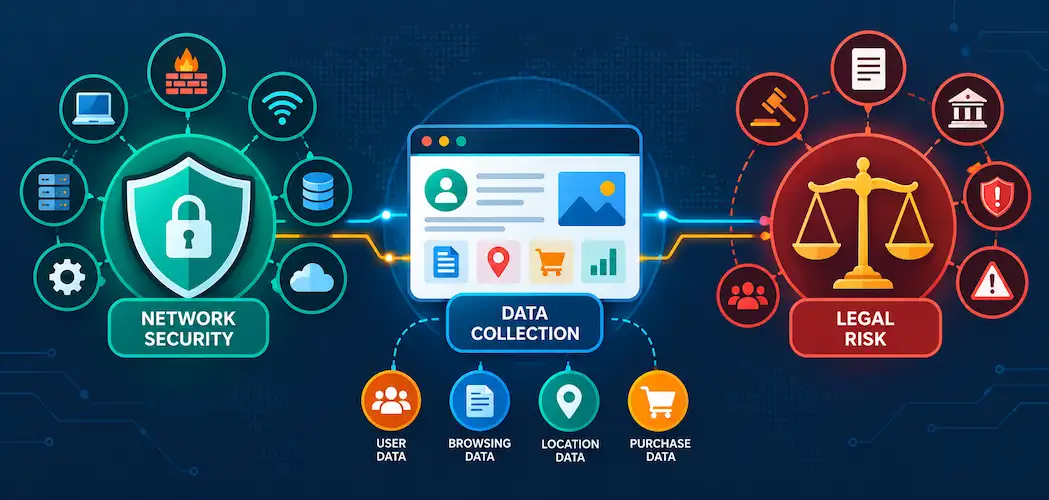
It usually starts as a small ticket. “We want competitor posts in our dashboard.” Or “Get us Reddit threads for the sentiment model.” Or maybe someone has read about an AI agent that can just look things up on LinkedIn. It looks like a bit of code and a cron job. It won’t be that simple. Collecting public social media data at any real scale affects nearly every part of the IT team: networking, application security, supplier risk management, data protection and on-call. Fetching the data is easy enough. The hard part is keeping it running, keeping it legal and making sure it doesn’t become a security liability.
This guide is for you: the people who will end up responsible for that system.
The problem before the solution
Before anyone starts writing Playwright code, get four things clear:
- Which platforms? TikTok, Instagram, YouTube, X, Reddit and LinkedIn all have different page layouts and defences to contend with. One platform is a project. Six is a product.
- What volume and frequency? Are you doing a one-off export of 500 profiles, or polling 5,000 accounts every hour?
- Who will consume the data? An analyst who doesn’t mind gaps is a very different customer from a feature inside your product with an uptime SLA attached.
- What data do you need? Public, logged-out profiles and posts are far less risky than anything that requires a login. If the requirement needs logged-in access, stop here and consult legal before going any further.
You’re in an arms race now
Most web traffic is now automated. Imperva’s 2025 Bad Bot Report found that in 2024, for the first time in a decade, automated traffic overtook human activity at 51% of all web traffic, with malicious bots alone accounting for 37%. Social media platforms are high on the target list, and they’re prepared to throw real weight behind the problem.
When it comes to your scraper, intent doesn’t matter. At the network edge, there’s no difference between a well-intentioned marketing dashboard and a credential-stuffing botnet.
TLS fingerprinting
Your client gets identified before it sends a single HTTP request, through the TLS handshake. The ClientHello message includes the supported cipher suites, the extensions and the order they appear in, and different TLS libraries produce distinctive combinations.
JA3, introduced in 2017, turned this into a widely used fingerprint. Now there’s JA4, released by FoxIO in 2023 as part of the JA4+ suite. It’s more robust: it sorts extensions so cosmetic reordering doesn’t create a new fingerprint, it works over both TCP and QUIC, and it uses a readable a_b_c format so you can easily see what changed. As FoxIO points out, most custom apps simply inherit the fingerprint of their TLS library. So a Python requests script looks like Python, not Chrome, however carefully you forge the User-Agent header.
Cloudflare, for example, makes JA3 and JA4 fingerprints available to its Bot Management customers, so they can write firewall rules that challenge or block every request with a suspicious fingerprint.
HTTP/2 and header fingerprinting
The same goes one level up. Browsers send HTTP/2 settings, window sizes and priority data in characteristic ways, with a particular pseudo-header order. Researchers from Akamai presented their work on passive HTTP/2 fingerprinting at Black Hat Europe 2017, after analysing more than 10 million connections. Header details matter too. As FoxIO notes, a request with no Accept-Language header is a strong sign that no human is involved.
Browser environment checks
When you switch to headless browsers to get past those checks, another layer comes into play: JavaScript that inspects the browser itself. The W3C WebDriver specification says navigator.webdriver should return true when the browser is under automated control. Detection vendors also look for side effects of the Chrome DevTools Protocol, which Playwright and Puppeteer rely on, along with missing fonts, odd screen dimensions and GPU rendering quirks. Cloudflare describes injecting lightweight, invisible JavaScript specifically to detect headless browsers.
Behavioural and machine learning scoring
Finally, all of that gets combined. Cloudflare says its machine learning engine produces the majority of its bot detections, giving every request a score from 1 to 99. It looks at request timing, navigation paths, session history and IP reputation. You’re not trying to avoid one rule. You’re trying to stay below a statistical threshold that the platform can change at any time, without telling you.
The network layer is where projects die
Datacentre IP ranges are well known and quickly blocked. Most teams that keep pushing end up buying residential or mobile proxies, which route requests through IP addresses assigned to real homes and phones. This is where scraping turns into a supplier risk and security issue.
Where do residential IP addresses come from?
Good providers find people who knowingly share their bandwidth, often for money. Others are far less careful.
In January 2026, Google’s Threat Intelligence Group published research on IPIDEA, which it called one of the largest residential proxy networks in the world. Google found that IPIDEA recruited devices through SDKs embedded in more than 600 Android apps, often without users realising what they were agreeing to. In a single seven-day period, Google saw more than 550 distinct threat groups using IPIDEA exit nodes, including actors linked to China, North Korea, Iran and Russia. It also reported that the proxy software could be used to push traffic back into host devices, compromising them further. Google took legal action against IPIDEA’s infrastructure, worked with Cloudflare to disrupt it and updated Play Protect to remove apps carrying the SDKs.
Two years earlier, in May 2024, the US Department of Justice announced the dismantling of the 911 S5 botnet. It had compromised millions of residential Windows computers, associated with more than 19 million unique IP addresses, largely through free VPN apps, and sold access to them as a proxy service. In June 2025, the FBI issued a public service announcement warning that the BADBOX 2.0 botnet, made up of millions of infected devices, was being used to sell access to compromised home networks as residential proxies.
So the uncomfortable truth is that some of the residential bandwidth on the open market comes from users who were tricked or compromised. With the wrong supplier, your traffic could share infrastructure with criminal groups. You might even be paying for access to someone’s hacked router.
What should you ask a proxy provider?
If you decide to build, treat your proxy provider like any other supplier with access to your traffic:
- How do they recruit exit nodes? Is there explicit, informed consent, and is the user paid?
- Which SDKs or apps do they use for recruitment? Can you see the consent screen?
- What logging do they keep, and where is it stored?
- Can they show you independent audits or certifications?
- How do they handle abuse reports and law enforcement requests?
If the answers aren’t clear, walk away.
What about bandwidth costs?
Residential proxies usually charge per gigabyte, at many times the cost of datacentre bandwidth. Modern social pages are heavy, and a headless browser will download scripts, images and video previews unless you block them carefully. So estimate costs with a simple model instead of guessing:
monthly_proxy_cost =
page_loads_per_month
× average_MB_per_page_load / 1024
× (1 + retry_rate)
× price_per_GB
You might be surprised how much retries matter. Blocks, timeouts and CAPTCHA walls all cause retries, and every retry costs bandwidth. Measure your real retry rate in staging before you lock in a budget.
The compute layer
Headless Chromium isn’t lightweight. One 2025 measurement of a Playwright-driven browser found that an idle headless Chromium launch used around 700 MB of memory, before any heavy pages had even loaded. Social pages with video and infinite scroll need more. And once you run sessions in parallel, you’re running a small cluster, not a single container.
Size the fleet for peak load, because social data demand is bursty. If the fleet is too small, a burst turns into a backlog.
Isolate the browsers
From a security perspective, a headless browser fleet runs untrusted JavaScript from third-party sites by design. Treat it that way:
- Keep the browsers in isolated network segments, with egress limited to what they need.
- Keep them away from internal services, metadata endpoints and credential stores.
- Make containers disposable. Rebuild them often instead of patching them in place.
- Don’t keep logged-in session cookies for personal accounts in the fleet. They’re credentials, and a container image isn’t a vault.
Extraction and schema drift
So you’ve got the page. Now you need to extract the data reliably, and this is the part that breaks all the time.
Modern social sites rarely put their data in clean HTML. It’s usually JSON embedded in script tags for the front-end framework to hydrate. Field names change without warning. A/B tests can serve different structures to different users or regions, so your scraper works fine in one place and breaks in another. And a redesign can break every selector overnight.
Silent failures are the worst kind. Imagine your parser returns null for a renamed follower field but doesn’t raise an error. It just writes zeros into your data warehouse, and nobody notices until a dashboard looks wrong two weeks later. Guard against that explicitly:
- Validate every record against a schema and quarantine anything that fails, rather than writing partial data.
- Store raw responses for a short time, so you can reparse after fixing a bug (subject to your retention policy).
- Alert on distribution changes, such as a sudden jump in nulls or zeros, not just on errors.
- Make outcomes clear in your logs: “profile not found”, “private profile”, “blocked by platform” and “parser failed” all need different responses. If they all look like an empty result, a blocking incident looks like a quiet day.
Normalise early, too. If every downstream consumer maps each platform’s field names itself, schema drift spreads through the whole organisation.
What about official APIs?
The obvious question is why you’d scrape at all when official APIs exist. The truth is that over the last few years, official access has narrowed and prices have gone up:
- X moved its API to pay-per-use pricing, charging for each resource read, for example $0.005 per post read according to its developer docs at the time of writing. High-volume use means an enterprise contract.
- Reddit started charging for API access in 2023. The widely reported rate of $0.24 per 1,000 calls led several popular third-party apps, including Apollo, to shut down.
- Meta shut down CrowdTangle, its public content analytics tool, on 14 August 2024. Its replacement, the Meta Content Library, is only open to approved academic researchers and non-profits.
- Instagram’s Basic Display API stopped working in December 2024. What’s left is mainly for business and creator accounts managing their own presence.
- TikTok’s Research API is only available to vetted academic and non-profit researchers.
So official APIs are still the way to go for accounts you own. But for public competitive data across platforms, they often aren’t an option for commercial users at all.
What have the courts actually said?
This section isn’t legal advice, but IT leaders should know the landmark cases, because they come up in every internal review.
- Van Buren v. United States (2021). The US Supreme Court read “exceeds authorized access” in the Computer Fraud and Abuse Act narrowly. The question isn’t whether someone had an improper motive for using access they already had. It’s whether a “gate” is up or down.
- hiQ Labs v. LinkedIn. Often quoted as proof that scraping public data is legal, but the details are more nuanced. In 2022 the Ninth Circuit found that hiQ had raised serious questions about whether scraping public profiles violated the CFAA. Then, in December 2022, the case ended in a stipulated consent judgment: hiQ agreed to pay $500,000, accepted a permanent injunction and agreed to delete the data. A lot of its problems came from using fake accounts, which is a different matter from logged-out scraping.
- Meta v. Bright Data (2024). In January 2024, a US federal court granted summary judgment to Bright Data on Meta’s breach of contract claim, finding that Bright Data didn’t “use” Facebook and Instagram when it scraped publicly available data while logged out. Meta later dropped its remaining claim.
- X Corp v. Bright Data (2024). In May 2024, a federal judge dismissed X’s scraping-related claims, finding them pre-empted by copyright law because X’s terms tried to prohibit scraping regardless of fair use. Some access-based claims were later allowed to be refiled, so this one isn’t fully resolved.
So the trend in recent US cases favours logged-out collection of genuinely public data, and goes against fake accounts and logged-in access. It’s not an open licence, though, and it’s all US law. Outside the US, data protection law matters even more.
Data protection: public doesn’t mean free to use
In August 2023, 12 data protection authorities, including the UK’s ICO, issued a joint statement on data scraping. The main message: even when personal information is publicly available, it’s still covered by data protection and privacy law in most jurisdictions. A larger group of regulators followed up in October 2024 with a statement expanding on their expectations around scraping, especially for AI training.
If you’re a UK or EU organisation, your social data pipeline needs the same groundwork as any other processing of personal data:
- A lawful basis. For most commercial monitoring this will be legitimate interests, and the ICO expects you to back that up with a documented Legitimate Interests Assessment (LIA) covering purpose, necessity and balancing.
- Data minimisation. Collect only the fields you need. If you’re measuring sentiment across thousands of posts, do you really need usernames?
- Retention limits. Decide how long raw responses and derived data are kept, and make sure deletion happens automatically.
- Log hygiene. Raw responses contain names, bios and message text. Keep them out of general application logs with long retention.
- Processor agreements. If you use a third-party data provider, it acts as your processor, so expect a DPA and a list of subprocessors.
How much will it really cost?
Most teams compare build and buy on cost per request. That flatters the build option, because the request is the cheapest part. A fairer comparison looks like this:
| Cost line | What to include |
|---|---|
| Compute | Fleet sized for peak concurrency, plus orchestration |
| Proxies | Residential bandwidth, retry overhead and supplier due diligence |
| Engineering | Initial build per platform, then reactive fixes after every platform change |
| On-call | Out-of-hours response when jobs start returning empty results |
| Data quality | Validation, backfills and clean-up after silent failures |
| Security | Network isolation, credential handling and incident risk |
| Compliance | LIAs, retention controls and documentation |
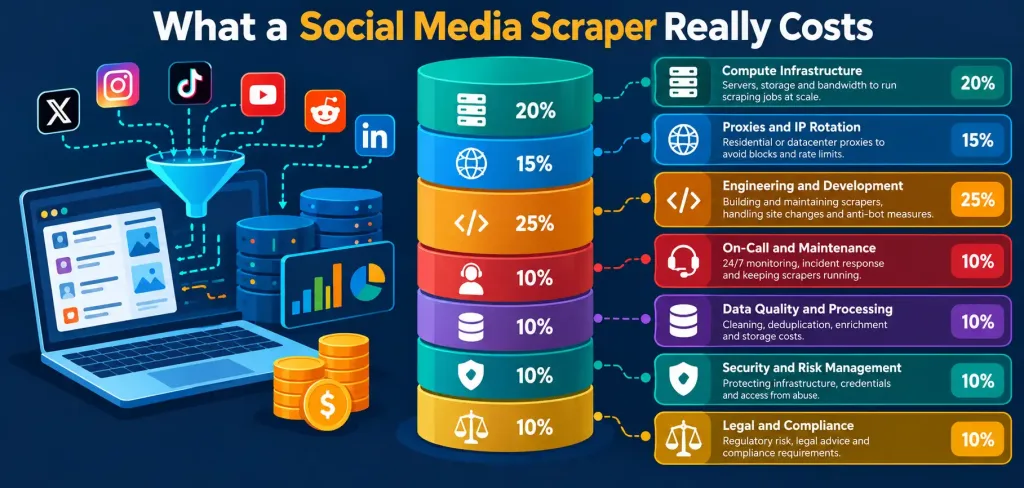
The largest and least predictable line is usually engineering time. Platform changes don’t happen on a schedule, and something that breaks late on a Friday afternoon can eat a whole weekend. To get a feel for the numbers, Social Fetch’s breakdown of what a self-built scraper really costs includes the proxy maths and a line-by-line worksheet, so it’s a good starting point for your own spreadsheet.
When does building still make sense?
There are cases where you shouldn’t feel bad about building it yourself:
- You need one platform at low volume, for internal research, and you can tolerate gaps in the data.
- The data you want is unusual enough that no provider covers it.
- You need tight control over request patterns, such as a slow, scheduled audit from a specific location.
- You already run a mature crawling platform, with the proxy, compliance and on-call side sorted.
If you go down this route, keep the scope narrow and expect regular repairs.
What should you demand from a provider?
If you buy, you’re outsourcing the fetch, network and extraction layers. That makes the provider’s engineering and governance your concern, so assess it like any other critical supplier:
- A documented, versioned schema, ideally an OpenAPI specification you can generate types from, with consistent field names across platforms.
- Typed outcomes. “Not found”, “private” and “temporarily unavailable” should be distinguishable in the response, not hidden in an empty array.
- Clear concurrency limits and retry signals. You should know how many requests you can have in flight, and the provider should send a proper retry signal such as Retry-After rather than silently dropping work.
- Request IDs on every response, so when you open a support ticket, it’s easy to trace the specific call.
- Fair billing. You shouldn’t be charged when a failure on the provider’s side means no data comes back, and usage should reconcile per request.
- Logged-out, public data only. Ask directly whether the provider uses logged-in accounts. If it does, you inherit the legal risk.
- Data protection paperwork: a DPA, a subprocessor list and a security page you can pass to your security team.
- Push delivery through webhooks or monitors, which saves you from polling and wasting quota.
What does a good provider look like in practice?
It helps to compare providers against a concrete example. Social Fetch serves more than 8 million requests a day across 25 platforms, and it’s a useful benchmark because it was built with exactly these operational problems in mind:
- One versioned schema across 264 endpoints, published as an OpenAPI specification. A TikTok profile comes back in the same shape as an Instagram profile, and you can generate client types straight from the spec.
- Typed lookup outcomes. A private profile, a missing profile and a restricted post are each reported explicitly in the response body, so “not found” is never confused with “blocked”.
- A request ID and the credits charged on every response, which makes support tickets and cost reconciliation easy.
- Predictable concurrency. Instead of a per-minute rate limit, each workspace can have up to 200 requests in flight. Beyond that you get an uncharged 503 with a Retry-After header, which plugs straight into the backoff code below.
- Fair billing. No charge when something fails on Social Fetch’s side, pay-as-you-go credits never expire, and plans start from $1.50 per 1,000 requests, with 100 free credits to test against your own requirements.
- Data protection paperwork ready for review: a published DPA, subprocessor list and security page.
- Monitors with signed webhooks that check accounts, channels and searches on X, Instagram, TikTok, Reddit, YouTube and LinkedIn on a schedule and push only what’s new.
Whichever providers you shortlist, run the same checks: read the schema, trigger each error case on purpose, test the concurrency limit, and send the DPA to your data protection lead before you sign anything.
Whatever route you take, build for back-pressure on your side too:
import random, time
def call_with_backoff(fetch, max_attempts=5, base=1.0, cap=30.0):
for attempt in range(max_attempts):
response = fetch()
if response.status_code not in (429, 503):
return response
retry_after = response.headers.get(“Retry-After”)
delay = float(retry_after) if retry_after else min(cap, base * 2 ** attempt)
time.sleep(delay + random.uniform(0, delay / 2)) # jitter avoids thundering herds
raise RuntimeError(“Gave up after retries”)
Respect Retry-After, add some jitter, limit concurrency per platform, and queue work instead of firing it all at once.
AI agents change the access model
A newer version of the original request is giving an AI assistant or agent direct access to social data. Rather than integrating with each tool separately, the industry has largely settled on the Model Context Protocol (MCP).
Anthropic published MCP as an open standard in November 2024, and OpenAI picked it up in March 2025. By the time Anthropic donated the protocol to the Linux Foundation’s new Agentic AI Foundation in December 2025, it had been adopted by ChatGPT, Cursor, Gemini, Microsoft Copilot and VS Code, with more than 10,000 active public MCP servers.
For infrastructure and security teams, that brings some real benefits and some new risks.
The benefits. The MCP specification defines an authorisation model for remote servers, based on the OAuth 2.1 draft. It requires PKCE on the client side and audience-bound tokens, and it forbids passing tokens through to upstream services. A hosted MCP server that implements this properly, such as Social Fetch’s, which works with Claude, ChatGPT, Cursor and VS Code, means there’s no local server to patch, access is granted and revoked through standard OAuth flows, and agent activity runs through the same metered, logged endpoints as your other integrations.
The risks. OWASP’s MCP Top 10 project lists tool poisoning, prompt injection through content the model reads, token mismanagement, and “shadow” MCP servers that staff connect without approval. In 2025, researchers at Invariant Labs showed how hidden instructions in a tool’s description, invisible to the user, could make an agent leak SSH keys. Social media content is an obvious injection vector, because the agent is reading text written by strangers.
Good controls when agents access social data:
- Allow-list approved MCP servers and block unapproved ones, just as you would with unsanctioned SaaS.
- Scope tokens narrowly, and prefer read-only access for research use cases.
- Treat retrieved posts as untrusted input. Agents shouldn’t be able to take consequential actions, such as sending emails or changing records, based purely on what they’ve read.
- Log tool calls centrally, so you can see what agents requested and when.
- Review tool descriptions when servers update. A description that changes after approval is a known attack.
Decision checklist
Get your network, security, data protection and engineering leads together and go through these questions:
- Do we need more than one platform, now or in the next six months?
- Will the data run on a schedule, or feed anything customer-facing?
- Do we have engineers who can be on call for breakages caused by platform changes?
- Can we source proxy bandwidth we’d be comfortable defending in a supplier review?
- Do we have a documented lawful basis, retention policy and minimisation plan?
- Have we priced engineering time realistically, including ongoing maintenance?
- Is there a provider that covers our platforms with a stable schema, typed errors and acceptable data protection terms?
- If AI agents need access, do we have controls for MCP servers and untrusted content?
If you said yes to the first two and no to the third or fourth, buying will almost certainly be cheaper and safer. If the job is narrow, internal and occasional, a small, well-isolated scraper may be all you need.
Conclusion
A social media data pipeline looks like a scripting task but behaves like a distributed system with a well-funded adversary upstream.
Before you commit to building one, cost every layer properly, involve security and data protection early, and ask tough questions about where your proxy traffic actually comes from. For most teams that need several platforms on a schedule, the build-vs-buy decision turns out to be shorter than it first seems.