
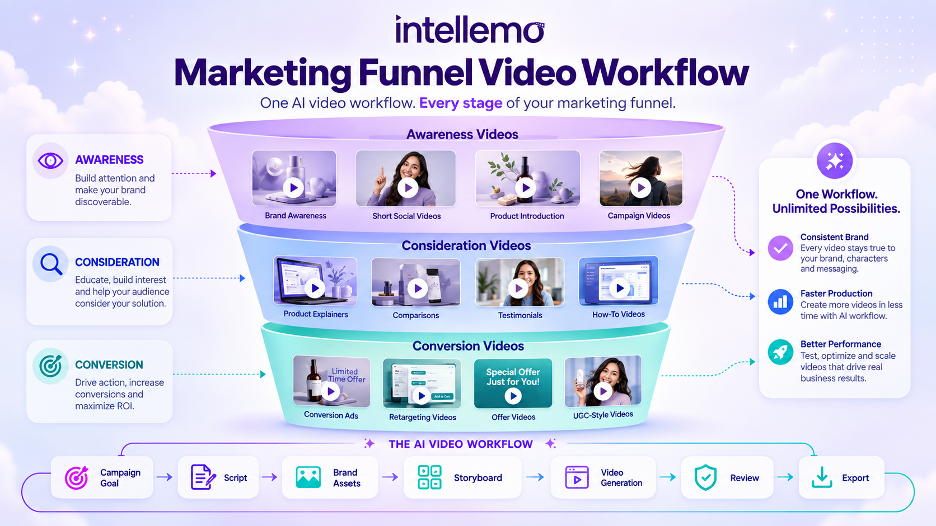
The vast majority of the marketing teams that experiment with AI video tools begin in the same manner. A user types a prompt, creates a clip, examines it, and either selects it or discards it and re-enters a new prompt. That’s a technique for one social post. It starts to collapse once it requires five, ten, or even twenty videos that are all branded.
An AI video content workflow addresses this with a video generation process rather than just a video output. It takes you from goal setting to scripting, consistent planning, review, and final export, stopping at each step to check. This guide walks through how to structure that process for a real marketing campaign.
Why a Structured Workflow Matters More Than a Single Tool
A structured AI video workflow is much more than an individual video prompt; it’s a repeatable process that takes a campaign idea from concept to planning, generation, review, and export. It allows for total control over consistency, tone, and quality prior to the completion of the video, not after.
It’s possible that a random generation will yield one excellent clip. It doesn’t often provide a seamless series of video content that a marketing team can deploy on a whole campaign. Without any planning step it is possible for brand elements to float between videos. The facial appearance of a character is modified. Each video is unique in its product shot. It’s irrelevant for one experiment, but it’s very important if you’re running a campaign that requires recognition and trust.
In a workflow approach, the process of creating a story, character, and product becomes distinct from the decision-making to select them. It is that separation that gives rise to scale.
Some AI video platforms now follow this structured model directly. For example, Intellemo AI uses a guided production workflow with review stages rather than moving immediately from a single prompt to a final rendered video.
Step 1: Define the Campaign Goal and Video Type
The task of the video should be known before the script is written. A video about awareness, a product explainer, an ad with a testimonial, and a shorter-form ad will all require different pacing, lengths, and emotional tones.
There are some initial questions to be answered:
- Is this video intended to be an introduction to a product or to provide instruction about a product?
- Is it going to be paid social, a landing page, or a combination of both?
- Does it require a voice or character, or is it just visual?
This is one of the most common reasons for AI-generated marketing videos to sound bland. The video technically works, but it doesn’t serve a specific purpose in the funnel.
Step 2: Script and Story Planning Before Generation
Even if it is a 30-second video, a good marketing video has a story structure. The script is broken into sections: problem, solution, proof, and call to action, as opposed to a string of pictures.
This is also the place for dialogue to be written and tone markers such as ‘confident,’ ‘urgent,’ or ‘reassuring,’ depending on the campaign. Video and product demonstrations require very different voices, and this should not be an afterthought when rendering the video.
Step 3: Maintaining Character, Product, and Brand Consistency
Consistency is one of the harder problems in AI-generated video, and it’s also one of the most important for marketing. If a campaign features a recurring character or spokesperson, that person needs to look and sound the same across every scene and every video in the set.
The same applies to products, logos, and locations. A dashboard shown in one video should match the dashboard shown in the next. A brand color or setting that shifts between clips breaks the sense that the campaign is one connected effort.
Tools like Intellemo AI approach this by letting users save characters, products, and locations as reusable references, then pull them into new scripts with a simple mention instead of rewriting a full description each time. That kind of reference system is what keeps a 10-video campaign looking like it came from one production, not ten separate experiments.
Step 4: Storyboarding and Review Before Final Rendering
Jumping straight from script to finished video skips the stage where most quality problems could have been caught early. Storyboarding shows what each scene will look like before it’s turned into motion, which gives the marketing team a chance to catch a wrong setting, a missing product shot, or a pacing issue while it’s still cheap to fix.
Approval checkpoints at this stage, covering the script, the storyboard, and sometimes the draft scene structure, mean fewer surprises at the final render. For a marketing team working under deadline, that predictability matters more than it might seem at first.
Step 5: Adding Voice, Lip Sync, and Sound Design
Visuals only carry a marketing video so far. Dialogue timing, natural-sounding speech, and lip sync accuracy all affect whether a viewer trusts what they’re watching, especially for spokesperson-style or talking-head content.
Background sound adds another layer that’s easy to underestimate. A product demo with subtle ambient sound feels more finished than one with dead silence behind it. Platforms that build sound design and lip sync into the same pipeline, rather than requiring a separate tool for each, save marketing teams a meaningful amount of production time.
Step 6: Quality Checks and Variant Testing
Not every generated clip or scene meets the bar on the first pass, and a good workflow accounts for that. Reviewing clips and scenes against a quality standard before they move to final rendering catches weak output early, instead of letting it slip into a published video.
Once a base video exists, generating variants becomes valuable for testing:
- Different hooks for the first three seconds of an ad
- Different pacing for different platforms
- Different character deliveries for different audience segments
This step is where AI ad video generators stop being a novelty and start functioning like a real performance marketing asset.
Step 7: Downloading, Exporting, and Using the Final Video
After a video is reviewed, it must be in a usable form when it is removed from the platform. There are various formats required for different channels. In fact, if you make a vertical Instagram Reels or YouTube Shorts clip, it won’t fit on a landing page without being cropped, and if you are publishing a clip in a square or widescreen, you might need to crop it.
Many platforms also provide an option to edit the completed video for any final touches before exporting, such as cutting or adding text or captions. The same base video can then be used for several marketing efforts, like an ad, a post, and an email campaign, rather than creating an ad video or a post video or an email video.
Common Mistakes Marketing Teams Make With AI Video Workflows
There are a few recurring patterns when teams use AI video as a quick-and-easy solution:
- Failure to plan and create directly from a general cue
- Not maintaining consistency of character or product throughout a multi-video campaign
- Conducting the experiments on a single variant of the tool rather than testing multiple variants.
- Without a review process, allowing low-quality clips to be published.
All of these can be solved by just adding a step in the process, not taking one out.
Frequently Asked Questions
What is an AI video content workflow?
An AI video content workflow refers to a process where a series of steps are followed to create marketing videos from a single prompt, rather than a single video.
Can AI-generated videos maintain brand consistency across a campaign?
Yes, if the workflow has saved references of characters, products, and locations. The biggest issue with consistency is using the same brand assets in each video without them being reused.
How do marketing teams test which AI video performs best?
By creating multiple versions of the same base video (e.g., various opening hooks or different pacing) and testing them one against the other on the platform on which the campaign will be deployed.
Final Thoughts
A solid AI video content workflow transforms video marketing into a repeatable and scalable process. Script and story planning, character and brand continuity, checking quality prior to final render, and exporting in an appropriate format for each channel all contribute to campaigns appearing not collated, but purposeful.
As AI video tools continue to mature, the teams that treat this as a structured process rather than a novelty will be the ones producing campaigns that scale without losing brand consistency along the way.



