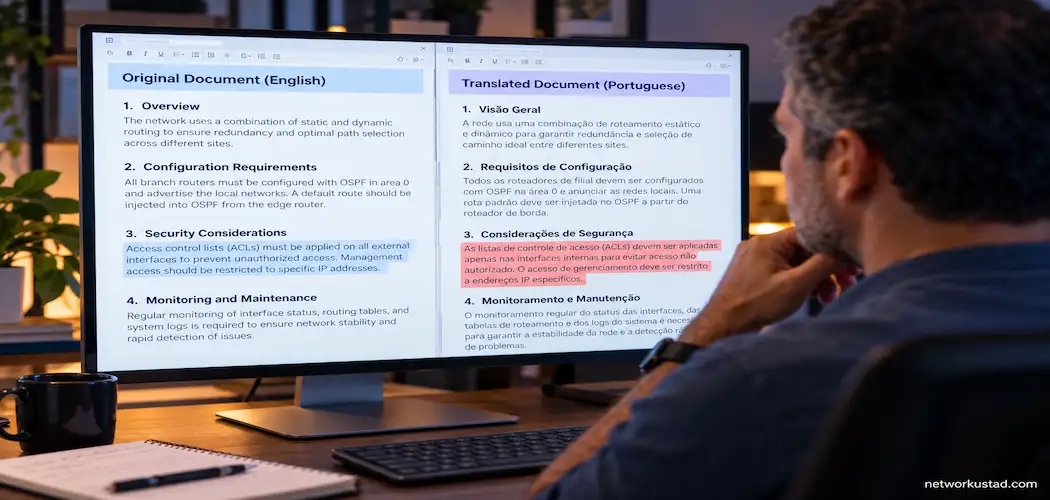
A machine-translated technical manual can look finished in seconds. That’s the problem. It looks finished long before it actually is. A translated installation guide, API reference, or compliance document can read smoothly in the target language while quietly getting a critical detail wrong — a reversed warning, a mistranslated unit, a technical term rendered in a way no engineer in that language would recognize.
This matters more as teams lean harder on machine translation to move faster across markets. Speed isn’t the issue. Skipping the review step that catches these errors before publication is. This guide walks through a five-step workflow for translating technical documents that actually holds up, plus the mistakes that undo it and how to decide between free tools and paid services for different kinds of work.
Why Technical Document Translation Needs More Than a Translate Button
General-purpose machine translation has gotten genuinely good at ordinary prose. Technical document translation is a different problem. It’s dense with terminology that has to stay consistent across an entire document, units and measurements that can’t shift meaning in translation, and formatting — numbered steps, warning callouts, tables — that needs to survive the process intact.
A single mistranslated term in a technical document isn’t a style issue. In a safety manual, an API reference, or a regulatory filing, it’s the kind of error that causes real downstream problems: a technician who misreads a torque specification, a developer who implements an API call incorrectly because a parameter description shifted in translation, or a compliance document that fails a review because a legal term was translated too loosely.
None of this means machine translation is the wrong starting point for technical document translation. It’s usually an efficient one. The workflow below treats it as exactly that — a starting point that needs structured human review, not a finished deliverable.
Step 1: Prepare the File Before You Translate Anything
Most technical document translation problems that show up at the end of the process were actually created at the beginning, by skipping preparation.
Start by cleaning the source document. Remove tracked changes, resolve comments, and flatten any content that’s still in draft form. A translation tool processes whatever text is actually in the file, including leftover edit history that was never meant to be final — so clean that out first, not after.
Check that the file format will survive translation cleanly. PDFs with complex multi-column layouts, embedded tables, or scanned image-based text behave very differently from a straightforward text-based PDF or a Word document. If the source is a scanned document, run OCR first and manually verify the extracted text before it goes anywhere near a translation step, since OCR errors compound badly once they’re translated into a second language.
Build or update a terminology glossary before translation starts, not after. If your organization has standard translations for recurring technical terms — product names, unit conventions, specific technical phrases that shouldn’t vary between documents — get that list ready. Feeding a consistent glossary into the process, where the tool supports it, meaningfully reduces the terminology drift that shows up when a document is translated section by section without one.
Step 2: Run the Initial Machine Translation Pass
With a cleaned, well-prepared source file, the machine translation pass itself is usually the fastest part of the whole workflow.
Several tools can handle this step, each with different tradeoffs in language coverage, file-size limits, formatting preservation, and privacy practices. An AI PDF translator, for example, is a free, browser-based option that according to its own site supports translation across more than 100 languages with a 20MB file-size limit and no account registration required, and states that uploaded files are deleted within 24 hours.
Those are the vendor’s own claims rather than independently verified figures, and it’s worth checking a tool’s current terms and data-handling practices directly before uploading anything sensitive or regulated, since file-size limits, retention policies, and supported languages change over time and vary by provider. The same caution applies to any similar browser-based translation tool, not just this one.
For documents containing confidential, proprietary, or regulated content, weigh a free browser-based tool’s data-retention claims against your organization’s own compliance requirements before using it at all. A professional translation service with a signed data-processing agreement may be the more appropriate choice regardless of cost, for exactly that category of document.
Whatever tool handles the initial pass, treat its output as a draft, not a deliverable. The next three steps exist because a machine pass alone isn’t enough for technical content.
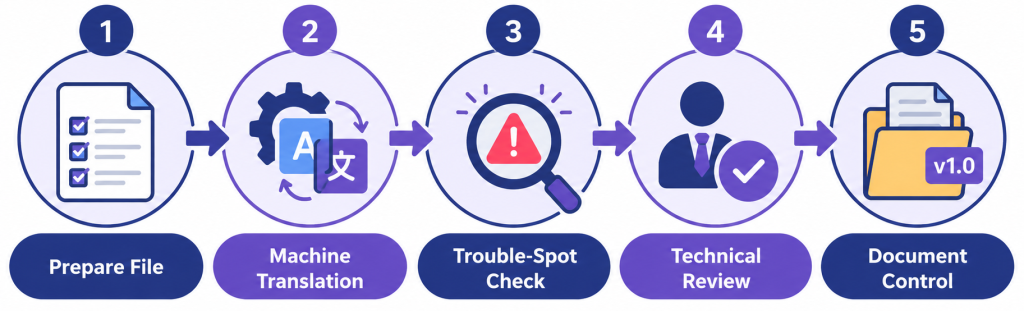
Step 3: Check the High-Risk Trouble Spots First
Rather than reviewing a translated document end to end in one pass, start with the sections most likely to contain errors that actually matter.
Numbers, units, and measurements. Confirm that numeric values, units of measurement, and date formats translated correctly and weren’t altered in ways that change their meaning. Decimal and thousands separators differ between languages (a comma versus a period, for example), and a translation tool can sometimes carry the wrong convention over from the source language.
Warnings and safety callouts. Any warning, caution, or danger notice needs a dedicated check, since these are exactly the sections where a subtle shift in meaning causes real harm. Confirm the translated warning still conveys the same severity and the same specific instruction as the original, not just a generally similar sentiment.
Technical terminology consistency. Search the translated document for your key technical terms and confirm they were rendered the same way every time they appear. Machine translation can translate the same source term differently depending on surrounding context, which creates confusion for a reader trying to follow a process that uses that term repeatedly.
Text expansion and layout breaks. Some languages run noticeably longer than their English equivalents once translated — German and Spanish are common examples — which can push text out of tables, break numbered-list formatting, or force a line to wrap awkwardly inside a diagram label. Check that layout-sensitive sections still read and display correctly after translation, not just that the words are accurate.
Step 4: Get a Technical Document Translation Review From Someone Who Knows the Subject
This is the step that gets skipped most often under deadline pressure, and it’s the one that actually catches the errors that matter most.
A linguistic reviewer, however skilled, checks whether the translation reads naturally and grammatically in the target language. A technical reviewer checks whether the content is still technically correct in the target language — whether an engineer, technician, or developer reading the translated version would actually understand and correctly execute what’s described.
Ideally, this reviewer is someone who’s fluent in the target language and has genuine subject-matter expertise in the document’s technical area — a bilingual engineer reviewing a translated engineering spec, for example, rather than a translator with no engineering background reviewing it alone. When that specific combination isn’t available internally, a two-reviewer approach works as a substitute: a linguistic reviewer checks the language, and a subject-matter expert who doesn’t speak the target language reviews a back-translation or works through the document with the linguistic reviewer section by section to confirm technical accuracy survived the process.
Step 5: Set Up Document Control and Version Tracking
A translated technical document isn’t a one-time deliverable. Source documents get updated, and when they do, the translated versions need a clear process for staying in sync — otherwise you end up with a translated manual describing a product version that no longer matches what’s actually shipping.
Track which source version each translation corresponds to, and build a lightweight process for flagging translations that need updating when the source changes. A simple version-numbering convention that mirrors the source document’s own versioning, recorded in a shared tracking sheet or document-management system, prevents translated versions from silently drifting out of date.
Store the glossary and any translation-memory data from the project somewhere your team can reuse it for the next document in the same product line. Rebuilding terminology decisions from scratch for every new document wastes the consistency work already done in Step 1.
Common Mistakes Teams Make With Technical Document Translation
A few patterns show up repeatedly across teams handling technical document translation for the first time.
Treating the machine translation output as finished. This is the single biggest mistake, and it’s the one this entire workflow exists to prevent. A fluent-sounding translation isn’t the same as an accurate one.
Skipping the technical review because a linguistic review already happened. These two review types catch different categories of error. Doing one doesn’t cover for skipping the other.
Not checking formatting and layout after translation. A document that was accurate and well-formatted in the source language can come out of translation with broken tables, misaligned warning boxes, or text that overflows its intended space — issues a purely linguistic read-through can miss if the reviewer isn’t specifically checking layout.
Translating without a glossary, then fixing inconsistency after the fact. Building the glossary first is meaningfully faster than catching and correcting inconsistent terminology after translation is already complete across a long document.
Assuming one tool’s data-handling practices apply to every tool. Retention periods, file-size limits, and supported languages vary meaningfully between translation tools and change over time, so re-verify a tool’s current terms before using it for a new, more sensitive document, rather than assuming last year’s terms still apply.
Free Tools vs. Professional Translation Services for Technical Document Translation
Not every technical document needs the same level of investment, and matching the right approach to the document’s actual stakes is part of doing technical document translation well.
Free, browser-based tools — PDFTranslator.org and similar services — tend to fit shorter, lower-stakes documents where a fast turnaround matters more than guaranteed accuracy, and where the content isn’t confidential or regulated. They’re a reasonable starting point for internal drafts, early-stage documentation, or content that will go through a thorough human review regardless of which tool produced the first pass.
Professional translation services, often staffed by linguists with subject-matter specialization and backed by a signed data-processing agreement, make more sense for regulated content, safety-critical documentation, legal or compliance filings, and any document where an error carries real financial, legal, or safety consequences. The added cost buys accountability and confidentiality guarantees that a free tool typically doesn’t offer.
A reasonable middle path for many organizations: use a free tool for the initial pass on lower-stakes content, and reserve a paid service’s human-translator review specifically for the high-risk sections identified in Step 3, rather than paying for full professional translation of every document regardless of its actual risk level.
Building Technical Document Translation Into a Repeatable Team Process
A workflow that lives only in one person’s head doesn’t survive that person going on vacation or leaving the team. Document the five steps above as an actual internal process — a checklist, a shared template, or a short internal guide — so anyone handling a translation project follows the same sequence.
Assign clear ownership for each step. Who prepares the source file. Who runs the initial translation pass. Who checks the high-risk trouble spots. Who provides the technical review. Who updates the version-tracking record once the translation is approved. A workflow with no named owner for a given step tends to be the step that quietly gets skipped under deadline pressure.
Build in a feedback loop. After each project, note what caused rework or errors, and feed that back into the glossary, the checklist, or the tool selection for next time. A process that improves slightly with each project is far more valuable over time than a perfect process nobody ever revisits.
Frequently Asked Questions
Is machine translation ever accurate enough to skip human review entirely?
For genuinely low-stakes, non-technical, internal-only content, possibly. For anything technical, safety-related, regulated, or customer-facing, a human review step — at minimum the trouble-spot check in Step 3 — is worth the time even on a tight deadline, since the cost of catching an error after publication is almost always higher than the cost of catching it before.
What’s the biggest source of errors in technical document translation specifically?
Terminology inconsistency and context-dependent meaning tend to cause the most trouble. A term that machine translation renders correctly in isolation can still be wrong in a specific technical context, which is exactly why a subject-matter technical review matters more for this category of content than for general prose.
Should I use a free translation tool for a confidential document?
Check the tool’s current data-retention and privacy practices carefully before doing this, and weigh that against your organization’s own confidentiality requirements. For genuinely sensitive or regulated content, a professional service with a signed data-processing agreement is generally the safer choice regardless of cost.
How do I keep terminology consistent across a long document or a series of related documents?
Build and maintain a shared glossary before translation starts, and reuse it across every document in the same product line or subject area, rather than rebuilding terminology decisions from scratch each time.
What happens if the source document gets updated after translation is already complete?
This is exactly what the document-control step in this workflow exists to catch. A clear version-tracking process flags which translations correspond to which source version, so an update to the source document triggers a known process for updating the translation rather than letting it quietly go out of sync.
The Bottom Line on Technical Document Translation
Multilingual technical document translation works best as a structured process, not a single tool. Preparing the source file properly, running an initial machine translation pass with an appropriate tool for the document’s sensitivity level, checking the specific sections most likely to contain meaningful errors, getting a genuine technical review rather than only a linguistic one, and setting up version tracking for the long run — together, these five steps catch the kinds of errors that a translate-and-publish approach consistently misses. For related guidance on getting technical content in front of the right audience once it’s accurately translated, see our technical documentation distribution guide.