Dell Chromebook 11 2-in-1: A Versatile and Affordable Laptop
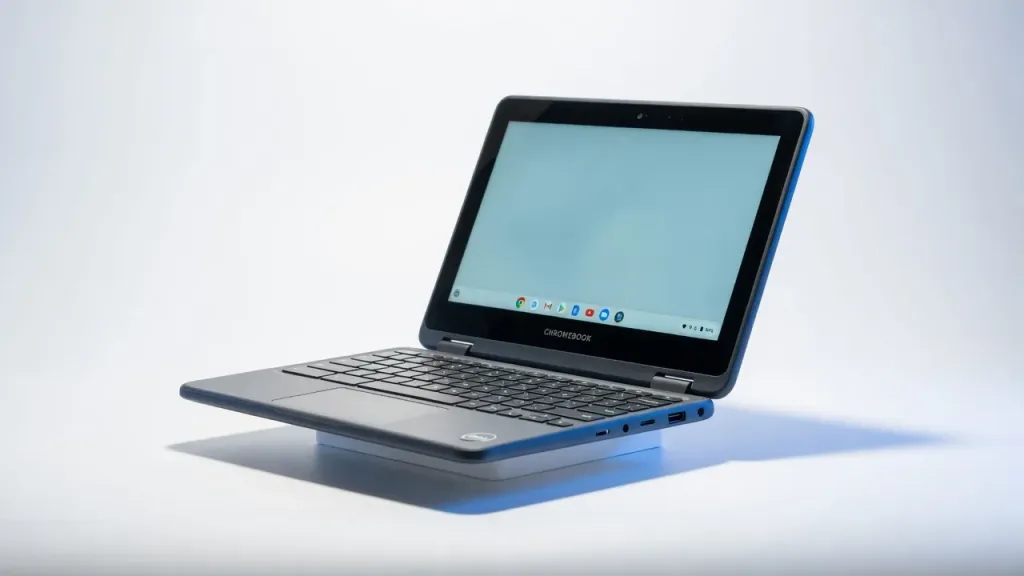
The Dell Chromebook 11 2-in-1 is not a productivity powerhouse — it is a hardened, centrally managed endpoint that runs ChromeOS's layered zero-trust security stack on durable hardware built for high-turnover environments. For IT teams managing large fleets of frontline workers, call centre staff, or K-12 education deployments, the combination of Verified Boot, TPM H1 hardware security, read-only OS, automatic background updates, and Google Admin Console MDM eliminates entire categories of endpoint risk that plague Windows fleets. The Intel N150 processor and 1366x768 display are honest limitations for knowledge workers. The security architecture is not limited at all. Read our full [ChromeOS enterprise deployment guide on NetworkUstad](https://networkustad.com/reviews/) for fleet management context.
ChromeOS Security Architecture: What IT Admins Need to Understand
The Dell Chromebook 11 2-in-1 is a delivery mechanism for ChromeOS’s security architecture. Understanding that architecture is what separates an informed procurement decision from a spec-sheet comparison.
ChromeOS is built on four interlocking security layers that collectively create what Google and independent security firm Atredis Partners have confirmed is the most secure default-configuration desktop OS available. As of 2026, there has been no documented successful ransomware attack or virus attack on ChromeOS — a claim no Windows or macOS deployment can make.
Verified Boot performs a cryptographic integrity check of the firmware and operating system every time the device starts. It compares the current OS state against a secure baseline stored in the Google H1 hardware chip. If any file has been modified — by malware, physical tampering, or corruption — the system automatically restores to a known-good state before proceeding. This happens in seconds with no user awareness or IT intervention required.
The read-only OS means that the core ChromeOS system files cannot be written to during normal operation. Malware that successfully executes code in a browser tab or app cannot persist between sessions because the OS partition is mounted read-only at the hardware level. Every reboot starts from a cryptographically verified clean state.
Sandboxing isolates every browser tab and application from every other process. A malicious website that exploits a browser vulnerability is contained within that tab’s sandbox — it cannot reach the OS, other tabs, or local files. This is the architectural reason why browser-delivered ransomware — the most common enterprise infection vector on Windows — cannot function on ChromeOS.
The Google H1 Secure Microcontroller is the hardware root of trust for the entire stack. Encryption keys are burned into this dedicated security chip during manufacturing and cannot be extracted by software, OS-level attacks, or physical probing without destroying the chip. This provides hardware-backed identity attestation for Chrome Verified Access — the mechanism that lets enterprise identity providers cryptographically verify a device is a legitimate, enrolled, policy-compliant ChromeOS device before granting access to corporate resources.
Google Admin Console: Fleet Management From Any Browser
For IT teams managing more than ten devices, the Google Admin Console is the primary argument for ChromeOS over Windows in price-sensitive deployments. Every enrolled ChromeOS device can be managed — configured, monitored, wiped, or blocked — from any browser, from anywhere, without VPN or on-premises infrastructure.
Zero-touch enrollment means devices arrive pre-enrolled in your organizational unit. Power on, connect to Wi-Fi, sign in with a corporate Google account, and the device automatically downloads all applicable policies, approved app lists, network configurations, and security settings from the Admin Console. For a 500-device deployment, this eliminates the imaging, configuration, and staging overhead that makes equivalent Windows fleet rollouts expensive.
Policy enforcement is granular and cloud-native. Admins can restrict USB data transfer, block specific app categories, enforce screen lock timing, disable camera or microphone on specific organizational units, control which network traffic routes through which proxy, and push emergency policy changes to the entire fleet in minutes. Changes propagate to devices on their next policy sync — no management server, no SCCM, no WSUS infrastructure required.
Remote device wipe is available for lost or stolen devices regardless of whether the device is online — it will wipe on next network connection. Combined with the H1 chip’s hardware encryption, a lost device represents minimal data risk even before the remote wipe executes.
Zero Trust Integration: BeyondCorp, Okta, and CrowdStrike
The Dell Chromebook 11’s enterprise value extends beyond ChromeOS’s native security into its integration ecosystem. ChromeOS integrates natively with Google BeyondCorp Enterprise — Google’s zero-trust access solution — to gate resource access not on network location but on device health, user identity, and request context simultaneously.
The Okta Device Trust Connector integration allows identity-first organisations to incorporate ChromeOS device signals into Okta access policies. A user attempting to authenticate to a corporate app on an unenrolled or policy-non-compliant device is denied access at the identity layer — regardless of whether they have valid credentials. This closes the credential theft gap that makes phishing attacks effective against Windows fleets.
CrowdStrike Falcon Insight XDR integration via the ChromeOS XDR connector provides continuous fleet monitoring for threat detection, even on an OS where traditional endpoint agents are not required. For security operations teams running CrowdStrike across a mixed device fleet, ChromeOS devices can feed telemetry into the same Falcon console as Windows and macOS endpoints — providing a single pane of glass for threat detection.
Performance Reality for Enterprise Roles
The Intel N150 processor is an honest limitation that procurement decisions must account for. For the roles where Chromebooks are most defensible — call centre agents, frontline retail workers, administrative staff, customer support teams, and education users — the performance is adequate. Browser-based applications, Google Workspace, web-based CRM and ERP interfaces, and video calls run without complaint on the N150 with 8GB RAM.
The limitation appears immediately in any workload that requires local compute: code compilation, data transformation in local applications, video editing, or running multiple complex web apps simultaneously. These are not ChromeOS workloads. If your procurement requirement includes these use cases, the Dell Chromebook 11 is the wrong device regardless of price.
The 64GB eMMC storage is the other practical constraint. ChromeOS is designed for cloud-first storage — Google Drive, network shares, web app data. If your deployment requires significant local file caching, offline document libraries, or locally installed Android apps with large data footprints, 64GB fills faster than most IT teams expect during pilot deployments. This is worth measuring against actual usage patterns before committing to fleet procurement.
Durability: MIL-STD-810H for High-Turnover Environments
The Dell Chromebook 11 2-in-1 is MIL-STD-810H tested and survives drop testing from 122cm — relevant for K-12 education and frontline worker deployments where device abuse is a procurement reality rather than an edge case. The 360-degree hinge supports clamshell, tent, presentation, and tablet modes, with USI stylus support in the 2-in-1 configuration for annotation workflows.
The spill-resistant keyboard handles liquid incidents that would brick consumer-grade hardware. For IT asset managers calculating total cost of ownership over a three-year fleet lifecycle, durability directly affects replacement rate — and replacement rate is often where education and frontline deployments exceed their per-device budget projections.
How It Compares for Enterprise Procurement
Against the HP Chromebook x360 11 G4 EE, the Dell 3120 is comparable on security architecture — both run the same ChromeOS security stack — with slight differences in build quality and port selection depending on specific configuration. Neither has a meaningful security advantage over the other; the choice reduces to vendor relationship, support contract terms, and per-unit pricing.
Against Windows 11 Pro endpoints at equivalent price points, the ChromeOS advantage is security overhead reduction. A Windows fleet at this price tier requires active antivirus management, patch cycle scheduling, imaging infrastructure, and ongoing malware response capacity. ChromeOS eliminates all of these IT costs — the total cost of ownership comparison over three years often favours ChromeOS even when the per-device license cost is higher.
Against the Apple MacBook Neo ($699) reviewed previously on NetworkUstad, the Dell Chromebook 11 wins on price and fleet manageability at scale, while losing on application compatibility, display quality, and raw performance. The MacBook Neo carries a full application ecosystem; the Chromebook is cloud-first by design. Both carry hardware TPM security chips. The right choice depends on the role, not the spec sheet.
Verdict
The Dell Chromebook 11 2-in-1 is the right device for specific deployment scenarios and the wrong device for others — and the distinction matters more than any individual specification. For IT teams deploying managed endpoints to frontline workers, call centre agents, education users, or administrative staff whose entire workflow runs in a browser, it delivers enterprise-grade security at a price point that makes Windows fleet management look expensive by comparison.
The ChromeOS security stack — Verified Boot, H1 hardware TPM, read-only OS, sandboxing, zero-touch enrollment, and Google Admin Console MDM — eliminates the malware attack surface and patch management overhead that consumes IT resources in Windows environments. The Intel N150 processor, 1366×768 display, and 64GB storage are the boundaries of that value proposition. Stay within those boundaries and the Chromebook 11 is a defensible procurement decision. Push beyond them and it is not.
Rating: 3.8 / 5 — A purpose-built zero-trust endpoint for managed fleet deployments, with hardware security that punches well above its price class and performance that does not.
Frequently Asked Questions
Is the Dell Chromebook 11 2-in-1 suitable for enterprise deployment?
What security features does ChromeOS include on the Dell Chromebook 11?
How does Google Admin Console work for managing Chromebook fleets?
What is Verified Boot and why does it matter for enterprise security?
Does the Dell Chromebook 11 support zero-trust security architecture?
What are the limitations of the Dell Chromebook 11 for IT professionals?
How does the Dell Chromebook 11 compare to Windows laptops for enterprise security?
What is the total cost of ownership for a Dell Chromebook 11 enterprise fleet?
+Pros
- ChromeOS zero-trust architecture eliminates entire Windows malware attack surface — no .exe files, read-only OS, hardware TPM
- Zero-touch enrollment and Google Admin Console MDM reduce per-device IT setup time to near zero at fleet scale
- Verified Boot with hardware root of trust provides cryptographic device integrity no software-based solution can match
- MIL-STD-810H durability and 360-degree hinge designed specifically for high-turnover, high-abuse deployment environments
- Automatic background OS updates mean IT teams are never managing patch cycles or chasing deferred reboots across the fleet
−Cons
- Intel N150 / Celeron processor unsuitable for local compute workloads — developer tools, data analysis, and video production are not viable
- 1366x768 display at 220 nits is dim and low-resolution by 2026 standards — noticeable limitation for extended daily use
- 64GB eMMC storage is tight even for cloud-first workflows — local file accumulation fills this quickly
- Chrome Enterprise Upgrade license ($50/device/year) is required for full MDM capability — adds ongoing cost to procurement calculations
- No offline capability for most enterprise apps — cloud dependency is both the security advantage and the operational risk in poor-connectivity environments
- 4GB RAM configuration struggles with multiple browser tabs alongside web apps — 8GB configuration strongly recommended for productive use