DMARC (Domain-based Message Authentication, Reporting and Conformance) serves as the benchmark for protecting domains from email spoofing, phishing, and various email-related abuses. A DMARC record generator is an essential tool for organizations that wish to streamline the setup of effective DMARC policies. With this generator, domain owners and administrators can effortlessly create DMARC records that dictate how mail servers should respond to unverified or potentially harmful emails.
The primary advantage of a DMARC Report generator and DMARC record generator is that they simplify the creation of accurate DMARC records by automatically generating the correct syntax with all required and optional tags. This reduces the risk of configuration errors that could weaken email security or interfere with the delivery of legitimate messages. Popular tools such as dmarcian, MXToolBox, EasyDMARC, and SuperTool help organizations create, validate, monitor, and optimize their DMARC configurations while providing valuable reporting insights for stronger email authentication and protection.
Phishing and domain spoofing continue to pose significant risks to both individuals and businesses. By establishing a thorough DMARC policy and publishing it as a TXT record in your domain’s DNS, you can set specific actions — such as none, quarantine, or reject — for emails that fail authentication, thereby enhancing your domain’s security and protecting email communications.
Key DMARC Record Components: Policy, Alignment, Reporting, and Enforcement
A DMARC record integrates various essential features to ensure robust email authentication. Familiarizing yourself with these aspects will strengthen security for your domain and improve the chances of successful email delivery.
DMARC Policy and Enforcement
The DMARC policy is implemented using the `p` (policy) tag in your DNS record.
- `none` policy: This mode simply monitors email without taking action, making it suitable for initial setup phases.
- `quarantine`: This setting sends emails that fail the checks to the spam folder or a quarantine, offering enhanced security.
- `reject`: This option outright denies delivery of emails that fail, ensuring the highest level of protection against phishing attempts and domain spoofing.
Additionally, the `sp` tag allows you to set a distinct DMARC policy for subdomains, providing thorough protection for both your main domain and any related subdomains.
Alignment (Identifier Alignment)
Ensuring policy alignment means that the domain specified in the ‘Header From’ field needs to correspond with the domains verified through SPF and DKIM authentication. This is essential to safeguard your Organizational Domain from being impersonated by attackers. The alignment settings consist of:
- `adkim` (for DKIM alignment), which can be set to either `r` (relaxed) or `s` (strict).
- `aspf` (for SPF alignment), which also accepts `r` (relaxed) or `s` (strict) options.
Choosing strict mode provides greater security by requiring exact domain matches, whereas relaxed mode allows for some flexibility with subdomains. Properly configuring these alignment settings is vital for reliable authentication.
DMARC Reporting: Aggregate and Forensic Reports
Effective DMARC implementation relies heavily on reporting. There are two primary types of DMARC reports:
1. Aggregate reports (`rua` tag): These provide a summary of email authentication outcomes and are delivered to a designated reporting address, typically formatted as a mailto URI (for example, `mailto:dmarc-reports@yourdomain.com`). They give an overview of your domain’s email health and the effectiveness of DMARC.
2. Forensic reports (`ruf` tag): These offer detailed, immediate reports of failures for specific emails, essential for thorough investigations and quick responses to issues like domain spoofing or policy violations.
- `ri` tag: Defines the interval for reporting, usually specified in seconds, with a standard setting of 86400 (24 hours).
- `fo` tag: Indicates the options for failure reporting (for instance, `1`, `0`, `d`, or `s`).
- `rf` tag: Specifies the desired format for reports, such as `afrf` or `iodef`.
Using DMARC aggregate and forensic reports effectively delivers valuable insights for continuous monitoring of email abuse and enhancing authentication processes. Tools like the Forensic Viewer and XML-to-Human converter, provided by dmarcian or EasyDMARC, can aid in the efficient analysis of these reports.
Required and Optional Tags
A DMARC record is essential to contain certain mandatory tags, including `v=DMARC1` and `p`. In addition, there are several optional tags — such as `sp`, `adkim`, `aspf`, `fo`, `pct`, `rua`, `ruf`, `rf`, and `ri` — that enable detailed adjustments for enforcement policies, alignment, and reporting preferences. An effective DMARC 1 record is one that combines these required and optional tags to align with your organization’s security goals.
Step-by-Step Guide to Creating a DMARC Record with a Generator
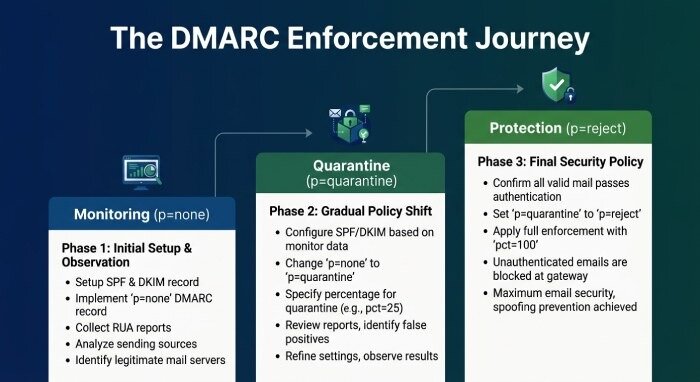
Setting up and implementing a DMARC record is simple when you utilize a reliable DMARC record generator. Here’s a step-by-step guide that makes use of top tools such as MXToolBox, dmarcian, or EasyDMARC.
1. Gather Domain and Email Infrastructure Insights
Start with an Overview of the Domain, highlighting your organization’s domain and examining current email authentication methods such as SPF and DKIM, along with your DNS configurations. Utilize tools like MX Lookup and DNS Lookup to compile a comprehensive list of all the sources used for sending emails, including any external ESPs and ISPs.
2. Select a Trusted DMARC Record Generator
- MXToolBox SuperTool
- dmarcian’s DMARC Wizard
- EasyDMARC’s Delivery Center
These services provide user-friendly interfaces and additional features, including manual editing and API Reference for more experienced users.
3. Input Key Parameters and Generate DMARC Record
Establish your policy tag, subdomain guidelines, and the reporting addresses for aggregate (rua) and forensic (ruf) emails. Determine the alignment settings for SPF and DKIM (adkim and aspf). Select your enforcement strategy: begin with no policy to gather insights, then increase to quarantine or reject as you build confidence in your setup.
- Use `pct` to define the percentage of emails that the policy will apply to (start at 10, then gradually increase to 100).
- Set the `fo` tag to specify conditions for forensic reports.
- Adjust the reporting interval (`ri`) if the default doesn’t meet your needs.
Complete the setup and create the DMARC record syntax, which usually begins with `v=DMARC1;`.
4. Review, Validate, and Finalize
Utilize a DMARC Record Checker tool such as MXToolBox or dmarcian’s Diagnostics to verify that the syntax is accurate. Look for any conflicts with other DNS TXT records. Perform a comprehensive authentication assessment to identify any possible delivery issues.
How to Publish, Test, and Monitor Your DMARC Record in DNS
Publishing the DMARC Record
Head to your DNS service provider, which might be GoDaddy, Cloudflare, or your own organization’s DNS management interface.
- Create a new TXT record for the hostname: `_dmarc.yourdomain.com`.
- Insert the DMARC record generated earlier into the value field for the TXT record.
- Ensure you save your changes.
Be aware that propagation times can differ. Utilize DNS lookup tools to confirm that the _dmarc record is visible.
Testing and Validation
Utilize the DMARC Record Checker, Diagnostics, and SuperTool to verify that the record is active and properly formatted. Review the email headers of received messages to ensure the DMARC authentication results are valid. Email Service Providers (ESPs) and Internet Service Providers (ISPs) will start sending aggregate and forensic DMARC reports to your designated reporting address, allowing for continuous monitoring.
Monitoring DMARC Reporting
Leverage dashboards from dmarcian, EasyDMARC, or your own custom solution to regularly assess:
- Summary reports that highlight overarching trends across your domain
- Forensic DMARC reports for detailed examination of issues
Tools like the XML-to-Human converter and Forensic Viewer simplify the interpretation of intricate report data. Modify your DMARC policy or SPF/DKIM setup as necessary based on your observations.
Best Practices for Moving from Monitoring to Full DMARC Protection
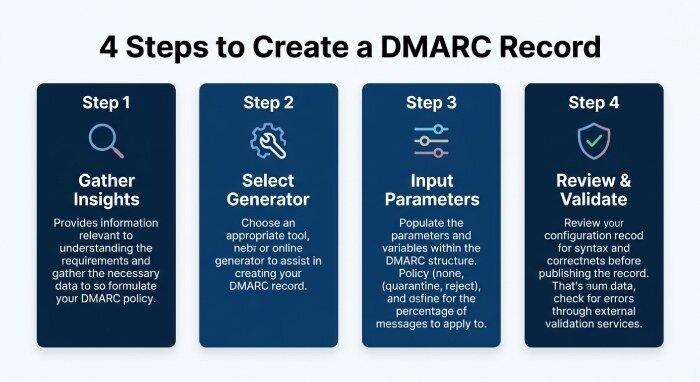
Shifting from a monitoring policy (none) to an enforcement policy (quarantine or reject) necessitates thoughtful strategizing to ensure consistent email delivery and robust email authentication.
Gradual Policy Alignment and Enforcement
Begin without a system in place to track traffic and gather adequate summary reports. Address authentication issues highlighted by MXToolBox, Delivery Center, and similar diagnostic tools. Transition to quarantine as SPF and DKIM alignment enhances, eventually progressing to reject for full defense against spoofing and phishing attacks.
Subdomain Policy and Identifier Alignment
Establish a precise policy for your subdomains by utilizing the subdomain policy (`sp`) tag to manage all email sources associated with your domain. Modify the adkim and aspf tags to ensure correct alignment of identifiers, striking a balance between stringent authentication measures and effective email delivery.
Ongoing Analytics and Manual Edit
Consistently review email headers, perform MX lookups, and examine failure reports to identify any irregularities or authentication problems. Feel free to adjust and finalize your DMARC record as your email system changes, especially when integrating new mailing sources or service providers.
Update Reporting Interval and Review Records
Adjust the reporting interval (`ri`) and verify your reporting addresses to optimize the processing of forensic and aggregate reports. Ensure that your reports are securely accessible, and contemplate incorporating features like Blacklist monitoring for comprehensive email health oversight.
Utilizing resources like a DMARC record generator, thorough diagnostics, and periodic examination of both aggregate and forensic reports enables you to effectively publish, uphold, and enforce DMARC on a large scale, preventing phishing, domain spoofing, and email misuse from impacting your users or customers.