
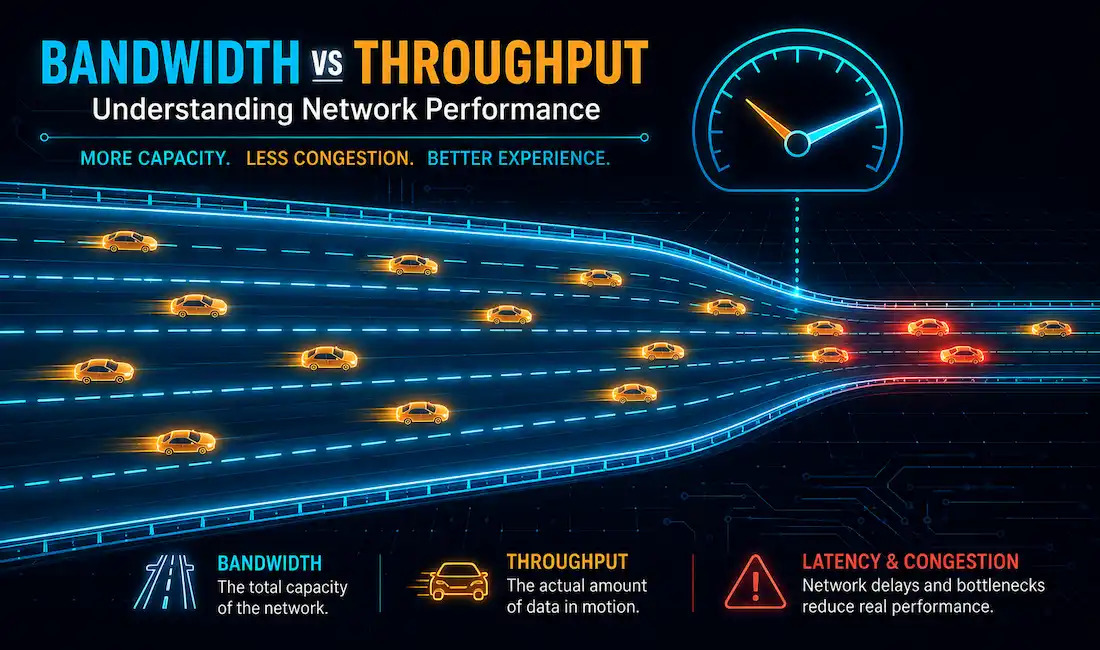
Bandwidth and throughput get used interchangeably all the time. They shouldn’t be. Whether you’re streaming 4K video, running a cloud application, or setting up a home network, knowing the difference actually matters. This article covers both terms in depth, with real examples, real tools to measure them, and the actual math behind why throughput almost never matches bandwidth.
Bandwidth
It is the amount of data that can move from one point to another in a given time, usually a second. It’s measured in bits per second: bps, Kbps, Mbps, Gbps.
People often think of bandwidth as “speed.” That’s not quite right. In both 100 Mbps and 1000 Mbps Ethernet, bits travel at the same physical speed, close to the speed of light through the medium. The difference is how many bits get sent per second, not how fast each individual bit moves.
A few things determine a network’s real, practical bandwidth:
- The properties of the physical media (copper, fiber, wireless spectrum).
- The signaling and detection technology chosen for that media.
- Basic physics. Every medium has hard limits.
Bandwidth connections can be symmetrical, where upload and download capacity match, or asymmetrical, where they don’t. Most home internet plans are asymmetrical, with upload capacity smaller than download. That’s a deliberate tradeoff, since most home use is download-heavy.
Standard unit conversions:
- 1 Kbps = 1,000 bits per second
- 1 Mbps = 1,000 Kbps
- 1 Gbps = 1,000 Mbps
A connection rated in Mbps beats one rated in Kbps. A connection rated in Gbps beats both.
Factors Influencing Bandwidth
- Physical infrastructure. Fiber-optic cable supports far more bandwidth than copper.
- Network hardware. Routers and modems each have their own ceiling.
- ISP-imposed limits. Your plan caps what you can actually use, regardless of what the hardware could technically support.
Higher bandwidth matters because it supports more devices and more data-intensive activity at once, things like 4K streaming or large downloads running in the background.
Reference Bandwidth Figures
| Technology | Bandwidth |
|---|---|
| Modem / Dialup | 56 kbit/s |
| ADSL Lite | 1.5 Mbit/s |
| T1/DS1 | 1.544 Mbit/s |
| Ethernet | 10 Mbit/s |
| Wireless 802.11b | 11 Mbit/s |
| T3/DS3 | 44.736 Mbit/s |
| Wireless 802.11g | 54 Mbit/s |
| Fast Ethernet | 100 Mbit/s |
| OC3 | 155 Mbit/s |
| Wireless 802.11n | 600 Mbit/s |
| OC12 | 622 Mbit/s |
| Gigabit Ethernet | 1 Gbit/s |
| OC48 | 2.5 Gbit/s |
| OC192 | 9.953 Gbit/s |
| 10 Gigabit Ethernet | 10 Gbit/s |
| 100 Gigabit Ethernet | 100 Gbit/s |
Bits and Bytes
Storage capacity works differently. Hard disks and USB drives are measured in kilobytes, megabytes, gigabytes, where “kilo” means a multiplier of 1,024, not 1,000. Networking bandwidth uses the simpler decimal system: 1 Kbps really is 1,000 bps, flat. Mixing these two conventions up is a common source of confusion, especially when a “100 GB” drive shows up as slightly less than 100,000,000,000 bytes once you actually check.
Bandwidth in Modern Networks
Bandwidth demand keeps climbing, driven by 5G, IoT, and AI-heavy applications. A few examples:
- 5G networks offer bandwidth up to 10 Gbps under ideal conditions, enabling latency-sensitive applications like autonomous vehicle coordination.
- Cloud computing platforms like AWS or Azure need high bandwidth to move the massive data volumes involved in AI model training.
- Streaming a 4K video on Netflix or YouTube consumes roughly 25 Mbps.
Bandwidth is shaped by the physical infrastructure underneath it, fiber, Ethernet, whatever the medium is, along with whatever plan your service provider sold you. Routers and modems also play a role, since even great infrastructure can’t exceed what your own hardware supports.
Throughput
Throughput measures how much data actually gets transferred across a medium in a given time. It measures real, delivered performance, not theoretical capacity. Throughput generally doesn’t match the stated bandwidth, and several factors explain why:
- The type of traffic.
- The amount of traffic.
- Latency caused by the number of network devices between source and destination.
- Error rate.
Latency is the time, including all delays, it takes data to travel from one point to another. In a multi-segment network, throughput can never exceed the slowest link in the path. It doesn’t matter if every other segment runs at 10 Gbps. One congested, low-throughput segment becomes the bottleneck for the whole path.
Throughput measurements include all the protocol overhead: packet headers, retransmitted packets from errors or collisions, everything. A related but stricter measurement, goodput, strips that overhead out entirely. Goodput is throughput minus session setup, acknowledgments, and encapsulation overhead. It measures only the original, usable data that actually arrived.
Throughput in Real-World Scenarios
Throughput varies by use case and by real network conditions:
- Video conferencing. A Zoom call in HD typically needs 3–5 Mbps of throughput. Packet loss degrades quality fast, even with bandwidth to spare.
- File transfers. Downloading a large file depends on both the server’s available bandwidth and your own network’s actual throughput at that moment.
- Gaming. Games like Fortnite need consistent throughput, roughly 1–3 Mbps, prioritizing low, stable latency over raw speed.
Key Differences Between Bandwidth and Throughput
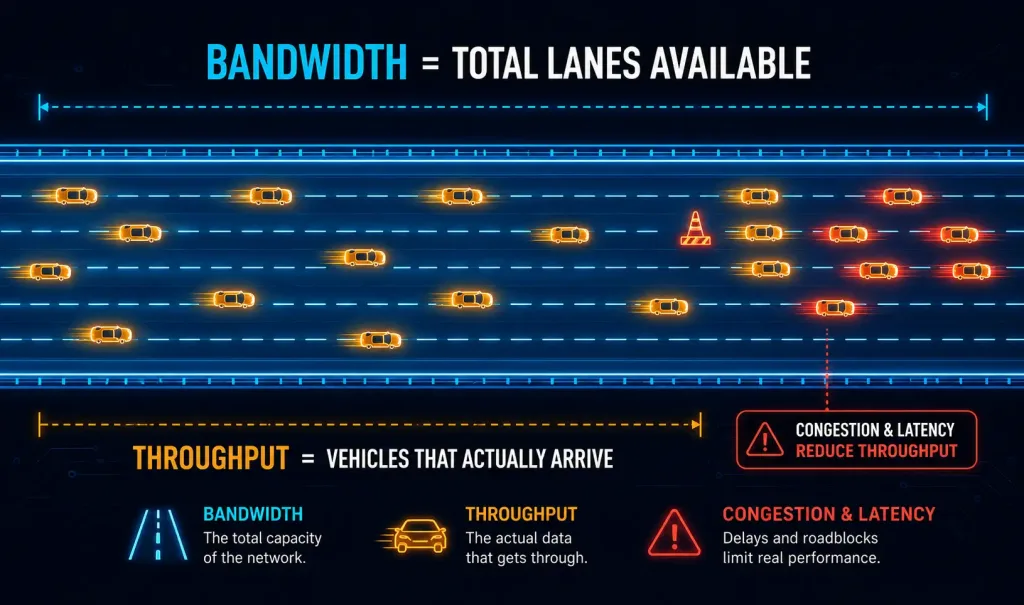
The highway analogy is the clearest way to picture this: bandwidth is the highway itself, the number of lanes available. Throughput is the number of vehicles that actually make it to their destination. More lanes mean more capacity, but traffic jams, accidents, and roadblocks, the real-world equivalents of congestion and latency, still reduce how many vehicles arrive compared to the highway’s theoretical capacity.
| Aspect | Bandwidth | Throughput |
|---|---|---|
| Definition | Maximum data transfer capacity | Actual data transferred |
| Measurement | bps, Mbps, Gbps | bps, Mbps, Gbps |
| Nature | Theoretical maximum | Real-world performance |
| Example | 100 Mbps internet plan | 70 Mbps achieved during a download |
| Affected by | Physical infrastructure, ISP plan | Latency, packet loss, congestion |
Factors Affecting Throughput
Throughput is always less than or equal to bandwidth. A few specific factors explain the gap:
- Latency. The travel time from source to destination. High latency, like on satellite internet, reduces throughput even when bandwidth is high. 5G, by contrast, typically achieves 1–10 ms latency, which is exactly why it boosts real-time application performance so much.
- Packet loss. Dropped packets from network errors directly lower throughput. This shows up constantly on Wi-Fi networks dealing with interference.
- Network congestion. During peak hours, multiple devices sharing one connection reduce everyone’s share. A 100 Mbps connection split across 10 active devices doesn’t cleanly divide into 10 Mbps each in practice, but it’s a reasonable rough estimate for what each device might realistically see under heavy simultaneous use.
- Device limitations. An outdated router, a Cat5 cable instead of Cat6, or plain software overhead can all bottleneck throughput well below what the underlying bandwidth would otherwise support.
- Protocol overhead. TCP/IP headers and control traffic eat into effective throughput. A 100 Mbps link commonly loses 5–10% of its capacity just to overhead.
The Real Math Behind Throughput: The Mathis Equation
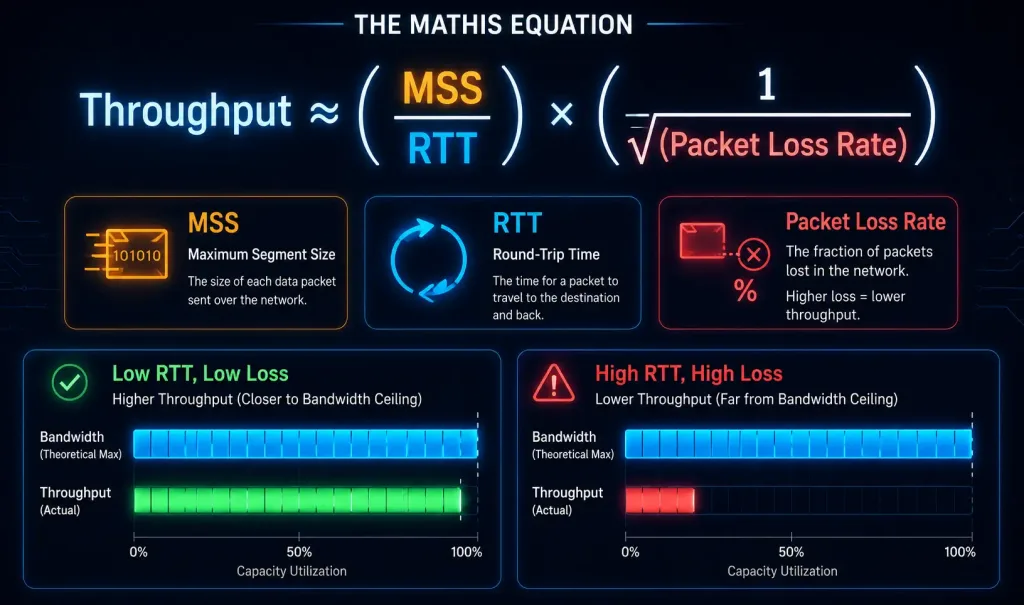
There’s a well-established formula networking engineers actually use to estimate TCP throughput, called the Mathis equation:
Throughput ≈ (MSS ÷ RTT) × (1 ÷ √(Packet Loss Rate))
Where:
- MSS is the Maximum Segment Size, the largest chunk of data a single TCP segment can carry.
- RTT is Round-Trip Time, how long it takes a packet to reach its destination and an acknowledgment to come back.
- Packet Loss Rate is the fraction of packets lost in transit (2% loss is written as 0.02).
The relationship is intuitive once you see it laid out: throughput drops as RTT increases, and it drops even faster as packet loss increases, since loss sits under a square root. A connection with a low RTT and near-zero loss can approach its full bandwidth. A connection with high latency or noticeable packet loss falls well short, even on a fast link. This is the real reason satellite internet, with its inherently high RTT, struggles to deliver throughput anywhere close to its rated bandwidth, even when the bandwidth number itself looks respectable on paper.
Measuring Bandwidth and Throughput
Measuring bandwidth: check your ISP plan or router specifications directly for the theoretical capacity you’re paying for. Tools like Speedtest by Ookla will show you an estimate of available bandwidth.
Measuring throughput: actual measurement tools give you real numbers instead of estimates.
- iPerf. A command-line tool for testing throughput directly between two devices.
- Netperf. Suited for throughput measurement in enterprise environments.
- PingPlotter. Tracks latency and packet loss, the two factors most responsible for throughput falling short of bandwidth.
Running iPerf on a 1 Gbps LAN and seeing 950 Mbps throughput isn’t a problem. That gap reflects minor, expected packet loss and overhead, confirming the network is performing efficiently, not failing.
Real-World Applications
Understanding this distinction matters across a range of scenarios:
- Enterprise networks. Companies use high-bandwidth fiber connections (often 10 Gbps) to guarantee enough real throughput for cloud backups and AI workloads.
- IoT devices. Smart home devices, security cameras especially, need consistent throughput, roughly 1–5 Mbps, to stream without buffering.
- Gaming and streaming. High throughput keeps gameplay and 4K streaming smooth, while low latency is what actually prevents lag.
- 5G and edge computing. 5G’s high bandwidth supports genuinely throughput-intensive applications, like remote surgery or autonomous drone control, where both capacity and consistency matter.
How to Optimize Throughput
- Upgrade hardware. Modern routers (Wi-Fi 6 or better) and quality cabling (Cat6 or fiber) remove a lot of avoidable bottlenecks.
- Reduce congestion. Limit the number of connected devices, or use Quality of Service (QoS) settings to prioritize traffic that actually needs it.
- Minimize latency. Choose lower-latency connections, fiber over satellite where you have the choice, and optimize routing paths where you control them.
- Monitor packet loss. Tools like PingPlotter help you actually find and fix the source of dropped packets, rather than guessing.
- Keep firmware and software updated. Outdated router firmware is a surprisingly common, easily avoidable source of throughput bottlenecks.
Conclusion
Bandwidth sets the theoretical ceiling. Throughput tells you what you actually got. The gap between them comes down to latency, packet loss, congestion, and overhead, all real, measurable factors, not mysterious ones. Understanding both, and knowing roughly why throughput falls where it does using something like the Mathis equation, puts you in a much better position to actually diagnose a slow connection instead of just blaming your ISP’s advertised speed.
FAQs
What is bandwidth?
Bandwidth is the maximum amount of data a network connection can theoretically carry in a given time, measured in bits per second. It represents capacity, not guaranteed real-world performance. Think of it as the size of the pipe, not the amount of water actually flowing through it at any given moment.
What is throughput?
Throughput is the amount of data actually, successfully transmitted over a network in a given period. It’s almost always lower than bandwidth, since real-world factors like interference, congestion, and hardware limits all take a bite out of the theoretical maximum. Throughput is what you actually experience, not what your plan advertises.
How do bandwidth and throughput differ?
Bandwidth is the theoretical maximum transfer rate a connection could support under ideal conditions. Throughput is the real, measured performance you get once latency, packet loss, and congestion are factored in. A 100 Mbps plan (bandwidth) commonly delivers something like 70–90 Mbps in practice (throughput), and that gap is normal, not a sign of a broken connection.
Why is bandwidth important for network performance?
Bandwidth sets the upper limit on how much data can move at once, which directly shapes loading speed, streaming quality, and how a network responds under load from multiple devices. Without enough bandwidth, no amount of optimization elsewhere can make up the difference. It’s the ceiling everything else operates under.
How can bandwidth and throughput be optimized?
Upgrading hardware, reducing the number of devices competing for the same connection, applying QoS to prioritize important traffic, minimizing latency where possible, and keeping firmware updated all help close the gap between bandwidth and throughput. None of these increase your actual bandwidth ceiling, but together they get your real-world throughput much closer to it.



