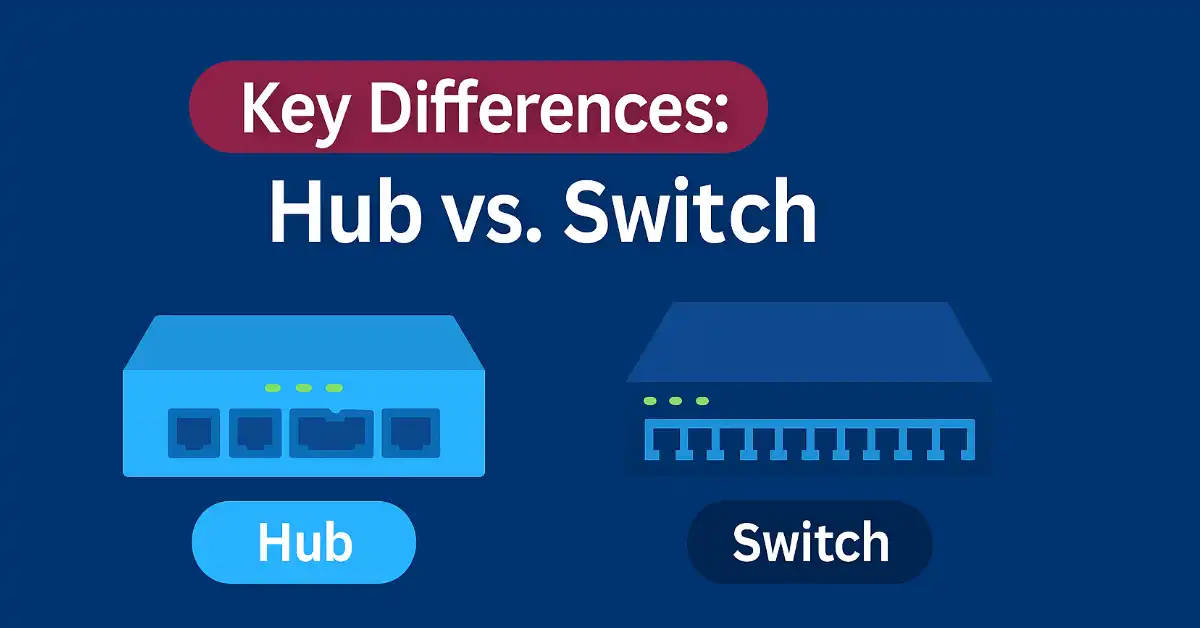
In networking, understanding the differences between a switch and a hub (switch vs. hub) is fundamental for students and networking professionals. While hubs were historically used to connect devices in local area networks (LANs), modern networks rely on switches for efficiency, scalability, and security. This article explores their roles, distinctions, and practical applications, with Cisco-specific examples to aid exam preparation and real-world networking tasks.
In 2026, the stakes are higher than ever. The global network switches market is projected to grow from $37.78 billion in 2025 to $40.57 billion in 2026 at a CAGR of 7.4%, and is expected to reach $55.47 billion by 2030. This explosive growth — fueled by AI workloads, cloud computing, and 5G expansion — makes mastering switches not just academically valuable but professionally essential.
What Are Switches and Hubs?
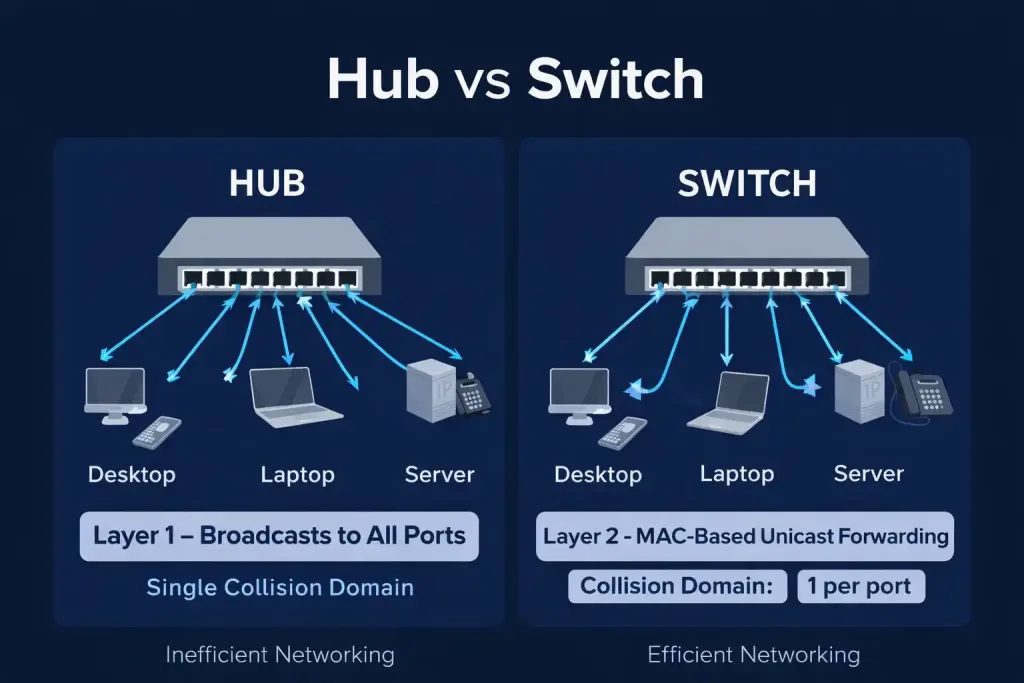
Switches and hubs are networking devices that connect computers, servers, or other networked devices within a LAN or across networks. Both have multiple ports for connecting Ethernet cables, but their functionality differs significantly. Hubs are now largely obsolete, while switches are the backbone of modern networks. Let’s dive into the key differences to clarify their roles for CCNA and CCNP students.
Why Switch vs. Hub Still Matters in 2026
The debate between switch and hub is not merely academic — it contextualizes how far networking has evolved. The worldwide Ethernet switch market recorded $11.7 billion in revenue in Q1 2025 alone, a 32.3% year-over-year increase driven primarily by data center demand for AI infrastructure. The data center portion of the Ethernet switch market grew 54.7% year-over-year in Q1 2025.
Key 2026 market trends every network engineer should know:
- AI & Hyperscale Demand: Data center switch market was valued at $17.93 billion in 2025, growing to a projected $28.53 billion by 2031 at 8.05% CAGR.
- Ethernet Dominance: Ethernet captured 84.20% of data center switch market share in 2025, with 400GbE and 800GbE adoption accelerating for AI workloads.
- Layer 2 Switch Leadership: Layer 2 switches led the market with a 36.55% share in 2026 due to VLAN support, link aggregation, and QoS capabilities.
- Fixed Configuration Switches: Dominated with a 59.19% market share in 2026, favored for branch offices, edge networks, and cost efficiency.
- Edge Computing Growth: Edge and micro data center facilities show the fastest CAGR of 9.62%, fueling demand for compact, high-throughput switches for IoT and 5G.
These numbers illustrate why hubs — limited to 10 Mbps, incapable of intelligent forwarding — have no place in this landscape.
Switch vs. Hub Differences
1. OSI Layer Operation
- Hub: Operates at Layer 1 (Physical Layer) of the OSI model. It transmits data as raw electrical signals (bits) without processing or interpreting the data.
- Switch: Operates at Layer 2 (Data Link Layer) for MAC address-based forwarding. Advanced Layer 3 (Network Layer) switches can route packets using IP addresses, a key topic for CCNP students.
| 💡 2026 Update: Layer 3 switches are now standard in enterprise campus deployments. They eliminate the need for a separate router-on-a-stick configuration for inter-VLAN routing, especially in high-throughput environments exceeding 10 Gbps per link. |
2. Data Transmission
- Hub: Floods data to all ports, causing network congestion and collisions. It supports only half-duplex communication, meaning data cannot be sent and received simultaneously.
- Switch: Sends data intelligently using unicast, multicast, or broadcast after learning MAC addresses. It supports full-duplex communication, allowing simultaneous sending and receiving, which improves performance.
Modern 2026 switches go far beyond basic MAC-based forwarding. Enterprise-grade managed switches now support programmable ASICs, hardware-accelerated forwarding at 400G–800G per port, and deep packet inspection — capabilities that were once exclusive to dedicated hardware appliances.
3. Network Domains
Collision Domain:
- Hub: All ports share a single collision domain, meaning devices compete for bandwidth, leading to collisions and reduced efficiency.
- Switch: Each port is a separate collision domain, minimizing traffic collisions and improving throughput.
Broadcast Domain:
- Hub: Operates as a single broadcast domain, sending broadcasts to all connected devices.
- Switch: Defaults to one broadcast domain but can be segmented into multiple domains using VLANs, a critical concept for CCNA students. For detailed VLAN configuration on Cisco switches, see: networkustad.com/2019/08/16/vlan-configuration-cisco-switches/
4. Features & Management
Hub:
- Passive device with no software or configuration options.
- Limited to 10 Mbps speeds (legacy 10Base-T Ethernet).
- No MAC address storage or security features.
Switch (2026 Capabilities:
- Supports advanced management including port security, bandwidth control, and VLAN configuration.
- Implements Spanning Tree Protocol (STP) to prevent network loops — a key CCNP topic.
- Available in 10/100/1000 Mbps and up to 800 Gbps port speeds in 2026 for hyperscale AI data centers.
- AI-powered analytics and zero-touch provisioning are now standard on enterprise managed switches.
- Software-Defined Networking (SDN) integration enables centralized, policy-based control of switching infrastructure.
5. Switch Types and Advanced Features
Managed vs. Unmanaged Switches:
- Unmanaged Switches: Plug-and-play devices with no configuration options. Suitable for small networks or home use, focusing on basic Layer 2 switching.
- Managed Switches: Offer advanced features like VLANs, Quality of Service (QoS), and port mirroring via CLI, GUI, or SNMP. CCNA students should master basic Cisco CLI commands like show vlan brief. See: networkustad.com/2019/06/14/basic-cisco-router-configuration-step/
Power over Ethernet (PoE) — Updated 2026 Standards:
PoE switches (e.g., Cisco Catalyst 9200) supply power to devices like IP phones or cameras over Ethernet cables. CCNP students should understand PoE standards and power budget management. In 2026, the full PoE standard progression is:
- 802.3af (PoE): Up to 15.4W per port — powers basic IP phones and simple cameras.
- 802.3at (PoE+): Up to 30W per port — supports PTZ cameras and dual-radio access points.
- 802.3bt Type 3 (PoE++): Up to 60W per port — ideal for high-performance wireless access points.
- 802.3bt Type 4 (PoE++): Up to 90–100W per port — supports Wi-Fi 7 APs, industrial IoT, LED lighting, and video conferencing systems. IEEE 802.3bt was incorporated into 802.3 in the 2022 revision.
| 💡 2026 PoE Insight: Most Wi-Fi 7 access points require at minimum 802.3at (PoE+), with high-performance models requiring 802.3bt PoE++ to operate at full capacity. Plan your power budget carefully — always leave 20–30% overhead. |
Quality of Service (QoS):
- Managed switches prioritize critical traffic (e.g., VoIP over email) using QoS policies.
- Example Cisco command: mls qos trust dscp — prioritizes packets based on DSCP values.
Software-Defined Networking (SDN) — 2026 Reality:
SDN has moved from a futuristic concept to mainstream enterprise reality. SDN decouples the control plane from the data plane, allowing centralized, software-based management of switching behavior across thousands of devices. Cisco’s Application Centric Infrastructure (ACI) and open-source SONiC are leading platforms in 2026. Enterprises using SDN report significantly improved traffic management, automated VLAN provisioning, and micro-segmentation capabilities — all reducing manual configuration errors.
Comparison Table: Hub vs. Switch (Updated 2026)
| Feature | Hub | Switch |
| OSI Layer | Layer 1 (Physical) | Layer 2 (Data Link) / Layer 3 (optional) |
| Data Transmission | Floods to all ports (half-duplex) | Intelligent forwarding (full-duplex) |
| Collision Domain | Single (all ports share) | Separate per port |
| Broadcast Domain | Single | Single (splittable via VLANs) |
| Speed | 10 Mbps (fixed) | 10/100/1000 Mbps – 800 Gbps (2026) |
| Management | None (passive) | VLANs, QoS, STP, SDN, AI analytics |
| PoE Support | None | Up to 90–100W per port (802.3bt) |
| Security Features | None | Port security, 802.1X, DHCP Snooping, DAI |
| AI/Automation | None | Zero-touch provisioning, AIOps (2026) |
| Market Status | Obsolete (discontinued) | Standard — $40.57B market in 2026 |
| Use Case | Legacy LANs (1990s–2000s) | Modern LANs, WANs, MANs, AI clusters |
Use Cases
Hub: Obsolete in modern networks due to inefficiency and lack of security. Historically used in small LANs (1990s–early 2000s) with 10Base-T Ethernet at 10 Mbps. Replaced by switches for better performance and scalability. CCNA students should understand hubs for legacy network questions in exams but focus on switches for practical applications.
Switch: Found in LANs, WANs, and MANs for scalable, high-performance networking. Supports modern speeds (1/10/40/100 Gbps) and features like PoE, VLANs, and link aggregation (LACP). See: networkustad.com/2019/11/05/introduction-to-link-aggregation/
2026 Switch Use Cases Worth Knowing
As a CCNA or CCNP candidate in 2026, understanding these real-world use cases will make your certification knowledge immediately applicable on the job:
AI & Hyperscale Data Centers:
Training large language models (LLMs) generates east-west traffic that is 24–32 times higher than standard data center traffic patterns. Hyperscale operators deploy 102.4 Tbps ASICs maintaining single-hop paths between GPUs. Early field results show a 1.6x reduction in model training duration when 400G links replace 100G links in the same fabric — representing millions of dollars in GPU utilization savings. Cisco Nexus, Arista EOS, and Juniper QFX dominate this space.
Enterprise Campus Networks:
Wi-Fi 7 rollout in 2025–2026 is driving large-scale PoE++ switch deployments. Multi-Gigabit (2.5G/5G/10G) uplinks from access switches are becoming standard to handle next-generation wireless throughput. Non-datacenter Ethernet switch revenue grew 9.6% YoY in Q1 2025, with 1GbE switches still making up over half of the segment.
Edge Computing & IoT:
Edge and micro data centers — serving 5G, IoT, and real-time analytics — show the fastest growth at a 9.62% CAGR in the switch market. Compact, remotely managed switches are enabling sub-10ms latency processing at edge nodes. For CCNP Enterprise students, edge switching scenarios increasingly appear in exam simulations.
Leaf-Spine Architecture:
Modern data centers have replaced traditional three-tier (core/distribution/access) designs with flat leaf-spine fabrics. Every leaf switch connects to every spine switch, providing predictable latency, easy horizontal scaling, and no Spanning Tree bottlenecks. This architecture is foundational knowledge for CCNP Data Center candidates.
Industrial & OT Networks:
Industrial Ethernet switches with IEEE 802.3bt PoE++ are being deployed in manufacturing, utilities, and transportation for connecting IoT sensors, industrial cameras, and PLC controllers. These switches operate in extreme temperatures (-40°C to 75°C) and include 6kV PoE surge protection.
Switch Security Features in 2026
Security is now built into the switching layer. Modern managed switches include these hardened features that CCNA and CCNP students should master:
- Port Security: Limits the number of valid MAC addresses per port, preventing unauthorized device connections.
- Dynamic ARP Inspection (DAI): Validates ARP packets against the DHCP snooping binding table to prevent ARP poisoning attacks.
- DHCP Snooping: Acts as a firewall between trusted and untrusted DHCP clients, blocking rogue DHCP servers.
- 802.1X Port Authentication: Requires devices to authenticate before joining the network — the basis of zero-trust network access at Layer 2.
- Private VLANs (PVLANs): Provide layer 2 isolation between devices in the same VLAN — widely used in hotel networks, co-location facilities, and cloud environments.
| 💡 Exam Tip: DHCP Snooping, DAI, and 802.1X are now testable topics in both CCNA 200-301 and CCNP Enterprise ENCOR exams. Hubs support none of these features. |
Essential Cisco Switch CLI Commands (2026 CCNA/CCNP Reference)
Mastering Cisco IOS commands is essential for both certification exams and real-world deployments. These commands are foundational — see our complete guide at: networkustad.com/2019/08/12/cisco-ios-common-show-commands/
| Command | Purpose | Exam Level |
| show vlan brief | Displays all VLANs and their assigned ports | CCNA |
| show mac address-table | Shows learned MAC addresses per switch port | CCNA |
| show interfaces trunk | Verifies 802.1Q trunk link configuration | CCNA |
| show spanning-tree | Displays STP topology and root bridge info | CCNA/CCNP |
| show interfaces status | Shows port speed, duplex, and link status | CCNA |
| show ip interface brief | Verifies Layer 3 switch SVI IP interfaces | CCNP |
| show ip route | Displays the Layer 3 routing table | CCNP |
| mls qos trust dscp | Enables DSCP-based QoS trust on an interface | CCNP |
| spanning-tree vlan 10 | Configures STP for a specific VLAN | CCNP |
| ip routing | Enables IP routing on a Layer 3 switch | CCNP |
Conclusion – Switch vs. Hub
Mastering the differences between switches and hubs is essential for both exams and real-world networking. Switches are the cornerstone of modern networks, offering intelligent traffic management, scalability, and advanced features like VLANs, PoE, and QoS. Hubs, while historically significant, are obsolete due to their inefficiency. With the global switch market reaching $40.57 billion in 2026 and AI-driven infrastructure reshaping data centers, network professionals who master switching deeply will remain indispensable. Practice Cisco switch configurations and troubleshooting commands to excel in your certification journey.
FAQs – Switch vs. Hub
What is the main difference between a Switch vs. Hub?
A hub floods data to all ports causing collisions, while a switch uses MAC addresses for intelligent unicast forwarding and supports full-duplex communication for better performance.
Why are switches preferred over hubs in modern networks?
Switches reduce collisions with separate collision domains, support VLANs, offer up to 800 Gbps speeds in 2026, and provide security features like port security and 802.1X authentication.
How does Spanning Tree Protocol (STP) work with switches?
STP prevents network loops by blocking redundant paths. Managed switches use STP (e.g., spanning-tree vlan 10) to ensure loop-free topologies. CCNP students must understand root bridge election and RSTP.
Can switches support Power over Ethernet (PoE)?
Yes. PoE switches deliver power and data over one cable. In 2026, 802.3bt PoE++ provides up to 90-100W per port, supporting Wi-Fi 7 access points, IP cameras, and industrial IoT edge devices.
What is the role of a Layer 3 switch in routing?
Layer 3 switches route IP packets using protocols like OSPF or EIGRP. The command ip routing enables routing on a Cisco switch, replacing traditional router-on-a-stick for high-speed inter-VLAN routing.