
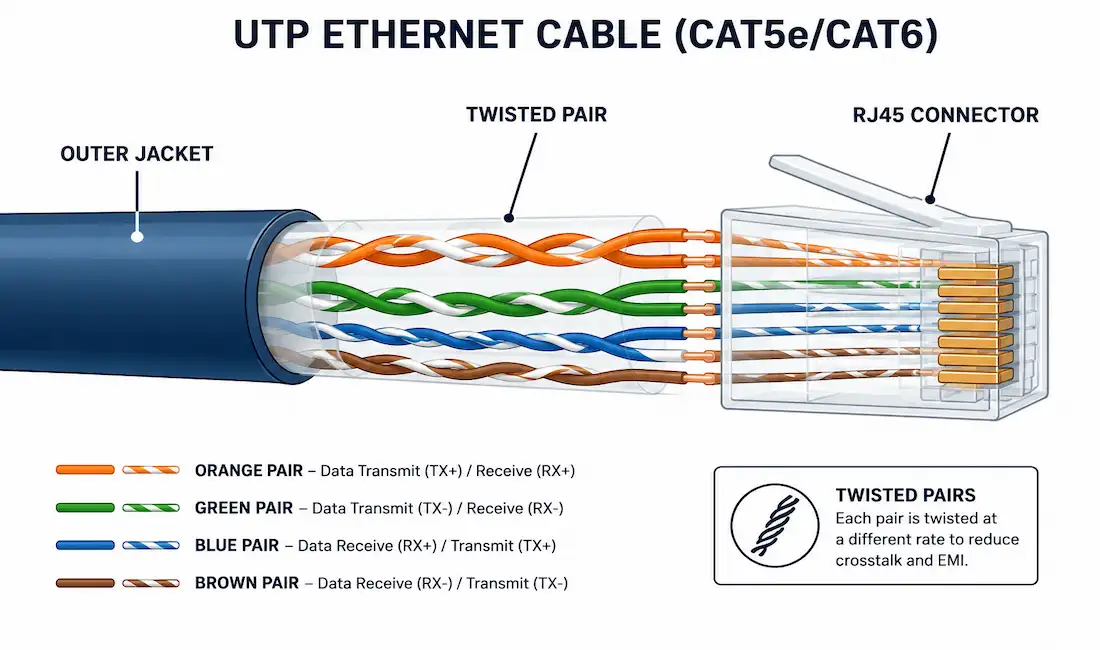
Unshielded Twisted Pair, or UTP, is the cabling behind most Ethernet networks and telephone systems in use today. It’s lightweight, inexpensive, and easy to install, which is exactly why it became the default choice for LAN cabling decades ago and still is. This guide covers how UTP actually works, what each cable category really supports, how it’s wired, and how to troubleshoot it when something goes wrong.
What Is Unshielded Twisted Pair (UTP) Cabling?
UTP cable consists of four twisted pairs of copper wire, eight conductors in total, wrapped together in a single flexible plastic sheath. “Unshielded” means there’s no extra shielding layer, like foil or mesh, wrapped around the pairs to block outside interference. That’s a deliberate tradeoff: skipping the shielding keeps the cable thin, flexible, and cheap, at the cost of some resistance to electromagnetic interference (EMI) and radio frequency interference (RFI).
Instead of relying on shielding, UTP fights interference with the twist itself. Cable designers rely on two techniques to make this work.
Cancellation
When two wires in a circuit run close together, and current flows through them in opposite directions, their magnetic fields point in opposite directions too. Those opposing fields cancel each other out, and in the process, they cancel out a good deal of the outside EMI and RFI hitting the pair as well. This is the core physical principle that makes unshielded cabling viable at all.
Varying the Twist Rate
Every pair in a UTP cable is twisted a different number of times per meter. Designers do this on purpose, following precise specifications for how many twists are allowed per pair, per cable length. If you look closely at a real UTP cable, you’ll notice the orange pair is twisted more tightly than the green pair, for example. Each pair gets its own twist rate specifically to prevent it from picking up crosstalk from its neighbors.
UTP Cabling Standards: Who Defines What
Two separate organizations govern different parts of UTP cabling, and it’s worth being precise about which one does what.
TIA/EIA-568, maintained by the Telecommunications Industry Association, is the standard most commonly used for commercial LAN cabling in North America. It defines cable types, maximum lengths, connector specifications, termination methods, and testing procedures.
Cable Category ratings (Cat5, Cat5e, Cat6, and so on) come from TIA/EIA-568 and the international ISO/IEC 11801 standard, not from IEEE. These categories classify cabling by the bandwidth and data rate it can reliably support.
IEEE plays a different role. It defines the Ethernet transmission standards that actually run over the cable, like 100BASE-TX, 1000BASE-T, and 10GBASE-T. A cable’s Category tells you what it’s physically capable of; the IEEE standard tells you which Ethernet speed is actually running on it. The two work together, but they come from different bodies.
UTP Cable Categories
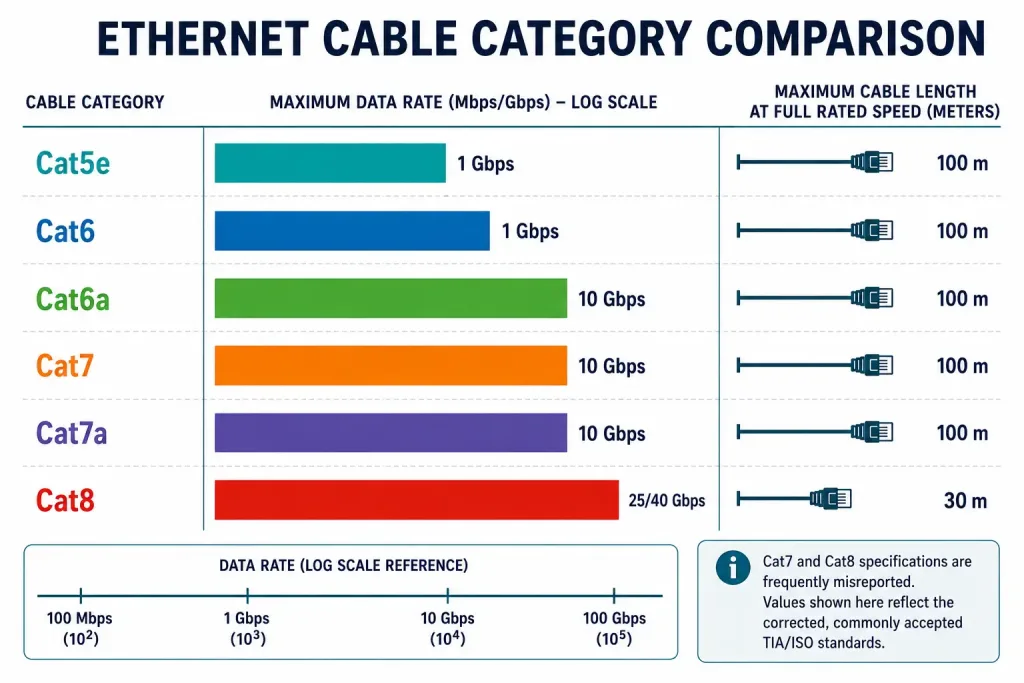
Cable categories keep climbing as networks demand more bandwidth. Here’s what each one actually supports, including two figures that are frequently reported incorrectly online.
| Category | Max Data Rate | Max Length (full rate) | Typical Use |
|---|---|---|---|
| CAT1 | ~1 Mbps | N/A | Legacy telephone wiring only; not rated for data networking |
| CAT2 | ~4 Mbps | 100 m | Legacy Token Ring / telephone |
| CAT3 | 10 Mbps | 100 m | 10BASE-T Ethernet, telephone |
| CAT4 | 16 Mbps | 100 m | Legacy Token Ring |
| CAT5 | 100 Mbps | 100 m | 100BASE-TX Fast Ethernet |
| CAT5e | 1 Gbps | 100 m | Gigabit Ethernet, minimum acceptable cable for new installs |
| CAT6 | 1 Gbps (10 Gbps up to ~37–55 m only) | 100 m | Gigabit Ethernet; 10G only over shorter runs |
| CAT6A | 10 Gbps | 100 m | 10 Gigabit Ethernet at full distance |
| CAT7 | 10 Gbps | 100 m | Shielded, 600 MHz, data center backbone |
| CAT8 | 25/40 Gbps | 30 m only | Short data center top-of-rack links, not building-wide cabling |
Two corrections worth calling out specifically, since they’re commonly misreported:
Cat7 does not officially support 40 Gbps at 100 meters. Its ISO/IEC 11801 Class F rating is 10 Gbps over the full 100-meter channel, with 600 MHz of bandwidth. Higher speeds have been demonstrated in lab conditions, but only at much shorter distances, not as part of the standard rating.
Cat8 does not run at 100 meters at all. Its 25/40GBASE-T speeds are only guaranteed up to a 30-meter channel, per ANSI/TIA-568.2-D. That short reach is a deliberate tradeoff for its very high 2000 MHz frequency, and it’s why Cat8 is used for short top-of-rack data center links rather than general building cabling. If you need 10 Gbps across a full 100-meter run, Cat6A is the standard, cost-effective choice, not Cat8.
Cable Termination and Connectors
UTP cabling terminates in RJ45 connectors, crimped onto the cable ends with a dedicated crimping tool. This is worth stating plainly, because UTP is sometimes confused with fiber optic cabling in secondhand articles online. Fiber uses entirely different connector types, including the LC connector developed by Lucent Technologies, which has no role in copper UTP Ethernet cabling at all. If you’re troubleshooting a UTP connector problem, you’re working with RJ45, full stop.
UTP Cable Types by Wiring Convention
Different jobs call for different wiring conventions inside the RJ45 connector, even though the cable itself looks identical from the outside.
- Straight-through: The most common cable type. Both ends follow the same standard, either T568A on both ends or T568B on both ends. Used to connect dissimilar devices, like a host to a switch, or a switch to a router.
- Crossover: One end uses T568A, the other uses T568B. Used to connect similar devices directly, like switch to switch, host to host, or router to router. Modern switches with Auto-MDIX largely eliminate the need for crossover cables, since they detect and adjust automatically.
- Rollover: A Cisco-proprietary wiring scheme, not based on T568A or T568B at all. Used to connect a workstation to a router or switch console port for direct configuration access.
| Cable Type | Standard |
|---|---|
| Ethernet Straight-through | Both ends T568A, or both ends T568B |
| Ethernet Crossover | One end T568A, other end T568B |
| Rollover | Cisco-proprietary, not T568A/B |
Using the wrong cable type between two devices usually won’t damage either one, but it will prevent them from communicating. Mismatched straight-through and crossover cables are one of the most common physical-layer mistakes in a lab environment, so it’s worth checking cable type first whenever two devices that should be linked show no connectivity at all.
Installation Best Practices
A handful of practices consistently prevent the most common UTP problems:
- Respect the bend radius. Keep bends no tighter than four times the cable’s diameter. Sharper bends can shift the twist ratio inside the cable and degrade its interference resistance.
- Test after termination. A proper cable tester checks continuity, wire-map accuracy, and crosstalk, catching miswired pairs before they become an intermittent, hard-to-diagnose problem later.
- Keep runs under 100 meters. This limit applies to Cat5e through Cat7. Signal attenuation becomes unreliable well before the copper physically fails, so treat 100 meters as a hard ceiling for planning purposes, not a rough guideline.
- Separate UTP runs from major EMI sources. Fluorescent lighting ballasts, large motors, and power cabling running parallel to UTP for long distances can all induce interference that the twist alone can’t fully cancel.
UTP vs. Shielded Twisted Pair (STP)
| Characteristic | UTP | STP |
|---|---|---|
| Shielding | None | Foil and/or braid shielding per pair or overall |
| Cost | Lower | Higher |
| Weight/Flexibility | Lighter, easier to route | Heavier, stiffer |
| EMI resistance | Relies on twist alone | Twist plus physical shielding |
| Typical use | Standard office/home LANs | High-EMI environments: industrial floors, near heavy electrical equipment |
| Grounding required | No | Yes, shielding must be properly grounded or it can worsen interference |
STP isn’t simply “better” than UTP across the board. In a typical office, UTP’s twist-based cancellation is more than sufficient, and STP’s added cost and stiffer installation aren’t worth it. STP earns its keep specifically in electrically noisy environments, like factory floors near large motors, where EMI would otherwise overwhelm an unshielded pair. It’s also worth noting that improperly grounded shielding on an STP run can actually act as an antenna and make interference worse, not better, which is why STP installs require more careful grounding than UTP.
Troubleshooting Common UTP Issues
Intermittent or slow connections. Start by checking cable category against the speed you’re trying to run. A Cat5e cable will never reliably deliver 10 Gbps, regardless of how well it’s terminated, since the cable itself doesn’t have the bandwidth. Confirm you’re using a category rated for the speed you need, at the length you need it.
High crosstalk readings on a cable tester. This usually points to poor termination technique, specifically untwisting the pairs too far back from the connector during crimping. TIA/EIA-568 specifies a maximum untwist distance at termination for exactly this reason. Re-terminating with less untwisted length often resolves it.
No link at all between two devices. Check wiring convention first. A straight-through cable between two similar devices without Auto-MDIX, or a crossover cable between dissimilar devices, will produce no link light at all, even though the cable itself is perfectly good.
Signal loss over long runs. If a run is approaching or exceeding 100 meters, attenuation is the likely cause. The fix isn’t a better cable category, it’s a shorter run, or a switch placed partway through the run to regenerate the signal.
Connector damage. RJ45 connectors with worn or broken locking tabs are a common physical failure point, especially on frequently unplugged patch cables. Replace the connector with a fresh, properly crimped RJ45 end; there’s no fiber-style connector involved in this repair.
How to Identify a Cable’s Category Without a Datasheet
Every UTP cable has its category printed directly on the jacket, repeated every meter or so along the cable’s length. Look for text like “CAT6” or “CAT6A” printed in small type alongside other markings, such as the wire gauge (usually 22–24 AWG) and whether the conductors are solid or stranded.
Solid-core cable is meant for permanent, in-wall runs and terminates into a punch-down block or keystone jack. Stranded cable is more flexible and is meant for patch cables, the short runs between a wall jack and a device, or between a patch panel and a switch. Mixing them up doesn’t break the network outright, but solid-core cable used repeatedly as a flexible patch cable will eventually crack at the point of repeated bending, since it isn’t designed for that kind of flexing.
If the jacket printing has worn off or was never legible, a cable certifier is the only reliable way to confirm a cable’s actual category, since visual inspection alone can’t distinguish, say, Cat5e from Cat6 cabling that looks physically similar.
Frequently Asked Questions
Does UTP cable have four wires or four pairs of wires?
UTP cable has four twisted pairs, which means eight individual copper conductors total, not four wires. Each pair is twisted at its own specific rate to reduce crosstalk with the other three pairs inside the same sheath.
Who defines Cat5, Cat6, and other cable category ratings?
Cable categories are defined by TIA/EIA-568 in North America and ISO/IEC 11801 internationally, not by IEEE. IEEE separately defines the Ethernet speed standards, like 1000BASE-T or 10GBASE-T, that actually run over a given category of cable.
Can Cat7 cable really do 40 Gbps?
Not as part of its official rating. Cat7’s ISO/IEC Class F standard guarantees 10 Gbps over a full 100-meter channel. Higher speeds have been shown in controlled lab tests, but only over much shorter distances, so 40 Gbps at 100 meters isn’t something you should plan a real installation around.
Why is Cat8 limited to 30 meters when older categories reach 100 meters?
Cat8 operates at a much higher frequency, 2000 MHz, to support its 25 and 40 Gbps speeds, and that high frequency is far more susceptible to signal degradation over distance. The 30-meter limit is a deliberate design tradeoff, which is why Cat8 is used for short data center rack connections rather than general office cabling.
Do UTP cables use LC connectors?
No. LC connectors are fiber optic connectors and have no role in copper UTP Ethernet cabling. UTP terminates in RJ45 connectors exclusively.
When should I use a crossover cable instead of a straight-through cable?
Crossover cables connect similar devices directly to each other, like switch to switch or PC to PC, while straight-through cables connect dissimilar devices, like a PC to a switch. Most modern switches support Auto-MDIX, which detects the wiring automatically and makes the distinction largely unnecessary in newer equipment.
Is UTP or STP better for a home network?
UTP is the right choice for the overwhelming majority of home and office networks. Its twist-based cancellation handles typical household EMI sources without issue, and STP’s added cost and stiffness only pay off in genuinely high-interference industrial environments.



