
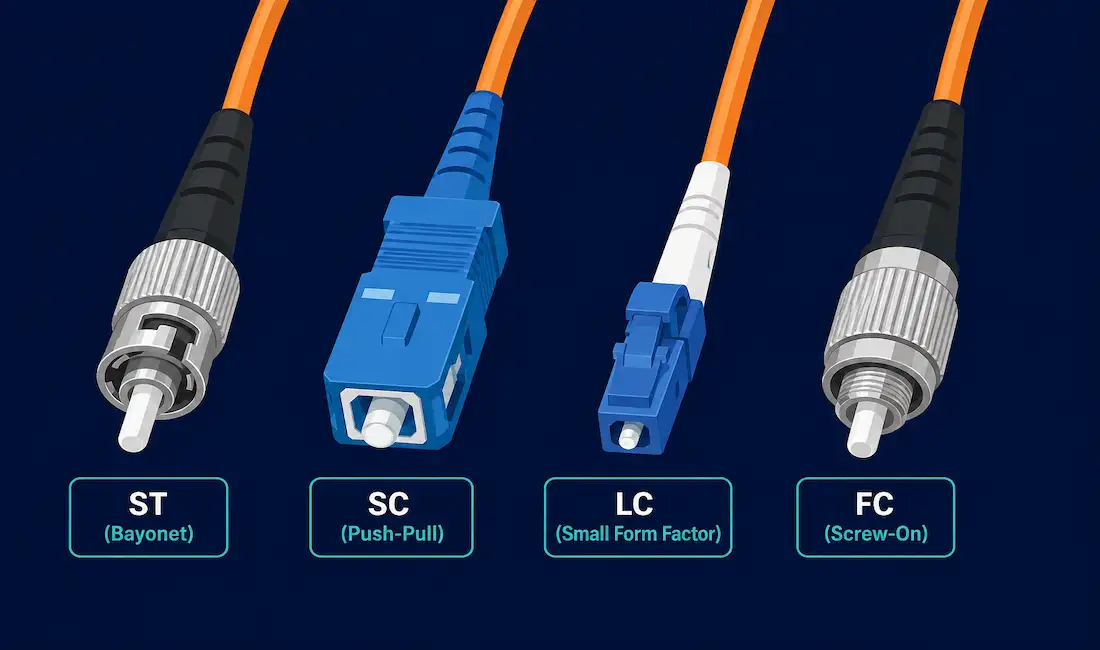
Fiber optic connectors terminate the ends of an optical fiber and let it plug into a port, patch panel, or another fiber run. Dozens of connector types exist, but the differences that actually matter for day-to-day work come down to three things: ferrule size, mating mechanism, and how much loss the connector introduces at the joint. This guide covers the four connector types you’ll run into constantly in real networks — ST, SC, LC, and FC — plus a quick look at the newer high-density connector that’s taken over modern data centers.
Why Connector Type Actually Matters
Every fiber connection is a potential source of signal loss. A poorly aligned or poorly seated connector can introduce enough insertion loss to degrade a link that would otherwise work fine. Connector type affects this in three concrete ways:
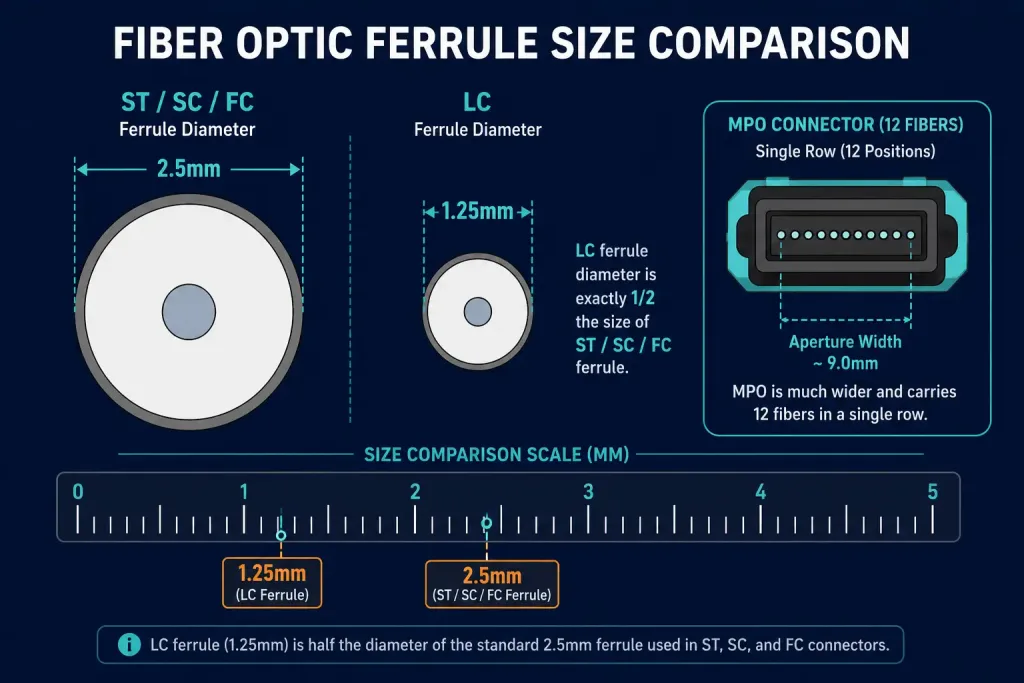
- Ferrule size determines how precisely the two fiber cores align. A 2.5mm ferrule (ST, SC, FC) and a 1.25mm ferrule (LC) both work well when properly polished and seated, but they aren’t interchangeable without an adapter.
- Mating mechanism — twist, push-pull, or screw-on — affects how consistently the connector reseats after repeated plugging and unplugging, which matters a lot in patch panels that get touched often.
- Simplex vs. duplex determines whether you’re managing one fiber per connector or two, which changes how you cable and label a run.
With that context, here’s what each of the four core connector types actually offers.
ST Connector (ST)
The ST connector was one of the first types widely deployed in fiber optic networking and was, for years, the most popular connector for multimode networks. AT&T originally developed it as a “straight tip” connector, which is where the name comes from. ST connectors use a 2.5mm ferrule inside a round plastic or metal body, and they lock in place with a twist-on, twist-off bayonet mechanism, similar in feel to a BNC coax connector.
Because ST, SC, FC, and FDDI connectors all share that same 2.5mm ferrule size, they can be mixed and matched using hybrid mating adapters when needed. ST connectors are spring-loaded, so a connection that isn’t fully seated can look connected while actually introducing significant loss. If you’re chasing unexplained high loss on an ST link, unseating and reseating the connector is one of the first things worth trying.
ST connectors have largely been displaced by smaller, higher-density connectors like LC in new installations, but they’re still common in older campus and building runs that haven’t been upgraded.
SC Connector (SC)
The SC connector is simple, rugged, and inexpensive. It uses a ceramic 2.5mm ferrule for accurate single-mode fiber alignment and a push-on, pull-off mating mechanism, which is generally easier to work with in tight spaces than the ST’s twist-lock design. The connector body is square-shaped, and two SC connectors are commonly clipped together into a duplex pair for send/receive pairs.
SC was developed by NTT, the Japanese telecommunications company, and the abbreviation is generally understood to stand for either “Subscriber Connector” or “Standard Connector,” depending on the source. For years, SC was the standard connector for single-mode telecom and enterprise backbone links, though it’s increasingly been supplanted by the smaller LC connector wherever port density matters.
LC Connector (LC)
The LC connector, short for Lucent Connector (sometimes informally called the “Little Connector”), is a Small Form Factor (SFF) connector developed by Lucent Technologies. It uses a retaining tab mechanism similar to an RJ45 or phone jack connector, and its body has a square shape similar to the SC connector, just at roughly half the size.
That smaller footprint is exactly why LC has become the dominant connector in modern high-density environments. Its 1.25mm ferrule, half the size of ST/SC/FC’s 2.5mm ferrule, lets twice as many fiber ports fit into the same panel space. This makes it the default choice for SFP and SFP+ transceivers in switches and routers, and for dense data center patch panels generally.
LC connectors are typically clipped together into a duplex pair, just like SC. There are three common LC variants, distinguished by fiber mode and polish type:
- Single-mode LC APC — angled polish, used where reflection back into the source must be minimized (common in PON and long-haul single-mode links).
- Single-mode LC UPC — flat ultra-polish, standard single-mode.
- Multi-mode LC UPC — flat ultra-polish, standard multimode.
APC and UPC connectors are not interchangeable, even though they can sometimes be forced together; the angled and flat polish geometries don’t align correctly, and mixing them causes high loss or reflection problems.
Ferrule Core Connector (FC)
The Ferrule Core (FC) connector was the most popular single-mode connector for a long stretch of fiber optic history. It uses a 2.5mm ferrule, similar to ST and SC, though early FC connectors used ceramic inside stainless steel ferrules (this link goes to an unrelated stainless steel wall shelf article — an auto-link mismatch from the original; retained here per standing instruction rather than removed or redirected) before the industry largely standardized on fully ceramic ferrules for better precision and consistency.
FC connectors screw on for a firm, stable connection, but you have to align the key with the slot properly before tightening, or the fiber cores won’t line up correctly even though the connector will physically thread on. That screw-on stability is exactly why FC is still a common choice in applications sensitive to vibration or accidental disconnection, such as video-over-fiber transmission equipment and some test instrumentation.
Beyond the Core Four: MPO/MTP and Other Connector Types
ST, SC, LC, and FC cover the vast majority of connections you’ll encounter, but a few other types are worth knowing by name:
- MPO/MTP — a multi-fiber push-on connector that terminates up to 12, 24, or more fibers in a single connector body. It’s become the standard for high-density data center backbone and breakout cabling, since running dozens of individual LC connections between racks isn’t practical at scale.
- MT-RJ — an older small-form-factor duplex connector with a design loosely resembling an RJ45 jack, largely superseded by LC.
- MU — developed by NTT as a miniaturized version of the SC connector, using the same 1.25mm ferrule as LC, mainly seen in dense telecom equipment.
- E2000 — a spring-loaded connector with a built-in shutter that automatically covers the ferrule when unplugged, protecting it from dust and reducing eye-safety risk from exposed laser light.
Connectors like the Bionic, SMA, ESCON, LX-5, and Volition types still exist in specific legacy or specialized equipment, but you’re unlikely to encounter them in a modern LAN or data center build.
Comparison Table
| Connector | Ferrule Size | Mechanism | Duplex/Simplex | Common Use |
|---|---|---|---|---|
| ST | 2.5mm | Twist-on bayonet | Simplex | Legacy multimode, older campus runs |
| SC | 2.5mm | Push-pull | Simplex or duplex | Legacy single-mode telecom/backbone |
| LC | 1.25mm | Push-pull, retaining tab | Simplex or duplex | Modern SFP/SFP+ transceivers, dense patch panels |
| FC | 2.5mm | Screw-on | Simplex | Vibration-sensitive links, test equipment |
| MPO/MTP | N/A (multi-fiber) | Push-on | Multi-fiber (12/24+) | High-density data center backbone |
How to Choose the Right Connector
In practice, connector choice usually comes down to matching existing equipment rather than starting from a blank slate. A few practical rules of thumb:
- Match your transceiver. If you’re connecting to an SFP or SFP+ port, you need LC. This is by far the most common situation in modern switch and router deployments.
- Match the existing patch panel. Retrofitting a single connector type into an ST or SC legacy installation is usually cheaper than converting the whole panel to LC, unless you’re doing a full upgrade anyway.
- Prioritize LC for new builds. Its smaller footprint and lower cost per port make it the practical default for any new installation without a specific reason to use something else.
- Consider FC for vibration-prone environments. Its screw-on mechanism resists being knocked loose in ways push-pull connectors can’t.
Troubleshooting Fiber Connector Issues
Unexpectedly high loss on a link that should work. Start by checking the connector is fully seated, not just resting in place. Spring-loaded connectors like ST can look plugged in while not making full contact.
A connection that worked before but fails intermittently now. Inspect the ferrule end-face for dust or contamination using a fiber inspection scope. A dirty ferrule end-face is one of the single most common causes of fiber link failures, and it’s often invisible to the naked eye.
Two connectors that should be compatible won’t mate. Check the polish type. APC and UPC connectors, and different manufacturers’ keying on connectors like FC, can physically resist mating even when the connector family looks correct at a glance.
A duplex LC or SC connection has swapped transmit and receive. This shows up as a link that negotiates but passes no traffic, or negotiates at the wrong speed. Swap the two fibers at one end and reseat.
Connector Standards and Eye Safety
Fiber connectors aren’t governed by a single universal body the way copper Ethernet cabling is under TIA/EIA-568. Instead, individual connector designs are typically standardized through a mix of Telcordia (formerly Bellcore) specifications, IEC standards, and de facto industry adoption once a design becomes common enough that manufacturers converge on it. This is part of why you’ll see slight variations in ferrule tolerance and polish quality between vendors, even for the same nominal connector type; look for connectors that explicitly cite IEC 61754 compliance if tight tolerances matter for your application.
One point worth taking seriously: never look directly into an unterminated fiber connector or a fiber end-face on a live link. Single-mode fiber commonly carries infrared laser light that’s completely invisible to the human eye but can still cause permanent retinal damage. This is exactly why connectors like the E2000, with its automatic dust-shutter mechanism, exist. Always assume a fiber connector could be live, and use a certified optical power meter to check for light output rather than checking visually, even when a link is believed to be disconnected or dark.
Fiber Connector Polish Types Beyond APC and UPC
Beyond the APC/UPC distinction covered above, you may also see connectors labeled PC (Physical Contact), an older, less-common polish that predates UPC. PC polish has a flatter, less-precisely-domed end-face than UPC, which generally results in slightly higher back-reflection. In practice, PC connectors have mostly been phased out in favor of UPC for multimode and single-mode work, so if you’re sourcing new patch cords today, you’ll almost always be choosing between UPC and APC rather than encountering PC as a live option.
Frequently Asked Questions
What are fiber optic connectors used for?
Fiber optic connectors join the ends of optical fiber cables to network equipment, patch panels, or other fiber runs, allowing a fiber connection to be made and unmade repeatedly without permanently splicing the cable. Different connector types trade off size, cost, and mechanical stability depending on the application.
What’s the difference between LC and SC connectors?
The main difference is size: LC uses a 1.25mm ferrule, half the size of SC’s 2.5mm ferrule, which lets roughly twice as many LC ports fit into the same panel space. LC has largely replaced SC in new installations for exactly this reason, especially anywhere port density matters.
Can I mix connector types on the same fiber run?
Not directly, but hybrid patch cords and mating adapters exist specifically to bridge between compatible ferrule sizes, such as ST to SC. Mismatched ferrule sizes, like 2.5mm to 1.25mm, always require an adapter or a hybrid cable rather than a direct connection.
What’s the difference between APC and UPC polish?
UPC (Ultra Physical Contact) connectors have a flat, slightly domed polish, while APC (Angled Physical Contact) connectors are polished at an 8-degree angle to reduce back-reflection into the light source. The two are not interchangeable, since mating a flat and angled ferrule causes high loss and possible fiber damage from the angle mismatch.
Why do data centers use MPO/MTP instead of individual LC connectors?
MPO/MTP connectors bundle up to 24 or more fibers into a single connector, which drastically reduces the number of individual connections needed for high-density backbone and breakout cabling. Running the equivalent number of individual LC connections between racks would take far more panel space and installation time.
How do I clean a dirty fiber connector?
Use a dedicated fiber-optic cleaning tool or lint-free cleaning card designed for the connector’s ferrule size, never a generic cloth or compressed air alone. Contamination on the ferrule end-face is one of the leading causes of unexplained signal loss, so inspecting and cleaning before troubleshooting further usually saves time.



