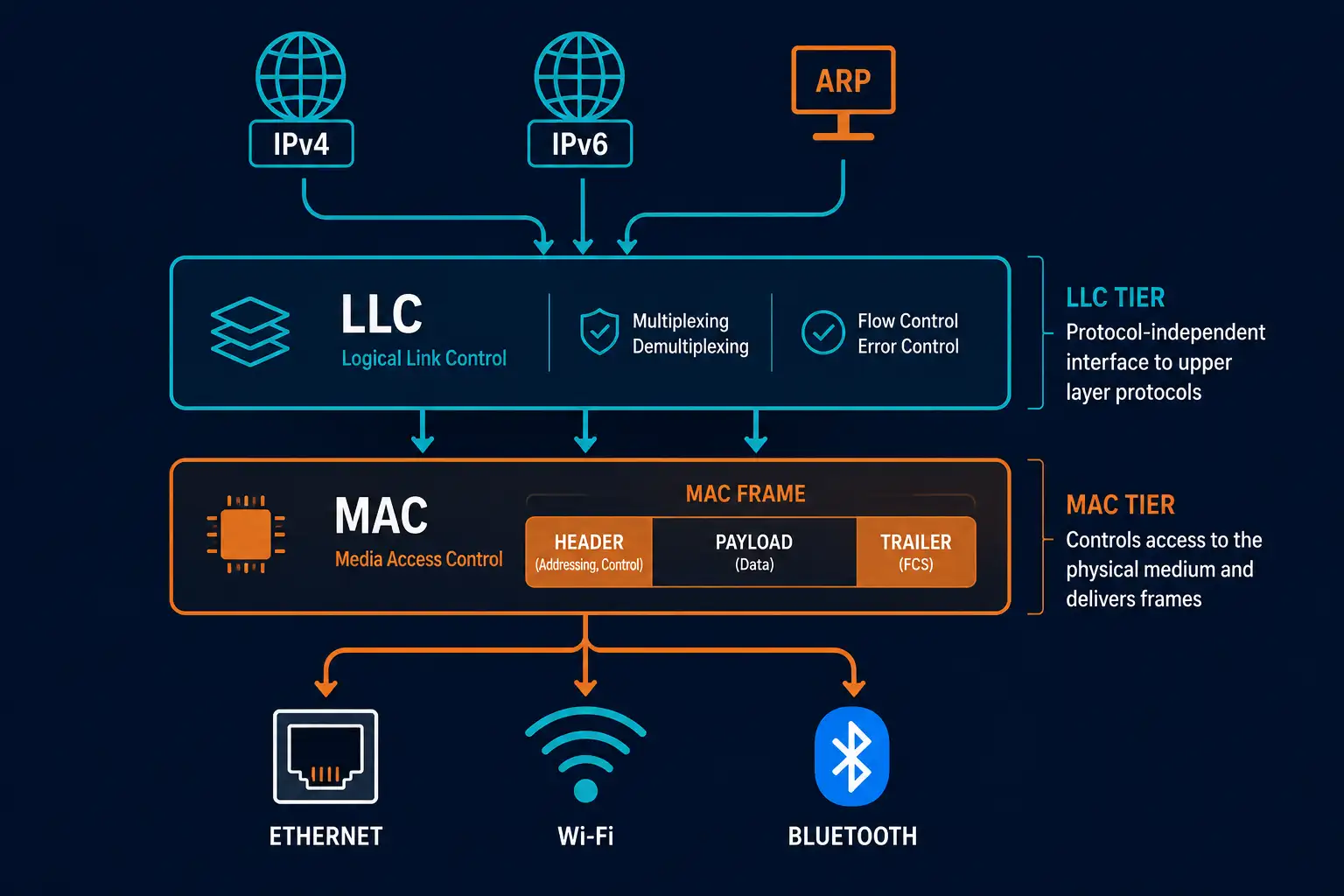
The Data Link Layer, Layer 2 of the OSI model, splits into two distinct sublayers, and understanding exactly where the line falls between them clears up a lot of confusion about how Layer 2 actually works. The Logical Link Control (LLC) sublayer talks to the Network Layer above it; the Media Access Control (MAC) sublayer talks to the physical medium below it. This guide covers what each sublayer genuinely does, where they overlap, and where a lot of secondhand explanations get the split wrong.
Overview: Where Each Sublayer Sits
- LLC sublayer: Interfaces with the Network Layer (Layer 3), handling protocol multiplexing and, optionally, reliability and flow control.
- MAC sublayer: Interfaces with the Physical Layer (Layer 1), handling media access, framing, and hardware addressing.
This split, standardized by IEEE 802.2 for LLC, is exactly what lets the same upper-layer protocols, IPv4, IPv6, and so on, work seamlessly across completely different physical technologies. LLC doesn’t need to know whether the frame below it is going out over Ethernet, Wi-Fi, or a serial link; that’s the MAC sublayer’s job entirely. This separation of concerns is a genuinely elegant piece of network architecture, and it’s easy to take for granted precisely because it works so reliably in practice.
LLC Sublayer: Functions and Services
The LLC sublayer sits directly below the Network Layer and adds control information needed to deliver a packet correctly. It’s typically implemented in software, often as part of a NIC driver, which makes it hardware-independent in a way the MAC sublayer generally isn’t. LLC supports whatever Layer 3 protocol is running above it, commonly IPv4, IPv6, or ARP.
Key Functions
Multiplexing and demultiplexing. On the sending side, LLC accepts a packet from whichever Layer 3 protocol generated it, adds a protocol type identifier to the LLC header, and passes the result down to the MAC sublayer. On the receiving side, it does the reverse: reading that protocol type identifier from an incoming frame and delivering the payload to the correct upper-layer protocol. This is precisely what lets a single network interface handle IPv4 and IPv6 traffic simultaneously without confusion, and it’s a good example of a networking function that runs constantly, invisibly, without most engineers ever needing to think about it directly.
Reliability (optional). Some LLC implementations use sequence numbers and acknowledgments to detect and retransmit lost frames at Layer 2, though this function is optional and far less commonly relied on today than it was in LLC’s earlier history, since most modern networks push reliability up to Layer 4 with TCP instead.
Flow control (optional). LLC can also manage transmission speed between sender and receiver using control frames, again an optional function that sees limited active use on typical modern IP networks, where flow control is more commonly handled at the transport layer or, on wired Ethernet specifically, through separate mechanisms like 802.3x PAUSE frames.
LLC Service Types
IEEE 802.2 defines three LLC service types, and it’s worth knowing all three even though only one dominates modern networking:
- Unacknowledged connectionless service (Type 1): Best-effort delivery with no connection setup and no acknowledgments, conceptually similar to UDP at a higher layer. This is by far the most common LLC service type in practice today, since most modern networks rely on IP and TCP to handle reliability at higher layers instead.
- Connection-oriented service (Type 2): Establishes a logical link before data transfer using supervisory frames, optionally with acknowledgments, sequence numbers, and a sliding window for reliability and flow control. Protocols like HDLC and PPP have historically used variations of this model.
- Acknowledged connectionless service (Type 3): Sends frames without a full connection setup but still includes sequence numbers and acknowledgments for each individual frame, useful where per-frame reliability matters but the overhead of a full connection-oriented session isn’t warranted.
MAC Sublayer: Functions and Responsibilities
The MAC sublayer sits directly below LLC and handles the specifics of getting a frame onto and off a particular physical medium. Unlike LLC, MAC’s exact specification varies by the underlying technology in use: Ethernet’s MAC behavior is defined under IEEE 802.3, Wi-Fi’s under IEEE 802.11, and Bluetooth’s under IEEE 802.15. Each technology’s MAC sublayer implements media access control appropriately for that specific medium’s physical characteristics.
Key Functions
Data encapsulation. MAC handles framing, adding headers (including MAC addresses) and trailers (including a frame check sequence) around the data handed down from LLC. It also handles addressing, using 48-bit MAC addresses to ensure a frame reaches the correct device on the local segment, and error detection, using a CRC in the frame trailer to catch transmission errors.
Media access control. This is the function that gives the sublayer its name: regulating how devices share access to the physical medium. On Ethernet, this has historically meant CSMA/CD on legacy shared-medium networks, though modern switched Ethernet has largely moved past needing it. On Wi-Fi, it means CSMA/CA, since a wireless device can’t reliably detect a collision while transmitting on a shared radio medium.
Corrected Comparison Table
| Sublayer | Key Functions | Protocols/Technologies | Interfaces With |
|---|---|---|---|
| LLC | Protocol multiplexing/demultiplexing, optional reliability, optional flow control | IPv4, IPv6, ARP | Network Layer (Layer 3) |
| MAC | Framing, hardware addressing, error detection, media access control | Ethernet (802.3), Wi-Fi (802.11), Bluetooth (802.15) | Physical Layer (Layer 1) |
Why the Split Matters in Practice
The LLC/MAC division is what lets a single upper-layer protocol stack run across genuinely different physical technologies without modification. A laptop moving from a wired Ethernet connection to Wi-Fi doesn’t require any change to how IP or TCP operate; only the MAC sublayer’s behavior changes, since it’s the part directly tied to the physical medium. This is a direct, practical benefit of the layered OSI approach, not just an academic distinction.
It’s also worth being precise about where LLC has genuinely diminished versus where its core function remains essential. LLC’s optional reliability and flow control features see limited use today, since TCP handles that job at a higher layer far more commonly. But LLC’s core protocol multiplexing function is still fundamentally necessary, every device running both IPv4 and IPv6 over the same network interface depends on it working correctly, even if most engineers never think about it directly.
Troubleshooting LLC and MAC Layer Issues
A device isn’t correctly receiving one IP version’s traffic while the other works fine. This is unusual, but when it happens, it can point to an LLC-level multiplexing misconfiguration or a driver issue, rather than a routing or addressing problem at Layer 3. Checking NIC driver status and updates is a reasonable early step.
Duplicate or conflicting MAC addresses on a segment. This is a MAC sublayer addressing problem, not an LLC issue, and it typically traces back to a manually assigned MAC address on a virtual machine or network device colliding with another device’s hardware-assigned address. Most switches log this condition, so checking switch logs for MAC flapping or duplicate address warnings is usually faster than troubleshooting individual endpoints directly.
Frames being dropped with CRC errors. This points to the MAC sublayer’s error detection function catching a physical-layer problem, almost always a cabling, connector, or interference issue rather than anything wrong with LLC or MAC configuration itself.
A Worked Example: One Frame, Both Sublayers at Work
It helps to trace a single frame through both sublayers to see the division of labor concretely. Say a laptop running both IPv4 and IPv6 needs to send an IPv6 packet over Ethernet.
At the LLC sublayer, the outgoing IPv6 packet gets tagged with a protocol type identifier indicating it’s IPv6, not IPv4 or ARP, and handed down to the MAC sublayer. This is LLC’s entire job in this transaction: making sure the receiving device’s LLC sublayer, on the other end, knows which protocol stack should receive this payload once the frame arrives.
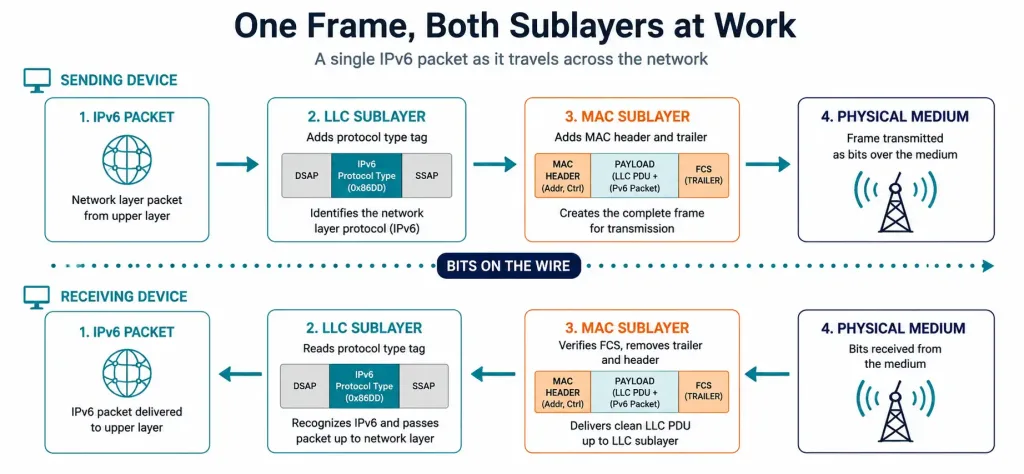
At the MAC sublayer, that tagged data gets wrapped in an Ethernet frame: a header containing the source and destination MAC addresses, and a trailer containing a frame check sequence for error detection. The MAC sublayer also handles actually placing this frame onto the physical medium, following Ethernet’s specific media access rules.
On the receiving end, the process runs in reverse. The receiving device’s MAC sublayer strips the Ethernet header and trailer, checks the frame check sequence for errors, and passes the remaining payload up to its LLC sublayer. LLC then reads the protocol type identifier and delivers the packet to the correct upper-layer protocol, in this case, the receiving device’s IPv6 stack rather than its IPv4 stack. Neither sublayer needed to know anything about the other’s specific job to do its own correctly, which is exactly the point of the layered design.
A Common Point of Confusion Worth Clearing Up
Because LLC and MAC together handle “framing” in a loose sense, it’s easy to assume the two sublayers share responsibility for it equally. They don’t. Framing, in the specific sense of building the actual header and trailer that surrounds the data on the wire, is entirely a MAC sublayer function. LLC’s contribution happens one layer up, adding its own protocol-identification header before the data ever reaches MAC, which then gets wrapped inside the MAC frame as part of the payload.
If you’re ever unsure which sublayer is responsible for a specific piece of frame structure, a reliable rule of thumb is that anything tied to the specific physical medium, addressing, error detection, media access, belongs to MAC, and anything tied to identifying the upper-layer protocol belongs to LLC. This distinction shows up repeatedly on certification exams precisely because it’s so commonly blurred in casual explanations, including, ironically, in the original version of the very article this one replaces.
Frequently Asked Questions
What’s the actual difference between the LLC and MAC sublayers?
LLC interfaces with the Network Layer above it, handling protocol multiplexing and optionally reliability and flow control, while MAC interfaces with the Physical Layer below it, handling framing, hardware addressing, and media access. The split lets upper-layer protocols work consistently across different physical media, since only the MAC sublayer’s behavior actually changes between, say, Ethernet and Wi-Fi.
Is the MAC sublayer defined by IEEE 802.3?
Only for Ethernet specifically. Wi-Fi’s MAC behavior is defined under IEEE 802.11, and Bluetooth’s under IEEE 802.15, each tailored to that technology’s physical medium. IEEE 802.3 defines MAC behavior only for Ethernet, not as a universal specification covering every MAC implementation.
What does the LLC sublayer’s multiplexing function actually do?
It lets a single network interface handle multiple Layer 3 protocols, like IPv4 and IPv6, simultaneously, by tagging outgoing frames with a protocol type identifier and reading that identifier on incoming frames to deliver them to the correct protocol. Without this function, a network interface would need a way to guess which upper-layer protocol a given frame belonged to, which isn’t reliable at scale.
Why does LLC’s optional reliability feature see so little use today?
Most modern networks rely on TCP at Layer 4 to handle retransmission and reliability, which makes LLC’s equivalent optional feature largely redundant in typical IP-based deployments. LLC’s reliability option remains part of the specification and does still see use in some non-IP or specialized network contexts, but it’s not something most engineers configure or think about on a standard modern network.
What are the three LLC service types?
The three types are unacknowledged connectionless service (best-effort, no acknowledgments), connection-oriented service (establishes a logical link, optionally with acknowledgments and flow control), and acknowledged connectionless service (per-frame acknowledgments without a full connection setup). Unacknowledged connectionless service is by far the most common in practice today, since IP and TCP handle reliability at a higher layer on most modern networks.
Does the MAC sublayer work the same way on wired and wireless networks?
No, the underlying media access control mechanism differs specifically because the physical media differ. Wired Ethernet historically used CSMA/CD for shared-medium collision handling, while Wi-Fi uses CSMA/CA, since a wireless device can’t reliably detect a collision while it’s actively transmitting on a shared radio channel.
Related: Self-Assessment – LLC and MAC Sublayers Functions