
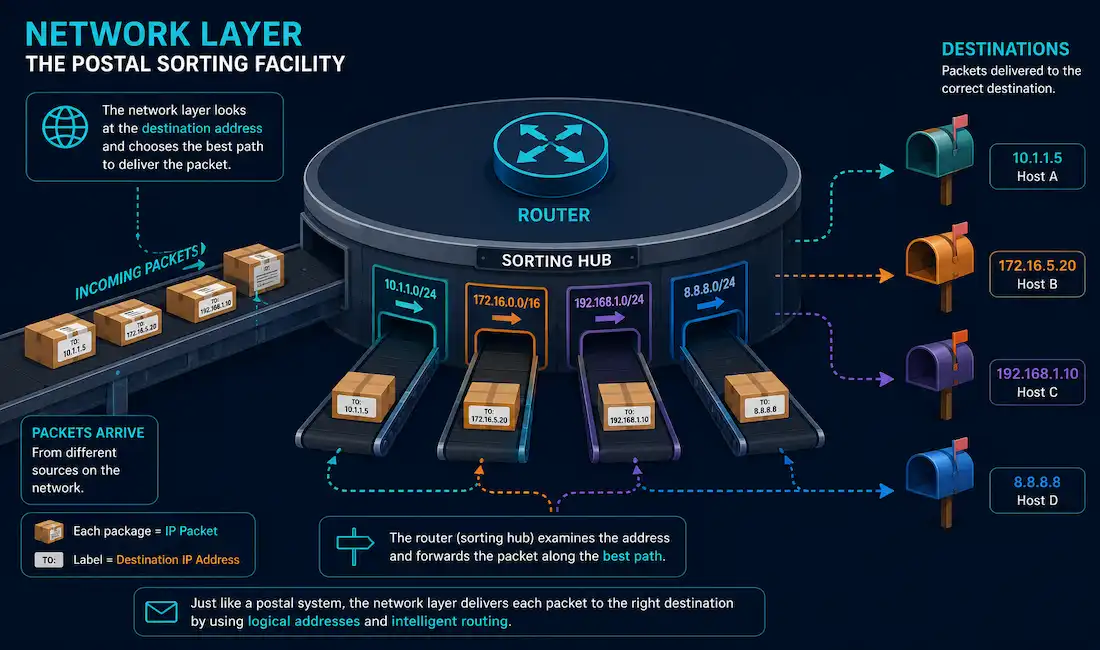
The network layer, Layer 3 of the OSI model, is responsible for one core job: delivering packets from a source device to a destination device across multiple interconnected networks. It defines the packet structure and the processing needed to carry data from one host to another, routing that data through whatever intermediate networks stand between them. This guide covers exactly what the network layer does, how encapsulation and routing actually work, and the main protocols that implement it.
A Simple Analogy
Think of the network layer as a postal system. IP addresses work like mailing addresses, identifying exactly where something needs to go. Routers work like sorting facilities, each one examining an address and deciding which direction to send something next. Routing protocols work like postal route planners, determining the most efficient path between sorting facilities. Time to Live (TTL) works like an expiration date on undeliverable mail, ensuring a packet that can’t find its destination eventually gets discarded rather than circulating the network forever.
What the Network Layer Actually Controls
The network layer controls the operation of the subnet, coordinating how packets move between different network segments. If two computers are connected directly by the same physical link with no intermediate network in between, this layer’s routing function isn’t actually needed for that connection, since there’s nowhere else for the data to be routed to.
Beyond routing, the network layer provides three core services that let end devices exchange data across a network at all: addressing, encapsulation, and de-encapsulation.
Addressing End Devices
Every source or destination device on a network, computers, laptops, file servers, web servers, network printers, VoIP phones, security cameras, mobile devices, needs a unique IP address. Without one, a device simply can’t participate in network communication at all, since there’s no way to specify it as a source or destination for any packet. This addressing requirement scales to every connected device on a network, which is exactly why IPv4’s limited address space became a genuine constraint as the number of connected devices grew, and why IPv6’s vastly larger address space matters for supporting the sheer volume of devices, sensors, and IoT hardware connecting to networks today.
Encapsulation
The network layer encapsulates the transport layer’s protocol data unit (PDU) into an IP packet, adding an IP header containing source and destination addresses. This works with both IPv4 and IPv6, and the IP header stays attached to the packet throughout its entire journey, from source all the way to the destination host, where it finally gets removed.
This layered encapsulation process, each layer wrapping the one below it in its own header, is exactly what lets services at different layers evolve and scale independently without disrupting each other. A router can apply IPv4 or IPv6 processing to a packet without needing to understand or modify anything in the transport layer segment riding inside it; routing decisions depend entirely on the network layer packet header’s contents. The data portion of the packet, the encapsulated transport layer PDU, remains completely unchanged throughout every network layer process it passes through.
De-Encapsulation
When a packet arrives at Layer 3 of its destination host, that host checks the packet’s IP header against its own IP address. If the destination IP address in the header matches, the host removes the IP header entirely, a process called de-encapsulation. Once de-encapsulated, the resulting Layer 4 PDU passes up to the transport layer for further processing, continuing its journey up the protocol stack toward whatever application ultimately needs the data.
Routing
Routing is what makes it possible for a packet to travel from a device on one network to a device on an entirely different network. A router’s job is to examine each packet and forward it along the best available path toward its destination. A packet frequently crosses several intermediary routers before reaching its final destination; each individual router traversal along that path is called a hop.
Modern routing at scale involves genuinely sophisticated path selection, balancing metrics like bandwidth, delay, and reliability across potentially many available paths, particularly in large enterprise and cloud network environments running well beyond the simple point-to-point links early networking material often illustrates with. That said, the fundamental job hasn’t changed: examine the destination address, consult a routing table, forward toward the best available next hop.
Network Layer Protocols
Several protocols operate at the network layer, each serving a distinct purpose:
- IPv4 (Internet Protocol version 4): The long-standing, most widely deployed addressing protocol, using 32-bit addresses.
- IPv6 (Internet Protocol version 6): The successor protocol, using 128-bit addresses to solve IPv4’s address exhaustion problem. Global adoption has grown steadily; Google’s own measurements showed traffic to its services hit a single-day peak of 50.1% IPv6 on March 28, 2026 — a notable milestone, though it reflects traffic to Google specifically rather than the internet worldwide, and other measurement sources (Cloudflare, APNIC) put global adoption meaningfully lower at the same time.
- ICMP (Internet Control Message Protocol): Used for diagnostic and error-reporting messages, including the ping and traceroute utilities most network engineers use constantly.
- IGMP (Internet Group Management Protocol): Manages multicast group membership, letting devices signal which multicast streams they want to receive.
- PIM-DM and PIM-SM (Protocol Independent Multicast, Dense Mode and Sparse Mode): Handle actual multicast routing between routers, building the distribution trees multicast traffic travels along.
- RIP (Routing Information Protocol): An early, simple distance-vector routing protocol, still occasionally seen in smaller or legacy networks despite being largely displaced by more capable protocols like OSPF and EIGRP in modern deployments.
- IPsec (Internet Protocol Security): A protocol suite providing authentication and encryption for IP traffic, commonly associated with the network layer even though its full functionality spans elements of higher layers as well.
- DDP (Datagram Delivery Protocol) and IPX (Internetwork Packet Exchange): Legacy network layer protocols from AppleTalk and Novell NetWare respectively, largely of historical interest today, since IP has become the near-universal standard.
- DVMRP (Distance Vector Multicast Routing Protocol): An early multicast routing protocol, now mostly superseded by PIM in modern deployments.
It’s worth being precise that some of these, RIP in particular, are more accurately described as routing protocols that operate in service of the network layer’s job rather than pure Layer 3 protocols in the strictest technical sense, since RIP messages themselves are actually carried inside UDP. In practice, this distinction rarely matters for understanding what these protocols do, but it’s worth knowing if you’re studying for a certification exam that tests the nuance directly.
A Worked Example: One Packet, Three Layers Deep
It helps to see the network layer’s role concretely. Say a laptop’s web browser sends an HTTP request to a remote server. The transport layer, TCP in this case, has already segmented the request and added its own header, tracking things like sequence numbers and port information.
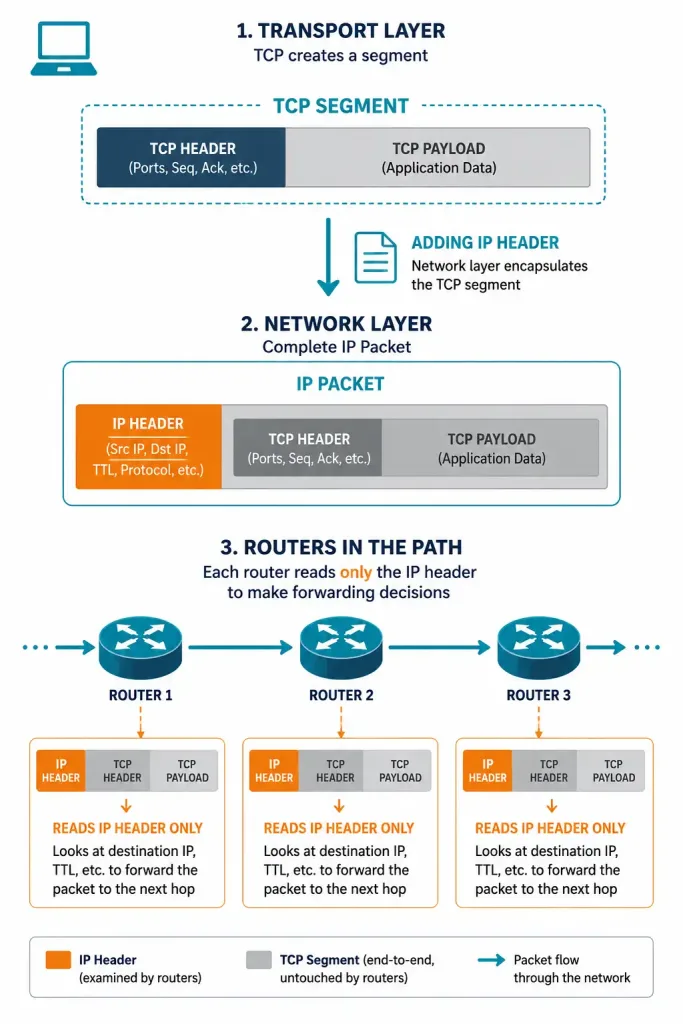
The network layer takes that TCP segment and treats it as a black box, wrapping it in an IP header without inspecting or modifying its contents at all. That IP header includes the laptop’s own IP address as the source and the remote server’s IP address as the destination. As this now-complete IP packet travels across the internet, every router it passes through examines only the IP header, checking the destination address against its routing table and forwarding the packet toward the next hop.
Not a single router along the way opens up the TCP segment inside; that’s not the network layer’s job, and routers generally don’t need to care what’s inside the payload to do their own job correctly. This separation of concerns is exactly what allows the same routing infrastructure to carry web traffic, video calls, and file transfers alike without any special handling.
When the packet finally reaches the destination server, the server’s network layer checks the destination IP address, confirms it matches its own, strips the IP header off entirely, and hands the remaining TCP segment up to its own transport layer for further processing. The web server application itself never sees an IP header at all; by the time data reaches it, the network layer’s job is already complete.
Why TTL Matters More Than the Postal Analogy Suggests
The postal analogy’s “expiration date” comparison for TTL is useful, but it’s worth understanding why TTL genuinely matters beyond just discarding truly undeliverable mail. Every IP packet’s header includes a Time to Live value, a number that decreases by at least one at every router hop it passes through. If that value ever reaches zero before the packet arrives at its destination, the router holding it at that moment discards the packet immediately, rather than forwarding it any further.
This exists specifically to prevent a packet from circulating endlessly if a routing loop develops somewhere in the network, a scenario where two or more routers mistakenly keep forwarding a packet back and forth to each other rather than toward its actual destination. Without TTL, a routing loop could consume bandwidth indefinitely, potentially degrading an entire network’s performance until someone manually intervened. With TTL in place, a looping packet simply expires and gets dropped within a bounded number of hops, containing the damage automatically.
This is also, incidentally, exactly how the traceroute utility works: it deliberately sends packets with progressively increasing TTL values, one hop’s worth at a time, and uses the resulting “TTL expired” error messages from each intermediate router to map out the full path a packet takes to its destination. It’s a good example of a low-level protocol mechanism, originally designed to solve one narrow problem, ending up genuinely useful for a completely different diagnostic purpose.
Frequently Asked Questions
What is the primary purpose of the network layer?
The network layer’s primary purpose is delivering packets from a source to a destination across multiple interconnected networks, using logical IP addressing and routing to determine the best path. It also handles encapsulating data from the transport layer and de-encapsulating it again once it reaches its destination.
How does the network layer differ from the transport layer?
The network layer handles end-to-end delivery of data across potentially many interconnected networks, using IP addressing and routing. The transport layer, sitting one layer above, focuses on reliable (or unreliable, in UDP’s case) communication between the two end devices themselves, handling things like segmentation, flow control, and, in TCP’s case, guaranteed delivery.
Why does every device need a unique IP address?
A unique IP address is what lets a device be specifically identified as a source or destination on a network; without one, there’s no way for a packet to be correctly addressed to or from that device at all. This requirement scales directly with the number of connected devices, which is a large part of why IPv6’s much larger address space matters as billions of devices, far more than IPv4’s address space can comfortably support, connect to networks worldwide.
What does “hop” mean in networking?
A hop refers to one router traversal along a packet’s path from source to destination. A packet crossing three routers to reach its destination has made three hops, and hop count is a metric some routing protocols, like RIP, use directly to help determine the best available path.
Is RIP still used on modern networks?
RIP sees limited use today, mostly in smaller or legacy networks, having been largely displaced by more capable protocols like OSPF and EIGRP that scale better and converge faster on larger, more complex networks. It remains relevant for foundational networking education specifically because its simplicity makes the core concepts of distance-vector routing easier to understand before moving on to more complex protocols, which is exactly why it’s still a fixture of introductory certification material even where it’s rarely deployed in production.
What’s the difference between IGMP and PIM?
IGMP manages the relationship between end devices and their local router, letting a device signal which multicast groups it wants to join or leave. PIM operates between routers themselves, actually building and maintaining the distribution paths multicast traffic travels along across the wider network, using the membership information IGMP has already gathered locally. The two work together as complementary pieces of the same overall multicast delivery system, one handling the local edge, the other handling the wider network.



