
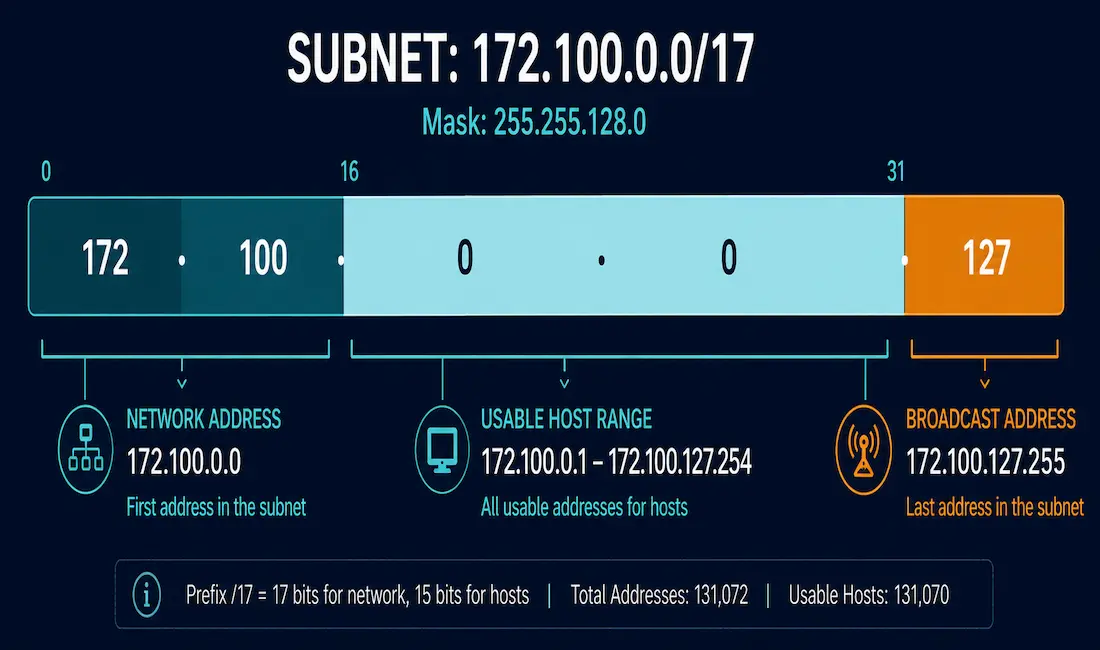
Every IPv4 subnet has a handful of specific addresses with fixed roles: one identifies the network itself, one is reserved for broadcasting to every device on it, and the rest are available for hosts. This guide covers exactly how to calculate each one, using prefix notation and binary math, with one consistent worked example carried through every section so the numbers stay easy to follow.
Before diving in, this builds directly on a few foundational topics worth having covered already: IP address classes, the positional number system binary math relies on, and the network and host portions of an IPv4 address.
The Prefix Length
Working with subnet masks in dotted-decimal form gets cumbersome quickly, which is exactly why prefix, or “slash,” notation exists. To find a mask’s prefix length, convert it to binary and count the consecutive 1 bits starting from the leftmost bit. For example, the subnet mask 255.255.128.0 converts to 11111111.11111111.10000000.00000000 in binary. Counting the 1s gives 17, so this mask’s prefix length is /17.
The reverse works just as directly: for a /20 prefix, write twenty 1s followed by twelve 0s, giving 11111111.11111111.11110000.00000000, which converts back to 255.255.240.0 in decimal.
Prefix-to-Subnet-Mask Reference Table
| Prefix | Binary | Subnet Mask |
|---|---|---|
| /8 | 11111111.00000000.00000000.00000000 | 255.0.0.0 |
| /9 | 11111111.10000000.00000000.00000000 | 255.128.0.0 |
| /10 | 11111111.11000000.00000000.00000000 | 255.192.0.0 |
| /11 | 11111111.11100000.00000000.00000000 | 255.224.0.0 |
| /12 | 11111111.11110000.00000000.00000000 | 255.240.0.0 |
| /13 | 11111111.11111000.00000000.00000000 | 255.248.0.0 |
| /14 | 11111111.11111100.00000000.00000000 | 255.252.0.0 |
| /15 | 11111111.11111110.00000000.00000000 | 255.254.0.0 |
| /16 | 11111111.11111111.00000000.00000000 | 255.255.0.0 |
| /17 | 11111111.11111111.10000000.00000000 | 255.255.128.0 |
| /18 | 11111111.11111111.11000000.00000000 | 255.255.192.0 |
| /19 | 11111111.11111111.11100000.00000000 | 255.255.224.0 |
| /20 | 11111111.11111111.11110000.00000000 | 255.255.240.0 |
| /21 | 11111111.11111111.11111000.00000000 | 255.255.248.0 |
| /22 | 11111111.11111111.11111100.00000000 | 255.255.252.0 |
| /23 | 11111111.11111111.11111110.00000000 | 255.255.254.0 |
| /24 | 11111111.11111111.11111111.00000000 | 255.255.255.0 |
| /25 | 11111111.11111111.11111111.10000000 | 255.255.255.128 |
| /26 | 11111111.11111111.11111111.11000000 | 255.255.255.192 |
| /27 | 11111111.11111111.11111111.11100000 | 255.255.255.224 |
| /28 | 11111111.11111111.11111111.11110000 | 255.255.255.240 |
| /29 | 11111111.11111111.11111111.11111000 | 255.255.255.248 |
| /30 | 11111111.11111111.11111111.11111100 | 255.255.255.252 |
The Worked Example Used Throughout This Guide
To keep every calculation consistent, every example below uses the same host address and mask: 172.100.20.50 with subnet mask 255.255.128.0 (/17).
Network Address
The network address is the first address in a subnet, identifying the subnet itself rather than any individual device. It’s calculated by performing a bitwise AND between the IP address and the subnet mask, in binary, then converting the result back to decimal.
| Binary | |
|---|---|
| IP Address | 10101100.01100100.00010100.00110010 |
| Subnet Mask | 11111111.11111111.10000000.00000000 |
| Network Address (AND) | 10101100.01100100.00000000.00000000 |
Converting that result back to decimal gives a network address of 172.100.0.0. This is also, equivalently, an IP address in which every bit in the host portion has been set to 0.
Broadcast Address
The broadcast address is the last address in a subnet, used to reach every device on that subnet simultaneously. It has every bit in the host portion set to 1, the exact opposite of the network address.
For our example, the /17 mask means 15 bits are available for hosts. Setting all 15 of those host bits to 1, while keeping the network bits from the network address unchanged, gives:
| Binary | |
|---|---|
| Network Address | 10101100.01100100.00000000.00000000 |
| Broadcast Address (host bits set to 1) | 10101100.01100100.01111111.11111111 |
Converting that back to decimal gives a broadcast address of 172.100.127.255. Any packet sent to this address is delivered to every host on the 172.100.0.0/17 subnet at once.
Host Address
A host address is any address within the subnet used to identify an individual device. Critically, the host portion of a valid host address is never all 0s (that’s the network address) and never all 1s (that’s the broadcast address); it always contains some mix of the two.
First Usable Host Address
The first usable address in any subnet has all 0s in the host portion except for the final bit, which is 1, exactly one increment above the network address itself.
| Dotted Decimal | Binary | |
|---|---|---|
| Network Address | 172.100.0.0/17 | 10101100.01100100.00000000.00000000 |
| First Usable Address | 172.100.0.1 | 10101100.01100100.00000000.00000001 |
Last Usable Host Address
The last usable address has all 1s in the host portion except for the final bit, which is 0, exactly one below the broadcast address.
| Dotted Decimal | Binary | |
|---|---|---|
| Last Usable Address | 172.100.127.254 | 10101100.01100100.01111111.11111110 |
| Broadcast Address | 172.100.127.255 | 10101100.01100100.01111111.11111111 |
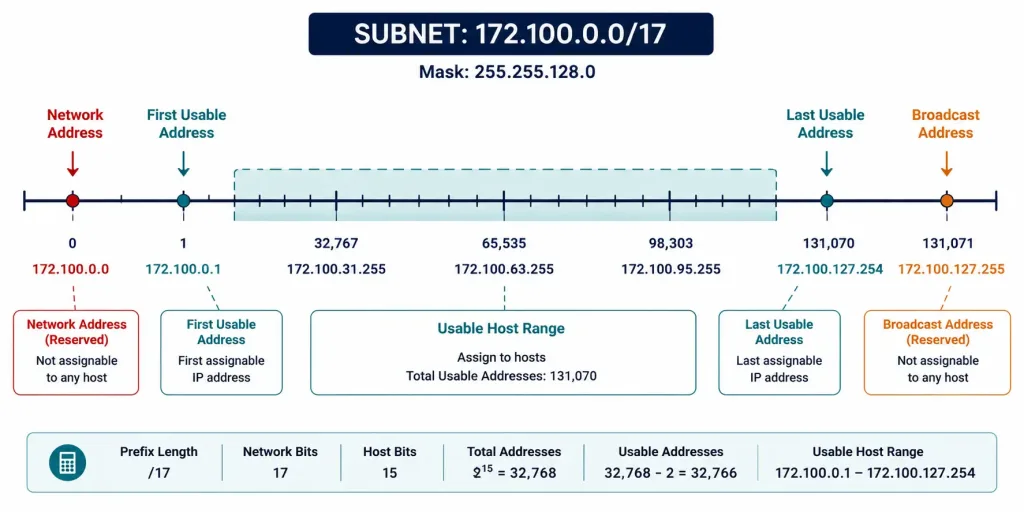
Together, this gives the complete picture for the 172.100.0.0/17 subnet: a network address of 172.100.0.0, a usable host range from 172.100.0.1 through 172.100.127.254, and a broadcast address of 172.100.127.255, a total of 32,766 usable host addresses within this one subnet. Every one of these values follows directly from the same handful of binary rules covered above.
How This Scales to a Second Example
It’s worth seeing this pattern hold up with a smaller, more common subnet size too. Take 192.168.10.0/24 with mask 255.255.255.0. All 8 bits of the last octet are host bits here. The network address is 192.168.10.0 (all host bits 0), the broadcast address is 192.168.10.255 (all host bits 1), and the usable host range runs from 192.168.10.1 through 192.168.10.254, giving 254 usable addresses, a range familiar to anyone who’s configured a typical home or small office router.
Troubleshooting Prefix and Addressing Issues
A device can’t get an IP address that seems valid for the subnet. Double-check it’s not actually the network address or broadcast address itself, both of which are reserved and can never be assigned to a device. A common mistake is manually assigning the very first or very last address in a range without accounting for these reservations, which is exactly why the “first usable” and “last usable” terminology matters, not just “first” and “last.”
Two devices with what look like different IPs can’t reach each other locally. Confirm they’re actually on the same subnet by calculating each one’s network address using its own configured mask. Two addresses can look close together numerically while still falling into different subnets depending on the prefix length in use.
Broadcast traffic isn’t reaching all expected devices. Confirm every device is actually configured with the correct subnet mask; a device with an incorrectly configured, narrower mask than the rest of the subnet will calculate a different broadcast address than its neighbors and may not respond to broadcasts sent to the subnet’s actual broadcast address.
Why the AND Operation Actually Works
It’s worth understanding why a bitwise AND is the right tool for finding a network address, rather than just memorizing the mechanical steps. AND returns 1 only when both input bits are 1; any 0 in either position forces the result to 0. A subnet mask’s 1 bits mark the network portion, and its 0 bits mark the host portion. ANDing an IP address against that mask preserves whatever the IP address had in the network-bit positions unchanged, while forcing every host-bit position to 0 regardless of what the original IP address had there.
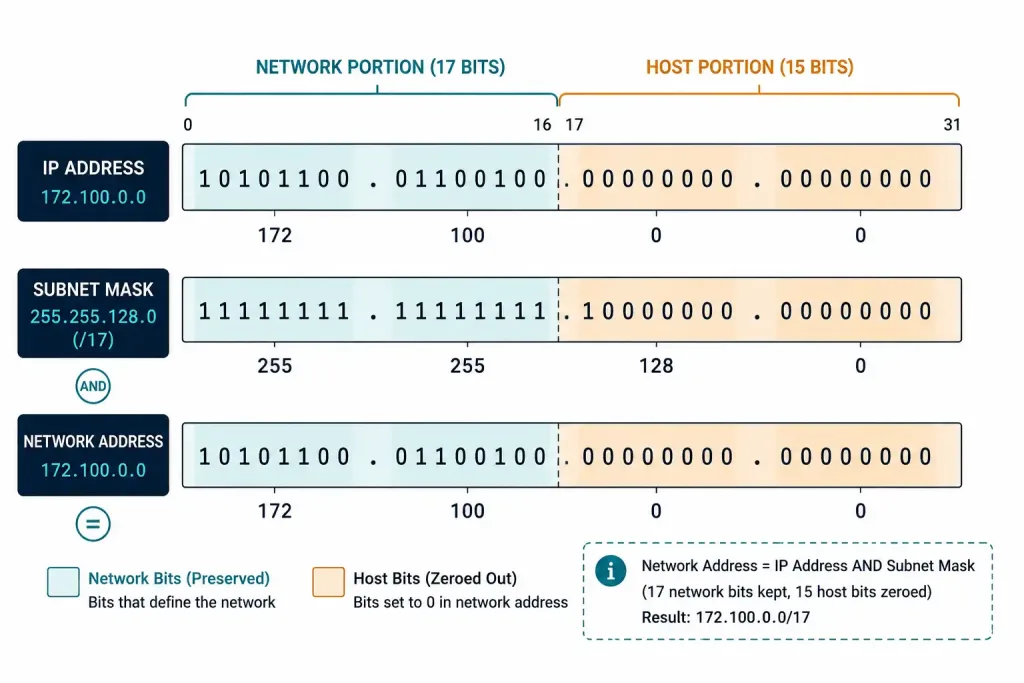
That’s exactly the definition of a network address: the original network bits, with every host bit zeroed out. The same logic, run in reverse, explains the broadcast address: instead of ANDing with the mask, you’re effectively forcing every host-bit position to 1 while leaving the network bits from the network address untouched, which is precisely what a logical OR against the inverted subnet mask (sometimes called the wildcard mask) accomplishes in a single step, a shortcut worth knowing once the underlying AND-based logic makes sense. Wildcard masks show up again later in access control list configuration, so this isn’t just a one-off trick specific to broadcast address calculation.
Common Prefix Lengths You’ll Actually Encounter
While the reference table above covers every prefix from /8 to /30, a handful of specific prefixes come up constantly in real networking work, worth knowing by sight rather than looking up every time. /24 is by far the most common on small networks and home routers, giving 254 usable hosts, a familiar and comfortably-sized range for a typical LAN.
/30 shows up specifically on point-to-point links, like a connection between two routers, since it provides exactly 2 usable addresses, one for each end, with no wasted space for a link that will only ever have two devices on it. /32 (not shown in the table above, since it represents zero host bits) identifies a single specific host address, commonly used for loopback interfaces or highly specific routing entries.
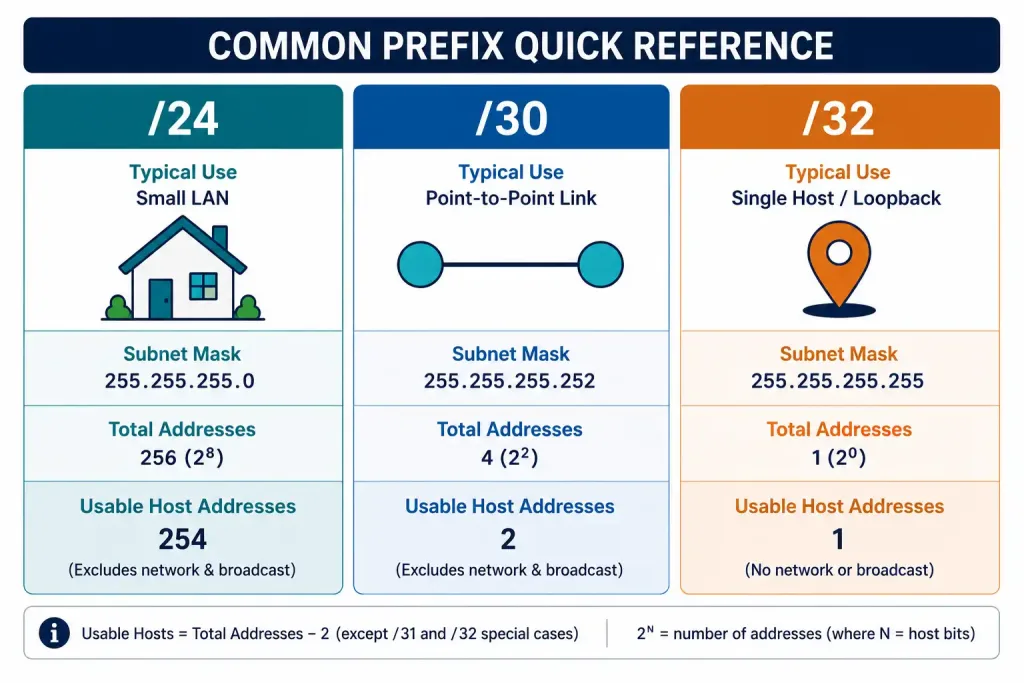
Recognizing these common cases by sight, without needing to work through the full binary conversion every time, is a genuinely practical skill that speeds up real troubleshooting considerably. Most experienced network engineers can recognize /24, /30, and a handful of other common prefixes instantly, reserving the manual binary math for the less frequently encountered sizes.
Frequently Asked Questions
How do I calculate a network’s prefix length from its subnet mask?
Convert the subnet mask to binary and count the number of consecutive 1 bits starting from the left; that count is the prefix length. For IPv6, this process is simplified considerably, since the network prefix is typically a fixed 64 bits rather than a variable length that has to be calculated each time.
Why can’t a host address be all zeros or all ones in the host portion?
All zeros in the host portion represents the network address itself, identifying the subnet rather than a device, while all ones is reserved as the broadcast address, used to reach every device on the subnet simultaneously. Assigning either to an individual device would create an addressing conflict with these two reserved, structurally significant addresses.
What happens if two devices are accidentally assigned the same host address?
This creates an IP address conflict, typically causing intermittent or failed connectivity for both devices as the network struggles to determine which one should actually receive traffic addressed to that IP. Most modern operating systems detect and warn about this condition, though resolving it still requires manually reassigning one of the conflicting addresses.
How do routers actually use the broadcast address?
Routers deliver traffic sent to a subnet’s broadcast address to every device on that subnet simultaneously, which is exactly how protocols like DHCP work: a client without an IP address yet broadcasts a discovery request, since it has no way to address a specific server directly, and every device on the segment receives it, though only the DHCP server responds.
What is CIDR notation and why does it matter?
CIDR (Classless Inter-Domain Routing) notation is the slash-prefix format itself, like /24, and it matters because it lets network administrators create subnets of essentially any size rather than being locked into the old classful system’s three fixed sizes. This flexibility significantly reduces wasted address space compared to classful addressing.
How does IPv6 handle network prefixes differently from IPv4?
IPv6 typically uses a fixed 64-bit network prefix, with the remaining 64 bits reserved for the host portion, often generated automatically from the device’s MAC address through a process called SLAAC. This is meaningfully simpler than IPv4’s variable-length prefixes, which require the kind of manual binary calculation covered throughout this guide.



