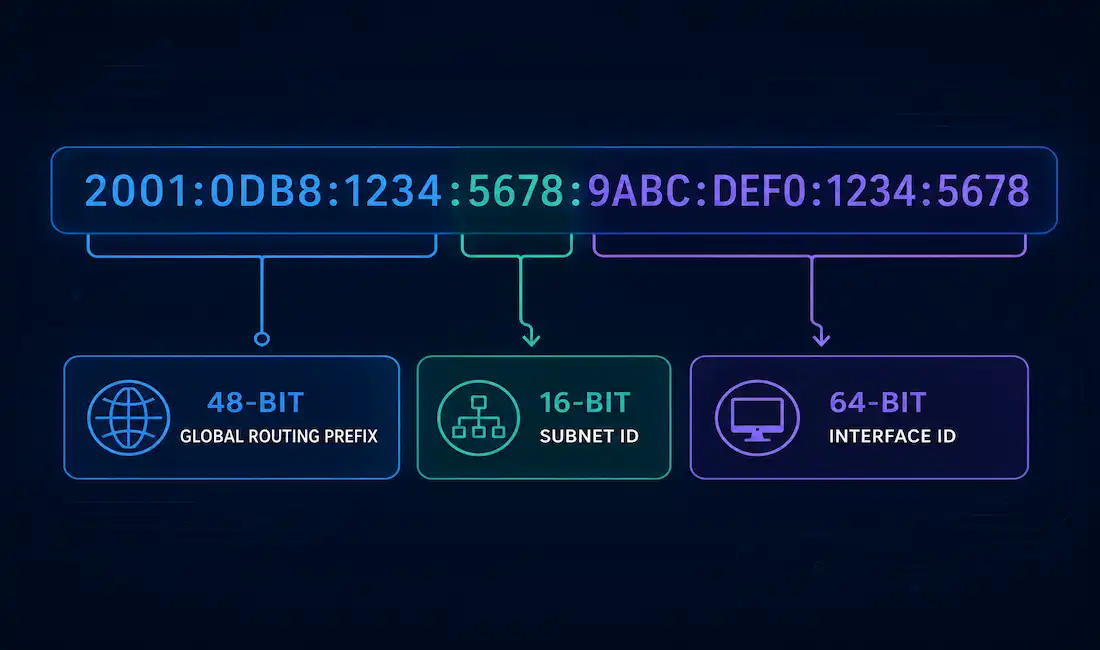
IPv6 subnetting works differently from IPv4 subnetting. There is no address shortage to manage, so the goals change. Instead of squeezing every possible host out of a block, IPv6 subnetting is about building a clean addressing hierarchy. This guide walks through the address structure, a full worked example, LAN and WAN allocation, and the troubleshooting steps you need for real deployments.
IPv4 uses 32-bit addresses. IPv6 uses 128-bit addresses. That jump gives IPv6 roughly 340 undecillion possible addresses — written out, that’s 340,282,366,920,938,463,463,374,607,431,768,211,456. This number is almost impossible to picture, but one comparison helps: it is about 20 orders of magnitude larger than the estimated number of grains of sand on Earth (roughly 7.5 quintillion). IPv6 was never at risk of running out.
Because address space is no longer scarce, IPv6 subnetting drops some IPv4 habits. CIDR and VLSM concepts still apply — IPv6 uses prefix-length notation (/48, /64, /127) the same way CIDR does for IPv4, and administrators can assign different prefix lengths to different links, which is the core idea behind VLSM. What IPv6 does not use is NAT for address conservation. There simply isn’t a shortage to work around.
IPv6 also removes the network ID and broadcast address rules that shape every IPv4 subnet. In IPv6, an address with all host bits set to 0 or all set to 1 is still a valid, usable address. That single change removes two addresses’ worth of “waste” from every subnet and simplifies the math considerably — you don’t subtract 2 for network and broadcast addresses the way you do in IPv4.
Two address types matter most in day-to-day IPv6 work:
- Link-local addresses — automatically generated on every IPv6-enabled interface, based on the device’s MAC address through the EUI-64 process. These never leave the local link and are not routable.
- Global unicast addresses — the routable, internet-facing addresses that subnetting decisions actually apply to.
The smallest subnet size Cisco and the IETF recommend for a standard LAN segment is /64. Even a subnet with only a handful of devices should still be sized at /64, because that prefix length is required for IPv6’s Stateless Address Autoconfiguration (SLAAC) to function correctly.
The IPv6 Global Unicast Address Structure
A typical global unicast address breaks into three fixed sections:
| Section | Size | Purpose |
|---|---|---|
| Global Routing Prefix | 48 bits | Assigned to your organization by an ISP or regional registry |
| Subnet ID | 16 bits | Used internally to create subnets |
| Interface ID | 64 bits | Identifies the specific host on the subnet |
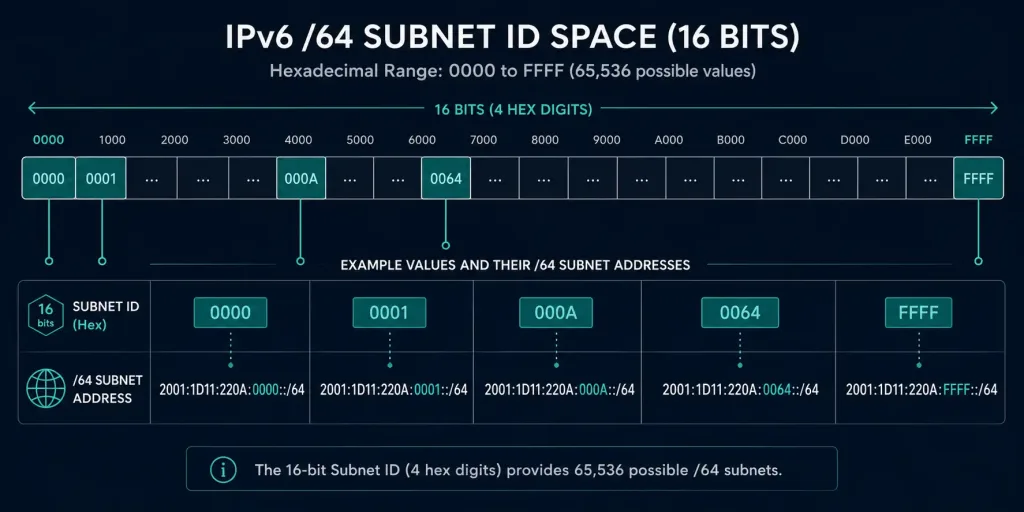
The 16-bit Subnet ID is the field you control. It sits between the fixed 48-bit prefix and the fixed 64-bit interface ID, and it’s where all of your subnetting decisions happen. Sixteen bits gives you 2¹⁶, or 65,536, possible subnets from a single /48 allocation — more than enough for the overwhelming majority of organizations, including large enterprises with hundreds of sites.
Subnetting With the 16-Bit Subnet ID
Because the Subnet ID sits on a clean hexadecimal boundary, IPv6 subnetting skips the binary math that IPv4 subnetting requires. You don’t need to borrow bits, calculate subnet masks, or convert between binary and decimal. You just count in hexadecimal, from 0000 to FFFF.
That’s the practical reason IPv6 subnetting is considered easier once you’re comfortable with hex. IPv4 subnetting forces you to think in binary at the bit level. IPv6 subnetting mostly asks you to increment a 4-digit hex value.
Worked Example: Subnetting a /48 Allocation
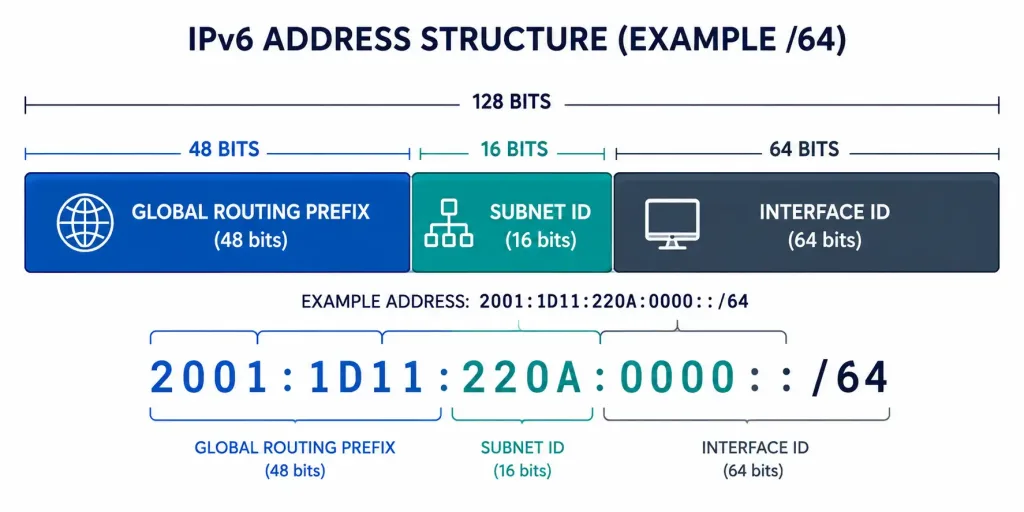
Suppose your organization is assigned the block 2001:1D11:220A::/48. That /48 gives you a full 16-bit Subnet ID to work with, which means you can create up to 65,536 individual /64 subnets — one for each value from 0000 through FFFF.
The table below shows the first six subnets created this way, along with the first and last usable address in each.
| Subnet ID | Network Address | First Usable Address | Last Usable Address |
|---|---|---|---|
| 0000 | 2001:1D11:220A:0000::/64 | 2001:1D11:220A:0000::1 | 2001:1D11:220A:0000:FFFF:FFFF:FFFF:FFFF |
| 0001 | 2001:1D11:220A:0001::/64 | 2001:1D11:220A:0001::1 | 2001:1D11:220A:0001:FFFF:FFFF:FFFF:FFFF |
| 0002 | 2001:1D11:220A:0002::/64 | 2001:1D11:220A:0002::1 | 2001:1D11:220A:0002:FFFF:FFFF:FFFF:FFFF |
| 0003 | 2001:1D11:220A:0003::/64 | 2001:1D11:220A:0003::1 | 2001:1D11:220A:0003:FFFF:FFFF:FFFF:FFFF |
| 0004 | 2001:1D11:220A:0004::/64 | 2001:1D11:220A:0004::1 | 2001:1D11:220A:0004:FFFF:FFFF:FFFF:FFFF |
| 0005 | 2001:1D11:220A:0005::/64 | 2001:1D11:220A:0005::1 | 2001:1D11:220A:0005:FFFF:FFFF:FFFF:FFFF |
Each /64 subnet in this table has a 64-bit interface ID, which means each one supports 2⁶⁴ addresses — that’s 18,446,744,073,709,551,616 possible host addresses per subnet, or roughly 18.4 quintillion. No realistic network will ever fill a single /64.
Extending the Pattern: All Possible Subnet IDs From This /48
The same counting pattern continues all the way through the 16-bit Subnet ID field. A short excerpt of the full range looks like this:
| Subnet ID | Network Address |
|---|---|
| 0000 | 2001:1D11:220A:0000::/64 |
| 0001 | 2001:1D11:220A:0001::/64 |
| 0002 | 2001:1D11:220A:0002::/64 |
| 0003 | 2001:1D11:220A:0003::/64 |
| 0004 | 2001:1D11:220A:0004::/64 |
| 0005 | 2001:1D11:220A:0005::/64 |
| 000A | 2001:1D11:220A:000A::/64 |
| 000F | 2001:1D11:220A:000F::/64 |
| 0010 | 2001:1D11:220A:0010::/64 |
| 0064 | 2001:1D11:220A:0064::/64 |
| 03E8 | 2001:1D11:220A:03E8::/64 |
| FFFF | 2001:1D11:220A:FFFF::/64 |
That last row, FFFF, is the final possible subnet — the 65,536th value the 16-bit field can hold. In practice, almost no organization needs anywhere close to that many subnets from one /48. Most enterprises use a small, structured slice of the range and leave the rest reserved for future growth.
LAN and WAN Subnet Allocation
Every LAN segment and every WAN link needs its own subnet. A common structure assigns a block of Subnet ID values to LANs and a separate block to WAN links, so the two are easy to tell apart at a glance during troubleshooting.
Illustrative Scenario: picture a mid-sized organization that has been assigned 2001:1D11:220A::/48. Using the counting method above, the network team assigns:
- Subnet IDs
0000through0004— five LAN segments (departments, floors, or VLANs) - Subnet ID
0005— a WAN link connecting to a second site
That’s six subnets in total from a single /48 allocation, with 65,530 Subnet ID values still available for future sites, departments, or WAN links. This is a teaching example, not a real customer deployment — the exact numbers are illustrative.
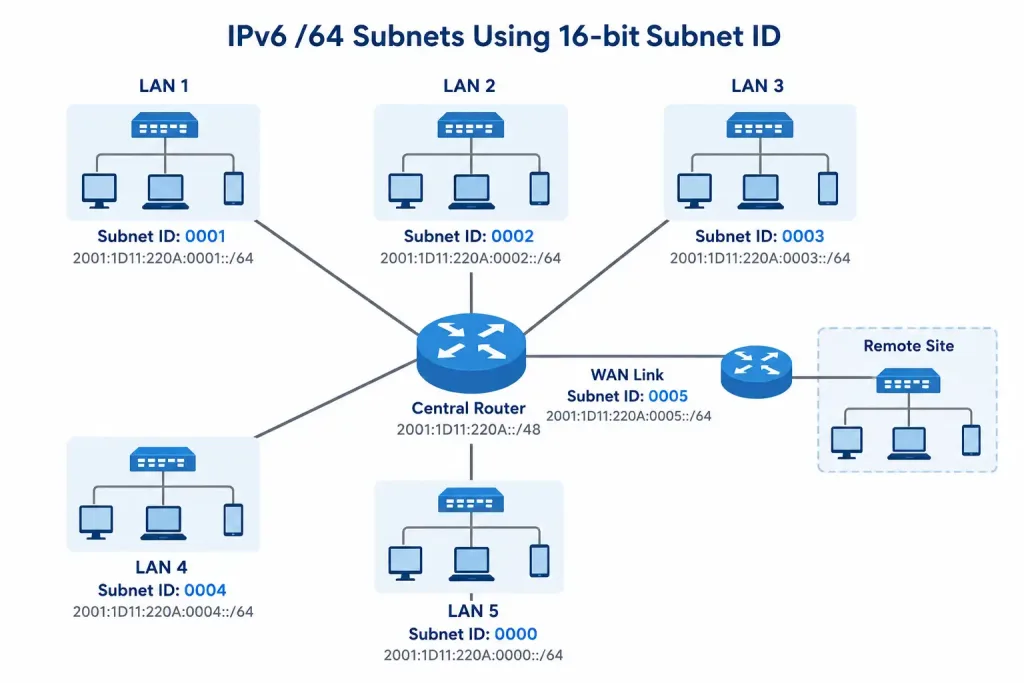
Every Local Area Network segment gets a full /64, even though a /64 provides vastly more addresses than any LAN will ever need. (Note: this anchor text points to the site’s VLAN article rather than a general LAN-fundamentals page — the link is topically adjacent but not an exact match; left in place per this site’s link-retention policy.)
Choosing a Prefix Length for WAN Links: /64 vs. /127
Many introductory guides teach that WAN and point-to-point links should simply use a /64, matching every other subnet. That’s workable, but it isn’t the documented best practice for inter-router links.
RFC 6164 formally recommends /127 prefixes for point-to-point links between routers. This recommendation reversed an earlier RFC (3627) that had called /127 prefixes harmful. The /127 approach exists for a concrete security reason: on a /64 point-to-point link, an attacker can trigger a “ping-pong” loop by sending traffic to unused addresses within that oversized subnet, bouncing packets between the two routers. A /127 leaves exactly two usable addresses — one for each router — so there’s no room for that kind of attack.
In practice:
- /64 is simpler, matches the rest of your addressing scheme, and is still common in smaller or less security-sensitive deployments. CCNA-level material often teaches this as the default.
- /127 is the modern best practice for router-to-router links, particularly in service provider and enterprise WAN environments where the ping-pong vulnerability matters.
Know both. Exam questions and real job requirements can expect either answer depending on context.
IPv6 Subnetting Best Practices
- Use /64 for every standard LAN segment. This is required for SLAAC to work and is treated as the minimum recommended subnet size.
- Use /127 for point-to-point WAN links where security matters, or /64 if your organization prefers a uniform scheme across all links.
- Plan your Subnet ID allocation in blocks. Reserve ranges for LANs, WAN links, loopbacks, and future growth before you start assigning addresses, the same way you’d plan a VLAN numbering scheme.
- Leverage the full 16-bit Subnet ID for hierarchy. You can group by region, building, or department using consistent hex ranges (for example,
1xxxfor one site,2xxxfor another). - Verify your configuration with
show ipv6 interface briefon Cisco equipment to confirm which prefixes are actually active on each interface.
Troubleshooting IPv6 Subnetting
Duplicate address detected. IPv6’s Duplicate Address Detection (DAD) process will flag two devices trying to use the same address. Clear the neighbor cache with clear ipv6 neighbors and let DAD re-run. If the conflict returns immediately, check for a misconfigured static address on one of the devices.
Incorrect prefix length. A router advertising the wrong prefix length will break connectivity for every host on that segment. Confirm the active prefix with show ipv6 route and compare it against your subnet plan. A /64 advertised where a /127 was intended (or vice versa) is a common copy-paste error in router configs.
Interfaces stuck in a “tentative” state. This usually means DAD hasn’t completed, often because of a duplicate link-local address. Check show ipv6 interface for the interface status and confirm the EUI-64-generated link-local address is unique on the segment.
Missing default route. IPv6 hosts rely on Router Advertisements (RAs) for their default gateway in most SLAAC deployments. If a host has an address but no connectivity beyond the local subnet, verify that the upstream router is actually sending RAs with show ipv6 interface and check for a misconfigured ipv6 nd ra suppress command on the interface.
Comparing IPv4 and IPv6 Subnetting
| Factor | IPv4 Subnetting | IPv6 Subnetting |
|---|---|---|
| Address length | 32 bits | 128 bits |
| Math required | Binary bit-borrowing | Hexadecimal counting |
| Network/broadcast addresses | Reserved, unusable | Not reserved — all-0s and all-1s are usable |
| Primary goal | Conserve address space | Build a clean hierarchy |
| NAT | Common, used to extend limited space | Not used for conservation |
| Minimum recommended LAN subnet | Varies by host count | /64, regardless of host count |
| Point-to-point link sizing | /30 or /31 | /64 (simple) or /127 (RFC 6164 best practice) |
FAQs
What is IPv6 subnetting and why is it important?
IPv6 subnetting divides a large address allocation into smaller, organized subnets, typically /64 blocks carved out of a /48 or /56 allocation. It matters because a clean subnet hierarchy makes routing, security policy, and troubleshooting far easier at scale, even though address exhaustion is no longer the driving concern it was under IPv4.
How is IPv6 subnetting different from IPv4?
IPv6 addresses are 128 bits long instead of 32, and IPv6 doesn’t reserve a network address or broadcast address the way IPv4 does. Subnetting decisions happen through prefix-length notation, and because address space is effectively unlimited, the entire goal shifts from “don’t waste addresses” to “organize the hierarchy well.”
What prefix length is commonly used in IPv6 subnetting?
A /64 is the standard prefix length for LAN segments and is required for SLAAC to function correctly. For point-to-point router links, /127 is the modern documented best practice under RFC 6164, though /64 is still used in simpler deployments.
Can I use VLSM concepts with IPv6?
Yes. IPv6 supports variable prefix lengths across different links — a /48 for a site, /64 for LANs, and /127 for point-to-point links, all coexisting in the same address plan. This achieves the same flexible-allocation goal that VLSM solves in IPv4, even though IPv6 doesn’t need to conserve addresses the way VLSM was originally designed to.
What tools help with IPv6 subnetting?
IPv6 subnet calculators handle the hex-counting and address-range math automatically, which is useful when planning large allocations. For hands-on verification, Cisco’s own show ipv6 interface brief and show ipv6 route commands confirm what’s actually configured and active on your equipment, which matters more than any calculator once a network is live.