
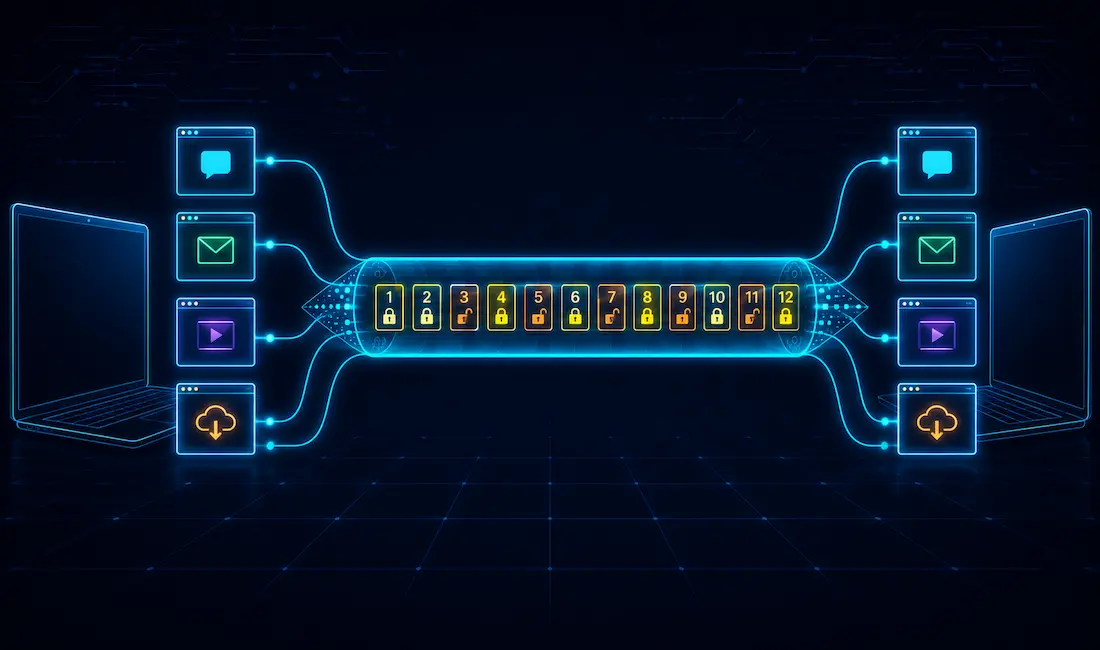
We routinely run multiple applications on a single device at once — a browser, an email client, a video call — and each needs its data delivered to the right place without interference from the others. The transport layer, Layer 4 of the OSI model, is what makes this possible: it accepts data from the application layer above it, prepares it for network layer addressing below, and — critically — provides logical, process-to-process communication between applications running on different hosts.
A sending and receiving device negotiate how to split data into segments, how to send it without losing pieces along the way, and how to confirm every segment actually arrived. The transport layer is responsible for end-to-end connectivity between hosts, process-to-process delivery, error control, and flow control — which is why it’s often called the “end-to-end” layer, in contrast to the hop-to-hop nature of the layers below it. The unit of data encapsulation at this layer is called a segment, and the transport layer’s protocols include TCP, UDP, and — less commonly — DCCP and SCTP.
Process-to-Process Delivery
The Data Link Layer provides the delivery of data frames between two directly connected neighboring nodes over a single link, using the 48-bit MAC address of each host’s network interface card — this is node-to-node delivery. The Network Layer handles delivery between two hosts across the wider network, using IP addresses — this is host-to-host delivery.
But actual communication on a network doesn’t happen between “nodes” or even “hosts” in the abstract — it happens between specific processes running on those hosts. That’s why the transport layer’s job is described as process-to-process delivery: taking part of a message from one specific process on the source host and delivering it to the corresponding process on the destination host.
At any given moment, several processes may be running on both the source and destination host simultaneously. The mechanism that makes it possible to deliver data to the correct one among many is the port number — a 16-bit value used to uniquely identify a specific client-server application or service on a host.
End-to-End Connection Between Hosts
An end-to-end connection exists between two applications — a messaging app like Facebook Messenger, for example — without either end needing any awareness of the network path in between. This is a transport layer responsibility, provided via TCP or UDP.
TCP is reliable because it actively ensures data delivery between hosts, using acknowledgments and retransmission. UDP, by contrast, is unreliable — a stateless protocol offering only best-effort delivery. UDP suits applications that can tolerate some loss in exchange for lower overhead and latency, such as video conferencing, and it’s also commonly used for multicasting.
Tracking Individual Conversations
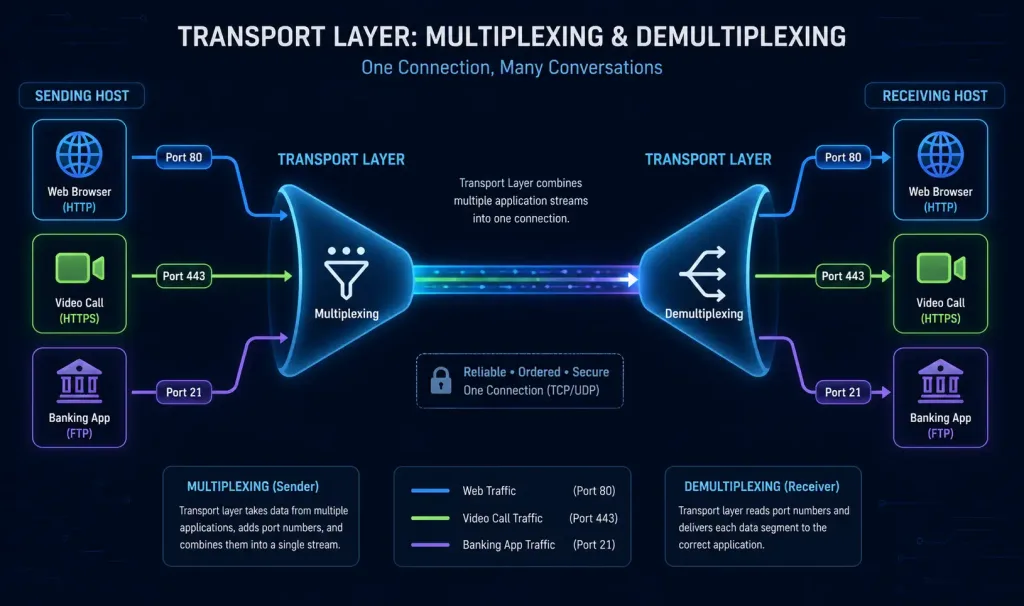
A single host may run numerous applications communicating with the network simultaneously, each with one or more remote applications. It’s the transport layer’s job to track every one of these conversations independently — for example, distinguishing an HTTP session on port 80 from an FTP session on port 21, even if both are happening at the same time on the same host.
Multiplexing and Demultiplexing
Multiplexing is the process of collecting data from several application processes on the sender, wrapping each with a header, and sending it out toward its destination. This is what allows multiple applications to genuinely share a network connection in real time — for example, a video call using UDP for its media stream while a banking app on the same device uses TCP with TLS for a separate, secure transaction, both flowing over the same physical connection simultaneously.
At the receiving end, the transport layer accepts incoming data segments — distinguished from each other by their destination port numbers — and passes each one to the correct upper-layer process. This reverse process is called demultiplexing.
Segmenting Data and Reassembling Segments
Networks impose a limit on how much data a single packet can carry. Transport layer protocols segment data into appropriately sized blocks to respect this limit, encapsulating each piece with the header information needed to track and later reassemble it correctly. On the receiving end, the transport layer uses that same header information to reconstruct the original data stream before handing it up to the application layer.
Identifying the Applications
By assigning a unique port number to each application, the transport layer can always route incoming data to the correct destination process — this is the same port-number mechanism underlying process-to-process delivery described above, just from the perspective of application identification specifically.
Congestion Control
Congestion occurs when heavy data traffic slows down network response time — as many sources attempt to send data simultaneously, router buffers can overflow, causing packet loss, and the resulting retransmissions of lost packets can make congestion even worse if left unmanaged. The transport layer addresses this through both open-loop congestion control (measures that try to prevent congestion before it happens) and closed-loop congestion control (measures that respond to and reduce congestion once it’s already occurring).
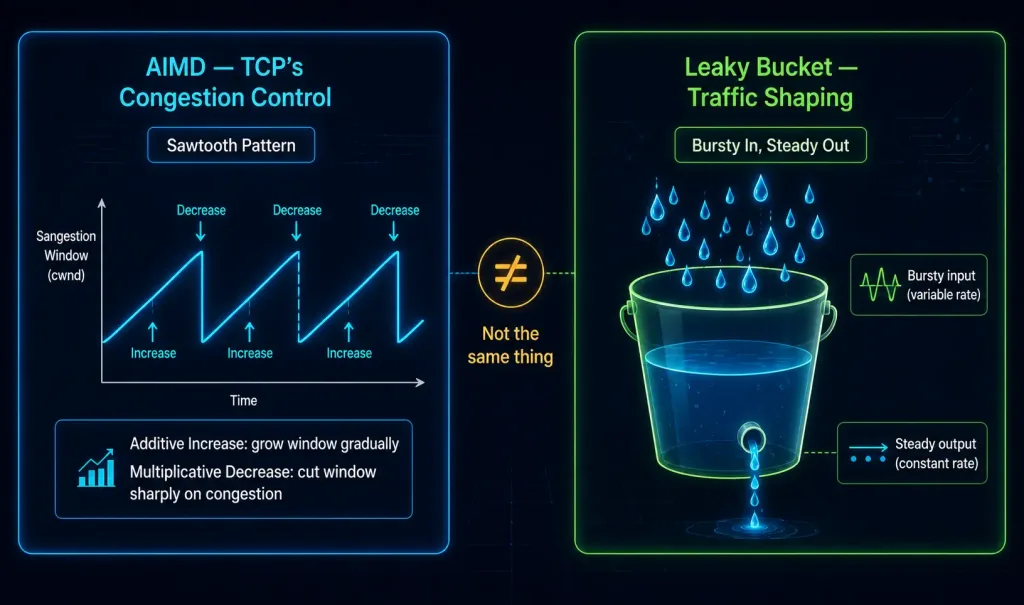
TCP specifically uses AIMD (Additive Increase, Multiplicative Decrease) as its core congestion control algorithm — gradually increasing its sending rate during normal operation, then sharply cutting it (typically halving the congestion window) whenever packet loss signals likely congestion. It’s worth being precise here: AIMD and the leaky bucket algorithm are two genuinely different techniques, not variations of the same thing.
Leaky bucket is a traffic-shaping mechanism — commonly implemented in routers and switches for rate-limiting and QoS enforcement — that smooths bursty traffic into a steady, controlled output rate, conceptually similar to water draining from a bucket with a small hole at a constant rate regardless of how fast it’s poured in. TCP’s own congestion control is AIMD; leaky bucket is a separate concept sometimes used elsewhere in network traffic management.
Data Integrity and Error Correction
Layer 4 checks incoming data from the application layer for errors, using error-detection codes and checksums to verify whether received data arrived intact. ACK (acknowledgment) and NACK (negative acknowledgment) messages inform the sender whether data arrived successfully and passed its integrity check.
Flow Control
Layer 4 also provides flow control between source and destination hosts, ensuring a sender doesn’t transmit faster than the receiver can actually process incoming data — particularly important whenever the sending device is capable of pushing data faster than the receiving device can keep up with.
TCP implements flow control through the sliding window mechanism: the receiver advertises how much data it’s currently willing to accept, and the sender limits its outstanding, unacknowledged data to stay within that window, adjusting dynamically as the receiver processes data and the window “slides” forward. By imposing this kind of flow control, TCP prevents data loss caused by a fast sender overwhelming a slow receiver. (Note: this link points to an unrelated cybersecurity article about Data Loss Prevention — a different concept entirely from TCP’s own flow-control mechanism — an inherited link mismatch from the original article, flagged here per audit policy.)
Conversation Multiplexing
A single, unbroken data stream could theoretically consume all available bandwidth on a network, preventing other communications from happening at the same time and making error recovery and retransmission of any damaged data considerably more difficult. By segmenting data into smaller chunks, Layer 4 enables many separate communications — from many different users — to share the same network simultaneously, with header fields on each segment letting the various transport layer protocols manage this shared traffic correctly.
Reliability
Different applications have genuinely different reliability requirements, which is exactly why the transport layer offers more than one protocol rather than a single one-size-fits-all option. The TCP/IP model’s two primary transport layer protocols are:
- Transmission Control Protocol (TCP) — reliable, ordered delivery.
- User Datagram Protocol (UDP) — faster, best-effort delivery.
IP itself is only concerned with a packet’s structure, addressing, and routing — it says nothing about how data actually gets delivered and transported reliably (or not) between two endpoints. That’s the specific job TCP and UDP fill, sitting directly on top of IP.
| Layer | Protocols |
|---|---|
| Application Layer | FTP, HTTP, SMTP, DNS, TFTP |
| Transport Layer | TCP, UDP, DCCP, SCTP |
| Internet Layer | IP |
| Network Access Layer | LAN, WAN |
Protocol Comparison
| Protocol | Reliability | Typical Use Case | Latency |
|---|---|---|---|
| TCP | High | Web browsing, email | Moderate |
| UDP | Low | Video, gaming | Low |
| DCCP | Moderate (congestion-controlled, unreliable) | Niche streaming/telemetry | Low |
| SCTP | High | Telecom signaling, some VoIP | Moderate |
Troubleshooting Transport Layer Issues
- Segment loss: Use
pingto check basic reachability and rough latency between hosts, andtcpdumpor a packet capture tool to actually confirm whether segments are being dropped in transit versus never being sent at all. - Port conflicts: Use
netstat -a(orss -tulnon modern Linux systems) to see which ports are currently in use, then reassign the conflicting application to a free port.
Beyond TCP and UDP: DCCP and SCTP
Datagram Congestion Control Protocol (DCCP)
DCCP is a message-oriented transport protocol designed for applications that want TCP-style congestion control without TCP’s reliable, ordered delivery guarantees — conceptually, “UDP with congestion control built in.” It supports connection setup and teardown, Explicit Congestion Notification (ECN), and feature negotiation between endpoints, enhancing network efficiency for the specific workloads it’s designed around. Because DCCP doesn’t guarantee in-order delivery, it’s theoretically well-suited to real-time applications where stale data has little value by the time it would otherwise be retransmitted.
A note on real-world adoption: despite being a genuinely reasonable design on paper, DCCP has seen quite limited real-world deployment. Most real-time applications — video conferencing platforms included — use plain UDP with their own custom, application-layer congestion and quality logic instead of DCCP specifically. There’s also no single, universally standard command-line tool for testing DCCP the way there is for TCP or UDP; working with it in practice generally means writing code directly against the socket API (SOCK_DCCP) rather than reaching for a dedicated CLI utility.
Stream Control Transmission Protocol (SCTP)
SCTP is a message-oriented, reliable transport protocol supporting multiple ordered streams within a single association and transparent multihoming — the ability to use multiple network paths for redundancy. This multihoming support is exactly why SCTP shows up in telecom signaling (its original design use case) and some VoIP deployments, where resilience against a single network path failing matters.
On Linux, the lksctp-tools package provides genuinely real, usable command-line utilities for working with SCTP: checksctp (verifies whether the running kernel supports SCTP), sctp_darn (sends and receives SCTP messages from the command line), and sctp_test (a more thorough userspace test application). Note that sctp_bindx specifically is a C socket API function, not a shell command — it’s something an application developer calls from code to bind multiple addresses to an SCTP socket for multihoming, not something you’d type at a terminal prompt.
Conclusion
The transport layer’s core job — reliable or best-effort process-to-process delivery, segmentation, multiplexing, flow control, and congestion control — is what actually lets multiple applications share a single network connection without stepping on each other. TCP and UDP cover the overwhelming majority of real-world traffic, each trading off reliability against speed in opposite directions, while DCCP and SCTP fill narrower, more specialized niches. Understanding not just what each protocol does, but genuinely distinct concepts like AIMD versus leaky bucket, or a real CLI tool versus a socket API function, is what separates a working understanding of Layer 4 from surface-level memorization.
FAQs
What is the primary function of the Transport Layer in the OSI Model?
The Transport Layer’s primary job is providing process-to-process communication between applications on different hosts, using port numbers to distinguish between multiple simultaneous conversations on the same device. Depending on the protocol used, it handles segmentation, error checking, and flow control to varying degrees — TCP provides all of these with strong reliability guarantees, while UDP provides only the basics with no reliability guarantee at all. This flexibility lets different applications choose the tradeoff between reliability and speed that actually suits their needs.
How does the Transport Layer differ from the Network Layer?
The Network Layer is responsible for host-to-host delivery — getting a packet from one device to another across a network, using IP addresses for routing. The Transport Layer builds on top of that, handling process-to-process delivery between specific applications on those hosts, adding port numbers, and — depending on the protocol — reliability, ordering, error correction, and flow control that the Network Layer doesn’t provide on its own. In short, the Network Layer gets data to the right machine; the Transport Layer gets it to the right application on that machine.
What are the main protocols used in the Transport Layer?
TCP and UDP are by far the two most commonly used transport layer protocols, providing reliable/ordered and fast/best-effort delivery respectively. DCCP and SCTP exist as more specialized alternatives — DCCP for congestion-controlled but unreliable delivery, and SCTP for reliable, multi-streamed delivery with multihoming support — but see meaningfully less real-world adoption than TCP and UDP, mostly showing up in specific niches like telecom signaling rather than general-purpose application traffic.
Why is the Transport Layer considered critical in networking?
Without the Transport Layer, applications would have no reliable way to distinguish their own traffic from every other application’s traffic sharing the same network connection, and no consistent mechanism for handling lost, out-of-order, or corrupted data. It bridges the upper application layers — which just want to send and receive application data — with the lower network layers, which only care about getting packets from one host to another, adding exactly the process-level addressing and (optionally) reliability that makes real, multi-application network communication practical.
Can the Transport Layer function without the other OSI layers?
No — the Transport Layer depends entirely on the Network, Data Link, and Physical Layers beneath it to actually move data across a network; without them, there’s no path for a segment to travel along in the first place. It also depends on the Application Layer above it to actually generate the data being transported. The Transport Layer’s role is specifically to bridge these layers together, not to replace any of their underlying functions.



