
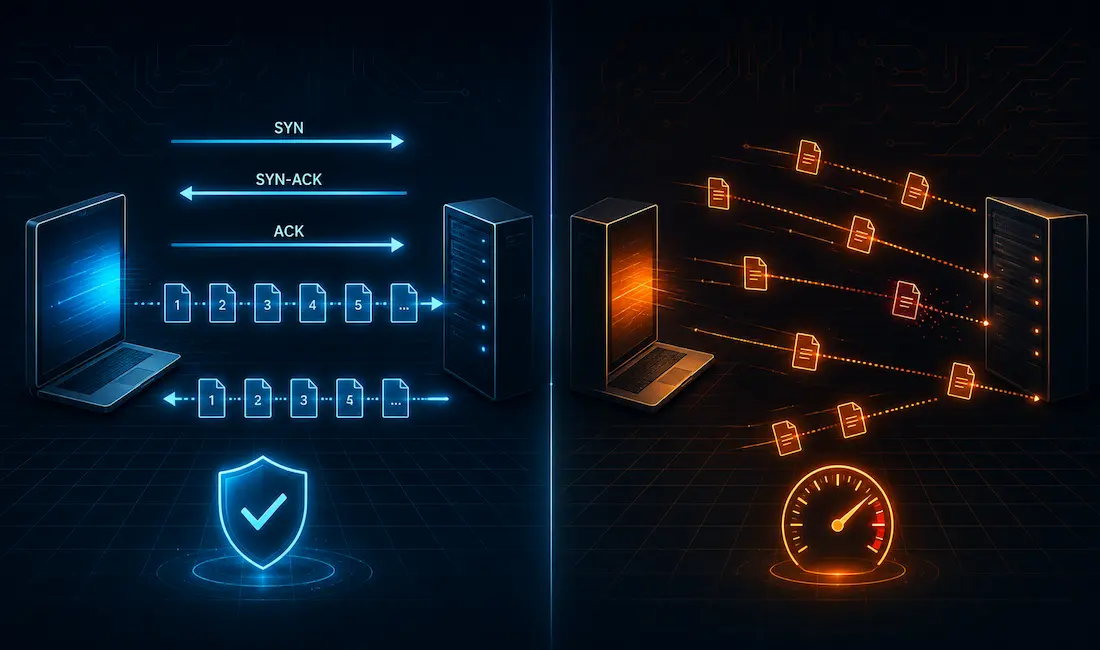
TCP and UDP are the two primary transport layer protocols handling data communication between hosts on an IP network. TCP is connection-oriented; UDP is connectionless. That single distinction cascades into almost every other difference between them — reliability, ordering, flow control, and overhead all follow from that one design choice.
TCP: Connection-Oriented and Reliable
Transmission Control Protocol (TCP) tracks packet transmission from source to destination and works to ensure reliable delivery. Typical examples include downloading a file, loading a web page, and sending an email — cases where getting every byte correctly and in order matters more than shaving off a few milliseconds of latency. Messaging apps like WhatsApp also run over TCP for their core text messaging, since a dropped or out-of-order message would be a genuinely bad experience — though features like read receipts are built by the app itself at the application layer, not something TCP provides directly; TCP’s job stops at reliably delivering bytes, not at tracking whether a human has actually read them.
TCP has three basic jobs:
- Numbering and tracking segments sent to a specific destination from a particular application.
- Acknowledging data that’s been received.
- Retransmitting any segment that goes unacknowledged after a timeout period.
Understanding the difference between UDP and TCP really comes down to understanding how each protocol handles these jobs — or doesn’t.
Establishing a Session: The Three-Way Handshake
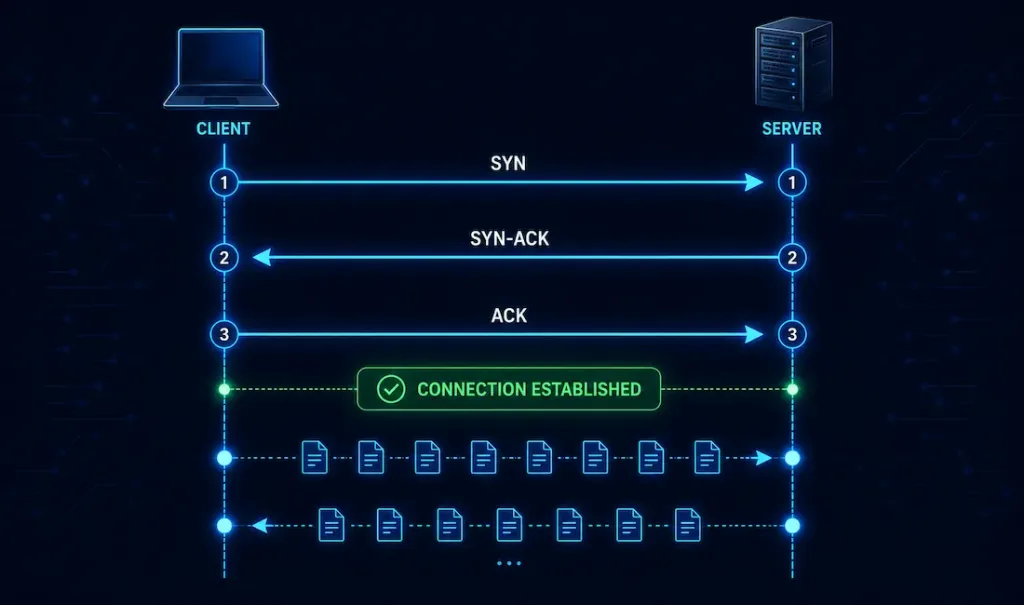
TCP is connection-oriented, meaning it negotiates and establishes a session between two devices before any actual data is exchanged. This happens through the well-known three-way handshake:
- SYN — the client sends a segment with the SYN flag set, along with an initial sequence number, essentially saying “I’d like to start a conversation, and here’s where my numbering starts.”
- SYN-ACK — the server responds with both the SYN and ACK flags set, acknowledging the client’s sequence number and providing its own initial sequence number in return.
- ACK — the client acknowledges the server’s sequence number, and the connection is now considered established.
Only after this handshake completes does actual application data start flowing. This upfront negotiation is exactly what gives TCP its reliability guarantees, but it also means every new TCP connection pays a round-trip-time cost before the first byte of real data moves — the actual delay this adds depends entirely on the round-trip time between the two hosts, not a fixed number; a connection between two machines on the same LAN might add under a millisecond, while a connection across continents could add well over 100ms, just for the handshake itself.
Reliable Delivery
Segments can become corrupted or lost in transit. TCP’s reliability mechanism ensures each segment either arrives successfully or gets retransmitted: the receiver acknowledges data it receives, and if the sender doesn’t get an acknowledgment within its retransmission timeout, it resends the segment. This reliability is genuinely valuable, but it isn’t free — the handshake, acknowledgments, and potential retransmissions all add processing and, in the case of packet loss, real added latency, which is part of why real-time applications that can tolerate some loss often choose UDP instead.
Same-Order Delivery
Packets can take different paths across a network and arrive out of order, especially over the wider internet where routing paths for the same connection can shift mid-session. TCP uses sequence numbers to reconstruct the original data in the correct order at the receiving end, regardless of the order segments actually arrive in.
Flow Control: The Sliding Window
TCP provides flow control so a fast sender doesn’t overwhelm a slower receiver. This is implemented through TCP’s sliding window mechanism: the receiver advertises a window size — essentially how much unacknowledged data it’s currently willing to buffer — and the sender limits how much data it has in flight to stay within that window. As the receiver processes data and acknowledges it, the window “slides” forward, allowing more data to be sent. This lets throughput scale up when the receiver can keep up, while automatically throttling back when it can’t, without either side needing to guess at a fixed, static rate.
UDP: Connectionless and Best-Effort
User Datagram Protocol (UDP) is connectionless and offers no delivery guarantee. A UDP datagram is sent without any prior handshake and without any built-in mechanism for the sender to learn whether it actually arrived — a bit like dropping a letter in a mailbox with no tracking number: the postal service doesn’t notify you if it goes missing.
UDP still handles the essential job of getting data segments between the right applications — using source and destination port numbers, just like TCP — with minimal overhead and a basic checksum for corruption detection. (Note: this link points to an unrelated article about public records/background-check services — an inherited link mismatch from the original article, flagged here per audit policy.)
But it does not acknowledge received data, and no transport-layer process tells the sender whether a given datagram was successfully delivered. While TCP reliability functions allow more dynamic, guaranteed communication between applications, they also incur extra overhead and possible transmission delays that UDP simply doesn’t pay. Whatever reliability an application needs on top of UDP — retransmission, ordering, acknowledgment — has to be built by the application itself, if it needs it at all.
UDP also natively supports multicast, letting a single stream reach many recipients efficiently — commonly used for things like IPTV distribution, where devices join a multicast group using IGMP (Internet Group Management Protocol) rather than each requiring a separate unicast stream from the source.
UDP Features
UDP performs the same basic data segmentation and reassembly as TCP, but without any of TCP’s reliability or flow-control mechanisms:
- No ordered reconstruction — datagrams are handed to the receiving application in whatever order they actually arrive.
- Unreliable delivery — lost datagrams are simply lost; UDP itself never retransmits them.
- Connectionless — no session setup between sender and receiver before data starts flowing.
- No flow control — UDP doesn’t tell the sender anything about the receiver’s current capacity to absorb more data.
UDP Header
UDP’s header is deliberately minimal — just 8 bytes, containing source port, destination port, length, and checksum fields, with none of TCP’s sequence numbers, acknowledgment numbers, or window-size fields. This is exactly why applications like live audio/video streaming and VoIP favor UDP: the low, fixed overhead and lack of retransmission delay matter more to these applications than guaranteed delivery of every single packet — a momentarily glitchy video frame is a far better outcome than the whole stream stalling while TCP waits to retransmit a lost segment.
Header Size Comparison
TCP headers range from 20 to 60 bytes (the extra length comes from optional fields), and include sequence numbers, acknowledgment numbers, and window-size information needed for reliability and flow control. UDP headers are a fixed 8 bytes, containing only source port, destination port, length, and checksum. That size difference is a direct, physical reflection of how much more bookkeeping TCP does on every single segment compared to UDP.
Congestion Control
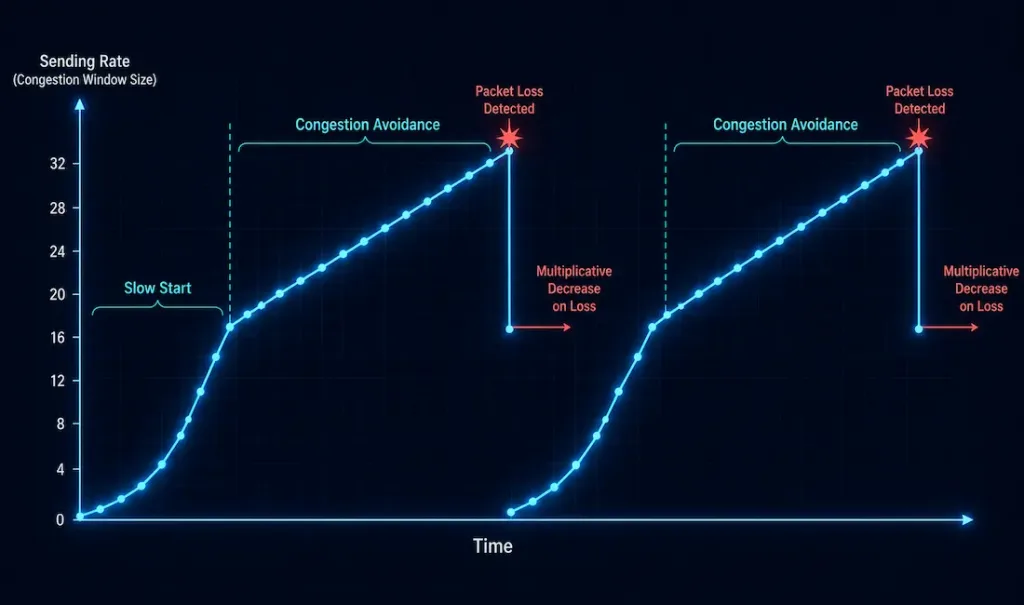
TCP’s congestion control adjusts how aggressively a sender transmits data based on inferred network conditions, generally through a few connected phases:
- Slow start — a new TCP connection begins by sending a small amount of data and increasing its sending rate quickly as acknowledgments come back successfully, probing for available bandwidth without immediately flooding the path.
- Congestion avoidance — once the sending rate approaches a certain threshold, growth becomes more conservative (typically additive/linear increases) rather than continuing to grow quickly.
- Multiplicative decrease on loss — when packet loss is detected (interpreted as a sign of congestion), TCP sharply reduces its sending rate — commonly cutting the congestion window roughly in half — rather than gradually tapering off. This full pattern (additive increase during normal operation, multiplicative decrease on detected congestion) is generally referred to as AIMD.
UDP has none of this — it will send at whatever rate the application asks it to, with no built-in awareness of network congestion at all. This is part of why applications that use UDP for bulk or sustained traffic often need to implement their own congestion-aware logic at the application layer if they want to play well with other traffic sharing the same network.
Error Detection and Correction
TCP detects corrupted segments through a checksum, and combined with its acknowledgment/retransmission cycle, actually recovers from corruption or loss by resending the affected segment. UDP also includes a checksum for detecting corruption, but on its own does nothing about it — a UDP datagram that fails its checksum is simply discarded, with no retransmission triggered by UDP itself. Any application built on UDP that needs actual error recovery has to implement that logic itself, which is exactly why some UDP-based protocols (like certain custom game-networking protocols, or QUIC, which layers reliability features on top of UDP) build their own retransmission and acknowledgment schemes rather than relying on the bare protocol.
TCP vs. UDP Comparison Table
| Feature | TCP | UDP |
|---|---|---|
| Connection type | Connection-oriented (three-way handshake) | Connectionless |
| Reliability | High — acknowledgment and retransmission | Best-effort — no guarantee |
| Delivery order | Guaranteed via sequencing | Delivered in whatever order received |
| Flow control | Yes — sliding window | No |
| Congestion control | Yes — slow start, congestion avoidance, AIMD | No |
| Header size | 20–60 bytes (variable) | 8 bytes (fixed) |
| Typical use cases | Web browsing, file transfer, email, most messaging apps | Live video/audio streaming, VoIP, online gaming, DNS lookups |
| Useful diagnostic tools | tcpdump, netstat -t, ss -t | nc -u (netcat), netstat -u, iperf3 |
(Note: the “Live video/audio streaming” link points to an article about mobile phone data plans rather than streaming protocol behavior specifically — a softer link mismatch inherited from the original article, flagged here per audit policy.)
Choosing Between TCP and UDP
In practice, the choice usually comes down to a simple question: is guaranteed, in-order delivery worth the added latency and overhead for this specific application? File transfers, web pages, and most messaging need every byte intact and in order — TCP is the obvious choice. Live video calls, competitive online gaming, and DNS lookups can tolerate the occasional lost packet far better than they can tolerate the delay of waiting for a retransmission, which is why UDP (sometimes with a thin layer of application-specific reliability built on top, as with DNS’s occasional retries or QUIC’s more elaborate reliability layer) tends to win out there instead.
Conclusion
TCP and UDP aren’t competing solutions to the same problem — they’re deliberately different tools built around a single core tradeoff between reliability and speed. TCP’s three-way handshake, sliding-window flow control, and congestion-avoidance mechanisms make it the right choice whenever correctness matters more than raw latency. UDP’s minimal 8-byte header and complete lack of built-in reliability make it the right choice whenever low latency and simplicity matter more than guaranteeing every packet arrives. Understanding both — including how they actually behave, rather than reaching for rough, unverified latency numbers — is foundational to both CCNA-level networking knowledge and real-world application design.
FAQs
What is the main difference between TCP and UDP?
TCP is connection-oriented and reliable — it establishes a session through a three-way handshake before sending data, then uses acknowledgments and retransmission to guarantee delivery. UDP is connectionless and best-effort, sending datagrams immediately with no session setup and no guarantee they’ll arrive, or arrive in order. This fundamental difference is why TCP suits applications needing accuracy (file transfers, web pages) while UDP suits applications prioritizing speed and low latency (live streaming, gaming, VoIP).
Why is TCP considered reliable?
TCP achieves reliability through a combination of mechanisms working together: sequence numbers let the receiver detect missing or out-of-order segments, acknowledgments confirm what’s actually been received, and a retransmission timer resends anything that goes unacknowledged. On top of that, TCP’s sliding-window flow control prevents a fast sender from overwhelming a slower receiver, and its congestion-control algorithms (slow start, congestion avoidance, and multiplicative decrease on detected loss) help it adapt its sending rate to actual network conditions rather than blindly sending at a fixed rate.
When should UDP be used instead of TCP?
UDP makes sense whenever an application values low latency and simplicity more than guaranteed delivery — live video and audio streaming, VoIP calls, competitive online gaming, and DNS lookups are all classic examples where a dropped packet is far less costly than the delay TCP’s retransmission and ordering guarantees would introduce. Because UDP skips the connection-setup handshake entirely, it can start sending data immediately, which matters for latency-sensitive, real-time use cases in particular. Applications that need some reliability but still want to avoid full TCP overhead sometimes build a lightweight, custom reliability layer directly on top of UDP instead, as QUIC does.
How does TCP actually detect and recover from data loss?
TCP tracks data using sequence numbers, and the receiver sends acknowledgments back referencing what it’s successfully received; if the sender doesn’t get an acknowledgment for a given segment within its retransmission timeout, it assumes that segment was lost and resends it. This process, combined with a checksum that lets the receiver detect corrupted segments and discard them (triggering the same retransmission logic), is what lets TCP guarantee that all data eventually arrives intact and in order — at the cost of added latency whenever loss or corruption actually occurs.
Can TCP and UDP be used on the same network at the same time?
Yes — TCP and UDP coexist constantly on the same network and often even within the same application, with different traffic types routed to whichever protocol suits them best. A video call, for instance, might use UDP for the actual audio/video media stream (prioritizing low latency) while using TCP for signaling or text chat within the same call (prioritizing reliability). Network devices don’t need to choose one protocol over the other — they simply forward each packet according to its own header, whether that header identifies it as TCP or UDP traffic.



