
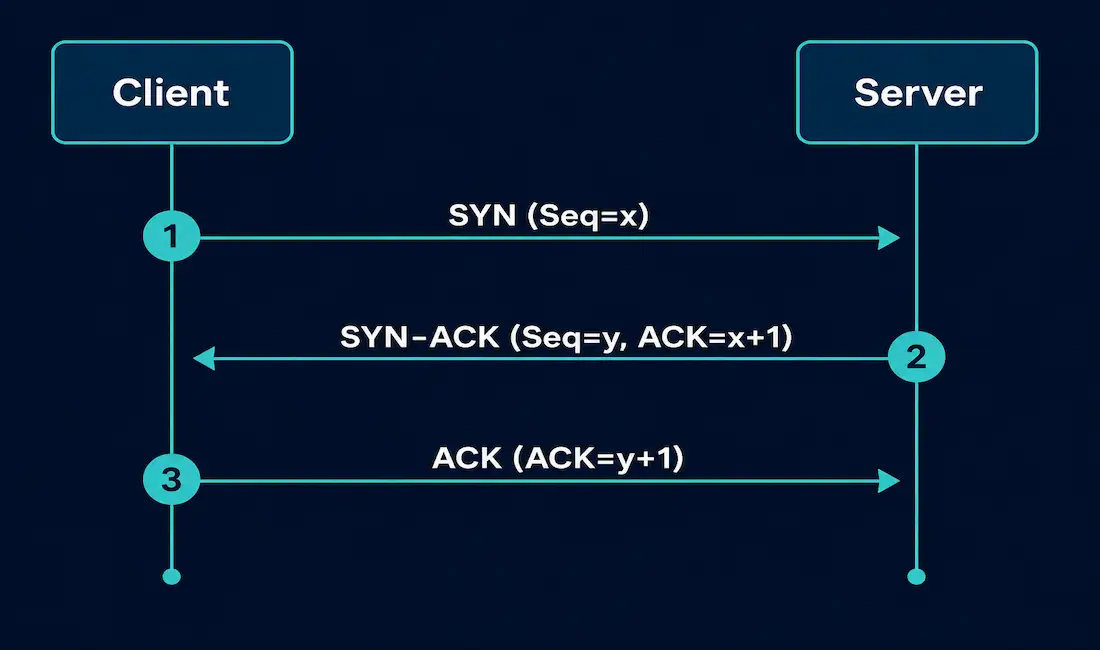
Every reliable TCP connection starts the same way: three packets, exchanged in a fixed sequence, before a single byte of real data moves. This is the TCP 3-way handshake, and it’s one of the most fundamental mechanics in networking. Understanding it isn’t just an exam requirement — it’s the foundation for reading packet captures, diagnosing connection failures, and recognizing attacks like SYN floods.
This guide covers the handshake step by step with real sequence and acknowledgment numbers, the TCP header flags that make it work, how connections tear down afterward, and what a half-open connection attack looks like in practice.
Why TCP Needs a Handshake
TCP is a connection-oriented, full-duplex protocol. Full-duplex means each side of the connection can send and receive independently — the client and server each maintain their own byte stream, moving in opposite directions, over the same logical connection.
For that to work reliably, both sides need to agree on a starting point before any data flows. Specifically, each side needs to tell the other where its byte-numbering sequence begins. That starting point is called the Initial Sequence Number (ISN), and it’s chosen semi-randomly by each host rather than starting at zero — a deliberate security measure that makes it harder for an attacker to guess sequence numbers and inject or hijack traffic.
The 3-way handshake is how both sides exchange and confirm their ISNs before real data transmission begins. Once it completes, both hosts know exactly what sequence number to expect next, which is what allows TCP to detect lost segments, reorder out-of-order packets, and guarantee reliable delivery.
The TCP Header Flags Involved
TCP uses single-bit control flags in the header to signal what a given segment is for. The handshake uses two of these directly:
| Flag | Meaning |
|---|---|
| SYN | Synchronize — proposes a starting sequence number and requests a new connection |
| ACK | Acknowledge — confirms receipt of data or a sequence number, valid on nearly every segment after the initial SYN |
| FIN | Finish — signals no more data will be sent, used during graceful connection termination |
| RST | Reset — immediately terminates a connection, typically after an error or an attempt to connect to a closed port |
| PSH | Push — asks the receiver to hand buffered data to the application immediately rather than waiting to fill a full segment |
| URG | Urgent — marks the urgent pointer field as significant, rarely used in modern applications |
The handshake itself is often called “SYN, SYN-ACK, ACK” because those are the flag combinations set on each of the three packets.
The Three Steps, With Real Numbers
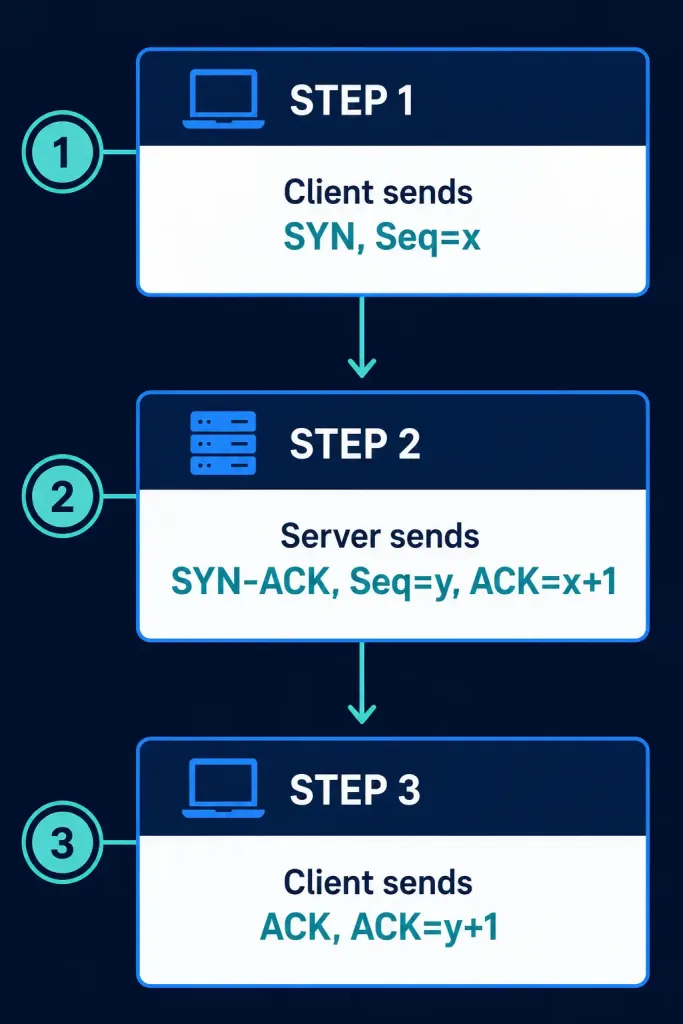
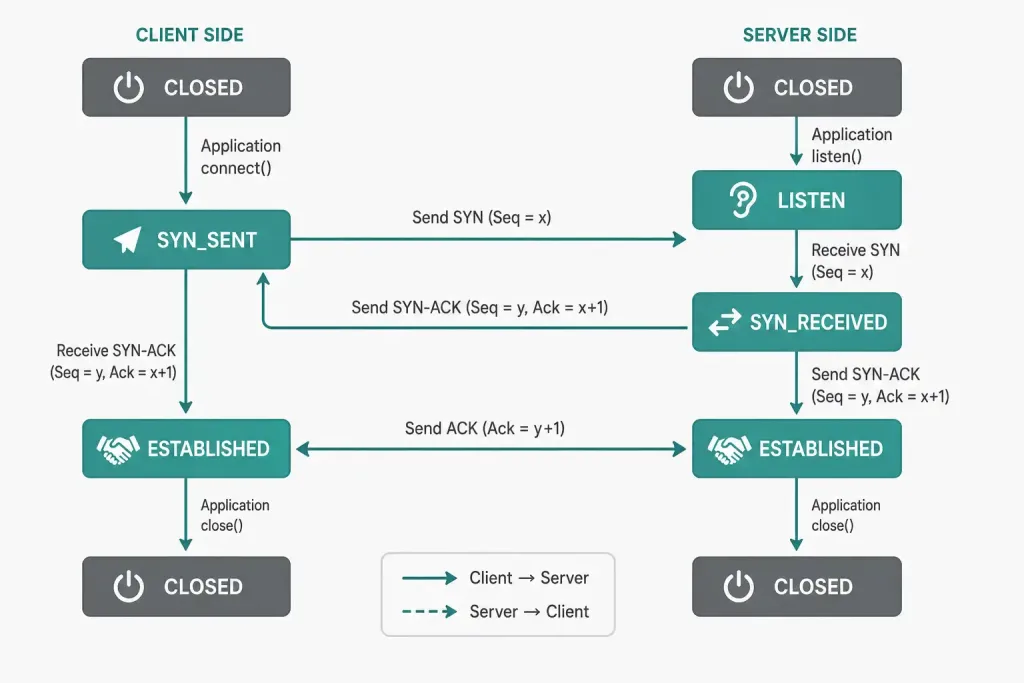
Here’s the handshake with an actual worked example, using x as the client’s initial sequence number and y as the server’s:
Step 1 — SYN. The client sends a segment with the SYN flag set and an initial sequence number, Seq=x. This proposes a starting point for the client’s byte stream and requests a connection.
Step 2 — SYN-ACK. The server responds with both the SYN and ACK flags set: Seq=y, ACK=x+1. The Seq=y proposes the server’s own starting sequence number — a separate, independently chosen value from the client’s x. The ACK=x+1 confirms the server received the client’s SYN and is now expecting the next byte from the client.
Step 3 — ACK. The client responds with the ACK flag set: ACK=y+1, confirming it received the server’s SYN and is now expecting the server’s next byte. At this point the connection is established, and both sides begin exchanging application data.
A common mistake — and one that shows up even in some published diagrams — is labeling the server’s sequence number in step 2 as x instead of y. The client and server choose their initial sequence numbers independently; reusing the client’s x for the server’s own sequence number is incorrect and inconsistent with how the final ACK (y+1) is derived.
What Happens After the Handshake
Once the handshake completes, both hosts can send and receive data simultaneously — this is what “full-duplex” means in practice. Every subsequent segment carries updated sequence and acknowledgment numbers, letting either side detect gaps, request retransmission of lost segments, and reassemble data in the correct order even if packets arrive out of sequence.
The ability to negotiate multiple independent TCP connections over a single physical interface — for example, a laptop with dozens of simultaneous ESTABLISHED connections over one Ethernet or Wi-Fi adapter — depends on this same sequence-number and port-number bookkeeping happening separately for every connection.
Closing a TCP Connection
Just as opening a connection takes three steps, closing one is a coordinated process — commonly called the four-way termination, since each side must close its own half of the full-duplex connection independently:
- The side initiating closure sends a FIN.
- The other side acknowledges it with an ACK.
- Once that side is also done sending data, it sends its own FIN.
- The original side acknowledges that FIN with a final ACK.
Because each side owns its own byte stream, one side can finish sending data and initiate closure while the other side is still transmitting — TCP doesn’t require both sides to have nothing left to say before the process starts. For a deeper walkthrough of this process, see our guide on TCP connection establishment and termination.
A connection can also end abruptly with an RST (reset) instead of a graceful FIN exchange — typically the result of an application error, a closed port receiving unexpected traffic, or a firewall actively terminating the session.
Half-Open Connections and SYN Floods
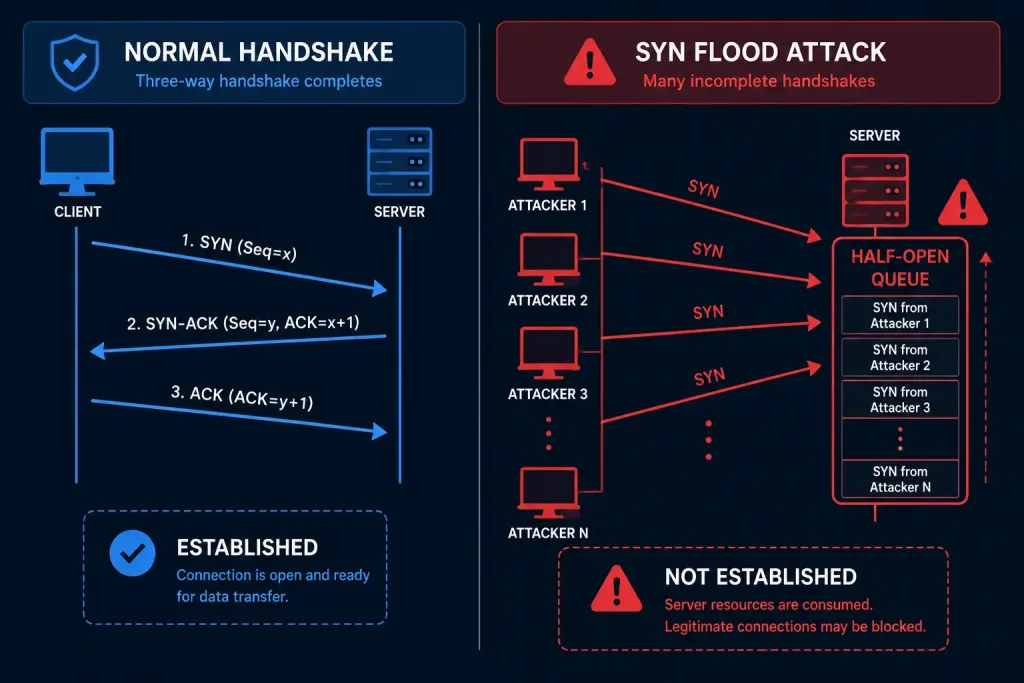
The handshake’s three-step design creates a specific vulnerability if step 3 never arrives. After a server sends its SYN-ACK, it allocates memory to track that pending connection and waits for the client’s final ACK. If the ACK never comes — because the client never intended to complete the handshake — the connection sits in a half-open state until it times out.
A SYN flood attack exploits exactly this. An attacker sends a large volume of SYN packets, often with spoofed source addresses, and never completes the handshake. Each half-open connection consumes server resources, and enough of them can exhaust the server’s connection queue, preventing legitimate clients from connecting at all.
Common mitigations include SYN cookies (which let the server avoid allocating state until the handshake actually completes), reducing the half-open connection timeout, and rate-limiting incoming SYN packets at the firewall.
TCP vs. UDP: Why the Handshake Matters
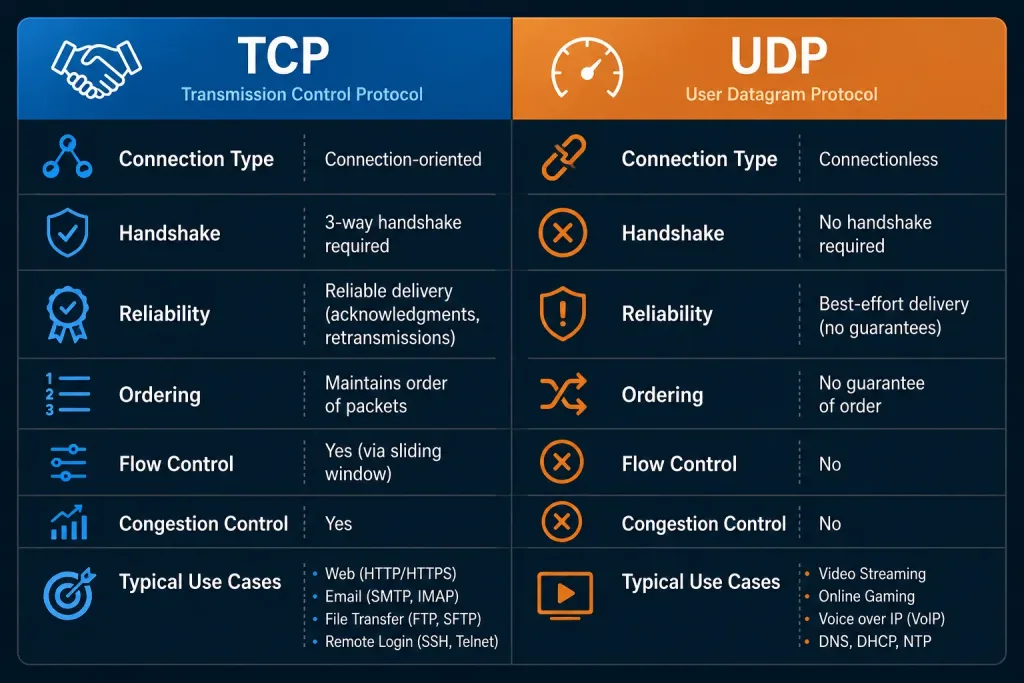
TCP’s handshake is also the clearest structural difference between TCP and UDP. UDP is connectionless — a sender simply transmits datagrams with no setup phase, no delivery guarantee, and no sequence tracking. That makes UDP faster and lower-overhead, which is why it’s used for DNS queries, video streaming, and online gaming, where an occasional lost packet is more tolerable than the latency of a handshake. TCP trades that speed for reliability, which is why it’s the default choice for web traffic, file transfers, and anything where data integrity matters more than raw speed.
Reading a Handshake in a Packet Capture
If you want to see this happen on a live connection, a packet capture tool makes the three packets easy to spot. In Wireshark, filter for a specific host and look for the [SYN], [SYN, ACK], and [ACK] flags in the Info column, in that order, all within a few milliseconds of each other on a healthy connection.
On Linux or macOS, tcpdump shows the same thing from the command line:
tcpdump -i any 'tcp[tcpflags] & (tcp-syn|tcp-ack) != 0' -nA handshake that never completes — a SYN with no SYN-ACK response, or a SYN-ACK with no final ACK — is one of the fastest ways to confirm a connectivity problem is happening at the network layer, before you start troubleshooting the application itself.
Connection States During the Handshake
Each host tracks the handshake’s progress internally using a connection state. These states are what tools like netstat and ss report while a connection is being set up:
| State | Which side | Meaning |
|---|---|---|
| CLOSED | Both | No connection exists yet. |
| LISTEN | Server | The server is waiting for an incoming SYN on a specific port. |
| SYN_SENT | Client | The client has sent its SYN and is waiting for the server’s SYN-ACK. |
| SYN_RECEIVED | Server | The server has received the client’s SYN, sent its own SYN-ACK, and is waiting for the final ACK. |
| ESTABLISHED | Both | The handshake is complete and both sides can exchange data. |
A connection that’s stuck in SYN_SENT on the client side usually means the SYN never reached the server, or the server never responded — check for a firewall dropping the packet, a service that isn’t actually listening on the target port, or basic routing issues. A connection stuck in SYN_RECEIVED on the server side, especially in large numbers, is one of the clearest signs of a SYN flood in progress.
Common Handshake Problems and What They Mean
Connection refused. The client’s SYN reached the destination host, but nothing is listening on that port. The destination typically responds immediately with an RST rather than a SYN-ACK. This almost always points to the target service being down, misconfigured, or bound to a different port than expected.
Connection timed out. The client sent a SYN and received no response at all — no SYN-ACK, no RST. This is different from a refused connection: it usually means a firewall silently dropped the packet, a route to the destination doesn’t exist, or the host itself is unreachable. A refused connection tells you the network path works and something answered; a timeout tells you the packet likely never got a response from anything.
SYN-ACK sent, but no final ACK. From the server’s point of view, this is a stalled handshake. It might be an asymmetric routing problem where the SYN-ACK can’t find its way back to the client, an aggressive firewall that’s blocking the return packet, or — at scale — a SYN flood attack where the client never intended to complete the handshake at all.
Handshake completes, but the application still fails. This is a useful diagnostic split: if [SYN], [SYN, ACK], and [ACK] all appear cleanly in a packet capture, the network layer is working correctly, and the problem is almost certainly in the application itself — authentication, a misconfigured service, or an application-layer timeout — not in basic connectivity.
FAQs
What is the TCP 3-way handshake?
The TCP 3-way handshake is the process two hosts use to establish a reliable connection before exchanging data. It consists of three segments — SYN, SYN-ACK, and ACK — that let both sides agree on starting sequence numbers and confirm each other’s readiness to communicate.
What role do sequence numbers play in the TCP handshake?
Sequence numbers let each side track exactly which bytes have been sent and received, which is what makes TCP reliable. During the handshake, the client and server each propose their own initial sequence number, chosen independently and semi-randomly for security reasons, and every later segment builds on those starting values to detect loss or reordering.
How does the acknowledgment number work in TCP?
An acknowledgment number confirms that a specific byte (or sequence of bytes) has been received and tells the other side what to send next. In the handshake, ACK=x+1 and ACK=y+1 each confirm receipt of the other side’s SYN and indicate the next expected byte, which is why the acknowledgment number is always the received sequence number plus one during connection setup.
Why is the 3-way handshake important for TCP?
Without the handshake, neither side would know the other’s starting sequence number, making it impossible to detect lost or out-of-order data reliably. It also protects against certain classes of connection-spoofing, since an attacker who can’t see the server’s SYN-ACK generally can’t guess the correct sequence number needed to complete step three.
What happens after the TCP 3-way handshake is complete?
Once the handshake finishes, the connection moves into the ESTABLISHED state and both sides can send and receive application data simultaneously, since TCP is full-duplex. The connection stays in this state until one side initiates termination with a FIN, or the connection is abruptly closed with an RST.
What’s the difference between a normal handshake failure and a SYN flood?
A normal handshake failure usually means one specific connection attempt didn’t complete — a firewall blocked it, the destination port is closed, or the network dropped a packet. A SYN flood is different: it’s a deliberate, high-volume attack sending many SYN packets that are never completed, aimed at exhausting a server’s half-open connection capacity rather than reaching any specific application.



